Desktop PC Freezing Error - Comp Freezes, No BSOD, no response

leflyi

New member
Local time
10:06 AM
Messages
5
Around 10 months ago, I built my first computer.
Everything was going well, no errors whatsover.
However around 3-6 months later (no sure exactly), In noticed that when I played games, it all depended on the game, the computer would freeze.

Back then I was using a AOC 2047 monitor which when it would freeze caused a large buzzing noise. Now the freezes are the same, but without the noise as i switched to a Dell Monitor.

Help me, I can't play some games due to this issue.

My Build is as following:


GA-990fxa-UD3 CPU
ATI Radeon 6970 2GB
G.Skill (2x4GB) 8GB Ram (F3-12800CL9D-8GBDRL)
Antec VP650P 650W PSU
X- FI audio card (added after freezing to solve audio static in headphones (on board sound)
2TB HDD
500 GB HDD

Bluray LG - dvd drive


Thankyou.


All the games i play freeze as random,

but recently after playing GW2 (guild wars 2)
it freezes ever 20 minutes.


Thankyou for your time and effort.

-Last thoughts-->

I have looked throughly through many forums and posts and could not find a answer. This is why im posting my issue now.

:)


Also i have already ran Memtest for 10 hours, and this has proven to have no errors, so im sure it is not bad memeory.

Any thoughts ?
 

My Computer My Computer

At a glance

Windows 7 Ultimate x64
OS
Windows 7 Ultimate x64
Hi,

Check the performance in safe mode/ Safe mode with networking. Check if the antivirus software has detected any virus/ malware/ spyware, if yes proceed with the Antivirus/Spyware/Malware troubleshooting.


Try running the below mentioned troubleshooters which could fix the problem:

If the issue still persists, then try creating a New User account and check if the symptom appears in the New User account or not.
 

My Computer My Computer

At a glance

Windows 7 Enterprise x64
OS
Windows 7 Enterprise x64
Hi,

Thanks for the advice.

I tried all of the above, and the problem persists.

There is still freezes.
No virus was found at all.

Any other suggestions ?

Thanks

Leflyi
 

My Computer My Computer

At a glance

Windows 7 Ultimate x64
OS
Windows 7 Ultimate x64
Hi,

If the issue still persists, you can even try restoring system back to factory settings and then check the performance of the system. Ensure backing up your data before reinstalling Operating system or PC restore.


My Computer My Computer

At a glance

Windows 7 Enterprise x64
OS
Windows 7 Enterprise x64
Around 10 months ago, I built my first computer.
Everything was going well, no errors whatsover.
However around 3-6 months later (no sure exactly), In noticed that when I played games, it all depended on the game, the computer would freeze.

Back then I was using a AOC 2047 monitor which when it would freeze caused a large buzzing noise. Now the freezes are the same, but without the noise as i switched to a Dell Monitor.

Help me, I can't play some games due to this issue.

My Build is as following:


GA-990fxa-UD3 CPU
ATI Radeon 6970 2GB
G.Skill (2x4GB) 8GB Ram (F3-12800CL9D-8GBDRL)
Antec VP650P 650W PSU
X- FI audio card (added after freezing to solve audio static in headphones (on board sound)
2TB HDD
500 GB HDD

Bluray LG - dvd drive


Thankyou.


All the games i play freeze as random,

but recently after playing GW2 (guild wars 2)
it freezes ever 20 minutes.


Thankyou for your time and effort.

-Last thoughts-->

I have looked throughly through many forums and posts and could not find a answer. This is why im posting my issue now.

:)


Also i have already ran Memtest for 10 hours, and this has proven to have no errors, so im sure it is not bad memeory.

Any thoughts ?

Quirky behavior may be related to a bad PSU. I would suggest testing it.

HTH
 

My Computer My Computer

At a glance

Windows 7 Professional x64Intel i5 quad processor16 GBRadeon HD 5770
Computer type
PC/Desktop
Computer Manufacturer/Model Number
Custom Built
OS
Windows 7 Professional x64
CPU
Intel i5 quad processor
Motherboard
DP67BG
Memory
16 GB
Graphics Card(s)
Radeon HD 5770
Sound Card
Realtek High Definition Audio
Monitor(s) Displays
Samsung SyncMaster
Screen Resolution
1920X1080
Hard Drives
WD 2TB (SATA Internal)
WD 1TB (USB External)
PSU
Corsair GS800
Case
Tower (Generic)
Cooling
3 Internal Fans
Keyboard
MS Wireless
Mouse
MS Optical Wired
Internet Speed
54 mbps
Antivirus
Emsisoft
Browser
IE-Version 9, Palemoon-Version 24.2.0
Thanks for the suggestion!

How would i go about testing the PSU?


Btw Debbie B, This is a fresh reformat.
 

My Computer My Computer

At a glance

Windows 7 Ultimate x64
OS
Windows 7 Ultimate x64
Thanks for the suggestion!

How would i go about testing the PSU?


Btw Debbie B, This is a fresh reformat.

Depending on your skill level, you can purchase a PSU tester from Microcenter and use it. Not really hard to do, but if you feel it may be the wrong choice, the only other option I can suggest is a repair shop.

HTH
 

My Computer My Computer

At a glance

Windows 7 Professional x64Intel i5 quad processor16 GBRadeon HD 5770
Computer type
PC/Desktop
Computer Manufacturer/Model Number
Custom Built
OS
Windows 7 Professional x64
CPU
Intel i5 quad processor
Motherboard
DP67BG
Memory
16 GB
Graphics Card(s)
Radeon HD 5770
Sound Card
Realtek High Definition Audio
Monitor(s) Displays
Samsung SyncMaster
Screen Resolution
1920X1080
Hard Drives
WD 2TB (SATA Internal)
WD 1TB (USB External)
PSU
Corsair GS800
Case
Tower (Generic)
Cooling
3 Internal Fans
Keyboard
MS Wireless
Mouse
MS Optical Wired
Internet Speed
54 mbps
Antivirus
Emsisoft
Browser
IE-Version 9, Palemoon-Version 24.2.0
What exactly should I be looking for during a PSU test ?
 

My Computer My Computer

At a glance

Windows 7 Ultimate x64
OS
Windows 7 Ultimate x64
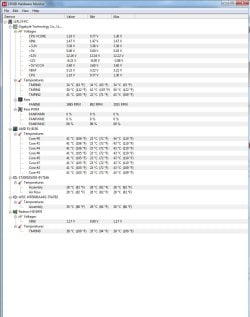
Would this attachment be of any help ?
 

Attachments

  • CPUID.jpg
    CPUID.jpg
    94.3 KB · Views: 13

My Computer My Computer

At a glance

Windows 7 Ultimate x64
OS
Windows 7 Ultimate x64
Back
Top