Desktop pdf icons keep changing

msnyder701

New member
Local time
1:35 PM
Messages
2
For some reason, the icons on my desktop for some (but not all) of my pdf files keep changing, from the standard Adobe icon to a "preview" icon that shows the first page of the document. I have tried rebuilding my font cache; the "Allow themes to change desktop icons" box is **unchecked**; and I have increased the size of the icon cache to 8192 by adding the appropriate line in the registry.

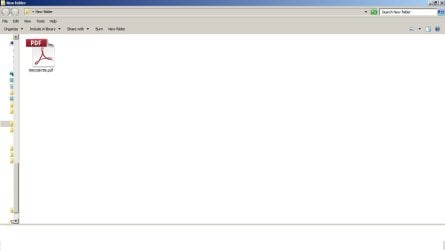
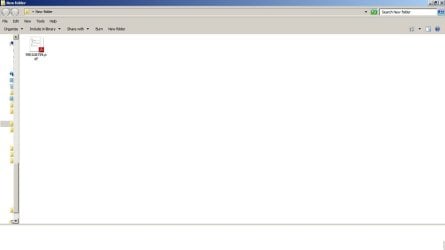
I can revert these icons to the Adobe version by opening the file and then saving it again with the same name, but it doesn't last. If I move the files to a new folder on the desktop, the icons will change to the one I want if I select "Large" or "Extra Large" icon size, but as soon as I select "Medium", it reverts to the "preview" style. I have attached two screenshots as examples. Same file, all I did was to switch icon sizes back and forth.

Sometimes moving the file from the folder on the desktop back onto the desktop itself will revert it to the Adobe icon, sometimes not.

Any ideas??????
 

Attachments
  • medium.jpg
    medium.jpg
    25.5 KB · Views: 3
  • large.jpg
    large.jpg
    26.3 KB · Views: 2

My Computer

Computer type
Laptop
Computer Manufacturer/Model Number
Dell Latitude E4310
OS
Windows 7 Enterprise
CPU
Intel Core i5 M540
Memory
4 GB
Graphics Card(s)
None
Welcome to Seven Forums msnyder701. I haven't used adobe reader for years. This may work, I was searching for the path to disable previews within adobe as well, I could not find them. Most people want the previews, and it is broken, there is a fix for that ;)

Try this:

Start> In search box type desktop> Enter> The desktop folder will open> Upper left Organize> Folder and search options> View tab> Tick Always show icons, never thumbnails> Apply and OK your way out

See if that works, it will only apply to the desktop folder unless you tell windows to apply to all folders. Of course, no thumbnails will show on the desktop now, only icons.

A Guy
 

My Computer

Computer type
PC/Desktop
OS
Windows 10 Home x64
CPU
INTEL Core i5-750 Quad-Core 3.37GHz
Motherboard
ASUS P7P55D
Memory
HyperX Fury Black Series 8GB (2 x 4GB) 1866Mhz
Graphics Card(s)
EVGA GeForce GTX 750 Superclocked 1GB 128-Bit GDDR5
Monitor(s) Displays
LG 32MA68HY 32" IPS
Screen Resolution
1920 x 1080
Hard Drives
Samsung 840 Evo 120GB, SEAGATE 500GB Barracuda® 7200.12, SATA 3 Gb/s, 7200 RPM, 16MB cache
PSU
ANTEC TruePower New TP-550, 80 PLUS, 550W
Case
ANTEC Three Hundred Illusion
Cooling
COOLER MASTER Hyper 212 Plus, 4 x 120mm 1 x 140mm Noctua's
Internet Speed
85 + Mbps
Antivirus
Avast
Browser
Vivaldi
It worked!

Wow, that worked! Thanks a million!!!
 

My Computer

Computer type
Laptop
Computer Manufacturer/Model Number
Dell Latitude E4310
OS
Windows 7 Enterprise
CPU
Intel Core i5 M540
Memory
4 GB
Graphics Card(s)
None
No worries. Be aware that if you change the view settings on another folder and choose to apply that to other folders of that type, you'd have to change back desktop only as above. Glad it seems to work for you ;)

A Guy
 

My Computer

Computer type
PC/Desktop
OS
Windows 10 Home x64
CPU
INTEL Core i5-750 Quad-Core 3.37GHz
Motherboard
ASUS P7P55D
Memory
HyperX Fury Black Series 8GB (2 x 4GB) 1866Mhz
Graphics Card(s)
EVGA GeForce GTX 750 Superclocked 1GB 128-Bit GDDR5
Monitor(s) Displays
LG 32MA68HY 32" IPS
Screen Resolution
1920 x 1080
Hard Drives
Samsung 840 Evo 120GB, SEAGATE 500GB Barracuda® 7200.12, SATA 3 Gb/s, 7200 RPM, 16MB cache
PSU
ANTEC TruePower New TP-550, 80 PLUS, 550W
Case
ANTEC Three Hundred Illusion
Cooling
COOLER MASTER Hyper 212 Plus, 4 x 120mm 1 x 140mm Noctua's
Internet Speed
85 + Mbps
Antivirus
Avast
Browser
Vivaldi
Bill,

a million hardly covers having back the pdf icons.....

joined just to say thanks, no matter how old the thread was.

jr
 

My Computer

Computer type
PC/Desktop
OS
w7 32
Glad I could help ;)

A Guy
 
Last edited:

My Computer

Computer type
PC/Desktop
OS
Windows 10 Home x64
CPU
INTEL Core i5-750 Quad-Core 3.37GHz
Motherboard
ASUS P7P55D
Memory
HyperX Fury Black Series 8GB (2 x 4GB) 1866Mhz
Graphics Card(s)
EVGA GeForce GTX 750 Superclocked 1GB 128-Bit GDDR5
Monitor(s) Displays
LG 32MA68HY 32" IPS
Screen Resolution
1920 x 1080
Hard Drives
Samsung 840 Evo 120GB, SEAGATE 500GB Barracuda® 7200.12, SATA 3 Gb/s, 7200 RPM, 16MB cache
PSU
ANTEC TruePower New TP-550, 80 PLUS, 550W
Case
ANTEC Three Hundred Illusion
Cooling
COOLER MASTER Hyper 212 Plus, 4 x 120mm 1 x 140mm Noctua's
Internet Speed
85 + Mbps
Antivirus
Avast
Browser
Vivaldi
Not sure if I should post in this old thread or I should start a new one but I have a similar problem but I am trying to find a different solution if possible

A bit of history...
So I recently installed Windows 7 after previously being an XP user so after I got everything installed I needed to install Acrobat reader so by mistake or I did not now it at the time but I installed the DC version which had a lot of extra stuff on After figuring out and finding the other version I uninstalled the DC version and installed the current Adobe Reader 11

So it all seems to have worked fine with showing the default icons but today for some reason when I downloaded my bank pdf statements the icons look like they have a thumbnail view instead of the default icons so I have 2 types of pdf icons on my desktop one is a normal default icon and the other is a thumbnail pdf icon

Using the tips here I can change the setting of the folder to show icons and never thumbnails but I would like to keep the thumbnails for the pictures and everything else can be icons
So I was wondering if there is a setting to keep some icons as thumbnails while the rest are icons

Alternatively I am not sure what caused the pdf files I downloaded to be saved as thumbnails in the first place
Previously when I used XP when I click on a file it opens in Firefox than I would click on the down arrow to download the file at which point I am prompted to either save it or open it with acrobat and than save it

With windows 7 and this acrobat when I click on the file it already opens in acrobat so all I can do is just save it unless there are some other settings that I am not aware of
 

My Computer

Computer type
PC/Desktop
Computer Manufacturer/Model Number
Custom
OS
Windows 7 Pro 64bit
CPU
Intel
Motherboard
Asrock B85M-ITX
Memory
8 GB
Graphics Card(s)
On board
Hard Drives
320 GB
Antivirus
None
Browser
Firefox
After a few tries I found a solution
Apparently the regular acrobat reader 11 does not have the ability to turn off the thumbnails while the dc version has an option in preferences/general tab to turn off the thumbnails

It's a little bit messy because it doesn't work on the existing files that have thumbnails
Just to back up a little
While I was playing with the settings in preferences in acrobat 11 I clicked on "set as default pdf handler" and that turned all pdf files on the desktop the same (thumbnail) so I did not have 2 versions anymore
Than I uninstalled the acrobat 11 and installed the acrobat DC which had this option to turn off the thumbnails but only for new files so I had to open each one and save it with the same file name and overwrite the old one and that changed the thumbnail to a regular icon

So I now have the pictures as thumbnails while everything else is an icon
Fortunately this did not affect the rest of the pdf files that were already saved in other separate folders this was just on the desktop so I did not had to convert many files
 

My Computer

Computer type
PC/Desktop
Computer Manufacturer/Model Number
Custom
OS
Windows 7 Pro 64bit
CPU
Intel
Motherboard
Asrock B85M-ITX
Memory
8 GB
Graphics Card(s)
On board
Hard Drives
320 GB
Antivirus
None
Browser
Firefox
Welcome to Seven Forums status1. I switched to Sumatra pdf long ago because of all the security issue, and bloat Adobe reader has. This is just one more reason ;). Glad you got it sorted...for now :p

A Guy
 

My Computer

Computer type
PC/Desktop
OS
Windows 10 Home x64
CPU
INTEL Core i5-750 Quad-Core 3.37GHz
Motherboard
ASUS P7P55D
Memory
HyperX Fury Black Series 8GB (2 x 4GB) 1866Mhz
Graphics Card(s)
EVGA GeForce GTX 750 Superclocked 1GB 128-Bit GDDR5
Monitor(s) Displays
LG 32MA68HY 32" IPS
Screen Resolution
1920 x 1080
Hard Drives
Samsung 840 Evo 120GB, SEAGATE 500GB Barracuda® 7200.12, SATA 3 Gb/s, 7200 RPM, 16MB cache
PSU
ANTEC TruePower New TP-550, 80 PLUS, 550W
Case
ANTEC Three Hundred Illusion
Cooling
COOLER MASTER Hyper 212 Plus, 4 x 120mm 1 x 140mm Noctua's
Internet Speed
85 + Mbps
Antivirus
Avast
Browser
Vivaldi
adobe reader

Hello All, I have also switched to Sumatra pdf. It is much more lightweight, and faster than adobe reader,
and has no crap with it.:)
 

My Computer

Computer type
PC/Desktop
Computer Manufacturer/Model Number
ASUS A85XM-A custom build
OS
Windows 10 Pro 64 bit
CPU
AMD A4-5300 APU with Radeon(tm) HD Graphics
Motherboard
ASUSTeK COMPUTER INC. A85XM-A
Memory
8.00 GB
Graphics Card(s)
AMD Radeon HD 7480D
Sound Card
(1) High Definition Audio Device (2) Realtek High Definiti
Monitor(s) Displays
HP W2072a 20 inch Led Backlit Monitor
Screen Resolution
1600 x 900 x 32 bits (4294967296 colors) @ 60 Hz
Hard Drives
TOSHIBA DT01ACA100 SATA Disk Device
Keyboard
Acer
Mouse
Acer
Internet Speed
varies
Antivirus
Windows Defender Antivirus
Browser
Waterfox, Edge
Thanks,
I tried Sumatra and it works and I probably would have switched to it but it does not handle fillable pdf forms and I need that feature for filling out the tax forms and any other fillable forms
 

My Computer

Computer type
PC/Desktop
Computer Manufacturer/Model Number
Custom
OS
Windows 7 Pro 64bit
CPU
Intel
Motherboard
Asrock B85M-ITX
Memory
8 GB
Graphics Card(s)
On board
Hard Drives
320 GB
Antivirus
None
Browser
Firefox
I have Foxit portable in my USB tool kit if I need to fill forms :)

A Guy
 

My Computer

Computer type
PC/Desktop
OS
Windows 10 Home x64
CPU
INTEL Core i5-750 Quad-Core 3.37GHz
Motherboard
ASUS P7P55D
Memory
HyperX Fury Black Series 8GB (2 x 4GB) 1866Mhz
Graphics Card(s)
EVGA GeForce GTX 750 Superclocked 1GB 128-Bit GDDR5
Monitor(s) Displays
LG 32MA68HY 32" IPS
Screen Resolution
1920 x 1080
Hard Drives
Samsung 840 Evo 120GB, SEAGATE 500GB Barracuda® 7200.12, SATA 3 Gb/s, 7200 RPM, 16MB cache
PSU
ANTEC TruePower New TP-550, 80 PLUS, 550W
Case
ANTEC Three Hundred Illusion
Cooling
COOLER MASTER Hyper 212 Plus, 4 x 120mm 1 x 140mm Noctua's
Internet Speed
85 + Mbps
Antivirus
Avast
Browser
Vivaldi
I have Foxit on my desktop but I only use it to fill forms that are not fillable by pdf
With Foxit I can add text anywhere
 

My Computer

Computer type
PC/Desktop
Computer Manufacturer/Model Number
Custom
OS
Windows 7 Pro 64bit
CPU
Intel
Motherboard
Asrock B85M-ITX
Memory
8 GB
Graphics Card(s)
On board
Hard Drives
320 GB
Antivirus
None
Browser
Firefox
Back
Top