Desktop Screen Problems

Aran Taylor

New member
Member
Local time
5:39 AM
Messages
49
Hi,

Im unsure if this is the right section but looking around it seems the most appropriate, so im sorry if this is in the wrong section.

I have 2 problems with my current desktop screen.

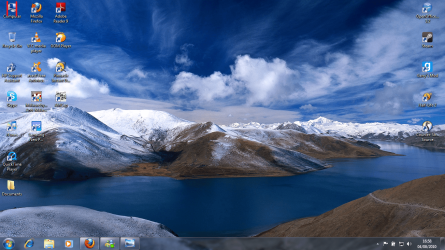
1) There are 2 lines at the top left of my screen (around the My Computer icon in the top left) that are void so to speak. I am unable to click on any spot that the lines cover. If i have an icon or a program, any button covering those lines i am unable to click on it.

e.g When using firefox i can't click the back button or forward button at the centre of them. (this is where the lines go through). I have to click on the edge of the button or move the firefox window.

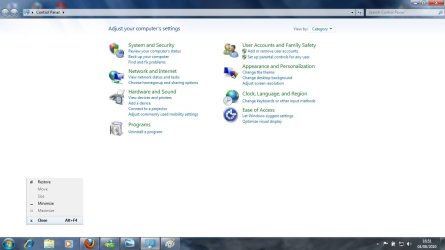
2) At the bottom left of my screen is a spot that when i click (left click), right-click options appear.

The same options that appear if you were to right-click on the top of a window (restore, move, size, minimize, maximize, close).

If i click close, the problem persists. If i click on the spot again the options appear. however if i click restore the problem goes away.

Thanks for any help that anyone can provide and thanks for taking your time to read the above.
 

My Computer

Computer Manufacturer/Model Number
(Hewlett Packard) Compaq Presario CQ61-427SA
OS
Windows 7 64-bit
CPU
AMD Athlon II Dual-Core M320 2.1 GHz
Memory
4 GB
Graphics Card(s)
ATI Mobility Radeon HD 4200
Screen Resolution
1366 x 768
My first reaction would be to download and run the free version of MalwareBytes. Make sure to update it, then do a quick scan. What ever it is, it's not your video card causing it. Please write back to let me know if MalwareBytes finds anything. Even if you already have an anti-virus, it might find something yours missed.
 

My Computer

Computer type
Laptop
Computer Manufacturer/Model Number
Toshiba P775-S7100
OS
Windows 7 Professional SP1 64-bit
CPU
Intel Core i5-2450M @2.5 GHz
Memory
6 GB DDR3 1333MHz
Graphics Card(s)
Intel HD 3000
Monitor(s) Displays
Built-in 17.3" LED; 22" Insignia NS-L22Q-10A
Screen Resolution
1600x900; 1360x768
Hard Drives
750 GB Hitachi
1TB Seagate FreeAgent External
Internet Speed
Verizon DSL Speed(Down/Up): 3360 Kbps / 800 Kbps
Antivirus
MSE and MBAM Pro
Browser
IE10
It might simply be that you monitor is not correct adjusted, most monitors come with an auto adjust button, it might simply be a case of pushing that and let the monitor set it self to the correct setting for your screen.


Steve
 

My Computer

Computer Manufacturer/Model Number
Over Clockers Ultima Viper 2.80Ghz
OS
Windows 7 Ultimate 64 - OEM Service Pack 1
CPU
Intel Core i7 930 2.80Ghz Bloomfield Socket LGA 1366
Motherboard
Gigabyte GA-X58A-UD3R Intel X58 Socket 1366 DDR3
Memory
Patriot Viper 6GB 3x2GB DDR3 PC3-1200C9 1600Mhz Tri Channel
Graphics Card(s)
Asus ATI Radeon HD 5770 CuCore 1024MB GDDR5 PCI Express
Sound Card
Realtek ALC889 @ Intel 82801JB ICH10 - High Definition Audio
Monitor(s) Displays
Samsung SyncMaster 920N 19"
Screen Resolution
1280*1024
Hard Drives
1 x OCZ Vertex2 Series 120GB 2.5" SATA-II SSD
1 x Seagate Barracuda 7200.12 1TB SATA-II 32MB Cache
1 x Western Digital Caviar Green 2TB SATA-II 64 MB Cache
PSU
Corsair TX 650W ATX SLi
Case
Antec 902 Ultimate Gaming Case Black
Cooling
Prolimatech Megahalems Rev B CPU Cooler Socket 775/1156/1366
Keyboard
Microsoft Comfort Curve Keyboard
Mouse
Microsoft Optical USB
Internet Speed
ADSL24 FTTC 34.2 Mbps Down 7.1Mbps Up
Other Info
OcUK 22x DVDSATA ReWriter Black
Akasa AK-FN058 Apache Black Super Silent 120mm Fan
Printer Epson Stylus Photo R300
Scanner Canon Canoscan 8000F
At the moment, im running the malware scan and my avast anti-virus scan.

As for the monitor. Im currently on a laptop so im unsure what to do about the screen.
 
Last edited:

My Computer

Computer Manufacturer/Model Number
(Hewlett Packard) Compaq Presario CQ61-427SA
OS
Windows 7 64-bit
CPU
AMD Athlon II Dual-Core M320 2.1 GHz
Memory
4 GB
Graphics Card(s)
ATI Mobility Radeon HD 4200
Screen Resolution
1366 x 768
Oh Ok I never read your specs :( Ignore what I said then sorry.


Steve
 

My Computer

Computer Manufacturer/Model Number
Over Clockers Ultima Viper 2.80Ghz
OS
Windows 7 Ultimate 64 - OEM Service Pack 1
CPU
Intel Core i7 930 2.80Ghz Bloomfield Socket LGA 1366
Motherboard
Gigabyte GA-X58A-UD3R Intel X58 Socket 1366 DDR3
Memory
Patriot Viper 6GB 3x2GB DDR3 PC3-1200C9 1600Mhz Tri Channel
Graphics Card(s)
Asus ATI Radeon HD 5770 CuCore 1024MB GDDR5 PCI Express
Sound Card
Realtek ALC889 @ Intel 82801JB ICH10 - High Definition Audio
Monitor(s) Displays
Samsung SyncMaster 920N 19"
Screen Resolution
1280*1024
Hard Drives
1 x OCZ Vertex2 Series 120GB 2.5" SATA-II SSD
1 x Seagate Barracuda 7200.12 1TB SATA-II 32MB Cache
1 x Western Digital Caviar Green 2TB SATA-II 64 MB Cache
PSU
Corsair TX 650W ATX SLi
Case
Antec 902 Ultimate Gaming Case Black
Cooling
Prolimatech Megahalems Rev B CPU Cooler Socket 775/1156/1366
Keyboard
Microsoft Comfort Curve Keyboard
Mouse
Microsoft Optical USB
Internet Speed
ADSL24 FTTC 34.2 Mbps Down 7.1Mbps Up
Other Info
OcUK 22x DVDSATA ReWriter Black
Akasa AK-FN058 Apache Black Super Silent 120mm Fan
Printer Epson Stylus Photo R300
Scanner Canon Canoscan 8000F
@ steve-pressman, thanks anyways for trying.

@ petey7, I did a scan with Malwarebyte and it didn't find any problems with my system.

Ill run the scan with avast and see if anything pops up then.
 

My Computer

Computer Manufacturer/Model Number
(Hewlett Packard) Compaq Presario CQ61-427SA
OS
Windows 7 64-bit
CPU
AMD Athlon II Dual-Core M320 2.1 GHz
Memory
4 GB
Graphics Card(s)
ATI Mobility Radeon HD 4200
Screen Resolution
1366 x 768
Hi,

Im unsure if this is the right section but looking around it seems the most appropriate, so im sorry if this is in the wrong section.

I have 2 problems with my current desktop screen.

1) There are 2 lines at the top left of my screen (around the My Computer icon in the top left) that are void so to speak. I am unable to click on any spot that the lines cover. If i have an icon or a program, any button covering those lines i am unable to click on it.

e.g When using firefox i can't click the back button or forward button at the centre of them. (this is where the lines go through). I have to click on the edge of the button or move the firefox window.

2) At the bottom left of my screen is a spot that when i click (left click), right-click options appear.

The same options that appear if you were to right-click on the top of a window (restore, move, size, minimize, maximize, close).

If i click close, the problem persists. If i click on the spot again the options appear. however if i click restore the problem goes away.

Thanks for any help that anyone can provide and thanks for taking your time to read the above.

Do any of these look like the problem you're having?

Problems with Notebook Displays Compaq Presario CQ61-427SA Notebook PC - HP Customer Care (United States - English)

A screenshot might help too,

http://www.sevenforums.com/tutorials/9717-screenshot-paint.html

http://www.sevenforums.com/tutorials/9733-how-post-screenshot-seven-forums.html
 

My Computer

Computer type
PC/Desktop
Computer Manufacturer/Model Number
Self Built
OS
Win 10 Pro x64
CPU
Intel I5-2500K @3.3GHz
Motherboard
Asrock P67 Extreme4
Memory
16GB G.Skill Ripjaws X (4x4GB)
Graphics Card(s)
EVGA GeForce 750 Ti SC 2GB
Sound Card
ASUS Xonar DG 5.1 Channels 24-bit 96KHz PCI Interface Sound
Monitor(s) Displays
auria eq2367
Screen Resolution
1920 x 1080
Hard Drives
250GB Samsung 850 EVO SSD
1TB WD Blue
1TB Hitachi
PSU
SeaSonic X 650W 80 Plus Gold
Case
Corsair Obsidian 750D
Cooling
Corsair H60, Three 140mm case fans
Keyboard
Logitech Wireless Keyboard K520
Mouse
Logitech Wireless Mouse M310
Internet Speed
Wave Broadband ~ 100 dn 5 up
Antivirus
Windows Defender, Malwarebytes Premium
Browser
Edge, IE11, Chrome
Other Info
Laptop specs: HP g7-1365dx /
CPU: AMD A6-3420M APU with Radeon(tm) HD Graphics /
RAM: Crucial 8Gb (2x4Gb) /
SSD: Crucial M4-CT128M4SSD2 ATA Device/ FW 000F /
GFX: AMD Radeon HD 6520G /
OS: Windows 10 Pro x64
Thanks for your post but i have none of those problems.

By screenshot do you want me to post one for both problems ?
 

My Computer

Computer Manufacturer/Model Number
(Hewlett Packard) Compaq Presario CQ61-427SA
OS
Windows 7 64-bit
CPU
AMD Athlon II Dual-Core M320 2.1 GHz
Memory
4 GB
Graphics Card(s)
ATI Mobility Radeon HD 4200
Screen Resolution
1366 x 768
Thanks for your post but i have none of those problems.

By screenshot do you want me to post one for both problems ?

It might help to see exactly what you are seeing.
 

My Computer

Computer type
PC/Desktop
Computer Manufacturer/Model Number
Self Built
OS
Win 10 Pro x64
CPU
Intel I5-2500K @3.3GHz
Motherboard
Asrock P67 Extreme4
Memory
16GB G.Skill Ripjaws X (4x4GB)
Graphics Card(s)
EVGA GeForce 750 Ti SC 2GB
Sound Card
ASUS Xonar DG 5.1 Channels 24-bit 96KHz PCI Interface Sound
Monitor(s) Displays
auria eq2367
Screen Resolution
1920 x 1080
Hard Drives
250GB Samsung 850 EVO SSD
1TB WD Blue
1TB Hitachi
PSU
SeaSonic X 650W 80 Plus Gold
Case
Corsair Obsidian 750D
Cooling
Corsair H60, Three 140mm case fans
Keyboard
Logitech Wireless Keyboard K520
Mouse
Logitech Wireless Mouse M310
Internet Speed
Wave Broadband ~ 100 dn 5 up
Antivirus
Windows Defender, Malwarebytes Premium
Browser
Edge, IE11, Chrome
Other Info
Laptop specs: HP g7-1365dx /
CPU: AMD A6-3420M APU with Radeon(tm) HD Graphics /
RAM: Crucial 8Gb (2x4Gb) /
SSD: Crucial M4-CT128M4SSD2 ATA Device/ FW 000F /
GFX: AMD Radeon HD 6520G /
OS: Windows 10 Pro x64
We're just wanting to have a look at exactly what your seeing to help try and diagnose the problem., that is why the request for s screen shot.( edit ok derek types faster) Fabe
 

My Computer

Computer Manufacturer/Model Number
Self Built
OS
Windows 7 ultimate 64 bit / XP Home sp3
CPU
intel Core 2 Duo E8400 3.0ghz
Motherboard
Asus P5ND bios 1401
Memory
8 gigs 1066 OCZ Fata1ty
Graphics Card(s)
EVGA GTX 580 Call of Duty Black Ops Edition
Sound Card
Creative Soundblaster Audigy 2zs
Monitor(s) Displays
Asus 24in LCD's 2MS X2
Screen Resolution
1920x1080p @60Hz
Hard Drives
WD Caviar 500 Black/ WD Caviar 200 Blue
PSU
OCZ 700W GameXtreme
Case
NZXT Apollo
Cooling
Corsair H50 CPU/120mm x3 /60mm x2 /Corsair Dominator Ram
Keyboard
Logitech Bluetooth Wireless MX5000
Mouse
Logitech Bluetooth Wireless MX1000
Internet Speed
Download 19.83 Upload 0.97
Other Info
Logitech Z2300 Speakers/ Bose Noise Cancelling Headphones/Avermedia PCI-e Hybrid TV Bravo/Epson NX415 all in one/ 4 Port Powered USB Hub/ LG 10x Bluray Burner /TSST Corp DVDRW External
Screenshot below.

Problem 1


There are 2 discreet lines that go vertically down that cover two spots on the My Computer Icon (this icon is in the top left space for me). They are about the same size as the icon. If i hover my mouse at those 2 areas no action can be done. Left click nor right click works.

Desktop problem 1.png

I tried my best to show it on a screenshot. In the picture you will see two red lines over the my computer icon. That's where the problem occurs.

Problem 2

Problem 2.jpg

As you can see the right-click options appear at a spot at the bottom right.
 

My Computer

Computer Manufacturer/Model Number
(Hewlett Packard) Compaq Presario CQ61-427SA
OS
Windows 7 64-bit
CPU
AMD Athlon II Dual-Core M320 2.1 GHz
Memory
4 GB
Graphics Card(s)
ATI Mobility Radeon HD 4200
Screen Resolution
1366 x 768
Thanks for posting the screen shot. Honestly I don't know what to make of either of the problems.Their are many quaified members who might be able to help so hang in their hopefully we can get yuou some answers. Fabe
 

My Computer

Computer Manufacturer/Model Number
Self Built
OS
Windows 7 ultimate 64 bit / XP Home sp3
CPU
intel Core 2 Duo E8400 3.0ghz
Motherboard
Asus P5ND bios 1401
Memory
8 gigs 1066 OCZ Fata1ty
Graphics Card(s)
EVGA GTX 580 Call of Duty Black Ops Edition
Sound Card
Creative Soundblaster Audigy 2zs
Monitor(s) Displays
Asus 24in LCD's 2MS X2
Screen Resolution
1920x1080p @60Hz
Hard Drives
WD Caviar 500 Black/ WD Caviar 200 Blue
PSU
OCZ 700W GameXtreme
Case
NZXT Apollo
Cooling
Corsair H50 CPU/120mm x3 /60mm x2 /Corsair Dominator Ram
Keyboard
Logitech Bluetooth Wireless MX5000
Mouse
Logitech Bluetooth Wireless MX1000
Internet Speed
Download 19.83 Upload 0.97
Other Info
Logitech Z2300 Speakers/ Bose Noise Cancelling Headphones/Avermedia PCI-e Hybrid TV Bravo/Epson NX415 all in one/ 4 Port Powered USB Hub/ LG 10x Bluray Burner /TSST Corp DVDRW External
Just to be sure we're clear on this, are the lines in the first pic drawn in or are they actually appearing on the desktop. Also, what is Gary's Mod?
 

My Computer

Computer type
Laptop
Computer Manufacturer/Model Number
Toshiba P775-S7100
OS
Windows 7 Professional SP1 64-bit
CPU
Intel Core i5-2450M @2.5 GHz
Memory
6 GB DDR3 1333MHz
Graphics Card(s)
Intel HD 3000
Monitor(s) Displays
Built-in 17.3" LED; 22" Insignia NS-L22Q-10A
Screen Resolution
1600x900; 1360x768
Hard Drives
750 GB Hitachi
1TB Seagate FreeAgent External
Internet Speed
Verizon DSL Speed(Down/Up): 3360 Kbps / 800 Kbps
Antivirus
MSE and MBAM Pro
Browser
IE10

My Computer

Computer type
PC/Desktop
Computer Manufacturer/Model Number
Self Built
OS
Win 10 Pro x64
CPU
Intel I5-2500K @3.3GHz
Motherboard
Asrock P67 Extreme4
Memory
16GB G.Skill Ripjaws X (4x4GB)
Graphics Card(s)
EVGA GeForce 750 Ti SC 2GB
Sound Card
ASUS Xonar DG 5.1 Channels 24-bit 96KHz PCI Interface Sound
Monitor(s) Displays
auria eq2367
Screen Resolution
1920 x 1080
Hard Drives
250GB Samsung 850 EVO SSD
1TB WD Blue
1TB Hitachi
PSU
SeaSonic X 650W 80 Plus Gold
Case
Corsair Obsidian 750D
Cooling
Corsair H60, Three 140mm case fans
Keyboard
Logitech Wireless Keyboard K520
Mouse
Logitech Wireless Mouse M310
Internet Speed
Wave Broadband ~ 100 dn 5 up
Antivirus
Windows Defender, Malwarebytes Premium
Browser
Edge, IE11, Chrome
Other Info
Laptop specs: HP g7-1365dx /
CPU: AMD A6-3420M APU with Radeon(tm) HD Graphics /
RAM: Crucial 8Gb (2x4Gb) /
SSD: Crucial M4-CT128M4SSD2 ATA Device/ FW 000F /
GFX: AMD Radeon HD 6520G /
OS: Windows 10 Pro x64
The lines are drawn on to show where the problem occurs.

As a breif, garrys mod is a modifcation of the half life 2 game engine. It basically allows you to use every prop from half-life 2 and make items like forts or cars etc. What ever you can imagine you can most likly make on it :P. It is a very good game to have.
 

My Computer

Computer Manufacturer/Model Number
(Hewlett Packard) Compaq Presario CQ61-427SA
OS
Windows 7 64-bit
CPU
AMD Athlon II Dual-Core M320 2.1 GHz
Memory
4 GB
Graphics Card(s)
ATI Mobility Radeon HD 4200
Screen Resolution
1366 x 768
Hi Aran Taylor,
Would you please Download DDS from one of these links:

Mirror 1 Mirror 2 Mirror 3
  • Disable any script blocking protection
  • Double click the dds icon to run the tool.
  • When done, DDS will open two (2) logs:
    1. DDS.txt
    2. Attach.txt <---this will be minimized in the task tray
  • Save both reports to your desktop.
Include the contents of both logs.
The scan will instruct you to post Attach.txt as an attachment.
No need for that though ..... just post it's contents as you would any other log.
 

My Computer

Computer type
PC/Desktop
Computer Manufacturer/Model Number
Bruce ... somewhere in his 40's
OS
Windows 7 Ultimate 32bit SP1
CPU
Intel(R) Core(TM)2 Quad CPU @ 2.40GHz, 2400 MHz
Motherboard
INTEL/D975XBX2
Memory
4 GB
Graphics Card(s)
ATI Radeon HD 2600 Pro
Monitor(s) Displays
Samsung SyncMaster 914v
Screen Resolution
1280 x 1024
Hard Drives
2/500GB each ... ST3500630AS ATA Device.
One is not connected
PSU
Rocketfish 700 W
Case
G.Skill Gigabyte Chassis
Keyboard
Standard PS/2 Keyboard
Mouse
Microsoft PS/2 Mouse
Internet Speed
DSL
Antivirus
Avira Internet Security
Browser
IE 11
Other Info
ATI HDMI Audio
The lines are drawn on to show where the problem occurs.

As a breif, garrys mod is a modifcation of the half life 2 game engine. It basically allows you to use every prop from half-life 2 and make items like forts or cars etc. What ever you can imagine you can most likly make on it :P. It is a very good game to have.

I was just making sure you didn't have anything installed or had made in changes that could cause the problem, as it seems like a software problem to me.
 

My Computer

Computer type
Laptop
Computer Manufacturer/Model Number
Toshiba P775-S7100
OS
Windows 7 Professional SP1 64-bit
CPU
Intel Core i5-2450M @2.5 GHz
Memory
6 GB DDR3 1333MHz
Graphics Card(s)
Intel HD 3000
Monitor(s) Displays
Built-in 17.3" LED; 22" Insignia NS-L22Q-10A
Screen Resolution
1600x900; 1360x768
Hard Drives
750 GB Hitachi
1TB Seagate FreeAgent External
Internet Speed
Verizon DSL Speed(Down/Up): 3360 Kbps / 800 Kbps
Antivirus
MSE and MBAM Pro
Browser
IE10

My Computer

Computer type
PC/Desktop
Computer Manufacturer/Model Number
Self Built
OS
Win 10 Pro x64
CPU
Intel I5-2500K @3.3GHz
Motherboard
Asrock P67 Extreme4
Memory
16GB G.Skill Ripjaws X (4x4GB)
Graphics Card(s)
EVGA GeForce 750 Ti SC 2GB
Sound Card
ASUS Xonar DG 5.1 Channels 24-bit 96KHz PCI Interface Sound
Monitor(s) Displays
auria eq2367
Screen Resolution
1920 x 1080
Hard Drives
250GB Samsung 850 EVO SSD
1TB WD Blue
1TB Hitachi
PSU
SeaSonic X 650W 80 Plus Gold
Case
Corsair Obsidian 750D
Cooling
Corsair H60, Three 140mm case fans
Keyboard
Logitech Wireless Keyboard K520
Mouse
Logitech Wireless Mouse M310
Internet Speed
Wave Broadband ~ 100 dn 5 up
Antivirus
Windows Defender, Malwarebytes Premium
Browser
Edge, IE11, Chrome
Other Info
Laptop specs: HP g7-1365dx /
CPU: AMD A6-3420M APU with Radeon(tm) HD Graphics /
RAM: Crucial 8Gb (2x4Gb) /
SSD: Crucial M4-CT128M4SSD2 ATA Device/ FW 000F /
GFX: AMD Radeon HD 6520G /
OS: Windows 10 Pro x64

My Computer

Computer Manufacturer/Model Number
(Hewlett Packard) Compaq Presario CQ61-427SA
OS
Windows 7 64-bit
CPU
AMD Athlon II Dual-Core M320 2.1 GHz
Memory
4 GB
Graphics Card(s)
ATI Mobility Radeon HD 4200
Screen Resolution
1366 x 768
Is this your computer? Do you have kids who sometimes use it?
 

My Computer

Computer type
PC/Desktop
Computer Manufacturer/Model Number
Bruce ... somewhere in his 40's
OS
Windows 7 Ultimate 32bit SP1
CPU
Intel(R) Core(TM)2 Quad CPU @ 2.40GHz, 2400 MHz
Motherboard
INTEL/D975XBX2
Memory
4 GB
Graphics Card(s)
ATI Radeon HD 2600 Pro
Monitor(s) Displays
Samsung SyncMaster 914v
Screen Resolution
1280 x 1024
Hard Drives
2/500GB each ... ST3500630AS ATA Device.
One is not connected
PSU
Rocketfish 700 W
Case
G.Skill Gigabyte Chassis
Keyboard
Standard PS/2 Keyboard
Mouse
Microsoft PS/2 Mouse
Internet Speed
DSL
Antivirus
Avira Internet Security
Browser
IE 11
Other Info
ATI HDMI Audio
Back
Top