Desktop slow to rebuild folders after 30 seconds inactivity

Altomar718

New member
Local time
5:29 PM
Messages
14
Hi Guys

Can anyone PLEASE help?

I have had issues with Windows Explorer has stopped working when open folders in the past, which I am not sure if it is related to my problem now. I am getting a proble.m with my desktop if it has been inactive for 30 seconds or more - If I open a folder, say photos from example, it opens as a white box and then takes some time for the files to appear. Once its done this, it works perfectly as many times as you want. However, if I leave the mouse alone or do not input anything - after 30 seconds (I have times it) there is a delay while the folders populate again !

I have done a poor video of this - the first bit is opening normally (within the 30 seconds, the secpnd bit with the delay is after no input) I would REALLY appreciate any help. I have disabled everything in MSCONFIG and it still happens as well as changing folder options to GENERAL etc. The only time it does not happen is in SAFE MODE - https://www.youtube.com/watch?v=FKrpzNOjE94
 

My Computer My Computer

At a glance

64bit Windows 7
Computer type
Laptop
Computer Manufacturer/Model Number
Sony Vaio
OS
64bit Windows 7
Problems like this may happen due to a corrupt desktop.ini file?

Before going on, would you try a new user account and see if problem exist there? http://www.sevenforums.com/tutorials/181024-user-account-create.html

See if this would help http://www.sevenforums.com/tutorials/3918-folder-template-change.html

There is this little app to reset desktop.ini - make a backup of current one/s before using it (if you use it) - Fix Desktop.INI files in Special Folders using DesktopINIFix for Windows Vista - The Winhelponline Blog

You will need to unhide protected system files to make them visible.
 

My Computer My Computer

At a glance

Windows 7 Ultimate x64 SP1AMD Phenom 2 1090T2x8GB Kingston HyperX Fury Black 1600Mhz Unga...MSI GTX 970 Gaming 4G
Computer type
PC/Desktop
Computer Manufacturer/Model Number
Custom Build
OS
Windows 7 Ultimate x64 SP1
CPU
AMD Phenom 2 1090T
Motherboard
Gigabyte GA-890FXA-UD5
Memory
2x8GB Kingston HyperX Fury Black 1600Mhz Unganged
Graphics Card(s)
MSI GTX 970 Gaming 4G
Sound Card
Realtek On-Board HD 7.1 Audio / Logitech G35
Monitor(s) Displays
3xAcer GD245HQ
Screen Resolution
1920x1080
Hard Drives
Samsung 850 Pro 512GB SSD - OS /
WD Caviar Black SATA 3 - 1 TBx2 - Dynamic RAID 0 /
WD Caviar Green SATA 2 - 640GBx2 - Dynamic RAID 0 /
WD Caviar Green SATA 2 - 640GB - Internal Backup /
Seagate Barracude SATA 3 - 3TB - External Backup/ Sync
PSU
HighPower 1000W
Case
Cooler Master HAF 932
Cooling
Noctua NH-D14
Keyboard
Logitech G19
Mouse
Logitech G500
Internet Speed
100/4 Mbit Cable (100GB quota)
Antivirus
ZoneAlarm Extreme Security / MBAM Pro / MBAE Free / SAS Free
Browser
IE 11 - Firefox - Chrome
Other Info
Logitech F710/ G27/ G940/ Z5500 // TrackIR 5 // Nvidia 3D Surround Vision
GokAy - Thanks for the reply - I appreciate it - I did as you said and created a new account and it all seemed to work perfectly but when I went back to my account ..... same issue. I also downloaded the app to reset the Desktop.ini (which I was really hopeful about) - but I see it is for Vista and although I tried it anyway, did not unfortunately work and I still have the problem.
 

My Computer My Computer

At a glance

64bit Windows 7
Computer type
Laptop
Computer Manufacturer/Model Number
Sony Vaio
OS
64bit Windows 7
Tried this one? http://www.sevenforums.com/tutorials/3918-folder-template-change.html

Try it on Desktop folder in C:\Users\youraccount\desktop


------------

Hmm, just rename your current desktop.ini files and copy them from the new account :) This should fix if indeed desktop.ini are the problem. If it doesn't work, delete the copied ones and rename old ones back.
 

My Computer My Computer

At a glance

Windows 7 Ultimate x64 SP1AMD Phenom 2 1090T2x8GB Kingston HyperX Fury Black 1600Mhz Unga...MSI GTX 970 Gaming 4G
Computer type
PC/Desktop
Computer Manufacturer/Model Number
Custom Build
OS
Windows 7 Ultimate x64 SP1
CPU
AMD Phenom 2 1090T
Motherboard
Gigabyte GA-890FXA-UD5
Memory
2x8GB Kingston HyperX Fury Black 1600Mhz Unganged
Graphics Card(s)
MSI GTX 970 Gaming 4G
Sound Card
Realtek On-Board HD 7.1 Audio / Logitech G35
Monitor(s) Displays
3xAcer GD245HQ
Screen Resolution
1920x1080
Hard Drives
Samsung 850 Pro 512GB SSD - OS /
WD Caviar Black SATA 3 - 1 TBx2 - Dynamic RAID 0 /
WD Caviar Green SATA 2 - 640GBx2 - Dynamic RAID 0 /
WD Caviar Green SATA 2 - 640GB - Internal Backup /
Seagate Barracude SATA 3 - 3TB - External Backup/ Sync
PSU
HighPower 1000W
Case
Cooler Master HAF 932
Cooling
Noctua NH-D14
Keyboard
Logitech G19
Mouse
Logitech G500
Internet Speed
100/4 Mbit Cable (100GB quota)
Antivirus
ZoneAlarm Extreme Security / MBAM Pro / MBAE Free / SAS Free
Browser
IE 11 - Firefox - Chrome
Other Info
Logitech F710/ G27/ G940/ Z5500 // TrackIR 5 // Nvidia 3D Surround Vision
Thanks GokAy - I found that on the Internet and tried that, but no difference as it definitely seems to be a glitch on the Desktop, and not the folders - If I open a folder, there is a delay but then, it opens instantly and will do that time after time..... if I do not move the mouse, or use another program for example searching the internet with Firefox or Chrome, if it over 30 seconds, when I go back to the desktop and try to open a folder - then I get a blank white box and have to wait for the files to show. I have searched for desktop.ini on my 64bit Window 7 and cannot find a path like the other post you did with a link for Vista.
 

My Computer My Computer

At a glance

64bit Windows 7
Computer type
Laptop
Computer Manufacturer/Model Number
Sony Vaio
OS
64bit Windows 7
Did you check desktop and those folders' properties for what they are optimized for?

Also the program works on Win7, just checked. Rename the desktop.ini files to desktop2.ini and click fix button. It will create a different one.
 

My Computer My Computer

At a glance

Windows 7 Ultimate x64 SP1AMD Phenom 2 1090T2x8GB Kingston HyperX Fury Black 1600Mhz Unga...MSI GTX 970 Gaming 4G
Computer type
PC/Desktop
Computer Manufacturer/Model Number
Custom Build
OS
Windows 7 Ultimate x64 SP1
CPU
AMD Phenom 2 1090T
Motherboard
Gigabyte GA-890FXA-UD5
Memory
2x8GB Kingston HyperX Fury Black 1600Mhz Unganged
Graphics Card(s)
MSI GTX 970 Gaming 4G
Sound Card
Realtek On-Board HD 7.1 Audio / Logitech G35
Monitor(s) Displays
3xAcer GD245HQ
Screen Resolution
1920x1080
Hard Drives
Samsung 850 Pro 512GB SSD - OS /
WD Caviar Black SATA 3 - 1 TBx2 - Dynamic RAID 0 /
WD Caviar Green SATA 2 - 640GBx2 - Dynamic RAID 0 /
WD Caviar Green SATA 2 - 640GB - Internal Backup /
Seagate Barracude SATA 3 - 3TB - External Backup/ Sync
PSU
HighPower 1000W
Case
Cooler Master HAF 932
Cooling
Noctua NH-D14
Keyboard
Logitech G19
Mouse
Logitech G500
Internet Speed
100/4 Mbit Cable (100GB quota)
Antivirus
ZoneAlarm Extreme Security / MBAM Pro / MBAE Free / SAS Free
Browser
IE 11 - Firefox - Chrome
Other Info
Logitech F710/ G27/ G940/ Z5500 // TrackIR 5 // Nvidia 3D Surround Vision
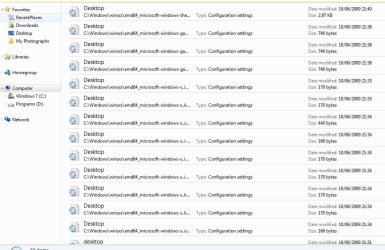
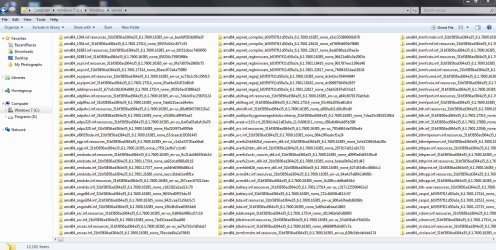
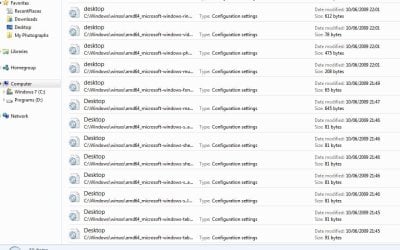
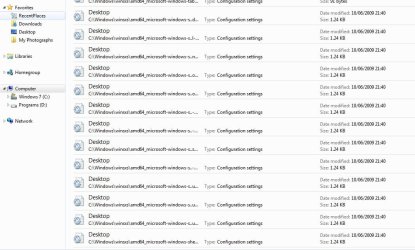
Hi GoKay - I did change the properties in the folders to GENERAL before but I cannot find an actual desktop.ini file - I went into My Computer and searched 'desktop.ini' and it just listed lots of entries but not an actual file (as pictures 1-4 althouth there are more) and in the file most of them mention C:\Windows\winsxs (Picture 6 is of that folder) which is full of files but none are actually desktop.ini !
 

Attachments

  • Capture2.JPG
    Capture2.JPG
    91.5 KB · Views: 0
  • Capture3.JPG
    Capture3.JPG
    92.9 KB · Views: 0
  • Capture4.JPG
    Capture4.JPG
    102.7 KB · Views: 0
  • Capture5.JPG
    Capture5.JPG
    66.6 KB · Views: 0
  • Capture6.JPG
    Capture6.JPG
    312.7 KB · Views: 0

My Computer My Computer

At a glance

64bit Windows 7
Computer type
Laptop
Computer Manufacturer/Model Number
Sony Vaio
OS
64bit Windows 7
No need to search anywhere :)
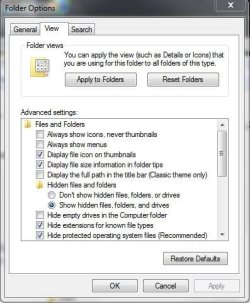
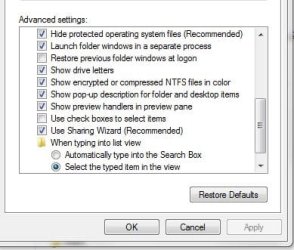
In folder options - view - check show hidden files and protected system files - apply
 

My Computer My Computer

At a glance

Windows 7 Ultimate x64 SP1AMD Phenom 2 1090T2x8GB Kingston HyperX Fury Black 1600Mhz Unga...MSI GTX 970 Gaming 4G
Computer type
PC/Desktop
Computer Manufacturer/Model Number
Custom Build
OS
Windows 7 Ultimate x64 SP1
CPU
AMD Phenom 2 1090T
Motherboard
Gigabyte GA-890FXA-UD5
Memory
2x8GB Kingston HyperX Fury Black 1600Mhz Unganged
Graphics Card(s)
MSI GTX 970 Gaming 4G
Sound Card
Realtek On-Board HD 7.1 Audio / Logitech G35
Monitor(s) Displays
3xAcer GD245HQ
Screen Resolution
1920x1080
Hard Drives
Samsung 850 Pro 512GB SSD - OS /
WD Caviar Black SATA 3 - 1 TBx2 - Dynamic RAID 0 /
WD Caviar Green SATA 2 - 640GBx2 - Dynamic RAID 0 /
WD Caviar Green SATA 2 - 640GB - Internal Backup /
Seagate Barracude SATA 3 - 3TB - External Backup/ Sync
PSU
HighPower 1000W
Case
Cooler Master HAF 932
Cooling
Noctua NH-D14
Keyboard
Logitech G19
Mouse
Logitech G500
Internet Speed
100/4 Mbit Cable (100GB quota)
Antivirus
ZoneAlarm Extreme Security / MBAM Pro / MBAE Free / SAS Free
Browser
IE 11 - Firefox - Chrome
Other Info
Logitech F710/ G27/ G940/ Z5500 // TrackIR 5 // Nvidia 3D Surround Vision
That is already checked, but I dont know where to locate the actual desktop.ini file to rename it etc.
 

Attachments

  • Capture.JPG
    Capture.JPG
    41.6 KB · Views: 9
  • Capture2.JPG
    Capture2.JPG
    32.6 KB · Views: 9

My Computer My Computer

At a glance

64bit Windows 7
Computer type
Laptop
Computer Manufacturer/Model Number
Sony Vaio
OS
64bit Windows 7
They will show on your desktop. If not, run that fixer, select desktop and click fix. See if it will appear.
 

My Computer My Computer

At a glance

Windows 7 Ultimate x64 SP1AMD Phenom 2 1090T2x8GB Kingston HyperX Fury Black 1600Mhz Unga...MSI GTX 970 Gaming 4G
Computer type
PC/Desktop
Computer Manufacturer/Model Number
Custom Build
OS
Windows 7 Ultimate x64 SP1
CPU
AMD Phenom 2 1090T
Motherboard
Gigabyte GA-890FXA-UD5
Memory
2x8GB Kingston HyperX Fury Black 1600Mhz Unganged
Graphics Card(s)
MSI GTX 970 Gaming 4G
Sound Card
Realtek On-Board HD 7.1 Audio / Logitech G35
Monitor(s) Displays
3xAcer GD245HQ
Screen Resolution
1920x1080
Hard Drives
Samsung 850 Pro 512GB SSD - OS /
WD Caviar Black SATA 3 - 1 TBx2 - Dynamic RAID 0 /
WD Caviar Green SATA 2 - 640GBx2 - Dynamic RAID 0 /
WD Caviar Green SATA 2 - 640GB - Internal Backup /
Seagate Barracude SATA 3 - 3TB - External Backup/ Sync
PSU
HighPower 1000W
Case
Cooler Master HAF 932
Cooling
Noctua NH-D14
Keyboard
Logitech G19
Mouse
Logitech G500
Internet Speed
100/4 Mbit Cable (100GB quota)
Antivirus
ZoneAlarm Extreme Security / MBAM Pro / MBAE Free / SAS Free
Browser
IE 11 - Firefox - Chrome
Other Info
Logitech F710/ G27/ G940/ Z5500 // TrackIR 5 // Nvidia 3D Surround Vision
I made all files visible - ran the fixer - selecting Desktop - the desktop showed nothing - refreshed the screen but still did not show
 

My Computer My Computer

At a glance

64bit Windows 7
Computer type
Laptop
Computer Manufacturer/Model Number
Sony Vaio
OS
64bit Windows 7
Desktop ini.jpg

Still nothing? Do you see them if you browse to that other account's desktop (the one you created as a test)?
 

My Computer My Computer

At a glance

Windows 7 Ultimate x64 SP1AMD Phenom 2 1090T2x8GB Kingston HyperX Fury Black 1600Mhz Unga...MSI GTX 970 Gaming 4G
Computer type
PC/Desktop
Computer Manufacturer/Model Number
Custom Build
OS
Windows 7 Ultimate x64 SP1
CPU
AMD Phenom 2 1090T
Motherboard
Gigabyte GA-890FXA-UD5
Memory
2x8GB Kingston HyperX Fury Black 1600Mhz Unganged
Graphics Card(s)
MSI GTX 970 Gaming 4G
Sound Card
Realtek On-Board HD 7.1 Audio / Logitech G35
Monitor(s) Displays
3xAcer GD245HQ
Screen Resolution
1920x1080
Hard Drives
Samsung 850 Pro 512GB SSD - OS /
WD Caviar Black SATA 3 - 1 TBx2 - Dynamic RAID 0 /
WD Caviar Green SATA 2 - 640GBx2 - Dynamic RAID 0 /
WD Caviar Green SATA 2 - 640GB - Internal Backup /
Seagate Barracude SATA 3 - 3TB - External Backup/ Sync
PSU
HighPower 1000W
Case
Cooler Master HAF 932
Cooling
Noctua NH-D14
Keyboard
Logitech G19
Mouse
Logitech G500
Internet Speed
100/4 Mbit Cable (100GB quota)
Antivirus
ZoneAlarm Extreme Security / MBAM Pro / MBAE Free / SAS Free
Browser
IE 11 - Firefox - Chrome
Other Info
Logitech F710/ G27/ G940/ Z5500 // TrackIR 5 // Nvidia 3D Surround Vision
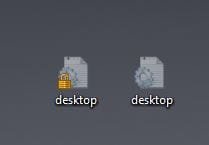
Now we are getting somewhere my friend - now they show !! - What no GoKay - delete them???
 

Attachments

  • Capture.JPG
    Capture.JPG
    9 KB · Views: 7

My Computer My Computer

At a glance

64bit Windows 7
Computer type
Laptop
Computer Manufacturer/Model Number
Sony Vaio
OS
64bit Windows 7
Just rename them to desktop2.ini, and and then run the fixer. You should get a new desktop.ini then

I wonder why you have a lock on that 1st ini file.
 

My Computer My Computer

At a glance

Windows 7 Ultimate x64 SP1AMD Phenom 2 1090T2x8GB Kingston HyperX Fury Black 1600Mhz Unga...MSI GTX 970 Gaming 4G
Computer type
PC/Desktop
Computer Manufacturer/Model Number
Custom Build
OS
Windows 7 Ultimate x64 SP1
CPU
AMD Phenom 2 1090T
Motherboard
Gigabyte GA-890FXA-UD5
Memory
2x8GB Kingston HyperX Fury Black 1600Mhz Unganged
Graphics Card(s)
MSI GTX 970 Gaming 4G
Sound Card
Realtek On-Board HD 7.1 Audio / Logitech G35
Monitor(s) Displays
3xAcer GD245HQ
Screen Resolution
1920x1080
Hard Drives
Samsung 850 Pro 512GB SSD - OS /
WD Caviar Black SATA 3 - 1 TBx2 - Dynamic RAID 0 /
WD Caviar Green SATA 2 - 640GBx2 - Dynamic RAID 0 /
WD Caviar Green SATA 2 - 640GB - Internal Backup /
Seagate Barracude SATA 3 - 3TB - External Backup/ Sync
PSU
HighPower 1000W
Case
Cooler Master HAF 932
Cooling
Noctua NH-D14
Keyboard
Logitech G19
Mouse
Logitech G500
Internet Speed
100/4 Mbit Cable (100GB quota)
Antivirus
ZoneAlarm Extreme Security / MBAM Pro / MBAE Free / SAS Free
Browser
IE 11 - Firefox - Chrome
Other Info
Logitech F710/ G27/ G940/ Z5500 // TrackIR 5 // Nvidia 3D Surround Vision
There is good news and bad news I am afraid - after all that, I did get it to work and recreated the ini file - - - but - - - the problem is still there - sorry - but thank you so much for trying to help me GoKay
 

My Computer My Computer

At a glance

64bit Windows 7
Computer type
Laptop
Computer Manufacturer/Model Number
Sony Vaio
OS
64bit Windows 7
It's alright, we had to try.

Does this happen for folders in, say, C or other partitions/drives?

Try cleaning with CCleaner, scan registry too with it.
 

My Computer My Computer

At a glance

Windows 7 Ultimate x64 SP1AMD Phenom 2 1090T2x8GB Kingston HyperX Fury Black 1600Mhz Unga...MSI GTX 970 Gaming 4G
Computer type
PC/Desktop
Computer Manufacturer/Model Number
Custom Build
OS
Windows 7 Ultimate x64 SP1
CPU
AMD Phenom 2 1090T
Motherboard
Gigabyte GA-890FXA-UD5
Memory
2x8GB Kingston HyperX Fury Black 1600Mhz Unganged
Graphics Card(s)
MSI GTX 970 Gaming 4G
Sound Card
Realtek On-Board HD 7.1 Audio / Logitech G35
Monitor(s) Displays
3xAcer GD245HQ
Screen Resolution
1920x1080
Hard Drives
Samsung 850 Pro 512GB SSD - OS /
WD Caviar Black SATA 3 - 1 TBx2 - Dynamic RAID 0 /
WD Caviar Green SATA 2 - 640GBx2 - Dynamic RAID 0 /
WD Caviar Green SATA 2 - 640GB - Internal Backup /
Seagate Barracude SATA 3 - 3TB - External Backup/ Sync
PSU
HighPower 1000W
Case
Cooler Master HAF 932
Cooling
Noctua NH-D14
Keyboard
Logitech G19
Mouse
Logitech G500
Internet Speed
100/4 Mbit Cable (100GB quota)
Antivirus
ZoneAlarm Extreme Security / MBAM Pro / MBAE Free / SAS Free
Browser
IE 11 - Firefox - Chrome
Other Info
Logitech F710/ G27/ G940/ Z5500 // TrackIR 5 // Nvidia 3D Surround Vision
It only happens with DESKTOP - If I open C:\ then any folders within there will open immediately but if it is folder on the desktop - perhaps the shorcut to C:\ or to My Photographs - or perhaps if working within another program or Firefox .... return to the desktop - delay, that is if nothing has been clicked on the desktop for 30 seconds or more - then the delay happens ! -
 

My Computer My Computer

At a glance

64bit Windows 7
Computer type
Laptop
Computer Manufacturer/Model Number
Sony Vaio
OS
64bit Windows 7
Hmm, those all should be shortcuts. Does it happen with new shortcuts to those folders?
 

My Computer My Computer

At a glance

Windows 7 Ultimate x64 SP1AMD Phenom 2 1090T2x8GB Kingston HyperX Fury Black 1600Mhz Unga...MSI GTX 970 Gaming 4G
Computer type
PC/Desktop
Computer Manufacturer/Model Number
Custom Build
OS
Windows 7 Ultimate x64 SP1
CPU
AMD Phenom 2 1090T
Motherboard
Gigabyte GA-890FXA-UD5
Memory
2x8GB Kingston HyperX Fury Black 1600Mhz Unganged
Graphics Card(s)
MSI GTX 970 Gaming 4G
Sound Card
Realtek On-Board HD 7.1 Audio / Logitech G35
Monitor(s) Displays
3xAcer GD245HQ
Screen Resolution
1920x1080
Hard Drives
Samsung 850 Pro 512GB SSD - OS /
WD Caviar Black SATA 3 - 1 TBx2 - Dynamic RAID 0 /
WD Caviar Green SATA 2 - 640GBx2 - Dynamic RAID 0 /
WD Caviar Green SATA 2 - 640GB - Internal Backup /
Seagate Barracude SATA 3 - 3TB - External Backup/ Sync
PSU
HighPower 1000W
Case
Cooler Master HAF 932
Cooling
Noctua NH-D14
Keyboard
Logitech G19
Mouse
Logitech G500
Internet Speed
100/4 Mbit Cable (100GB quota)
Antivirus
ZoneAlarm Extreme Security / MBAM Pro / MBAE Free / SAS Free
Browser
IE 11 - Firefox - Chrome
Other Info
Logitech F710/ G27/ G940/ Z5500 // TrackIR 5 // Nvidia 3D Surround Vision
Yes - I tried that - I have a partitioned drive - C: and D: and store photos on the D: - I created a desktop shortcut from My Photos and if I open it from the desktop, I get the delay, but directly from the D:\ partition - instantly opens !

It is almost as though there is a time limit set in the registry somewhere which says if nothing happens, go through all the files again and hence the delay.
 
Last edited:

My Computer My Computer

At a glance

64bit Windows 7
Computer type
Laptop
Computer Manufacturer/Model Number
Sony Vaio
OS
64bit Windows 7
Back
Top