Desktop wifi slow.Wired desktop Fast.Laptop wifi fast.

I don't see a 'channel bonding' section of the hub, I'll have a proper search later but its not located on the 'easy wifi' page.

Since amending the channel to Ch1, another router has appeared using channel 1 :-(

Although there is a small change in the graph following this change its not very significant. Still only recording 25MB when other pc/laptop are receiving near 60MB.

I think I will take the pc up to the router, connect directly and see what I'm getting...


The settings would be on the routers set up page. The hub is the same as a switch.
You should be able to get to your routers set up page by typing 192.168.0.1 in your browsers URL.

The other machine using channel 1 and is using wireless G which doesn't have a very strong signal so might not affect you very much at all. The DNS you are using is also suspect and it should be pointing to the routers default gateway but it's not for some reason.

Did you set a DNS server on your machines IP page? If there is a channel 1 being used then you would still want to turn off channel bonding which is on, and try going to channel 6. Trying different channels is more about signal quality and not really about signal strength.

As far as signal strength, the distance and the number of walls between you and the access point has everything to do with that. The only way to increase your signal strength is to move closer to access point, or eliminate the walls between you and the access point or move the access point closer to that particular machine.
 
Last edited:

My Computer My Computer

At a glance

Windows 7 Ult, Windows 8.1 Pro,Q9650-4.275GHz, E8600 4.5GHz, E6750-3.8GHzG.Skill PC2 9600 1200Mhz 5 5 5 15 2TGTX480
Computer type
PC/Desktop
Computer Manufacturer/Model Number
Home built
OS
Windows 7 Ult, Windows 8.1 Pro,
CPU
Q9650-4.275GHz, E8600 4.5GHz, E6750-3.8GHz
Motherboard
Evga 780i FTW
Memory
G.Skill PC2 9600 1200Mhz 5 5 5 15 2T
Graphics Card(s)
GTX480
Sound Card
Asus Xonar D2
Monitor(s) Displays
HannsG
Screen Resolution
1680X1050
Hard Drives
GSkill Phoenix Pro 120GB SSD
PSU
ThermalTake Toughpower 1000Watt modular
Case
ThermalTake XaserV
Cooling
Xigmatek S1283
Keyboard
Logitech G15
Mouse
Logitech G9
Internet Speed
T1
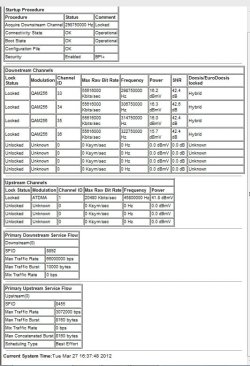
I haven't been able to find any 'tool' that I can use for SNR, however I have found the info from the router:

I have limited knowledge and don't really understand this fully.


Downstream ChannelsLock StatusModulationChannel IDMax Raw Bit RateFrequencyPowerSNRDocsis/EuroDocsis lockedLockedQAM2563355616000 Kbits/sec298750000 Hz16.2 dBmV42.4 dBHybridLockedQAM2563455616000 Kbits/sec306750000 Hz16.3 dBmV42.6 dBHybridLockedQAM2563555616000 Kbits/sec314750000 Hz16.0 dBmV42.4 dBHybridLockedQAM2563655616000 Kbits/sec322750000 Hz15.7 dBmV42.4 dBHybridUnlockedUnknown00 Ksym/sec0 Hz0.0 dBmV0.0 dBUnknownUnlockedUnknown00 Ksym/sec0 Hz0.0 dBmV0.0 dBUnknownUnlockedUnknown00 Ksym/sec0 Hz0.0 dBmV0.0 dBUnknownUnlockedUnknown00 Ksym/sec0 Hz0.0 dBmV0.0 dBUnknown
 

My Computer My Computer

At a glance

Win 7 Ultimate1.6 GHz1 GB
Computer Manufacturer/Model Number
Dell 32 bit
OS
Win 7 Ultimate
CPU
1.6 GHz
Memory
1 GB
I'm not sure what any of that means but as I mentioned before if you want better signal strength you will need to follow the directions I posted earlier.
 

My Computer My Computer

At a glance

Windows 7 Ult, Windows 8.1 Pro,Q9650-4.275GHz, E8600 4.5GHz, E6750-3.8GHzG.Skill PC2 9600 1200Mhz 5 5 5 15 2TGTX480
Computer type
PC/Desktop
Computer Manufacturer/Model Number
Home built
OS
Windows 7 Ult, Windows 8.1 Pro,
CPU
Q9650-4.275GHz, E8600 4.5GHz, E6750-3.8GHz
Motherboard
Evga 780i FTW
Memory
G.Skill PC2 9600 1200Mhz 5 5 5 15 2T
Graphics Card(s)
GTX480
Sound Card
Asus Xonar D2
Monitor(s) Displays
HannsG
Screen Resolution
1680X1050
Hard Drives
GSkill Phoenix Pro 120GB SSD
PSU
ThermalTake Toughpower 1000Watt modular
Case
ThermalTake XaserV
Cooling
Xigmatek S1283
Keyboard
Logitech G15
Mouse
Logitech G9
Internet Speed
T1
(OK that cut/paste didn't work, I'll attach it)
 

My Computer My Computer

At a glance

Win 7 Ultimate1.6 GHz1 GB
Computer Manufacturer/Model Number
Dell 32 bit
OS
Win 7 Ultimate
CPU
1.6 GHz
Memory
1 GB
Page hadn't updated, sorry
 

Attachments

  • router screenprint 1.jpg
    router screenprint 1.jpg
    72 KB · Views: 10

My Computer My Computer

At a glance

Win 7 Ultimate1.6 GHz1 GB
Computer Manufacturer/Model Number
Dell 32 bit
OS
Win 7 Ultimate
CPU
1.6 GHz
Memory
1 GB
I haven't been able to find any 'tool' that I can use for SNR, however I have found the info from the router:

I have limited knowledge and don't really understand this fully.


Downstream ChannelsLock StatusModulationChannel IDMax Raw Bit RateFrequencyPowerSNRDocsis/EuroDocsis lockedLockedQAM2563355616000 Kbits/sec298750000 Hz16.2 dBmV42.4 dBHybridLockedQAM2563455616000 Kbits/sec306750000 Hz16.3 dBmV42.6 dBHybridLockedQAM2563555616000 Kbits/sec314750000 Hz16.0 dBmV42.4 dBHybridLockedQAM2563655616000 Kbits/sec322750000 Hz15.7 dBmV42.4 dBHybridUnlockedUnknown00 Ksym/sec0 Hz0.0 dBmV0.0 dBUnknownUnlockedUnknown00 Ksym/sec0 Hz0.0 dBmV0.0 dBUnknownUnlockedUnknown00 Ksym/sec0 Hz0.0 dBmV0.0 dBUnknownUnlockedUnknown00 Ksym/sec0 Hz0.0 dBmV0.0 dBUnknown

Network stumbler is one tool for snr.
 

My Computer My Computer

At a glance

windows XP
Computer Manufacturer/Model Number
wi
OS
windows XP
Back
Top