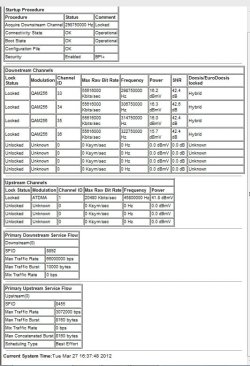
I don't see a 'channel bonding' section of the hub, I'll have a proper search later but its not located on the 'easy wifi' page.
Since amending the channel to Ch1, another router has appeared using channel 1 :-(
Although there is a small change in the graph following this change its not very significant. Still only recording 25MB when other pc/laptop are receiving near 60MB.
I think I will take the pc up to the router, connect directly and see what I'm getting...
The settings would be on the routers set up page. The hub is the same as a switch.
You should be able to get to your routers set up page by typing 192.168.0.1 in your browsers URL.
The other machine using channel 1 and is using wireless G which doesn't have a very strong signal so might not affect you very much at all. The DNS you are using is also suspect and it should be pointing to the routers default gateway but it's not for some reason.
Did you set a DNS server on your machines IP page? If there is a channel 1 being used then you would still want to turn off channel bonding which is on, and try going to channel 6. Trying different channels is more about signal quality and not really about signal strength.
As far as signal strength, the distance and the number of walls between you and the access point has everything to do with that. The only way to increase your signal strength is to move closer to access point, or eliminate the walls between you and the access point or move the access point closer to that particular machine.
Last edited:
My Computer
At a glance
Windows 7 Ult, Windows 8.1 Pro,Q9650-4.275GHz, E8600 4.5GHz, E6750-3.8GHzG.Skill PC2 9600 1200Mhz 5 5 5 15 2TGTX480
- Computer type
- PC/Desktop
- Computer Manufacturer/Model Number
- Home built
- OS
- Windows 7 Ult, Windows 8.1 Pro,
- CPU
- Q9650-4.275GHz, E8600 4.5GHz, E6750-3.8GHz
- Motherboard
- Evga 780i FTW
- Memory
- G.Skill PC2 9600 1200Mhz 5 5 5 15 2T
- Graphics Card(s)
- GTX480
- Sound Card
- Asus Xonar D2
- Monitor(s) Displays
- HannsG
- Screen Resolution
- 1680X1050
- Hard Drives
- GSkill Phoenix Pro 120GB SSD
- PSU
- ThermalTake Toughpower 1000Watt modular
- Case
- ThermalTake XaserV
- Cooling
- Xigmatek S1283
- Keyboard
- Logitech G15
- Mouse
- Logitech G9
- Internet Speed
- T1