Desktop will not boot when I have new Power Supply

axaznguitony26

New member
Local time
5:08 PM
Messages
23
Okay when I installed new power supply and it was working fine. I came back home and installed new rams and when I turn it back on, the computer will no longer turn on and so I took out the new rams and installed the old one back on and still will not turn on. I removed the old power supply and left the old ram on the motherboard and still will not turn on, not even the fans...

Motherboard has a green steady light, same with the power supply on the old one.


Gateway GT5014 Pentium D 2.8 GHz upgrade from Media Center 2005 to Windows 7 ULT
 

My Computer My Computer

At a glance

Windows 7 Pro 32
OS
Windows 7 Pro 32
Please update your System Specs
http://www.sevenforums.com/tutorials/180324-system-info-see-your-system-specs.html
I am mainly interesting in knowing which motherboard you have.

Your post is confusing,
So you have used the NEW power supply, it worked before you changed the RAM.
Now your computer will not boot or turn on? With the new AND old ram?

Later you removed your old power supply ....? When was it in?
Have you tested the new and the old ram with your old power supply?

Please post back with the 2 power supplies you have also
 

My Computer My Computer

At a glance

Windows 8 64 bit PROAMD Phenom X4 9100e2GB X2 DDR2Sapphire HD 6850
Computer type
PC/Desktop
Computer Manufacturer/Model Number
Gateway / Slight Modifications
OS
Windows 8 64 bit PRO
CPU
AMD Phenom X4 9100e
Motherboard
Gateway RS780
Memory
2GB X2 DDR2
Graphics Card(s)
Sapphire HD 6850
Sound Card
Integrated
Monitor(s) Displays
Gateway 19" + Dell 19"
Screen Resolution
1440X900 sometimes 2880 by 900
Hard Drives
WD 80GB
WD 640GB
WD 1,000GB
PSU
Antec BP 550watts
Case
Antec 300
Cooling
Stock Cooling
Keyboard
Saitek Eclipse II
Mouse
Gigabyte GM-M6800
Internet Speed
D: 30Mbps U:4Mbps
Antivirus
Avast version 8
Browser
Internet Explorer ver 10 64 bit
Other Info
This is my work computer.
I have another laptop running Windows 7 64 bit.
Another PC running Windows 8 64 bit pro.
Total of 3
Gateway GT5014 Media Center (Pentium D 2.8 GHz, 1 GB RAM, 250 GB HDD) specifications


  • General
  • Type Media center
  • Product Form Factor Tower
  • Built-in Devices TV tuner
  • Width 7.3 in
  • Depth 17.9 in
  • Height 15.4 in
  • Weight 23.4 lbs
  • Processor
  • Type Intel Pentium D 820 / 2.8 GHz
  • Multi-Core Technology Dual-Core
  • 64-bit Computing Yes
  • Installed Qty 1.0
  • Max Supported Qty 1.0
  • Processor Main Features Intel Execute Disable Bit , Intel Extended Memory 64 Technology
  • Mainboard
  • Chipset type Intel 945G Express
  • Data bus speed 800.0 MHz
  • Cache Memory
  • Type L2 cache
  • Installed Size 2.0 MB
  • Cache Per Processor 2 MB ( 2 x 1 MB )
  • RAM
  • Installed Size 1.0 GB / 4.0 GB (max)
  • Technology DDR2 SDRAM
  • Memory Speed 533.0 MHz
  • Memory Specification Compliance PC2-4200
  • Form Factor DIMM 240-pin
  • Features Dual channel memory architecture
  • Configuration Features 2 x 512 MB
  • Storage Controller
  • Type 1.0 x Serial ATA - Integrated
  • Controller Interface Type Serial ATA-300
  • Channel Qty 4.0
  • Storage Controller (2nd)
  • Type 1 x IDE - Integrated
  • Controller Interface Type ATA-100
  • Channel Qty 1
  • Storage
  • Hard Drive 1.0 x 250.0 GB - Standard - Serial ATA-150 - 7200.0 rpm
  • Hard Drive (2nd) None
  • Optical Storage
  • Type DVD±RW (+R DL) - IDE
  • Read Speed 40x (CD) / 16x (DVD)
  • Write Speed 40x (CD) / 16x (DVD±R) / 4x (DVD+R DL)
  • Rewrite Speed 24x (CD) / 6x (DVD-RW) / 8x (DVD+RW)
  • Optical Storage (2nd)
  • Type DVD-ROM
  • Read Speed 48x (CD) / 16x (DVD)
  • Storage Removable
  • Type None
  • Monitor
  • Monitor Type none.
  • Graphics Controller
  • Type Integrated
  • Graphics Processor / Vendor Intel GMA 950 Dynamic Video Memory Technology 3.0
  • Audio Output
  • Type Sound card - Integrated
  • Sound Output Mode 7.1 channel surround
  • Compliant Standards High Definition Audio
  • Speaker(s) 2.0 x Right / left channel
  • Input Device
  • Type Mouse , Keyboard
  • Mouse
  • Mouse technology Optical
  • Mouse interface USB
  • Mouse features Scroll
  • Telecom
  • Modem Fax / modem
  • Max Transfer Rate 56.0 Kbps
  • Protocols & Specifications ITU V.92
  • Networking
  • Networking Network adapter - Integrated
  • Data Link Protocol Gigabit Ethernet , Ethernet , Fast Ethernet
  • Printer
  • Type None
  • Expansion / Connectivity
  • Expansion Bays 2.0 (total) / 1.0 (free) x Front accessible - 5.25" x 1/2H , 2.0 (total) / 2.0 (free) x Front accessible - 3.5" x 1/3H , 3.0 (total) / 1.0 (free) x Internal - 3.5" x 1/3H
  • Expansion Slot(s) 1.0 (total) / 1.0 (free) x SD Memory Card - DIMM 240-pin , 1.0 (total) / 1.0 (free) x Memory Stick , 4.0 (total) / 0.0 (free) x Memory , 1.0 (total) / 1.0 (free) x CompactFlash Card , 3.0 (total) / 1.0 (free) x SmartMedia Card , 1.0 (total) / 2.0 (free) x Processor , 1.0 (total) / 1.0 (free) x PCI Express x1 , 1.0 (total) / 1.0 (free) x PCI Express x16 , 1.0 (total) / 1.0 (free) x PCI
  • Interfaces 1.0 x Mouse - Generic - 9 pin D-Sub (DB-9) , 2.0 x Keyboard - Line-in - 6 pin FireWire , 1.0 x Display / video - Generic - Mini-phone 3.5 mm , 1.0 x Audio - IEEE 1284 (EPP/ECP) - Mini-phone stereo 3.5 mm , 3.0 x Audio - VGA - Mini-phone stereo 3.5 mm , 1.0 x Hi-Speed USB - RS-232 - 15 pin HD D-Sub (HD-15) , 4.0 x Audio - Input - 25 pin D-Sub (DB-25) , 1.0 x IEEE 1394 (FireWire) - SPDIF - 6 pin mini-DIN (PS/2 style) , 1.0 x Microphone - Line-out - 6 pin mini-DIN (PS/2 style) , 7.0 x Parallel - 4 pin USB Type A , Serial
  • Power
  • Device Type Power supply
  • Operating System / Software
  • OS Provided Microsoft Windows XP Media Center Edition 2005


I installed new ram with old one... it works...


Came home, installed new one but took the old rams out since I don't need it and replaced it with pny brand ddr2 2 1gb ram sticks ...


old power supply is Beste brand which model : ATX- 300 - 12EB3 300w

new power supply is Corsair 600w

old ram uses 2 514 ram = 1024mb pc4200
new ram uses 2 1gb ram = 2gb pc 6400


at the beginning, i add the old rams with new power supply it works fine... when i remove the old rams to replaced it with the new rams, computer will no longer turn on.... so now when i took the new rams out and add old rams back on, computer will still no longer turn back on.

I did the same steps with the old power supply still doesn't power on... no beeps, no flashing lights just green steady light on the back of the old power supply but on the new power supply shows no light at all on the back and also green steady light on the motherboard but there's no light in front of the computer tower.
 

My Computer My Computer

At a glance

Windows 7 Pro 32
OS
Windows 7 Pro 32
Please double check to see all of your connections are properly seated and connected properly too.
Is this your computer? Gateway Support - Specifications
If so they didn't mention what motherboard you had.

I suggest we try going bare minimum if you feel comfartable of course. I suggest you to unplug all your harddrives any anything that is extra.
Since we know the old Power supply (300W) was working before lets test this one.
Please plug in your Power supply to your motherboard.
If i am correct there should be 2 cables total.
Your motherboard will use either a 20 or 24 pinpower cable. since it seems like this computer is a bit old i think it will use 20 pin.
It should also use a 4 pin power connecter too.(Sometimes they are 8 pin)

Make sure the CPU is properly seated and locked in. Make sure the fan is also properly plug in.
I know personally from experience that if your motherboard isn't locked down properly your computer wont turn on.
Any beeps?
Fans spinning?

Also make sure your power supply is turn on, some power supplies have an on and off switch in the back. Like always be safe and remember to be grounded. Avoid ESD (electric static discharge.
If i wasnt clear please let me know. Doing the best i can :) Hoping we can solve this together
 

My Computer My Computer

At a glance

Windows 8 64 bit PROAMD Phenom X4 9100e2GB X2 DDR2Sapphire HD 6850
Computer type
PC/Desktop
Computer Manufacturer/Model Number
Gateway / Slight Modifications
OS
Windows 8 64 bit PRO
CPU
AMD Phenom X4 9100e
Motherboard
Gateway RS780
Memory
2GB X2 DDR2
Graphics Card(s)
Sapphire HD 6850
Sound Card
Integrated
Monitor(s) Displays
Gateway 19" + Dell 19"
Screen Resolution
1440X900 sometimes 2880 by 900
Hard Drives
WD 80GB
WD 640GB
WD 1,000GB
PSU
Antec BP 550watts
Case
Antec 300
Cooling
Stock Cooling
Keyboard
Saitek Eclipse II
Mouse
Gigabyte GM-M6800
Internet Speed
D: 30Mbps U:4Mbps
Antivirus
Avast version 8
Browser
Internet Explorer ver 10 64 bit
Other Info
This is my work computer.
I have another laptop running Windows 7 64 bit.
Another PC running Windows 8 64 bit pro.
Total of 3
what does the green steady lights mean anyway? ill try to fix it later on today since it's almost 4am and need to rest...

also the connector should be on tight when i removed and add old ram because it was fine til i replaced it with the new rams.. not sure what's going on.. other desktop used new ram but it's working fine but not this one.

yes that's my pc but it uses Pentium D rather than premium 4 same motherboard and I think it's Intel Cortez.. trying to find if there's new motherboard that uses same fan and things from old motherboard.

I think I got the ESD, I got shocked lots of times and few years back though it happen when computer was on.... this time, the computer was off but the plug was still plugged into the wall and forgot to unplug it:(
 

My Computer My Computer

At a glance

Windows 7 Pro 32
OS
Windows 7 Pro 32
Steady green light is usually a sign of the motherboard receiving power. However without knowing what motherboard you have i can't be 100%.

I know the issue isn't RAM. A computer can still POST, even without RAM.
RAM, HDD, Disc Drives at this moment don't need to connected.
Only motherboard and CPU and PSU.

Did you mess with the front panel connecters at all? They basically connect to the motherboard from the case. Usually control lights on case and POWER button.

You got shock while changing the RAM? or Power Supply Unit?
 

My Computer My Computer

At a glance

Windows 8 64 bit PROAMD Phenom X4 9100e2GB X2 DDR2Sapphire HD 6850
Computer type
PC/Desktop
Computer Manufacturer/Model Number
Gateway / Slight Modifications
OS
Windows 8 64 bit PRO
CPU
AMD Phenom X4 9100e
Motherboard
Gateway RS780
Memory
2GB X2 DDR2
Graphics Card(s)
Sapphire HD 6850
Sound Card
Integrated
Monitor(s) Displays
Gateway 19" + Dell 19"
Screen Resolution
1440X900 sometimes 2880 by 900
Hard Drives
WD 80GB
WD 640GB
WD 1,000GB
PSU
Antec BP 550watts
Case
Antec 300
Cooling
Stock Cooling
Keyboard
Saitek Eclipse II
Mouse
Gigabyte GM-M6800
Internet Speed
D: 30Mbps U:4Mbps
Antivirus
Avast version 8
Browser
Internet Explorer ver 10 64 bit
Other Info
This is my work computer.
I have another laptop running Windows 7 64 bit.
Another PC running Windows 8 64 bit pro.
Total of 3
few yrs back i did get shocked but still works but when i changed the ram few weeks ago, i didn't get shock and pc wasn't on but the power supply was still on plugged into the wall and forgot to unplug it and no i didn't mess with anything in the front...

The motherboard is Intel NEW~MotherBoard Gateway GT5012 GT5012H GT5014 GT5016E | eBay

looks like this one the motherboard (above link)
 

My Computer My Computer

At a glance

Windows 7 Pro 32
OS
Windows 7 Pro 32
If the PC won't even boot now you can try resetting the bios.

If/when it does boot, i suggest going into bios setup and make sure RAM settings are correct.

If you do reset bios, check that all other settings are correct such as AHCI/IDE mode.
 

My Computer My Computer

At a glance

Multi-Boot W7_Pro_x64 W8.1_Pro_x64 W10_Pro_x6...AMD Athlon II x4 6206GB GSkill DDR2 800AMD 4670 GPU + AMD 4200 IGP
Computer type
PC/Desktop
Computer Manufacturer/Model Number
home built
OS
Multi-Boot W7_Pro_x64 W8.1_Pro_x64 W10_Pro_x64 +Linux_VMs +Chromium_VM
CPU
AMD Athlon II x4 620
Motherboard
Gigabyte GA-MA785G-UD3H
Memory
6GB GSkill DDR2 800
Graphics Card(s)
AMD 4670 GPU + AMD 4200 IGP
Sound Card
on board Realtek ALC889A
Monitor(s) Displays
RCA 40" LCD TV, Insignia 32" LCD TV, HP 15" LCD monitor
Screen Resolution
1680 x 1050
Hard Drives
OCZ Vertex 3 120GB,
Samsung F3 1TB (3),
Several others - WD, Seagate, Hitachi, ...
PSU
Corsair 500 W
Case
Rosewill mid tower
Cooling
CM 90mm rifle
Keyboard
Gyration wireless, Logitech wireless, Dell USB wired
Mouse
Gyration wireless, Logitech wireless, V7 USB wired
Internet Speed
Spectrum - 100Mbps D / 10Mbps U
Antivirus
Avast, MBAM3, EMET, WinPatrol
Browser
Pale Moon, Firefox, IE
Other Info
2 multi-boot PC's
Mainly HTPC/Office/Gen purpose (no gaming).
Trendnet USB KVM.
LG DVD burner/Blue Ray Player.
Tray system for removable SATA backup drives.

Not currently OCd, under-volted.
I use Hybrid sleep, rarely re-boot or shutdown.

Hauppauge HD-PVR, Avermedia PCIe TV Tuner, Hauppauge PCI TV Tuner.
Your Power supply seems to check ok, since your motherboard turns on a green light. If you can confirm this by testing it on a different machine that would be helpful.

It must be either your CPU or faulty motherboard, going in that order.
PLEASE MAKE SURE THAT YOUR CPU 4pin power cable is connected. This case being X. Without this there is no chance of your system doing a POST(power on self test)

GATEWAY GT5012 GT5012H GT5014 GT5016E MOTHERBOARD NEW | eBay
Please confirm that
A, C, M, X
are all fully connected.
Unplug your computer from the wall, hold the power button. If your power supply has an on and off switch in back please turn it off and then back to on. Then plug it in back into the wall and try and power on.
 

My Computer My Computer

At a glance

Windows 8 64 bit PROAMD Phenom X4 9100e2GB X2 DDR2Sapphire HD 6850
Computer type
PC/Desktop
Computer Manufacturer/Model Number
Gateway / Slight Modifications
OS
Windows 8 64 bit PRO
CPU
AMD Phenom X4 9100e
Motherboard
Gateway RS780
Memory
2GB X2 DDR2
Graphics Card(s)
Sapphire HD 6850
Sound Card
Integrated
Monitor(s) Displays
Gateway 19" + Dell 19"
Screen Resolution
1440X900 sometimes 2880 by 900
Hard Drives
WD 80GB
WD 640GB
WD 1,000GB
PSU
Antec BP 550watts
Case
Antec 300
Cooling
Stock Cooling
Keyboard
Saitek Eclipse II
Mouse
Gigabyte GM-M6800
Internet Speed
D: 30Mbps U:4Mbps
Antivirus
Avast version 8
Browser
Internet Explorer ver 10 64 bit
Other Info
This is my work computer.
I have another laptop running Windows 7 64 bit.
Another PC running Windows 8 64 bit pro.
Total of 3
Interesting, Let make get a confirmation, i do not believe you need a POWER LED.
As long as your POWER SW(power switch) is connected where it belongs this should not be a problem. You would only need POWER LED if your computer case has a light in the front that displays if its on or off.
 

My Computer My Computer

At a glance

Windows 8 64 bit PROAMD Phenom X4 9100e2GB X2 DDR2Sapphire HD 6850
Computer type
PC/Desktop
Computer Manufacturer/Model Number
Gateway / Slight Modifications
OS
Windows 8 64 bit PRO
CPU
AMD Phenom X4 9100e
Motherboard
Gateway RS780
Memory
2GB X2 DDR2
Graphics Card(s)
Sapphire HD 6850
Sound Card
Integrated
Monitor(s) Displays
Gateway 19" + Dell 19"
Screen Resolution
1440X900 sometimes 2880 by 900
Hard Drives
WD 80GB
WD 640GB
WD 1,000GB
PSU
Antec BP 550watts
Case
Antec 300
Cooling
Stock Cooling
Keyboard
Saitek Eclipse II
Mouse
Gigabyte GM-M6800
Internet Speed
D: 30Mbps U:4Mbps
Antivirus
Avast version 8
Browser
Internet Explorer ver 10 64 bit
Other Info
This is my work computer.
I have another laptop running Windows 7 64 bit.
Another PC running Windows 8 64 bit pro.
Total of 3
The Power Switch is all that is needed for the computer to start, The power led is the led light that tays on when the computer is on, the HDD led only shows when the hard drive is being accessed. None of these is nessary for the computer to start, only the power SW.

Make sure all connections on the motherboard are connected and seated all the way, take all ram out and start the computer. It will not start without ram, but if the motherboard is acting properly, you should hear a serise of beeps, to tell you there is no ram. But, be sure tof the connections. When changing ram it is quite easy to accidentially bump and loosen a connection. We have all done it.
 

My Computers My Computers

  • At a glance

    Windows 11 ProRyzen 9 5900X32GB G Skill DDR4-3600EVGA RTX 3080 FTW 3 Ultra
    Computer type
    PC/Desktop
    Computer Manufacturer/Model Number
    ALWAYS UNDER CONSTRUCTION
    OS
    Windows 11 Pro
    CPU
    Ryzen 9 5900X
    Motherboard
    Asus X570 Crosshair Viii Hero
    Memory
    32GB G Skill DDR4-3600
    Graphics Card(s)
    EVGA RTX 3080 FTW 3 Ultra
    Sound Card
    On Board/Sennheiser PC37X Headset
    Monitor(s) Displays
    3 X Asus 27"
    Screen Resolution
    2560x1440
    Hard Drives
    2 X 1 TB NVME drives
    PSU
    EVGA 850
    Case
    Phanteks Eclipse P400A
    Cooling
    EVGA 280 AIO
    Keyboard
    Logitech G510s/ Logitech G13
    Mouse
    Logitech G502
    Internet Speed
    24/1
    Antivirus
    ESET/MBAM Pro/SAS Pro
    Browser
    Chrome/ Firefox/ Edge
  • At a glance

    Windows 11 ProIntel Ultra 9 288V32 GB LPDDR5X 8533
    Computer type
    Laptop
    System Manufacturer/Model Number
    Dell 16 Plus
    OS
    Windows 11 Pro
    CPU
    Intel Ultra 9 288V
    Memory
    32 GB LPDDR5X 8533
    Monitor(s) Displays
    16" Mini-LED HDR600 Touch 90 Hz
    Screen Resolution
    2560X1600
    Hard Drives
    1 TB NVME
If pressing the power Button does nothing, even though the board reports recieving power, its likely a connection issue.
One way to know for sure is if your board has jumper switches, or onboard switches to bypass it entirely. Which it may not have.


As metioned, the ones marked LED will be for indicator lights. The PC will function correctly with or without them. They are not critical.
This is also dependent on the Case itself. though many have them, not all will. Some may only have the HD LED, the Power LED, Both, or none at all.


Take a close look at your front panel connectors. they look similar to this:
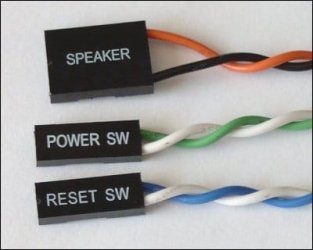
1.jpg
These are from the case, specifically the power switch etc, connecting to the motherboard.

The motherboard itself should have connections similar to this:
2.gif

Keep in mind this is an example and may not be exactly what you will see.
The important thing is to look closely at the motherboard as these will be labled.
Match the wires (note the + and -) and make sure the connect at the appropriate place.


Also, double check that the long, 24pin main power connection is connected securly. Typically on the far right side of the motherboard.
And also, check the CPU power connection. This will likely be a small 4 pin (square) connector, or maybe even a 8pin. This is usually on the top left area of the motherboard, left of the main CPU area.


Any time you are working with changing anything inside the case, you should ALWAYS make sure the PSU is unplugged from the wall, flip the switch on the back, and then power up to drain any exceess power in the system before you touch anything.

That goes for everything. Changing RAM, reseating GPU, adding a sound card, or even reseating power connections.

 

My Computer My Computer

At a glance

Windows 7 Home Premium 64bitIntel Core i7 2700k8GB Mushkin Redline Ridgebacks @1866EVGA GTX570 SC
Computer Manufacturer/Model Number
Custom (Self Build)
OS
Windows 7 Home Premium 64bit
CPU
Intel Core i7 2700k
Motherboard
eVGA P67 SLI
Memory
8GB Mushkin Redline Ridgebacks @1866
Graphics Card(s)
EVGA GTX570 SC
Sound Card
XiFi Titanium HD
Monitor(s) Displays
LG W2453V
Screen Resolution
1920x1080
Hard Drives
Intel 320 80GB -- Intel X25-V 40GB --WD Black 1TB x2 -- WD Blue 640GB
PSU
Seasonic x750
Case
Corsair 600T SE White
Cooling
eVGA Superclocked CPU Cooler
Keyboard
Saitek Cyborg
Antivirus
Kaspersky
Browser
IE
Other Info
LG BD/DVD
i dont have none of those though but there's a blue light in the front of the tower and orange color on the button of the tower in the front but supposed to be on which it's not.

old psu has no power switch which is steady green on the back of the psu while new one has a switch but no light... the only time there's a light is if the computer is turned on.

I remember having some green jumper but not sure where it is... when i never put it back on, it still works but now it doesn't when i changed rams etc....
 

My Computer My Computer

At a glance

Windows 7 Pro 32
OS
Windows 7 Pro 32
I am sorry i don't quite understand your post.
Any chance you can take a picture and upload it ?
http://www.sevenforums.com/tutorials/9733-screenshots-files-upload-post-seven-forums.html

So far your tower has a blue light and a orange light? Can you take a picture of these?
Old psu doesnt have a power switch but a green light in back. New PSU doesnt have a light but has a switch.

What is this green jumper your talking about ?

Did you mess around with the front panel connecters? (also take a picture of this)
 

My Computer My Computer

At a glance

Windows 8 64 bit PROAMD Phenom X4 9100e2GB X2 DDR2Sapphire HD 6850
Computer type
PC/Desktop
Computer Manufacturer/Model Number
Gateway / Slight Modifications
OS
Windows 8 64 bit PRO
CPU
AMD Phenom X4 9100e
Motherboard
Gateway RS780
Memory
2GB X2 DDR2
Graphics Card(s)
Sapphire HD 6850
Sound Card
Integrated
Monitor(s) Displays
Gateway 19" + Dell 19"
Screen Resolution
1440X900 sometimes 2880 by 900
Hard Drives
WD 80GB
WD 640GB
WD 1,000GB
PSU
Antec BP 550watts
Case
Antec 300
Cooling
Stock Cooling
Keyboard
Saitek Eclipse II
Mouse
Gigabyte GM-M6800
Internet Speed
D: 30Mbps U:4Mbps
Antivirus
Avast version 8
Browser
Internet Explorer ver 10 64 bit
Other Info
This is my work computer.
I have another laptop running Windows 7 64 bit.
Another PC running Windows 8 64 bit pro.
Total of 3
Blue light for power led
Orange light for hard drive

Snapshot of me 5.jpg

Snapshot of me 6.jpg

Snapshot of me 4.jpg

Snapshot of me 3.jpg

ignore the red and blue lights since taking this pictures using PS3 eyetoy cam on laptop
 

My Computer My Computer

At a glance

Windows 7 Pro 32
OS
Windows 7 Pro 32
The red light on picture 4 is that from the PS Eye Cam?
Sadly these pictures wont help us.

Sorry but if you follow of all Wishmasters suggestions on post 13, I think we reach the end of the road, We either go back and retry a few steps and double check everything we mention was done.
 

My Computer My Computer

At a glance

Windows 8 64 bit PROAMD Phenom X4 9100e2GB X2 DDR2Sapphire HD 6850
Computer type
PC/Desktop
Computer Manufacturer/Model Number
Gateway / Slight Modifications
OS
Windows 8 64 bit PRO
CPU
AMD Phenom X4 9100e
Motherboard
Gateway RS780
Memory
2GB X2 DDR2
Graphics Card(s)
Sapphire HD 6850
Sound Card
Integrated
Monitor(s) Displays
Gateway 19" + Dell 19"
Screen Resolution
1440X900 sometimes 2880 by 900
Hard Drives
WD 80GB
WD 640GB
WD 1,000GB
PSU
Antec BP 550watts
Case
Antec 300
Cooling
Stock Cooling
Keyboard
Saitek Eclipse II
Mouse
Gigabyte GM-M6800
Internet Speed
D: 30Mbps U:4Mbps
Antivirus
Avast version 8
Browser
Internet Explorer ver 10 64 bit
Other Info
This is my work computer.
I have another laptop running Windows 7 64 bit.
Another PC running Windows 8 64 bit pro.
Total of 3
Intrusion switch connector.... what is that and that's the one with two pins that not connected
 

My Computer My Computer

At a glance

Windows 7 Pro 32
OS
Windows 7 Pro 32
The intrusion connector is usually a connection to BIOS that will tell you if the case has been opened. It is not necessary.
 

My Computers My Computers

  • At a glance

    Windows 11 ProRyzen 9 5900X32GB G Skill DDR4-3600EVGA RTX 3080 FTW 3 Ultra
    Computer type
    PC/Desktop
    Computer Manufacturer/Model Number
    ALWAYS UNDER CONSTRUCTION
    OS
    Windows 11 Pro
    CPU
    Ryzen 9 5900X
    Motherboard
    Asus X570 Crosshair Viii Hero
    Memory
    32GB G Skill DDR4-3600
    Graphics Card(s)
    EVGA RTX 3080 FTW 3 Ultra
    Sound Card
    On Board/Sennheiser PC37X Headset
    Monitor(s) Displays
    3 X Asus 27"
    Screen Resolution
    2560x1440
    Hard Drives
    2 X 1 TB NVME drives
    PSU
    EVGA 850
    Case
    Phanteks Eclipse P400A
    Cooling
    EVGA 280 AIO
    Keyboard
    Logitech G510s/ Logitech G13
    Mouse
    Logitech G502
    Internet Speed
    24/1
    Antivirus
    ESET/MBAM Pro/SAS Pro
    Browser
    Chrome/ Firefox/ Edge
  • At a glance

    Windows 11 ProIntel Ultra 9 288V32 GB LPDDR5X 8533
    Computer type
    Laptop
    System Manufacturer/Model Number
    Dell 16 Plus
    OS
    Windows 11 Pro
    CPU
    Intel Ultra 9 288V
    Memory
    32 GB LPDDR5X 8533
    Monitor(s) Displays
    16" Mini-LED HDR600 Touch 90 Hz
    Screen Resolution
    2560X1600
    Hard Drives
    1 TB NVME
update - when i plug the power supply cord back in then pull the plug out, it made that power down sound but the computer remain non bootable :(
 

My Computer My Computer

At a glance

Windows 7 Pro 32
OS
Windows 7 Pro 32
Back
Top