- Local time
- 10:52 PM
- Messages
- 121
Hi, I am using windows 7 and a while ago I added a combination firewire / usb2 pci card. I needed the firewire port for an older video camcorder that only uses firewire. I know that when I installed I tested to make sure I could capture using the firewire port. But since then I have had many updates and have upgraded my video editing software. (premiere pro cs5.5). I do understand that I could have a problem with the card, but I have USB devices attached right now to the card.
I am unable to capture video (says is offline) so I started to google for troubleshooting suggestions and came upon this.... Fixing Firewire Problems in Windows 7 - David Knarr Beginning at the very top is what I was attempting to do.
The first thing they suggest is to go into device manager and "Under the Device Manager, look down the list for IEEE 1394 Bus Host Controllers and Double Click on it.
It should display something like - 1394 OHCI Compliant Host Controller
Note: If it has the word (Legacy) behind it, you are already setup and you can just exit out.
BUT I cannot find anywhere in device manager the device or anything related at all to 1394. If you refered to the link above what they are saying is there are some issues with the 1394 driver that comes standard with windows 7 and they suggest to change it to a legacy driver option. So here are my questions...
1) Since this is a combination USB device AND firewire card, is it possible that it is just showing up as a usb generic device in device manager?
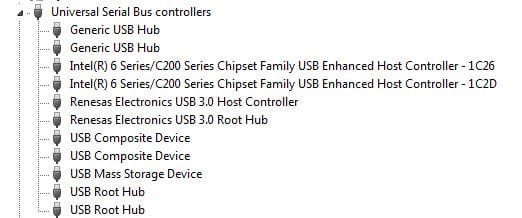
2) I've expanded the device manager tree in every catagory and see nothing related to 1394... If windows was recognizing my firewire port would the IEEE 1394 Bus Host Controllers be in its own main catagory in the tree?
3) Would enabling USB legacy in the bios make any difference?
4) Is there anything else in the bios I should check?
Really sorry for the long post and multiple questions, but wanted to give as much info as possible. I'm in a real time crunch to capture video footage for a project.
Thanks for any help in advance. - Carl
I am unable to capture video (says is offline) so I started to google for troubleshooting suggestions and came upon this.... Fixing Firewire Problems in Windows 7 - David Knarr Beginning at the very top is what I was attempting to do.
The first thing they suggest is to go into device manager and "Under the Device Manager, look down the list for IEEE 1394 Bus Host Controllers and Double Click on it.
It should display something like - 1394 OHCI Compliant Host Controller
Note: If it has the word (Legacy) behind it, you are already setup and you can just exit out.
BUT I cannot find anywhere in device manager the device or anything related at all to 1394. If you refered to the link above what they are saying is there are some issues with the 1394 driver that comes standard with windows 7 and they suggest to change it to a legacy driver option. So here are my questions...
1) Since this is a combination USB device AND firewire card, is it possible that it is just showing up as a usb generic device in device manager?
2) I've expanded the device manager tree in every catagory and see nothing related to 1394... If windows was recognizing my firewire port would the IEEE 1394 Bus Host Controllers be in its own main catagory in the tree?
3) Would enabling USB legacy in the bios make any difference?
4) Is there anything else in the bios I should check?
Really sorry for the long post and multiple questions, but wanted to give as much info as possible. I'm in a real time crunch to capture video footage for a project.
Thanks for any help in advance. - Carl
My Computer
At a glance
Windows 7 home premium 64 bit sp1Intel Core I7-2600 3.4 Ghz 1155 8M 95W CPU16 gb DD3 1333MHZNvidea Gforce GTX 550Ti
- Computer type
- PC/Desktop
- Computer Manufacturer/Model Number
- SYX SG-103
- OS
- Windows 7 home premium 64 bit sp1
- CPU
- Intel Core I7-2600 3.4 Ghz 1155 8M 95W CPU
- Motherboard
- MSI P67A-C43 (B3) ATX
- Memory
- 16 gb DD3 1333MHZ
- Graphics Card(s)
- Nvidea Gforce GTX 550Ti
- Sound Card
- Realtek ALC892 integrated
- Monitor(s) Displays
- acer 23"
- Screen Resolution
- 1920 x 1080
- Hard Drives
- Hitachi 1 TB 3.5" SATA 3G 7200rpm
Seagate ST32000641AS baracuda XT , 2 TB 3.5" 7200 rpm
Western digital My Book 1 tb USB2 external
Western digital My Book 3 tb USB3 external
- PSU
- 500 Watt 80 plus
- Case
- Cooler Master Elite 310 RC-310-BWN1-GP
- Keyboard
- Logitech MK 200 Keybard
- Mouse
- Logitech MK200 mouse
- Other Info
- 24x DVDRW Dual Layer SATA optical drive