Devices intermittently not working on boot- reboot solves-various BSOD

jhine5588

New member
Local time
12:56 PM
Messages
10
Hello,


As the title prefaces my clean Win 7 SP1 64-bit appears to intermittently load certain devices during boot, namely my network adapter, and occasionally BSOD's with various BSOD errors. The BSOD tend to happen during video game play.


I was unable to run SFC complete so I did a little digging on this forum and discovered which updates would not allow SFC to complete and uninstalled them. I can now run SFC /scannow 100% and have a log file however I have zero idea where to start with the log file. Any help would be appreciated.


Thanks


Jeremy
 

Attachments

My Computer My Computer

Computer type
PC/Desktop
Computer Manufacturer/Model Number
custom
OS
Win 7 Pro 64-bit
CPU
Q9550
Motherboard
P5E3 WS Pro
Memory
Corsair Vengeance
Graphics Card(s)
Radeon 4870X2
Hard Drives
WD Caviar Black 640GB
Antivirus
-
Browser
Firefox
Hi jhine5588,

Where is the Win7x64 install media from?
Did sfc /scannow complete without error message?

If you would, please download, save to desktop, run SFCFix.exe by Niemiro, follow the prompts & post log. The log will be saved to your desktop & open in notepad when completed.
Thank you.

Snick
 
Last edited:

My Computer My Computer

Computer type
PC/Desktop
Computer Manufacturer/Model Number
HP Desktop & Compaq Laptop
OS
Win 10 x64, Linux Lite, Win 7 x64, BlackArch, & Kali
Hard Drives
Samsung 850 Pro 256Gb,
Hitachi HDD 1Tb,
Crucial MX SSD 250Gb
Segate 3Tb USB 3.0 Ext. Backup HDD
Internet Speed
150Mbps dn, 20Mbps up
Antivirus
Avast Free, Malwarebytes Anti-Exploit & Anti-Ransomware
Browser
Firefox, Chrome, Opera, & VPN
The ISO was from ebay and I put it on a thumbdrive. I'm pretty sure that I need to get a DVD and attempt it that way because for some reason doing it with the thumbdrive doesn't work that well on my computer. A few failed attempts at installing windows, which is most likely my entire issue... I'd rather not do yet another clean install, but I'm not against it.

Is that program any different than the SFC that is provided with windows? I attached my log from the windows SFC in my first post, which after deleting a few listed updates it was able to run completely but stated there were in fact errors it could not correct.


Jeremy
 

My Computer My Computer

Computer type
PC/Desktop
Computer Manufacturer/Model Number
custom
OS
Win 7 Pro 64-bit
CPU
Q9550
Motherboard
P5E3 WS Pro
Memory
Corsair Vengeance
Graphics Card(s)
Radeon 4870X2
Hard Drives
WD Caviar Black 640GB
Antivirus
-
Browser
Firefox
The ISO was from ebay and I put it on a thumbdrive. I'm pretty sure that I need to get a DVD and attempt it that way because for some reason doing it with the thumbdrive doesn't work that well on my computer. A few failed attempts at installing windows, which is most likely my entire issue... I'd rather not do yet another clean install, but I'm not against it.

Is that program any different than the SFC that is provided with windows? I attached my log from the windows SFC in my first post, which after deleting a few listed updates it was able to run completely but stated there were in fact errors it could not correct.

Jeremy

May be a bad/corrupt ISO from Ebay & is most likely Original Equipment Manufacturer (OEM) and unless it is the same as the computer you are running, i.e. HP OEM, HP computer its not compatible because of the OEM SLIC table.

The SLIC table is a portion of system BIOS that is dedicated to containing operating system license activation information. SLIC tables are added to BIOS by large computer manufacturers to expedite the process of licensing operating system software on new computers.

Yes SFCFix.exe is not SFC /SCANNOW. As you stated there were errors SFC /SCANNOW Could not correct. SFC Fix is more thorough and produces a log of the errors SFC /SCANNOW doesn't.

May have to run SURT depending on the errors SFCFix.exe delineates.

Please run SFCFix.exe and post log. Depending on the errors and amount we may be able to replace them. If there are registry errors or too many errors to locate the exact file and replace them, a Repair Install would be the next corrective measure.

I have 460,000+ windows files on my server for replacement of corrupt of missing system folders/files.

I have a valid Microsoft Win7x64 ISO from the now defunct Microsoft Digital River you may download if you wish. Approved per Sevenforums Admin Shawn Brink.

Snick
 
Last edited:

My Computer My Computer

Computer type
PC/Desktop
Computer Manufacturer/Model Number
HP Desktop & Compaq Laptop
OS
Win 10 x64, Linux Lite, Win 7 x64, BlackArch, & Kali
Hard Drives
Samsung 850 Pro 256Gb,
Hitachi HDD 1Tb,
Crucial MX SSD 250Gb
Segate 3Tb USB 3.0 Ext. Backup HDD
Internet Speed
150Mbps dn, 20Mbps up
Antivirus
Avast Free, Malwarebytes Anti-Exploit & Anti-Ransomware
Browser
Firefox, Chrome, Opera, & VPN
May be a bad/corrupt ISO from Ebay & is most likely Original Equipment Manufacturer (OEM) and unless it is the same as the computer you are running, i.e. HP OEM, HP computer its not compatible because of the OEM SLIC table.

The SLIC table is a portion of system BIOS that is dedicated to containing operating system license activation information. SLIC tables are added to BIOS by large computer manufacturers to expedite the process of licensing operating system software on new computers.

Yes SFCFix.exe is not SFC /SCANNOW. As you stated there were errors SFC /SCANNOW Could not correct. SFC Fix is more thorough and produces a log of the errors SFC /SCANNOW doesn't.

May have to run SURT depending on the errors SFCFix.exe delineates.

Please run SFCFix.exe and post log. Depending on the errors and amount we may be able to replace them. If there are registry errors or too many errors to locate the exact file and replace them, a Repair Install would be the next corrective measure.

I have 460,000+ windows files on my server for replacement of corrupt of missing system folders/files.

I have a valid Microsoft Win7x64 ISO from the now defunct Microsoft Digital River you may download if you wish. Approved per Sevenforums Admin Shawn Brink.

Snick


Oh it's for sure an OE because now my computer says it's a Dell :rolleyes:


I attempted multiple times to download and run the SP1 updates from Windows. I also downloaded the EXE to install SP1 and it kept giving me the error code for corrupt or incomplete data, that's why I purchased the ISO from ebay. The first clean install I did with it it went through flawlessly. Attempted the free update to Win10 once Win7 SP1 was loaded and Win10 install failed... Couldn't get it to boot properly after that so formatted and I went back to Win7 SP1 and had a hell of a time getting it to go. Finally, out of sheer luck I'm assuming it worked, and here I am running Win7 SP1 and my free upgrade opportunity for 2 of my PC's has now ended... If it weren't for bad luck I would have no luck!!


I'm currently running SFCFix now, I will report back ASAP.


Thanks for the help BTW! I'm glad to see people are still supporting Win7 even if Microsoft is not... It's honestly way more user-friendly than Win10 IMHO.


*Edit* that scan went way quicker than I thought it would... Please see the attached Log.


Jeremy
 

Attachments

My Computer My Computer

Computer type
PC/Desktop
Computer Manufacturer/Model Number
custom
OS
Win 7 Pro 64-bit
CPU
Q9550
Motherboard
P5E3 WS Pro
Memory
Corsair Vengeance
Graphics Card(s)
Radeon 4870X2
Hard Drives
WD Caviar Black 640GB
Antivirus
-
Browser
Firefox
jhine5588

Perused your SFC submission
corrupt component hive and a plethora of other issues

Code:
SUMMARY: Some corruptions could not be fixed automatically.
[B]   CBS & SFC total detected corruption count:     78[/B]
   CBS & SFC total unimportant corruption count:  0
   CBS & SFC total fixed corruption count:        0
   SURT total detected corruption count:          0
   SURT total unimportant corruption count:       0
   SURT total fixed corruption count:             0
AutoAnalysis:: directive completed successfully.
Successfully processed all directives.
[B]Failed to process registry database in location 1.
Failed to load registry hive [/B]C:\Windows\System32\config\COMPONENTS into key HKEY_LOCAL_MACHINE\COMPONENTS with error code ERROR_PRIVILEGE_NOT_HELD.

Failed to process registry database in location 2 with error code ERROR_FILE_NOT_FOUND.
WARNING: Failed to process registry database in location 3 with error code ERROR_INVALID_HANDLE.
Failed to process registry database in location 4 with error code ERROR_INVALID_HANDLE.
Failed to process registry database in location 4 with error code ERROR_FILE_NOT_FOUND.

I suggest a Repair Install with Valid Microsoft Win7 ISO from my OneDrive with Instructions & Links

Win7x64 extracted iso from my OneDrive with READ ME FIRST TEXT and hyperlinks.
You run the repair install from within running windows, watch Brian's excellent video on subject-matter.
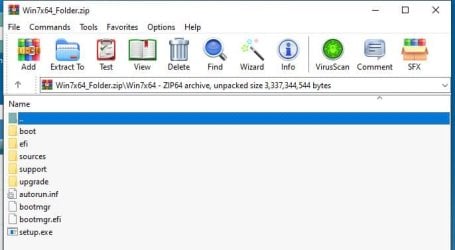
Place folder on your desktop and open it. Click setup.exe, follow prompts and choose upgrade.
Make sure you have your 25 character activation/product key saved to re-enter it after the repair install. That is in the READ ME FIRST text too!
I have performed may Repair Installs, piece of cake! If you can, make a full disk image backup to external hard drive prior to repair install to be safe.

Any questions post on this thread please!

FYI: I extracted the contents of the ISO to a folder with 7-zip to make your process easier! ;)
 

My Computer My Computer

Computer type
PC/Desktop
Computer Manufacturer/Model Number
HP Desktop & Compaq Laptop
OS
Win 10 x64, Linux Lite, Win 7 x64, BlackArch, & Kali
Hard Drives
Samsung 850 Pro 256Gb,
Hitachi HDD 1Tb,
Crucial MX SSD 250Gb
Segate 3Tb USB 3.0 Ext. Backup HDD
Internet Speed
150Mbps dn, 20Mbps up
Antivirus
Avast Free, Malwarebytes Anti-Exploit & Anti-Ransomware
Browser
Firefox, Chrome, Opera, & VPN
I downloaded your link above on my laptop, copied the file to a flash drive and tried to unzip it onto my PC but I keep getting Error 0x80004005 for install.wim. I hit "try again" and the computer BSOD for memory management, I think.

I rebooted and tried again and I was able to hit "try again" 3 times but it keeps throwing that same error for install.wim.

Should I try downloading it on my PC and unzipping it?


Jeremy
 

My Computer My Computer

Computer type
PC/Desktop
Computer Manufacturer/Model Number
custom
OS
Win 7 Pro 64-bit
CPU
Q9550
Motherboard
P5E3 WS Pro
Memory
Corsair Vengeance
Graphics Card(s)
Radeon 4870X2
Hard Drives
WD Caviar Black 640GB
Antivirus
-
Browser
Firefox
I attempted to download the file 3 times on my PC and every one of them failed.


Jeremy
 

My Computer My Computer

Computer type
PC/Desktop
Computer Manufacturer/Model Number
custom
OS
Win 7 Pro 64-bit
CPU
Q9550
Motherboard
P5E3 WS Pro
Memory
Corsair Vengeance
Graphics Card(s)
Radeon 4870X2
Hard Drives
WD Caviar Black 640GB
Antivirus
-
Browser
Firefox
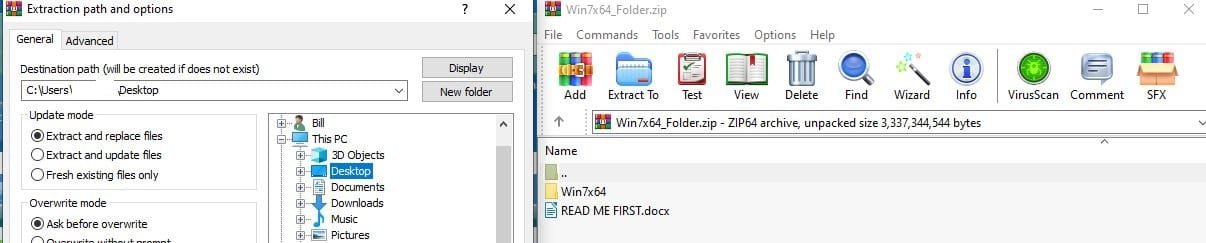
Why did you copy it to a flash drive & then unzip it to PC? No need to do that. I unzip it to my desktop.

I'm downloading the zip file now. I'll see if I have the same problem. Nope!

Extraction Path and Contents of Zip

Capture.JPG

Contents of Win7x64 Folder

Capture 2.JPG

Desktop Snippet

Capture 3.JPG


Snick
 

My Computer My Computer

Computer type
PC/Desktop
Computer Manufacturer/Model Number
HP Desktop & Compaq Laptop
OS
Win 10 x64, Linux Lite, Win 7 x64, BlackArch, & Kali
Hard Drives
Samsung 850 Pro 256Gb,
Hitachi HDD 1Tb,
Crucial MX SSD 250Gb
Segate 3Tb USB 3.0 Ext. Backup HDD
Internet Speed
150Mbps dn, 20Mbps up
Antivirus
Avast Free, Malwarebytes Anti-Exploit & Anti-Ransomware
Browser
Firefox, Chrome, Opera, & VPN
Why did you copy it to a flash drive & then unzip it to PC? No need to do that. I unzip it to my desktop.

I'm downloading the zip file now. I'll see if I have the same problem. Nope!

Snick


Whatever is going on with Win7 it is not allowing me to complete downloads. It won't even let me install the drivers for the new video card I purchased.

I tried booting into safe mode and attempting the download again. 7 times.


Jeremy
 

Attachments

  • SCREENSHOT.jpg
    SCREENSHOT.jpg
    66.5 KB · Views: 1
Last edited:

My Computer My Computer

Computer type
PC/Desktop
Computer Manufacturer/Model Number
custom
OS
Win 7 Pro 64-bit
CPU
Q9550
Motherboard
P5E3 WS Pro
Memory
Corsair Vengeance
Graphics Card(s)
Radeon 4870X2
Hard Drives
WD Caviar Black 640GB
Antivirus
-
Browser
Firefox
jhine5588

I tried download again worked fine. Don't know why you are having problems and performed a repair install on my Win7 x64 drive. Work flawlessly. SMH! :rolleyes:

In the repair install instructions below, download for win7 pro is from GetIntroPC.com, checked the link and website, clean!

You can use ei.cfg utility to make it all in one.
Use 7-zip to extract the ISO to a folder.
Run Setup.exe to start Repair Install.

All the above is in the repair install instructions with links. If a link is invalid, please advise me and I will repair/correct the issue.

Here are the instructions of Repair Install in Word .docx format.
Repair Install Instructions.docx

Maybe we can try providing you a copy via TeamViewer?

TeamViewer: The Remote Desktop Software

Off subject, is your browser you are using Firefox? I ask because of the extra blank lines between paragraphs. Easy fix in about:config.

Enter about:config type it into your address bar where the http is
Yes, you will be careful!
copy below bold text into searchbox
editor.use_div_for_default_newlines
double click entry to toggle true/false

Snick
 
Last edited:

My Computer My Computer

Computer type
PC/Desktop
Computer Manufacturer/Model Number
HP Desktop & Compaq Laptop
OS
Win 10 x64, Linux Lite, Win 7 x64, BlackArch, & Kali
Hard Drives
Samsung 850 Pro 256Gb,
Hitachi HDD 1Tb,
Crucial MX SSD 250Gb
Segate 3Tb USB 3.0 Ext. Backup HDD
Internet Speed
150Mbps dn, 20Mbps up
Antivirus
Avast Free, Malwarebytes Anti-Exploit & Anti-Ransomware
Browser
Firefox, Chrome, Opera, & VPN
Hi


Been looking at that 1st cbs log ----- Its awfull


Wherever you got your install media, its NOT genuine in any way or form
It would appear to be a system image copy, taken when KB3035583 AKA get Windows 10 was released, and its still there and i believe is the root of all your problems

As for your comp now showing as a Dell that would backup my previous statement.
and would also imply an activation exploit is in use.
google your product key, a genuine retail one is unlikely to get any results --- multiple hits = bad news
and if the key is 32KD2-K9CTF-M3DJT-4J3WC-733WD you've definately been conned

YOUR BEST BET

A CLEAN INSTALL using a proper download media

Use another computer to download the ISO


The free upgrade to W10 is still available, was uptill a week ago, however if MS detects any problems with your current OS it might not upgrade.

Upgrade to Windows 10 from Windows 7 for Free | Tutorials


Roy
 
Last edited:

My Computer My Computer

Computer type
PC/Desktop
Computer Manufacturer/Model Number
medionl/Aspire 6930G/acer x55a
OS
W7 home premium 32bit/W7HP 64bit/w10 tp insider ring
CPU
E5300 dual core
Motherboard
medion MS7366
Memory
3gb
Graphics Card(s)
Nvidia Geforce 7100 Nforce 630i
Monitor(s) Displays
avixc
Internet Speed
n (isp resticted to 72)
Antivirus
mse/pands
Browser
palemoon
Other Info
Belkin Fd7050 n USB using Railink RT2870 drivers, more upto date
Hi


Been looking at that 1st cbs log ----- Its awfull

...

The free upgrade to W10 is still available, was uptill a week ago, however if MS detects any problems with your current OS it might not upgrade.

Upgrade to Windows 10 from Windows 7 for Free | Tutorials


Roy

Yeah, I'm not surprised about the CBS log.

I attempted the Win10 upgrade a few times. I have a genuine Win7 Pro 64-bit CD that I purchased from NewEgg when I built this PC but the Win10 will not upgrade non SP1 it seems. Maybe there is a cheat for this? This was my whole thought of purchasing the SP1 ISO was to upgrade to Win10 in the end anyways.


Jeremy

P.S. Snick, I'm using Chrome on this computer (my laptop) and most of my responses have been through this as my desktop is still acting funny due to these issues.
 

My Computer My Computer

Computer type
PC/Desktop
Computer Manufacturer/Model Number
custom
OS
Win 7 Pro 64-bit
CPU
Q9550
Motherboard
P5E3 WS Pro
Memory
Corsair Vengeance
Graphics Card(s)
Radeon 4870X2
Hard Drives
WD Caviar Black 640GB
Antivirus
-
Browser
Firefox
Hi

as far as i know, PROVIDED that the product key you have is GENUINE you can still use it to Activate the same EDITION of windows when you clean install w10.

lets check >>>THEM<<< run this tool copy/paste the results ---- use option 2 or 3


Download Microsoft Genuine Advantage Diagnostic Tool 1.9.27.0

now change the product key to the 1 from your Newegg CD - via control panal >> System.. change product key
and run the tool again.


Roy
 

My Computer My Computer

Computer type
PC/Desktop
Computer Manufacturer/Model Number
medionl/Aspire 6930G/acer x55a
OS
W7 home premium 32bit/W7HP 64bit/w10 tp insider ring
CPU
E5300 dual core
Motherboard
medion MS7366
Memory
3gb
Graphics Card(s)
Nvidia Geforce 7100 Nforce 630i
Monitor(s) Displays
avixc
Internet Speed
n (isp resticted to 72)
Antivirus
mse/pands
Browser
palemoon
Other Info
Belkin Fd7050 n USB using Railink RT2870 drivers, more upto date
I agree with the CBS log assessment! AWFUL!
SFCFix log is equally AWFUL!
Those logs are why I suggested Repair Install of Win7.
OP should then be able to upgrade from Win7 to Win10.

Snick
 

My Computer My Computer

Computer type
PC/Desktop
Computer Manufacturer/Model Number
HP Desktop & Compaq Laptop
OS
Win 10 x64, Linux Lite, Win 7 x64, BlackArch, & Kali
Hard Drives
Samsung 850 Pro 256Gb,
Hitachi HDD 1Tb,
Crucial MX SSD 250Gb
Segate 3Tb USB 3.0 Ext. Backup HDD
Internet Speed
150Mbps dn, 20Mbps up
Antivirus
Avast Free, Malwarebytes Anti-Exploit & Anti-Ransomware
Browser
Firefox, Chrome, Opera, & VPN
Those logs are why I suggested Repair Install of Win7.
OP should then be able to upgrade from Win7 to Win10.

Snick

I formatted my flash drive in windows disk manager, downloaded the Win7x64_Folder directly to the flash drive via my laptop, jammed it in my desktop and unzipped to its own folder on the desktop and I'm still getting the error 0x80004005 for install.wim. My searches say this is an issue with the ISO creation? I skipped this file and attempted to run setup.exe and received "Windows could not collect information for [OSImage] since the specified image file [installwim] does not exist."

I downloaded the Win10 updater as well, went through the update sequence and received error 0xc1800103 - 0x90002 first, deleted folder C:\Windows\SoftwareDistribution\Download per Upgrade to 10 pro Solved - Windows 10 Forums and received error 0x80070490 - 0x20018.

At this point I would really love to go to Win10 but it seems to be conducive on my Win7 unless I attempt to create a Win10 ISO again, which failed on me before and resulted in me having to revert back to Win7 via a clean install as it would not boot Win10 fully.


Jeremy
 

My Computer My Computer

Computer type
PC/Desktop
Computer Manufacturer/Model Number
custom
OS
Win 7 Pro 64-bit
CPU
Q9550
Motherboard
P5E3 WS Pro
Memory
Corsair Vengeance
Graphics Card(s)
Radeon 4870X2
Hard Drives
WD Caviar Black 640GB
Antivirus
-
Browser
Firefox
I just finished the Repair Install to Fix Windows 7 Without Reformatting by Britec video and my only issue is I need to uninstall SP1 according to him. However the Win10 updater does not run at all without SP1 installed as it says it does not work with this version of Windows and with the games I want to play I need SP1 as a bare minimum.

Seems like I should just buy a copy of Win10 Pro and hope my Win7 Pro key will allow me to activate it!!


Jeremy

P.S. The double spacing on my posts does show up when I'm using Firefox on my desktop, I'll fix that. Thanks!
 

My Computer My Computer

Computer type
PC/Desktop
Computer Manufacturer/Model Number
custom
OS
Win 7 Pro 64-bit
CPU
Q9550
Motherboard
P5E3 WS Pro
Memory
Corsair Vengeance
Graphics Card(s)
Radeon 4870X2
Hard Drives
WD Caviar Black 640GB
Antivirus
-
Browser
Firefox
jhine5588

No you do not need to uninstall SP1. I just performed a repair install with SP1 installed.
The Folder I provided is All-in-One, all version of Windows 7 x64 are included.
A windows 7 ISO always has all versions included. The ei.cfg file sets which versions appears when you run setup.exe.
I removed the ei.cfg file and all versions are available, you can only activate the version you have the key for.
Make sure you have your 25 character key before you start repair install. You will need it to reactivate Windows.

The repair install I did was yesterday, took a couple hours on 1tb SSD then updates which are now completed.
I used DISM++ for updates, which you can download from my OneDrive if you wish.
Here's links to my OneDrive
This is more detailed Repair Windows Without Reformatting.docx
DISM++.zip unzip and run x64 after your repair install
Win7x64_ISO.zip All in one ISO From Microsoft Official Download Digital River (now defunct)

Snick
 

My Computer My Computer

Computer type
PC/Desktop
Computer Manufacturer/Model Number
HP Desktop & Compaq Laptop
OS
Win 10 x64, Linux Lite, Win 7 x64, BlackArch, & Kali
Hard Drives
Samsung 850 Pro 256Gb,
Hitachi HDD 1Tb,
Crucial MX SSD 250Gb
Segate 3Tb USB 3.0 Ext. Backup HDD
Internet Speed
150Mbps dn, 20Mbps up
Antivirus
Avast Free, Malwarebytes Anti-Exploit & Anti-Ransomware
Browser
Firefox, Chrome, Opera, & VPN
jhine5588

No you do not need to uninstall SP1. I just performed a repair install with SP1 installed.
The Folder I provided is All-in-One, all version of Windows 7 x64 are included.
A windows 7 ISO always has all versions included. The ei.cfg file sets which versions appears when you run setup.exe.
I removed the ei.cfg file and all versions are available, you can only activate the version you have the key for.
Make sure you have your 25 character key before you start repair install. You will need it to reactivate Windows.

The repair install I did was yesterday, took a couple hours on 1tb SSD then updates which are now completed.
I used DISM++ for updates, which you can download from my OneDrive if you wish.
Here's links to my OneDrive
This is more detailed Repair Windows Without Reformatting.docx
DISM++.zip unzip and run x64 after your repair install
Win7x64_ISO.zip All in one ISO From Microsoft Official Download Digital River (now defunct)

Snick

I cannot do a SP1 repair install without a SP1 ISO. I don't dare use the one I purchased on eBay again as I had problems with it.

Every path I attempted before to update my Win7 to SP1 failed so I really don't want to do yet another clean install of Win7 unless I have an SP1 ISO or just upgrade to Win10 out of the gate. Even using the Microsoft MediaCreationTool2004 to put Win10 on a flash drive failed. I honestly feel something is going goofy with the flash drive drivers or something and I just need to put it all on a DVD and be done.

I should be able to use the MediaCreatorTool2004 and burn a Win10 ISO to a DVD, yeah?


Jeremy
 

My Computer My Computer

Computer type
PC/Desktop
Computer Manufacturer/Model Number
custom
OS
Win 7 Pro 64-bit
CPU
Q9550
Motherboard
P5E3 WS Pro
Memory
Corsair Vengeance
Graphics Card(s)
Radeon 4870X2
Hard Drives
WD Caviar Black 640GB
Antivirus
-
Browser
Firefox
Perused of your CBS and SFCFix logs again

With all the Component Hive/Registry entry errors, the only way I know of to correct this is to replace the registry hive with that from a copy from a valid copy of Win7 the try a repair install.

From my note archive
Title -> Repair Install Fails, Then Use This Most Likely Solution
There's a trick we sometimes use though if the file is completely beyond repair and In Place Upgrade/Repair Install on the OS fails.
The trouble is, if the COMPONENTS hive is really messed up, sometimes even the Repair Install fails. If this happens, backup your current COMPONENTS hive & replace it with the standard hive from your Windows version, architecture and Service pack (e.g. Windows 7 SP1 amd64).
Then the Repair Install usually does work.
 

My Computer My Computer

Computer type
PC/Desktop
Computer Manufacturer/Model Number
HP Desktop & Compaq Laptop
OS
Win 10 x64, Linux Lite, Win 7 x64, BlackArch, & Kali
Hard Drives
Samsung 850 Pro 256Gb,
Hitachi HDD 1Tb,
Crucial MX SSD 250Gb
Segate 3Tb USB 3.0 Ext. Backup HDD
Internet Speed
150Mbps dn, 20Mbps up
Antivirus
Avast Free, Malwarebytes Anti-Exploit & Anti-Ransomware
Browser
Firefox, Chrome, Opera, & VPN
Back
Top