
Diabolical hard disk

Alejandro85

Well-known member
Guru
Gold Member
Local time
4:26 PM
Messages
2,533
Location
Buenos Aires
I was just looking at my HD to clean up some free space, but look at that number I got:
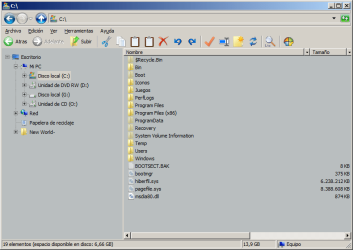
FreeSpace.png

Should I do something? :D
 

My Computer

Computer type
Laptop
Computer Manufacturer/Model Number
Toshiba Sattelite A665-S6092
OS
Windows 7 Ultimate x64
CPU
Intel Core i7-740QM
Memory
8 GB DDR3
Graphics Card(s)
NVIDIA GeForce 330GT
Screen Resolution
1366x768
Hard Drives
Samsung 840 SSD 500GB
1TB USB3 external HD
Cooling
Coolermaster Notepal U3 notebook cooling pad
Internet Speed
3mbps ASDL
Antivirus
ClamWin 0.98.7
Browser
Opera 12.17 x86 (main), Firefox 38 (sec), IE11 (last resort)
Cool story bro...how about performing an exorcism?
 

My Computer

Computer type
PC/Desktop
OS
Microsoft Windows 10 Professional / Windows 7 Professional
CPU
Intel i5-3570
Motherboard
Lenovo Mahobay
Memory
16GB DDR3
Graphics Card(s)
AMD Radeon HD 7850 2GB
Sound Card
(1) Realtek HD Audio (2) AMD HD Audio
Monitor(s) Displays
LG LS192WS
Screen Resolution
1440 x 900 @ 32bit color
Hard Drives
(1) SUV300S37A/120G (2) ST3500413AS SATA Disk Device AHCI mode enabled.
PSU
Corsair HX620
Case
Thermaltake V4 Black Edition
Cooling
Cooler Master Hyper 212 + Artic Silver 5 on CPU/GPU
Keyboard
Dell SK-8115
Mouse
Razer Copperhead with MAPED mat (awesome!)
Internet Speed
100 Mbps up/down
Browser
Chrome
Being a desktop, you don't need the hiberfil.
Knock that off by typing the following in an "elevated" command prompt (right click the cp icon, and select run as administrator)

powercfg.exe -h off

You can knock the pagefile down too. W7 OS generally matches the ram installed.
Do that by following this path:
Start orb - Control Panel - System & Security - System - (in upper left section) Advanced System Settings - Performance: (click) Settings - Advanced tab - Virtual Memory: (click) Change.

Highlight C: (if it's not); click the Custom size radio button.
Set Initial size (mb): to 512
Set Maximum size (mb): to 1024

Reboot.

I would also download CCleaner and run that regularly to get rid of left over Temp files as part of its cleanup run.
 

My Computer

Computer Manufacturer/Model Number
8 home-builds from the 80's into 2004
OS
W7 Home Premium 32bit
Back
Top