Difficulty with 5.1 sound, Realtek HD Audio Manager

Tpaign

New member
Local time
4:56 PM
Messages
2
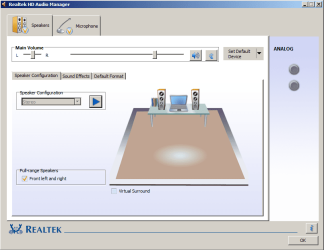
I am posting because I am having trouble getting my 5.1 system to work with my Acer Aspire 7551 laptop the way I want it to. My laptop is connected to my receiver by HDMI, but Realtek HD Audio Manager only supports stereo sound. I have attached a screenshot. Sound only comes out of the front L and R speakers. I understand that music is only mixed in 2-channel stereo, but I have six speakers and I want sound to come out of them.

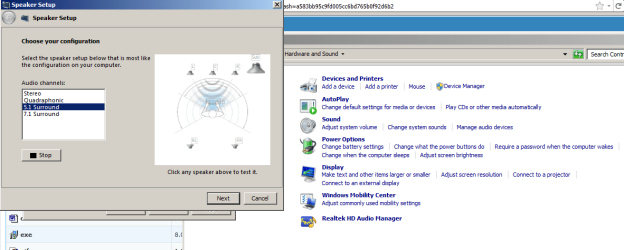
When I test the speakers in Windows control panel, I can confirm that all of them are working (I have attached a screenshot of that too). I tried installing the Realtek HD audio driver from the Acer website and it didn't fix the problem. Also, I'm not sure how to find out what my sound card is. If someone who is more familiar with this sort of thing could help me with that, I would appreciate it.

Edit: Notice the two speakers shown in the screenshot of Realtek HD Audio Manager. When I click on these to test, sound comes from the laptop speakers, not my 5.1 set!
 

Attachments
  • realtek.png
    realtek.png
    28.2 KB · Views: 609
  • controlpanel.png
    controlpanel.png
    31.2 KB · Views: 550
Last edited:

My Computer My Computer

At a glance

Windows 7 Home Premium 64 bitAMD Phenom II N830 Triple-Core Processor, ~2....4096MB RAMAMD Mobility Radeon HD 5650
Computer Manufacturer/Model Number
Acer Aspire 7551
OS
Windows 7 Home Premium 64 bit
CPU
AMD Phenom II N830 Triple-Core Processor, ~2.1GHz
Memory
4096MB RAM
Graphics Card(s)
AMD Mobility Radeon HD 5650
Tpaign, welcome to the Seven Forums.

part of the problem is that the HDMI audio has nothing to do with the onboard Realtek, it is actually part of the integrated HD 4250 video and requires the AMD/ATI video driver to be installed which will also install the HDMI audio driver. You should be able to use the latest directly from AMD for it,

http://www.sevenforums.com/graphic-cards/1810-latest-amd-catalyst-video-driver-windows-7-a.html

but if not grab the latest one from Acer that says it is for the HD 6650M/6850M, as it also has support in it for the video in your laptop.

P.S. For what it is worth the audio built into the onboard video is also Realtek based, but as far as I know doesn't work with the reference Realtek driver, and only works with the one included with the video driver or the one directly from Realtek that specifies support for AMD/ATI HDMI audio,

Realtek
 

My Computer My Computer

At a glance

Win 7 Ultimate x64FX-8350 @ 4.6 GHz so farADATA XPG V1 Series Black 8GB DDR3 1600Sapphire R9 270x Dual-X
Computer type
PC/Desktop
Computer Manufacturer/Model Number
Me
OS
Win 7 Ultimate x64
CPU
FX-8350 @ 4.6 GHz so far
Motherboard
Asus M5A97 EVO
Memory
ADATA XPG V1 Series Black 8GB DDR3 1600
Graphics Card(s)
Sapphire R9 270x Dual-X
Sound Card
Xonar DGX w/ Corsair Vengence 1300
Monitor(s) Displays
Acer S232HL Abid
Screen Resolution
1920x1080
Hard Drives
120 GB OCZ Vertex 3
500 GB Seagate 7200.12
PSU
Antec Earthwatts 650W Green
Case
Antec Three Hundred
Cooling
Cooler Master 212 EVO
Keyboard
Logitech G510
Mouse
Logitech G500s
Internet Speed
35000/3000
Okay, so if I understand you correctly, the Realtek HD audio manager is irrelevant. After messing around with some settings, I am hearing surround sound now when I play something which is set up for it, like a video game. For stereo sources, like listening to music, I guess I can just enable the "ext. stereo" option on my receiver which makes the sound come from all speakers. That works fine for me.
 

My Computer My Computer

At a glance

Windows 7 Home Premium 64 bitAMD Phenom II N830 Triple-Core Processor, ~2....4096MB RAMAMD Mobility Radeon HD 5650
Computer Manufacturer/Model Number
Acer Aspire 7551
OS
Windows 7 Home Premium 64 bit
CPU
AMD Phenom II N830 Triple-Core Processor, ~2.1GHz
Memory
4096MB RAM
Graphics Card(s)
AMD Mobility Radeon HD 5650
Okay, so if I understand you correctly, the Realtek HD audio manager is irrelevant.

Correct, it doesn't even get installed with the driver included with the AMD video driver. It may get installed when you get the HDMI driver directly from Realtek and allow for extra configuration options in the audio manager of the HDMI audio, but someone else will have to confirm whether it does or not as I have never tried it.

Also if you have installed the AMD driver you should have the HDMI showing like this in the Windows playback properties,

hmdi.png

with it set as the default playback device when in use.
 

My Computer My Computer

At a glance

Win 7 Ultimate x64FX-8350 @ 4.6 GHz so farADATA XPG V1 Series Black 8GB DDR3 1600Sapphire R9 270x Dual-X
Computer type
PC/Desktop
Computer Manufacturer/Model Number
Me
OS
Win 7 Ultimate x64
CPU
FX-8350 @ 4.6 GHz so far
Motherboard
Asus M5A97 EVO
Memory
ADATA XPG V1 Series Black 8GB DDR3 1600
Graphics Card(s)
Sapphire R9 270x Dual-X
Sound Card
Xonar DGX w/ Corsair Vengence 1300
Monitor(s) Displays
Acer S232HL Abid
Screen Resolution
1920x1080
Hard Drives
120 GB OCZ Vertex 3
500 GB Seagate 7200.12
PSU
Antec Earthwatts 650W Green
Case
Antec Three Hundred
Cooling
Cooler Master 212 EVO
Keyboard
Logitech G510
Mouse
Logitech G500s
Internet Speed
35000/3000
Back
Top