
Solved Digital Camera (C182 Kodak 12mp) does not connect to Win7 OS Computer

TaylorReed

New member
Local time
6:31 AM
Messages
3
Location
Tennessee
I have an older model Kodak Camera. (C182 Kodak 12mp with Kodak EasyShare Software.) Kodak was completely USELESS; they won't help me unless I buy a new camera.

When I connect the camera to the computer it doesn't show up like it used to. Usually I can connect it to the computer and turn the camera on and I can find the camera under My Computer in the Devices with Removable Storage tab. But ever since I switched to Windows 7, I cannot find the camera anywhere on my computer. There are no settings on the camera to change this, and I could not come up with a solution on my own. When I searched the forums here, I found similar issues, but with different models of cameras. Can anyone help me out?
 

My Computer My Computer

At a glance

Windows 7 Home 32 Bit
Computer Manufacturer/Model Number
Home Built Computer
OS
Windows 7 Home 32 Bit
Monitor(s) Displays
One
Screen Resolution
32 bit
Mouse
Fellowes 3 button Optical Scroll Mouse
Hi TaylorReed, welcome to 7F! :)

There are several solutions at this link: http://www.sevenforums.com/software/7612-kodak-camera-not-recognised-windows-7-a.html
Look at #'s 2, 5, 8. 10, 11, 12, and 13.
The premise being to uninstall any drivers/programs (easyshare) by Kodak, and let the OS install the drivers.

Here is the removal tool:Clear Utility

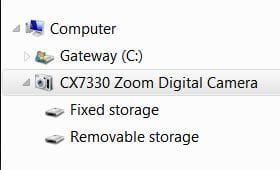
I have a CX7330, and all I ever did was plug it in, the OS installed its own set of drivers, and when I plug it in, I find it now like you had been, listed under Computer below my HDD.
Kodakcx7330.JPG

Until you get this straightened out your best bet would be to pull the SDCard from the camera, and run it in one of your card readers on your machine, IF you have one. It will also be faster that way.
 

My Computer My Computer

At a glance

Originally Win 7 Hm Prem x64 Ver 6.1.7600 Bui...Intel i3 530 2.93GHz, 2933MHz 2 Cores 4 Logic...6GB of 1,333MHz DDR3 SDRAM32MB Intel Graphics Media Accelerator HD IGChip
Computer type
PC/Desktop
Computer Manufacturer/Model Number
Gateway DX4831-01e (Mid-Tower Desktop)
OS
Originally Win 7 Hm Prem x64 Ver 6.1.7600 Build 7601-SP1 | Upgraded to Windows 10 December 14, 2019
CPU
Intel i3 530 2.93GHz, 2933MHz 2 Cores 4 Logical Processors
Motherboard
Gateway H57M01 133 megahertz
Memory
6GB of 1,333MHz DDR3 SDRAM
Graphics Card(s)
32MB Intel Graphics Media Accelerator HD IGChip
Sound Card
Realtek High Definition Audio
Monitor(s) Displays
Gateway HX2000 20inch TFT active matrix TN
Screen Resolution
1600 x 900 x 59 hertz
Hard Drives
WDC WD10EADS-00M2B0 [HDD] (1000.20 GB) -- drive 0,
HL-DT-ST DVDRAM GH41N [CD-ROM dr]
Four card readers, and Four USB 2.0
PSU
300watts.
Case
Mid-Tower Desktop
Cooling
Stock from Gateway
Keyboard
Natural Ergonomic Keyboard 4000, see Other Info
Mouse
Orig. Gateway wore out now using Insignia USB wired optical
Internet Speed
Vz FIOS 10ms png 57.64Mbps down 65.53Mbps up Speedtest.org
Antivirus
Zamana Anti-logger with Anti-malware, MSE, Windows Firewall,
Browser
IE11.0.9600.19399-Upd ver11.0.135, Firefox 68.0.1 x64
Other Info
System Specs by Belarc.

BIOS: American Megatrends Inc. P01-A0 11/17/2009

Replaced the MS 'Natural' Standard PS/2 Enhanced 101-102 Keyboard with a new Natural Ergonomic Keyboard 4000 on August 1st 2014.

Canon Pixma MG3222 Printer.

Updated to IE11 on 12102015 | Fios Quantum Router g1100

Additional AV: SpywareBlaster, manual Mbam, SAS
Thanks. I'll give it a shot
 

My Computer My Computer

At a glance

Windows 7 Home 32 Bit
Computer Manufacturer/Model Number
Home Built Computer
OS
Windows 7 Home 32 Bit
Monitor(s) Displays
One
Screen Resolution
32 bit
Mouse
Fellowes 3 button Optical Scroll Mouse
okay so apparently my computer no longer has Windows 7, but Windows XP. I checked the OS for the computer because I could not get your suggestions to work, and I found that my parents have downgraded the computer to Windows XP Service Pack 3. :mad: WHY it was downgraded I'll never know... but the camera still doesn't work (although I am VERY happy to be rid of that EasyShare crap).
 

My Computer My Computer

At a glance

Windows 7 Home 32 Bit
Computer Manufacturer/Model Number
Home Built Computer
OS
Windows 7 Home 32 Bit
Monitor(s) Displays
One
Screen Resolution
32 bit
Mouse
Fellowes 3 button Optical Scroll Mouse
It should still be just a matter of plugging it in, and XP will detect it, and install the proper drivers.

Where are you plugging it in? The camera needs a powered USB Port, and not a hub because some hubs are not powered.

Have you tried a different USB port? Try one of the ones in the back of the machine.

Once you connect the USB cord make sure you have the camera turned on.
 

My Computer My Computer

At a glance

Originally Win 7 Hm Prem x64 Ver 6.1.7600 Bui...Intel i3 530 2.93GHz, 2933MHz 2 Cores 4 Logic...6GB of 1,333MHz DDR3 SDRAM32MB Intel Graphics Media Accelerator HD IGChip
Computer type
PC/Desktop
Computer Manufacturer/Model Number
Gateway DX4831-01e (Mid-Tower Desktop)
OS
Originally Win 7 Hm Prem x64 Ver 6.1.7600 Build 7601-SP1 | Upgraded to Windows 10 December 14, 2019
CPU
Intel i3 530 2.93GHz, 2933MHz 2 Cores 4 Logical Processors
Motherboard
Gateway H57M01 133 megahertz
Memory
6GB of 1,333MHz DDR3 SDRAM
Graphics Card(s)
32MB Intel Graphics Media Accelerator HD IGChip
Sound Card
Realtek High Definition Audio
Monitor(s) Displays
Gateway HX2000 20inch TFT active matrix TN
Screen Resolution
1600 x 900 x 59 hertz
Hard Drives
WDC WD10EADS-00M2B0 [HDD] (1000.20 GB) -- drive 0,
HL-DT-ST DVDRAM GH41N [CD-ROM dr]
Four card readers, and Four USB 2.0
PSU
300watts.
Case
Mid-Tower Desktop
Cooling
Stock from Gateway
Keyboard
Natural Ergonomic Keyboard 4000, see Other Info
Mouse
Orig. Gateway wore out now using Insignia USB wired optical
Internet Speed
Vz FIOS 10ms png 57.64Mbps down 65.53Mbps up Speedtest.org
Antivirus
Zamana Anti-logger with Anti-malware, MSE, Windows Firewall,
Browser
IE11.0.9600.19399-Upd ver11.0.135, Firefox 68.0.1 x64
Other Info
System Specs by Belarc.

BIOS: American Megatrends Inc. P01-A0 11/17/2009

Replaced the MS 'Natural' Standard PS/2 Enhanced 101-102 Keyboard with a new Natural Ergonomic Keyboard 4000 on August 1st 2014.

Canon Pixma MG3222 Printer.

Updated to IE11 on 12102015 | Fios Quantum Router g1100

Additional AV: SpywareBlaster, manual Mbam, SAS
Make sure your machine is fully up to date with Windows Updates.

Then run: http://www.sevenforums.com/tutorials/1538-sfc-scannow-command-system-file-checker.html at least three times with restarts in between scans even if the scans do not find any problems.
This command will work with all flavors of Windows.
I know it sounds redundant to do this, but it has been found this to be the most efficient way to run SFC.

If your machine still won't recognize your camera you could try this tool: The Microsoft AutoPlay Repair Wizard

Scroll down a bit to see:
How to fix the Microsoft scanner and camera wizard in Windows XP?

You have the Microsoft scan at and camera wizard installed on your computer, but it is not working, you can go to the Microsoft download Center and get a tool to fix it. It is a free download and it will check to see if all your auto play settings are working. When you have downloaded this tool, plug-in your camera and this process will be checked to see if there is a problem.

Source: Where is the Automatic Scanner and Camera Wizard | Computer Tips
 

My Computer My Computer

At a glance

Originally Win 7 Hm Prem x64 Ver 6.1.7600 Bui...Intel i3 530 2.93GHz, 2933MHz 2 Cores 4 Logic...6GB of 1,333MHz DDR3 SDRAM32MB Intel Graphics Media Accelerator HD IGChip
Computer type
PC/Desktop
Computer Manufacturer/Model Number
Gateway DX4831-01e (Mid-Tower Desktop)
OS
Originally Win 7 Hm Prem x64 Ver 6.1.7600 Build 7601-SP1 | Upgraded to Windows 10 December 14, 2019
CPU
Intel i3 530 2.93GHz, 2933MHz 2 Cores 4 Logical Processors
Motherboard
Gateway H57M01 133 megahertz
Memory
6GB of 1,333MHz DDR3 SDRAM
Graphics Card(s)
32MB Intel Graphics Media Accelerator HD IGChip
Sound Card
Realtek High Definition Audio
Monitor(s) Displays
Gateway HX2000 20inch TFT active matrix TN
Screen Resolution
1600 x 900 x 59 hertz
Hard Drives
WDC WD10EADS-00M2B0 [HDD] (1000.20 GB) -- drive 0,
HL-DT-ST DVDRAM GH41N [CD-ROM dr]
Four card readers, and Four USB 2.0
PSU
300watts.
Case
Mid-Tower Desktop
Cooling
Stock from Gateway
Keyboard
Natural Ergonomic Keyboard 4000, see Other Info
Mouse
Orig. Gateway wore out now using Insignia USB wired optical
Internet Speed
Vz FIOS 10ms png 57.64Mbps down 65.53Mbps up Speedtest.org
Antivirus
Zamana Anti-logger with Anti-malware, MSE, Windows Firewall,
Browser
IE11.0.9600.19399-Upd ver11.0.135, Firefox 68.0.1 x64
Other Info
System Specs by Belarc.

BIOS: American Megatrends Inc. P01-A0 11/17/2009

Replaced the MS 'Natural' Standard PS/2 Enhanced 101-102 Keyboard with a new Natural Ergonomic Keyboard 4000 on August 1st 2014.

Canon Pixma MG3222 Printer.

Updated to IE11 on 12102015 | Fios Quantum Router g1100

Additional AV: SpywareBlaster, manual Mbam, SAS
This thread was brought to my attention by a recent post only 50 minutes ago by a New Member that unfortunately took the wrong course of action, and made an inappropriate post.

He/she is no longer with us, that I can understand, but I noticed the thread had been marked solved before the departure of said new member, so I can only surmise that:

A.) The OP found a solution.
B.) The OP used one of my solutions.
C.) A Mod or Admin marked the thread solved.

I strongly believe either A or B, and less C, but it would of been nice to know how the OP solved his/her problem. :(
 

My Computer My Computer

At a glance

Originally Win 7 Hm Prem x64 Ver 6.1.7600 Bui...Intel i3 530 2.93GHz, 2933MHz 2 Cores 4 Logic...6GB of 1,333MHz DDR3 SDRAM32MB Intel Graphics Media Accelerator HD IGChip
Computer type
PC/Desktop
Computer Manufacturer/Model Number
Gateway DX4831-01e (Mid-Tower Desktop)
OS
Originally Win 7 Hm Prem x64 Ver 6.1.7600 Build 7601-SP1 | Upgraded to Windows 10 December 14, 2019
CPU
Intel i3 530 2.93GHz, 2933MHz 2 Cores 4 Logical Processors
Motherboard
Gateway H57M01 133 megahertz
Memory
6GB of 1,333MHz DDR3 SDRAM
Graphics Card(s)
32MB Intel Graphics Media Accelerator HD IGChip
Sound Card
Realtek High Definition Audio
Monitor(s) Displays
Gateway HX2000 20inch TFT active matrix TN
Screen Resolution
1600 x 900 x 59 hertz
Hard Drives
WDC WD10EADS-00M2B0 [HDD] (1000.20 GB) -- drive 0,
HL-DT-ST DVDRAM GH41N [CD-ROM dr]
Four card readers, and Four USB 2.0
PSU
300watts.
Case
Mid-Tower Desktop
Cooling
Stock from Gateway
Keyboard
Natural Ergonomic Keyboard 4000, see Other Info
Mouse
Orig. Gateway wore out now using Insignia USB wired optical
Internet Speed
Vz FIOS 10ms png 57.64Mbps down 65.53Mbps up Speedtest.org
Antivirus
Zamana Anti-logger with Anti-malware, MSE, Windows Firewall,
Browser
IE11.0.9600.19399-Upd ver11.0.135, Firefox 68.0.1 x64
Other Info
System Specs by Belarc.

BIOS: American Megatrends Inc. P01-A0 11/17/2009

Replaced the MS 'Natural' Standard PS/2 Enhanced 101-102 Keyboard with a new Natural Ergonomic Keyboard 4000 on August 1st 2014.

Canon Pixma MG3222 Printer.

Updated to IE11 on 12102015 | Fios Quantum Router g1100

Additional AV: SpywareBlaster, manual Mbam, SAS
Back
Top