Thanks, this was a stopgap solution that worked for me, but would depend on compatibility with the soundcard inside the computer. There are various audio drivers on the Realtek website, but people with other sound cards such as Asus may have problems if their cards are not supported in Windows 7.
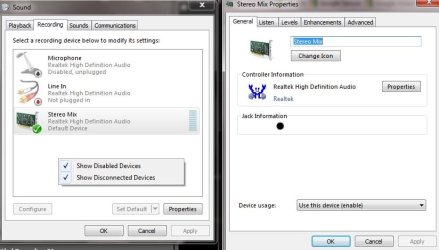
In order to record off the sound card, it may be necessary to right click the "Recording devices" window to ensure that "Show Disabled Devices" and "Show Disconnected Devices" are checked. By selecting "Stereo Mix" as the recording source, it should be possible to record whatever goes through the sound card. See below for an illustration.
Incidentally, the Sound Recorder in Windows 7 is the same mediocre tool that it was in Vista. There are plenty of other pieces of audio recording software, but Microsoft has skimped with such a basic sound recorder.
Hi,i did all the things said... i enabled stereo mix n made it as the default device too....! bt i still cant record the output sound... m too using win 7 n realtek audio... plz do help...!!!!! i used adobe audition 3.0 for recording sound it did with win xp bt m still unable to do it wid wind 7...!!!!! DO help....!!!!! Regards...
My Computer
- OS
- Windows 7 Ultimate x64
- CPU
- i ball
- Motherboard
- intel
- Memory
- 500 GB
- Graphics Card(s)
- ATI Radeon 4350
- Sound Card
- realtek
- Monitor(s) Displays
- samsung
- Hard Drives
- Seagate