DirectX Launcher Problem

janwei97

New member
Local time
12:45 AM
Messages
6
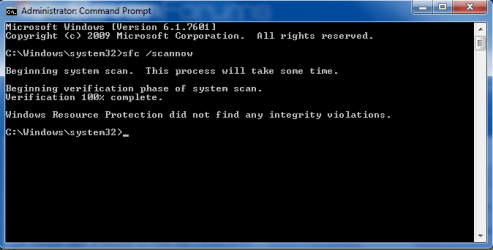
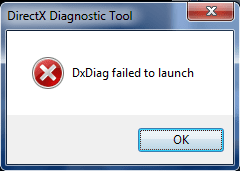
Hi, I have a problem here. DirectX launcher wouldn't launch at all. I have tried the 'sfc / scannow' command in the Command Prompt too but the results were good therefore I assume that there are no corrupted files inside my comp. I have even used Registry Cleaners regularly but it still can't work.
DxDiag.pngscan.png
 

My Computer

Computer type
Laptop
Computer Manufacturer/Model Number
Dell
OS
Windows 7 Home Premium 64-Bit Operating System
CPU
Intel(R)Core(TM)i5 CPU M 450 @ 2.40GHz 2.40GHz
Motherboard
Dell
Memory
4.00GB
Graphics Card(s)
ATI Mobility Radeon HD 540v
Hard Drives
SAMSUNG HM641GI ATA Device
Antivirus
McAfee
Browser
Internet Explorer
Get latest DirectX here: Download DirectX 9.0c (Jun 10) - FileHippo.com and install it. Restart system. See if your problem's solved.

I have downloaded it from the website you gave me but the previous dxdiag is still there. Do I need to delete it? And where is the new dxdiag file located at? I tried to run dxdiag but instead, they ran the old one. I can't run the new one.
 

My Computer

Computer type
Laptop
Computer Manufacturer/Model Number
Dell
OS
Windows 7 Home Premium 64-Bit Operating System
CPU
Intel(R)Core(TM)i5 CPU M 450 @ 2.40GHz 2.40GHz
Motherboard
Dell
Memory
4.00GB
Graphics Card(s)
ATI Mobility Radeon HD 540v
Hard Drives
SAMSUNG HM641GI ATA Device
Antivirus
McAfee
Browser
Internet Explorer
You need not to delete anything. Just run the setup and restart and see if your problem gets solved. The components are just updated. There's no ''new'' location of dxdiag.
 
It doesn't work. Anyway, thanks for your help :D
 

My Computer

Computer type
Laptop
Computer Manufacturer/Model Number
Dell
OS
Windows 7 Home Premium 64-Bit Operating System
CPU
Intel(R)Core(TM)i5 CPU M 450 @ 2.40GHz 2.40GHz
Motherboard
Dell
Memory
4.00GB
Graphics Card(s)
ATI Mobility Radeon HD 540v
Hard Drives
SAMSUNG HM641GI ATA Device
Antivirus
McAfee
Browser
Internet Explorer
Owh forgot. I did make some changes to the 'Zone' part under 'Internet Settings in the Registry Key. Could that be the cause?
 

My Computer

Computer type
Laptop
Computer Manufacturer/Model Number
Dell
OS
Windows 7 Home Premium 64-Bit Operating System
CPU
Intel(R)Core(TM)i5 CPU M 450 @ 2.40GHz 2.40GHz
Motherboard
Dell
Memory
4.00GB
Graphics Card(s)
ATI Mobility Radeon HD 540v
Hard Drives
SAMSUNG HM641GI ATA Device
Antivirus
McAfee
Browser
Internet Explorer
Are you sure?
 

My Computer

Computer type
Laptop
Computer Manufacturer/Model Number
Dell
OS
Windows 7 Home Premium 64-Bit Operating System
CPU
Intel(R)Core(TM)i5 CPU M 450 @ 2.40GHz 2.40GHz
Motherboard
Dell
Memory
4.00GB
Graphics Card(s)
ATI Mobility Radeon HD 540v
Hard Drives
SAMSUNG HM641GI ATA Device
Antivirus
McAfee
Browser
Internet Explorer
How do I do that? I have already permanently deleted some folders :(
 

My Computer

Computer type
Laptop
Computer Manufacturer/Model Number
Dell
OS
Windows 7 Home Premium 64-Bit Operating System
CPU
Intel(R)Core(TM)i5 CPU M 450 @ 2.40GHz 2.40GHz
Motherboard
Dell
Memory
4.00GB
Graphics Card(s)
ATI Mobility Radeon HD 540v
Hard Drives
SAMSUNG HM641GI ATA Device
Antivirus
McAfee
Browser
Internet Explorer
Back
Top