Solved Disable Automatic System Restore Point Creation?

qrajber93

New member
Local time
6:54 AM
Messages
5
Is it possible to disable automatic System Restore Point creation (to prevent Windows to create restore points daily and after (re)installing programs / Windows updates)?

I want to manually create System Restore Points because automatic creation uses too much space, because I install new programs very often.

Note that I still want to use System Restore. I don't want it to be automatic.
 

My Computer

Computer type
Laptop
Computer Manufacturer/Model Number
Toshiba Satellite C855-12K PSKCEE
OS
Windows 7 Ultimate x64
CPU
Intel(R) Pentium(R) CPU B960 @ 2.20GHz, 2200 Mhz, 2 Core(s)
Memory
4 GB
Graphics Card(s)
AMD Radeon HD 7610M
Hard Drives
TOSHIBA MK5075GSX ATA Device
Local Disk (C:) 150 GB - System
Local Disk (D:) 315 GB
Antivirus
avast! Free Antivirus
Browser
Google Chrome
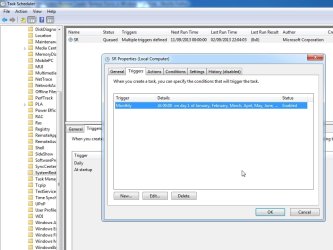
Have a look at the settings in task scheduler.

sysrest.jpg
 

My Computers

System One System Two

  • Computer type
    PC/Desktop
    OS
    7 X64
    CPU
    i5 8400
    Motherboard
    gigabyte b365m ds3h
    Memory
    2x8gb 3200mhz
    Hard Drives
    various
    PSU
    pure power 11 400w cm
    Case
    Coolermaster
    Cooling
    cryorig m9i
  • Computer type
    PC/Desktop
    OS
    7x64
    CPU
    g5400
    Motherboard
    ga b365m ds3h
    Memory
    8gb ddr4 2400
    PSU
    xfx pro 450w
Have a look at the settings in task scheduler.

View attachment 285408

Here are the steps:
1.) Click the Windows Start button.
2.) Type Task Scheduler
3.) Select And click the program
4.) Click the left arrow on the left side of the option "Task Scheduler Library".
5.) Double click Microsoft Folder. Double Click folder.
6.) Then click the folder "System Restore"
7.) Double Click the "SR". It should open a new Window.
8.) Click the "Triggers" Tab
9.) Select 1 option then click EDIT

Hope these helps..
 

My Computer

Computer type
Laptop
Computer Manufacturer/Model Number
Dell
OS
Windows 7 Ultimate 64-bit
CPU
Intel Mobile Core 2 Duo SP9400
Motherboard
Dell Inc. 0MR506 (Microprocessor)
Memory
4.00GB Dual-Channel DDR3 (7-7-7-20)
Graphics Card(s)
Intel Mobile Intel 4 Series Express Chipset Family (Dell)
Sound Card
IDT High Definition Audio CODEC
Monitor(s) Displays
Generic PnP Monitor (1280x800@60Hz)
Screen Resolution
1280x800
Hard Drives
232GB Western Digital WDC WD2500BEVT-75ZCT2 ATA Device (SATA)
Case
Dell
Keyboard
Dell
Mouse
Dell
Antivirus
ESET NOD32 10
Browser
Google Chrome, Mozilla Firefox, Internet Explorer

My Computer

Computer type
Laptop
Computer Manufacturer/Model Number
Toshiba Satellite C855-12K PSKCEE
OS
Windows 7 Ultimate x64
CPU
Intel(R) Pentium(R) CPU B960 @ 2.20GHz, 2200 Mhz, 2 Core(s)
Memory
4 GB
Graphics Card(s)
AMD Radeon HD 7610M
Hard Drives
TOSHIBA MK5075GSX ATA Device
Local Disk (C:) 150 GB - System
Local Disk (D:) 315 GB
Antivirus
avast! Free Antivirus
Browser
Google Chrome
Thanks for answers. Also, I found out that turning off System Protection is important if you don't want automatic creation of System Restore Points. Here is how:

http://www.sevenforums.com/tutorials/330-system-protection-turn-off.html

If I am correct this option will WIPE OUT all previous RESTORE PTS? However, the previous option in TASK SCHEDULER will not? However, will the TASK SCHEDULER revert back to enabling AUTO SYS RESTORE?

I could swear I had the TASK SCHEDULER disabling AUTO SYS RESTORE, but I now have a new AUTO RESTORE PT. Anyone know about this?
 

My Computer

Computer type
PC/Desktop
OS
Windows 7 Home Prem 32 bit
Back
Top