Solved Disable cmd.exe for standard users on Windows 7 Starter edition.

meprett

New member
Local time
6:56 PM
Messages
7
Hello.
I have a machine running Windows 7 Starter edition. I would like to block access to cmd.exe.
Is there a way to accomplish this? (Starter edition does not have gpedit.msc)
 

My Computer My Computer

At a glance

Windows 7 Starter 32 bits
Computer type
PC/Desktop
OS
Windows 7 Starter 32 bits
Welcome to the forum the simple way would be move it from the path so it wouldn't run unless they knew were it was or just rename it
 

My Computer My Computer

At a glance

win 8 32 bit
Computer type
PC/Desktop
OS
win 8 32 bit
Thank you for your reply.

I tried to rename it and to move it to a different location (logged in as an administrator and also in safe mode) but I get this error:
image.jpg
 

My Computer My Computer

At a glance

Windows 7 Starter 32 bits
Computer type
PC/Desktop
OS
Windows 7 Starter 32 bits
Why do you want to do that? What do you plan to accomplish?
It seems, at most, security though obscurity (hence, no security at all) and what is done though cmd can trivially be done by many other means.
 

My Computer My Computer

At a glance

Windows 7 Ultimate x64Intel Core i7-740QM8 GB DDR3NVIDIA GeForce 330GT
Computer type
Laptop
Computer Manufacturer/Model Number
Toshiba Sattelite A665-S6092
OS
Windows 7 Ultimate x64
CPU
Intel Core i7-740QM
Memory
8 GB DDR3
Graphics Card(s)
NVIDIA GeForce 330GT
Screen Resolution
1366x768
Hard Drives
Samsung 840 SSD 500GB
1TB USB3 external HD
Cooling
Coolermaster Notepal U3 notebook cooling pad
Internet Speed
3mbps ASDL
Antivirus
ClamWin 0.98.7
Browser
Opera 12.17 x86 (main), Firefox 38 (sec), IE11 (last resort)
The Prevent access to the command prompt policy is related to the DisableCMD DWORD registry value, located at,
Code:
HKCU\Software\Policies\Microsoft\Windows\System
Its would-be default data value is 0. Set its value to 2 to disable the command prompt program. Set its value to 1 to disable the command prompt and its associated script files (.bat and .cmd).

Changes to this registry value will only affect the user of which the change was applied, so you will have to repeat the change for each user as required. Altering the respective HKLM entry does not seem to do anything, i.e., it won’t disable the command prompt for all users.


To disable PowerShell, the only option (only elegant option at least) is to configure the Don't run specified Windows Applications policy. This of course requires group policy.
 

My Computer My Computer

At a glance

Windows 10, Windows 8.1 Pro, Windows 7 Profes...
Computer type
PC/Desktop
OS
Windows 10, Windows 8.1 Pro, Windows 7 Professional, OS X El Capitan
Okay folks I'm confused.

I'm of the understanding that only users with administrator privileges can use CMD Prompt.
If I'm correct all other users should be quest without administrator privileges.

Please unconfuse me.

Jack
 

My Computer My Computer

At a glance

Windows 10 Pro. 64/ version 1709 Windows 7 Pr...Intel i7-6800K @ 4.3Corsair Platinum 16 gig @2400EVGA GTX 1070 OC
Computer type
PC/Desktop
Computer Manufacturer/Model Number
Home made Desktop
OS
Windows 10 Pro. 64/ version 1709 Windows 7 Pro/64
CPU
Intel i7-6800K @ 4.3
Motherboard
ASUS X-99 Deluxe II
Memory
Corsair Platinum 16 gig @2400
Graphics Card(s)
EVGA GTX 1070 OC
Monitor(s) Displays
Asus 27" LED LCD/VE278Q
Screen Resolution
1920-1080 or 1280-720 HDMI
Hard Drives
INTEL SSD 730-240 Gb Sata 3.0/
PSU
EVGA Platium 1200W
Case
Phanteks Luxe Tempered Glass 8 fans/ one radiator
Cooling
XSPC/ Water Cooled CPU
Keyboard
Das 4 Professional
Mouse
Logitech M705/MX Anywhere 2-S
Internet Speed
100 mbits
Antivirus
Microsoft Security Essentials/ Malwarebytes Premium 3.0/ SAS
Browser
I.E. 11 default/Firefox/ ISP Time Warner Cable/Spectrum
Other Info
LG BluRay Burner/
Sound system-KLipsch-THX/
Icy Dock ssd Hot Swap bays.
I'm of the understanding that only users with administrator privileges can use CMD Prompt.
If I'm correct all other users should be quest without administrator privileges.

Anyone can run a command prompt, it's just one more program and it will run no matter what access level the user has, it's a very common for standards to use it in fact. Of course, like every software, it's restricted in what it can do by the current privileges, so a non-admin might get some "access denied" when it runs an admin-only program within cmd.

Just try it without elevating and it will just work. Modifying anything in your profile will work, but for example creating a file in the windows folder will fail (requires admin), exactly the same as Windows Explorer for instance. Elevating it will allow unrestricted access to the whole system.

Unconfused? Or confused even more? :p
 

My Computer My Computer

At a glance

Windows 7 Ultimate x64Intel Core i7-740QM8 GB DDR3NVIDIA GeForce 330GT
Computer type
Laptop
Computer Manufacturer/Model Number
Toshiba Sattelite A665-S6092
OS
Windows 7 Ultimate x64
CPU
Intel Core i7-740QM
Memory
8 GB DDR3
Graphics Card(s)
NVIDIA GeForce 330GT
Screen Resolution
1366x768
Hard Drives
Samsung 840 SSD 500GB
1TB USB3 external HD
Cooling
Coolermaster Notepal U3 notebook cooling pad
Internet Speed
3mbps ASDL
Antivirus
ClamWin 0.98.7
Browser
Opera 12.17 x86 (main), Firefox 38 (sec), IE11 (last resort)
Thank you Alejandro85.

That helps.
I am always the only user on any of my computers so I never tried using CMD Prompt as a Guest.
My understanding has been wrong for a long time.

Thank you for your guidance.
 

My Computer My Computer

At a glance

Windows 10 Pro. 64/ version 1709 Windows 7 Pr...Intel i7-6800K @ 4.3Corsair Platinum 16 gig @2400EVGA GTX 1070 OC
Computer type
PC/Desktop
Computer Manufacturer/Model Number
Home made Desktop
OS
Windows 10 Pro. 64/ version 1709 Windows 7 Pro/64
CPU
Intel i7-6800K @ 4.3
Motherboard
ASUS X-99 Deluxe II
Memory
Corsair Platinum 16 gig @2400
Graphics Card(s)
EVGA GTX 1070 OC
Monitor(s) Displays
Asus 27" LED LCD/VE278Q
Screen Resolution
1920-1080 or 1280-720 HDMI
Hard Drives
INTEL SSD 730-240 Gb Sata 3.0/
PSU
EVGA Platium 1200W
Case
Phanteks Luxe Tempered Glass 8 fans/ one radiator
Cooling
XSPC/ Water Cooled CPU
Keyboard
Das 4 Professional
Mouse
Logitech M705/MX Anywhere 2-S
Internet Speed
100 mbits
Antivirus
Microsoft Security Essentials/ Malwarebytes Premium 3.0/ SAS
Browser
I.E. 11 default/Firefox/ ISP Time Warner Cable/Spectrum
Other Info
LG BluRay Burner/
Sound system-KLipsch-THX/
Icy Dock ssd Hot Swap bays.
Why do you want to do that? What do you plan to accomplish?
It seems, at most, security though obscurity (hence, no security at all) and what is done though cmd can trivially be done by many other means.

Hello, I'm trying to accomplish this: Command Prompt - Enable or Disable

The only problem is that the Starter edition of W. 7 presents the aforementioned limitation.
 

My Computer My Computer

At a glance

Windows 7 Starter 32 bits
Computer type
PC/Desktop
OS
Windows 7 Starter 32 bits
...Changes to this registry value will only affect the user of which the change was applied, so you will have to repeat the change for each user as required. Altering the respective HKLM entry does not seem to do anything, i.e., it won’t disable the command prompt for all users.


To disable PowerShell, the only option (only elegant option at least) is to configure the Don't run specified Windows Applications policy. This of course requires group policy.

Thank you very much for your reply, my friend.
I thought there might have been a way to disable command prompt for all users. Too bad, I'll have to alter the registry for each account accordingly, then.
 

My Computer My Computer

At a glance

Windows 7 Starter 32 bits
Computer type
PC/Desktop
OS
Windows 7 Starter 32 bits
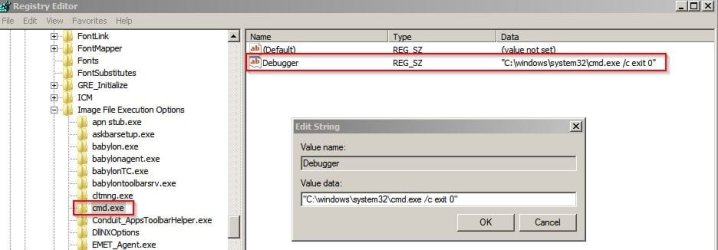
You can create the following registry entry:

Code:
Windows Registry Editor Version 5.00

[HKEY_LOCAL_MACHINE\SOFTWARE\Microsoft\Windows NT\CurrentVersion\Image File Execution Options\cmd.exe]
"Debugger"="\"C:\\windows\\system32\\cmd.exe /c exit 0\""

Registry Editor.jpg

That basically will tell cmd.exe to simply exit whenever it runs.

I,' not sure that it's a good idea though. What if cmd.exe needs to run when installing software for example? Well it won't be able to unless you delete the reg.
 

My Computer My Computer

At a glance

Microsoft Windows 7 Home Premium 64-bit 7601 ...AMD C-60 APU with Radeon(tm) HD Graphics4.00 GBAMD Radeon HD 6290 Graphics
Computer type
Laptop
Computer Manufacturer/Model Number
ASUS
OS
Microsoft Windows 7 Home Premium 64-bit 7601 Multiprocessor Free Service Pack 1
CPU
AMD C-60 APU with Radeon(tm) HD Graphics
Motherboard
ASUSTeK COMPUTER INC. X501U
Memory
4.00 GB
Graphics Card(s)
AMD Radeon HD 6290 Graphics
Sound Card
(1) AMD High Definition Audio Device (2) Realtek High Defi
Screen Resolution
1366 x 768 x 32 bits (4294967296 colors) @ 60 Hz
Hard Drives
Hitachi HTS545050A7E380 SATA Disk Device
Antivirus
Comodo CIS & FW, SecureAplus App Whitelisting, Threatfire
Browser
Cyberfox 64bit, Opera 64bit, Airfox
Other Info
Spy-The-Spy, HitmanPro.Alert, Norton Connect Safe, MJRegWatcher, BitDefender TrafficLight, Voodoo Shield, Zemana AntiMalware
Thank you so much for your reply, Callender. That looks like it might solve the issue. I'll try to implement it and see how it goes.
 

My Computer My Computer

At a glance

Windows 7 Starter 32 bits
Computer type
PC/Desktop
OS
Windows 7 Starter 32 bits
Wow, Callendar, I didn’t know about that key and that’s a very clever suggestion. Though your demonstration of the key’s usage doesn’t make much sense…

If the Debugger value’s data is,
Code:
"C:\windows\system32\cmd.exe /c exit 0"
then you’re saying, whenever cmd is invoked, execute the following command string instead,
Code:
"C:\windows\system32\cmd.exe /c exit 0" C:\windows\system32\cmd.exe
Which doesn’t make sense because the path “C:\windows\system32\cmd.exe /c exit 0” won’t ever exist, and as a result Windows will report the following message upon launching cmd each time, does it not?

cmd-path-not-found.png


This is great news though. By taking advantage of this registry value, we can replicate the behaviour of the Don't run specified Windows Applications policy almost perfectly, for any application, without the need of group policy, i.e., with the following Debugger implementation,
Code:
"Debugger"="mshta.exe vbscript:code(close(MsgBox(\"This operation has been cancelled due to restrictions in effect on this computer. Please contact your system administrator.\",16,\"Restrictions\")))"
 
Last edited:

My Computer My Computer

At a glance

Windows 10, Windows 8.1 Pro, Windows 7 Profes...
Computer type
PC/Desktop
OS
Windows 10, Windows 8.1 Pro, Windows 7 Professional, OS X El Capitan
This is great news though. By taking advantage of this registry value, we can replicate the behaviour of the Don't run specified Windows Applications policy almost perfectly, for any application, without the need of group policy, i.e., with the following Debugger implementation,
Code:
"Debugger"="mshta.exe vbscript:code(close(MsgBox(\"This operation has been cancelled due to restrictions in effect on this computer. Please contact your system administrator.\",0,\"Restrictions\")))"

Yes your suggestion is way better. Mine was intended to allow the debugger to launch cmd.exe with exit status 0. That just tells cmd.exe to exit as soon as it's launched. However I'm not sure that using debugger to launch a process with the same name as the original actually works as I intended.

I got the idea from here:

How to block applications and toolbar installers

Basically I actually use that registry key to block any desired process by name from ever running.
 

My Computer My Computer

At a glance

Microsoft Windows 7 Home Premium 64-bit 7601 ...AMD C-60 APU with Radeon(tm) HD Graphics4.00 GBAMD Radeon HD 6290 Graphics
Computer type
Laptop
Computer Manufacturer/Model Number
ASUS
OS
Microsoft Windows 7 Home Premium 64-bit 7601 Multiprocessor Free Service Pack 1
CPU
AMD C-60 APU with Radeon(tm) HD Graphics
Motherboard
ASUSTeK COMPUTER INC. X501U
Memory
4.00 GB
Graphics Card(s)
AMD Radeon HD 6290 Graphics
Sound Card
(1) AMD High Definition Audio Device (2) Realtek High Defi
Screen Resolution
1366 x 768 x 32 bits (4294967296 colors) @ 60 Hz
Hard Drives
Hitachi HTS545050A7E380 SATA Disk Device
Antivirus
Comodo CIS & FW, SecureAplus App Whitelisting, Threatfire
Browser
Cyberfox 64bit, Opera 64bit, Airfox
Other Info
Spy-The-Spy, HitmanPro.Alert, Norton Connect Safe, MJRegWatcher, BitDefender TrafficLight, Voodoo Shield, Zemana AntiMalware
This is great news though. By taking advantage of this registry value, we can replicate the behaviour of the Don't run specified Windows Applications policy almost perfectly, for any application, without the need of group policy, i.e., with the following Debugger implementation,
Code:
"Debugger"="mshta.exe vbscript:code(close(MsgBox(\"This operation has been cancelled due to restrictions in effect on this computer. Please contact your system administrator.\",0,\"Restrictions\")))"

So following your advice I find that this works well for me:

Code:
Windows Registry Editor Version 5.00

[HKEY_LOCAL_MACHINE\SOFTWARE\Microsoft\Windows NT\CurrentVersion\Image File Execution Options\cmd.exe]
"Debugger"="mshta \"javascript:var sh=new ActiveXObject( 'WScript.Shell' ); sh.Popup( 'This operation has been cancelled due to restrictions in effect on this computer. Please contact your system administrator', 10, 'Message!', 64 );close()\""

:)
 

My Computer My Computer

At a glance

Microsoft Windows 7 Home Premium 64-bit 7601 ...AMD C-60 APU with Radeon(tm) HD Graphics4.00 GBAMD Radeon HD 6290 Graphics
Computer type
Laptop
Computer Manufacturer/Model Number
ASUS
OS
Microsoft Windows 7 Home Premium 64-bit 7601 Multiprocessor Free Service Pack 1
CPU
AMD C-60 APU with Radeon(tm) HD Graphics
Motherboard
ASUSTeK COMPUTER INC. X501U
Memory
4.00 GB
Graphics Card(s)
AMD Radeon HD 6290 Graphics
Sound Card
(1) AMD High Definition Audio Device (2) Realtek High Defi
Screen Resolution
1366 x 768 x 32 bits (4294967296 colors) @ 60 Hz
Hard Drives
Hitachi HTS545050A7E380 SATA Disk Device
Antivirus
Comodo CIS & FW, SecureAplus App Whitelisting, Threatfire
Browser
Cyberfox 64bit, Opera 64bit, Airfox
Other Info
Spy-The-Spy, HitmanPro.Alert, Norton Connect Safe, MJRegWatcher, BitDefender TrafficLight, Voodoo Shield, Zemana AntiMalware
Back
Top