Disable Start Menu side bar pop out

hello people

New member
Power User
Local time
4:38 PM
Messages
210
Can anyone tell me how to disable the side bar pop outs that are present in the start menu?

For example MS Word is in the task menu and to the right you can view a list of recent MS Word documents. I don't want to see that list at all.

Can it be disabled?

Here's an example with Windows Paint:

sidebar2.jpg


Thanks
:)
 

My Computer My Computer

OS
Windows 7 Home Premium 64bit
CPU
i7 930 2.8g
Motherboard
x58A-Ud3R rev2.0 FB
Memory
Corsair xms3 CMX6GX3M3C 1600 C7 2gx3
Graphics Card(s)
HIS ATI pcie HD5670
Sound Card
Presonus Firebox
Monitor(s) Displays
Flatron W2343T x2
Hard Drives
1x500g Seagate Sata2 7200
2x1TB Seagate Sata2 7200
PSU
Cooler Master 700W Silent Pro
Case
Antec
Cooling
Zalman CPU Cooler CNPS10x-Quiet
I think I worked it out....they are called 'jump lists' I think...I set 'how many items to show in jump lists' to 0...and now there are no jump lists viewable.

So I think I did it
 

My Computer My Computer

OS
Windows 7 Home Premium 64bit
CPU
i7 930 2.8g
Motherboard
x58A-Ud3R rev2.0 FB
Memory
Corsair xms3 CMX6GX3M3C 1600 C7 2gx3
Graphics Card(s)
HIS ATI pcie HD5670
Sound Card
Presonus Firebox
Monitor(s) Displays
Flatron W2343T x2
Hard Drives
1x500g Seagate Sata2 7200
2x1TB Seagate Sata2 7200
PSU
Cooler Master 700W Silent Pro
Case
Antec
Cooling
Zalman CPU Cooler CNPS10x-Quiet
I'm not sure those are also jump lists, but what you were originally referring to are MRUs (Most Recently Used items).
 

My Computer My Computer

Computer Manufacturer/Model Number
Self-built rig
OS
Win7 Pro x64
CPU
Koa i5-2550K
Memory
8 GB
Graphics Card(s)
Sapphire ATI 6870 1GB GDDR5
Sound Card
RealTek HD Audio / ATI HDMI Audio
Monitor(s) Displays
Samsung HDTV Monitor T23A350
Screen Resolution
1920 x 1080
Hard Drives
- SSD (C:)
- HDD (D:)
- BD-ROM (E:)
Keyboard
Logitech G110
Internet Speed
Unifi home (5mbps)
anyone figure out how to remove recently used items?
 

My Computer My Computer

Computer type
PC/Desktop
OS
Windows 7 Ultimate x64

My Computer My Computer

Computer type
Laptop
Computer Manufacturer/Model Number
Sager NP9170
OS
Win 7 Pro x64 / Win 10 Pro
CPU
Intel(R) Core(TM) i7-3630QM CPU @ 2.40GHz
Motherboard
CLEVO P170EM
Memory
12 GB
Graphics Card(s)
(1) Intel(R) HD Graphics 4000 (2) NVIDIA GeForce GTX 675M
Sound Card
(1) Realtek High Definition Audio (2) Intel(R) Display Aud
Monitor(s) Displays
17.3
Screen Resolution
1920x1080
Hard Drives
(1) Samsung 860 EVO 500GB(OS) (1) Samsung 860 EVO 500GB(Data)
Keyboard
Backlite
Antivirus
MSE, Malwarebytes Pro
Browser
Firefox
Other Info
DESKTOP: Custom-built.
OS: Win 10 Pro x64.
CASE: Rosewill R5.
CPU: Intel I5 4670K CPU @ 3.40GHz.
CPU COOLER: Cool Master Hyper 212 EVO.
MOTHERBOARD: Asus Z87-A.
MEMORY: Kingston HyperX 2x4 GB.
GPU: Nvidia Geforce 650 TI.
PSU: Corsair TX750.
DRIVES: (1) Samsung 840 120 GB SSD (2) Western Digital blue 500 GB 7200 RPM.
Disable it permanently ?
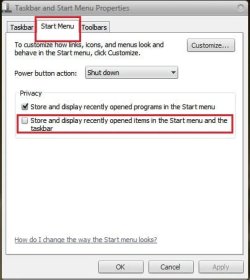
Right click on taskbar and select "Properties" . It will open the Startbar and Startmenu Properties Window . In the Start menu tab, uncheck this item under privacy ... it will not appear anymore .
 

Attachments

  • Capture.JPG
    Capture.JPG
    29.6 KB · Views: 4

My Computer My Computer

Computer type
PC/Desktop
Computer Manufacturer/Model Number
Self Assembled
OS
Microsoft Windows 10 Pro Insider Preview 64-bit
CPU
Intel(R) Core(TM) i3-4130 CPU @ 3.40GHz
Motherboard
Gigabyte Technology Co., Ltd. B85M-D3H
Memory
Corsair Vengence 4GB x2 (8.00GB Dual-Channel DDR3 @ 798MHz)
Graphics Card(s)
2047MB GeForce GTS 450 (ZOTAC International)
Sound Card
Onboard (Realtek High Definition Audio)
Monitor(s) Displays
LG Flatron E2040T
Screen Resolution
1600x900
Hard Drives
Western Digital 1 TB
Seagate 500 GB
PSU
Corsair VS550
Case
Cooler Master K380
Cooling
Cooler Master Seidon 120V Plus
Keyboard
Logitech MK260r
Mouse
Logitech MK260r
Internet Speed
PMPL Broadband
Antivirus
Windows Defender + MBAM
Browser
Firefox
Other Info
Dell Studio 15" Laptop
Back
Top