Disable Wifi when connect via ethernet in windows 7

timlab1955

New member
Member
VIP
Local time
8:47 PM
Messages
186
Every time I connect to my ethernet, windows 7 will NOT disable the wifi. Is it a driver issue or what?
 

My Computer My Computer

At a glance

Windows Professional 64bitIntel Core i7 2820QM @ 2.30GHz, Sandy Bridge ...16GBGeneric PnP Monitor (1600x900@60Hz), NVIDIA G...
Computer Manufacturer/Model Number
Dell XPS 17
OS
Windows Professional 64bit
CPU
Intel Core i7 2820QM @ 2.30GHz, Sandy Bridge 32nm
Motherboard
03RG89, Intel Ver: A12
Memory
16GB
Graphics Card(s)
Generic PnP Monitor (1600x900@60Hz), NVIDIA GeForce GT 555m
Sound Card
High Definition Audio Device
Monitor(s) Displays
NVIDIA 3D
Screen Resolution
1600 x 900 3d
Hard Drives
250GB SAMSUNG SAMSUNG SSD PM810 2.5" 256GB ATA Device (SATA-SSD)
625GB SAMSUNG SAMSUNG HM640JJ ATA Device (SATA)
Other Info
Transend 64GB Memory Card, Lexar Echo ZE 32GB USB 2.0 Backup DriveLEHZE32GASBNA <---Newest thing and very small.
I don't think it's a driver issue, but just how windows works. Every laptop I've had does that.
 

My Computer My Computer

At a glance

Windows 7 Pro x64AMD Athlon 64 x2 6000+ Oc'd @ 3.30GHzG.Skill Pi 1066Mhz 2 x 2GBSapphire 512MB 256bit ddr3 Radeon HD 3850
Computer Manufacturer/Model Number
Joshua Delaughter
OS
Windows 7 Pro x64
CPU
AMD Athlon 64 x2 6000+ Oc'd @ 3.30GHz
Motherboard
Gigabyte GA-MA790GP-UD4H
Memory
G.Skill Pi 1066Mhz 2 x 2GB
Graphics Card(s)
Sapphire 512MB 256bit ddr3 Radeon HD 3850
Sound Card
Integrated HD Realtek
Monitor(s) Displays
Asus 22" LCD
Hard Drives
WD Black 1TB
WD Green 640GB
PSU
Rosewill Stallion 500w
Case
Rosewill Tu-20
Cooling
AC 64 Freezer pro, and lots of other fans
Internet Speed
13Mbps(22 if you count power boost) Cox
Use the proper key to turn it off. If you have your wireless set to automatically connect, that`s what it`s gonna do.
 

My Computer My Computer

At a glance

Windows 10 Pro x64Intel Core i7 6700KGSkill TridentZ RGB 16GB 3600 16-16-16-36EVGA GTX 980 Ti SC x2
Computer type
PC/Desktop
Computer Manufacturer/Model Number
Skylake Special #666
OS
Windows 10 Pro x64
CPU
Intel Core i7 6700K
Motherboard
Asus Sabertooth Z170 Mark 1
Memory
GSkill TridentZ RGB 16GB 3600 16-16-16-36
Graphics Card(s)
EVGA GTX 980 Ti SC x2
Sound Card
Realtek High Definition
Monitor(s) Displays
AOC G2460PG
Screen Resolution
1920 x 1080 144Hz
Hard Drives
Samsung 860 Pro 256GB, Seagate Barracuda 4TB x2
PSU
EVGA 1000 P2, EVGA White Custom Braided Cables
Case
Corsair Vengeance C70 Gunmetal Black
Cooling
Corsair H100i v2, Corsair ML120 x2, Thermal Grizzly Kryonaut
Keyboard
Logitech G910 Orion Spectrum
Mouse
Logitech G700s
Internet Speed
Verizon Fios Quantum Gateway 75/75
Antivirus
Windows Defender, Malwarebytes Free 3.8.3
Browser
Chrome
Other Info
Corsair SP120 x4, LG Blu-ray Drive, Durabrand HT-395 100 Watt Dolby Digital Amp, Corsair H2100 Wireless 7.1 Headset
Add ram - how do you turn it off?
 

My Computer My Computer

At a glance

Windows Professional 64bitIntel Core i7 2820QM @ 2.30GHz, Sandy Bridge ...16GBGeneric PnP Monitor (1600x900@60Hz), NVIDIA G...
Computer Manufacturer/Model Number
Dell XPS 17
OS
Windows Professional 64bit
CPU
Intel Core i7 2820QM @ 2.30GHz, Sandy Bridge 32nm
Motherboard
03RG89, Intel Ver: A12
Memory
16GB
Graphics Card(s)
Generic PnP Monitor (1600x900@60Hz), NVIDIA GeForce GT 555m
Sound Card
High Definition Audio Device
Monitor(s) Displays
NVIDIA 3D
Screen Resolution
1600 x 900 3d
Hard Drives
250GB SAMSUNG SAMSUNG SSD PM810 2.5" 256GB ATA Device (SATA-SSD)
625GB SAMSUNG SAMSUNG HM640JJ ATA Device (SATA)
Other Info
Transend 64GB Memory Card, Lexar Echo ZE 32GB USB 2.0 Backup DriveLEHZE32GASBNA <---Newest thing and very small.
There should be a key on the keyboard ( sometimes has a pic of an antenna ) or a button somewhere. Usually newer laptops will have a blue light when it`s on and a amber light when it`s off.

There are many video reviews of the XPS 17 on youtube.
 

My Computer My Computer

At a glance

Windows 10 Pro x64Intel Core i7 6700KGSkill TridentZ RGB 16GB 3600 16-16-16-36EVGA GTX 980 Ti SC x2
Computer type
PC/Desktop
Computer Manufacturer/Model Number
Skylake Special #666
OS
Windows 10 Pro x64
CPU
Intel Core i7 6700K
Motherboard
Asus Sabertooth Z170 Mark 1
Memory
GSkill TridentZ RGB 16GB 3600 16-16-16-36
Graphics Card(s)
EVGA GTX 980 Ti SC x2
Sound Card
Realtek High Definition
Monitor(s) Displays
AOC G2460PG
Screen Resolution
1920 x 1080 144Hz
Hard Drives
Samsung 860 Pro 256GB, Seagate Barracuda 4TB x2
PSU
EVGA 1000 P2, EVGA White Custom Braided Cables
Case
Corsair Vengeance C70 Gunmetal Black
Cooling
Corsair H100i v2, Corsair ML120 x2, Thermal Grizzly Kryonaut
Keyboard
Logitech G910 Orion Spectrum
Mouse
Logitech G700s
Internet Speed
Verizon Fios Quantum Gateway 75/75
Antivirus
Windows Defender, Malwarebytes Free 3.8.3
Browser
Chrome
Other Info
Corsair SP120 x4, LG Blu-ray Drive, Durabrand HT-395 100 Watt Dolby Digital Amp, Corsair H2100 Wireless 7.1 Headset
ADDRAM - Like everyone else we are all lazy and don't feel like to hit a key. I was thinking that it was automaticly done and that is what I'm looking for.
 

My Computer My Computer

At a glance

Windows Professional 64bitIntel Core i7 2820QM @ 2.30GHz, Sandy Bridge ...16GBGeneric PnP Monitor (1600x900@60Hz), NVIDIA G...
Computer Manufacturer/Model Number
Dell XPS 17
OS
Windows Professional 64bit
CPU
Intel Core i7 2820QM @ 2.30GHz, Sandy Bridge 32nm
Motherboard
03RG89, Intel Ver: A12
Memory
16GB
Graphics Card(s)
Generic PnP Monitor (1600x900@60Hz), NVIDIA GeForce GT 555m
Sound Card
High Definition Audio Device
Monitor(s) Displays
NVIDIA 3D
Screen Resolution
1600 x 900 3d
Hard Drives
250GB SAMSUNG SAMSUNG SSD PM810 2.5" 256GB ATA Device (SATA-SSD)
625GB SAMSUNG SAMSUNG HM640JJ ATA Device (SATA)
Other Info
Transend 64GB Memory Card, Lexar Echo ZE 32GB USB 2.0 Backup DriveLEHZE32GASBNA <---Newest thing and very small.
Windows already automatically uses the wired connection when it is connected.
You do not have to turn off the wireless to do that.
 

My Computer My Computer

At a glance

Windows 10 Pro (x64)Intel Core i7-3930K (3.2GHz - 4.5GHz)4x Samsung 4GB PC3-12800 DDR3 (16GB 1600MHz)Nvidia Geforce GTX 690
Computer type
PC/Desktop
Computer Manufacturer/Model Number
Alienware Aurora ALX R4
OS
Windows 10 Pro (x64)
CPU
Intel Core i7-3930K (3.2GHz - 4.5GHz)
Motherboard
Alienware Aurora-R4 x79
Memory
4x Samsung 4GB PC3-12800 DDR3 (16GB 1600MHz)
Graphics Card(s)
Nvidia Geforce GTX 690
Sound Card
SteelSeries Siberia Elite
Monitor(s) Displays
Dell UltraSharp U3011
Screen Resolution
2560x1600
Hard Drives
Samsung 850 Pro 256 GB, Seagate 1TB Desktop Hybrid HDD, 2x Western Digital 4TB Green HDD
PSU
875W Some Dell PSU <.<
Case
Alienware Aurora ALX
Cooling
Custom Liquid Cooling (EK CPU & GPU blocks) dual EK 480RAD
Keyboard
Logitech G710+ Mechanical
Mouse
Logitech G700s
Internet Speed
Verizon Fios (50 mbps average)
Other Info
Server: Intel NUC D54250WYK: i5-4250U, 16GB, 256 GB mSATA, Windows Server 2012 R2
logicearth-I was thinking the same thing, but mine doesn't do it. I've looked in internet connections and such and can't find anything. Got a map to where I can tell it when I'm wired to discount the wifi?
 

My Computer My Computer

At a glance

Windows Professional 64bitIntel Core i7 2820QM @ 2.30GHz, Sandy Bridge ...16GBGeneric PnP Monitor (1600x900@60Hz), NVIDIA G...
Computer Manufacturer/Model Number
Dell XPS 17
OS
Windows Professional 64bit
CPU
Intel Core i7 2820QM @ 2.30GHz, Sandy Bridge 32nm
Motherboard
03RG89, Intel Ver: A12
Memory
16GB
Graphics Card(s)
Generic PnP Monitor (1600x900@60Hz), NVIDIA GeForce GT 555m
Sound Card
High Definition Audio Device
Monitor(s) Displays
NVIDIA 3D
Screen Resolution
1600 x 900 3d
Hard Drives
250GB SAMSUNG SAMSUNG SSD PM810 2.5" 256GB ATA Device (SATA-SSD)
625GB SAMSUNG SAMSUNG HM640JJ ATA Device (SATA)
Other Info
Transend 64GB Memory Card, Lexar Echo ZE 32GB USB 2.0 Backup DriveLEHZE32GASBNA <---Newest thing and very small.
When you connect your ethernet cable and you are already connected wirelessly, the network icon in the bottom right is still gonna show the bar graph. Right click on the network icon and open network and sharing center. Click on connect or disconnect and then right click on your network and disconnect.

Or just left click on the network icon and disconnect from your wireless network.

It is fine to leave the wireless on when you hard wire, you will be getting 100 Mbs.
 

My Computer My Computer

At a glance

Windows 10 Pro x64Intel Core i7 6700KGSkill TridentZ RGB 16GB 3600 16-16-16-36EVGA GTX 980 Ti SC x2
Computer type
PC/Desktop
Computer Manufacturer/Model Number
Skylake Special #666
OS
Windows 10 Pro x64
CPU
Intel Core i7 6700K
Motherboard
Asus Sabertooth Z170 Mark 1
Memory
GSkill TridentZ RGB 16GB 3600 16-16-16-36
Graphics Card(s)
EVGA GTX 980 Ti SC x2
Sound Card
Realtek High Definition
Monitor(s) Displays
AOC G2460PG
Screen Resolution
1920 x 1080 144Hz
Hard Drives
Samsung 860 Pro 256GB, Seagate Barracuda 4TB x2
PSU
EVGA 1000 P2, EVGA White Custom Braided Cables
Case
Corsair Vengeance C70 Gunmetal Black
Cooling
Corsair H100i v2, Corsair ML120 x2, Thermal Grizzly Kryonaut
Keyboard
Logitech G910 Orion Spectrum
Mouse
Logitech G700s
Internet Speed
Verizon Fios Quantum Gateway 75/75
Antivirus
Windows Defender, Malwarebytes Free 3.8.3
Browser
Chrome
Other Info
Corsair SP120 x4, LG Blu-ray Drive, Durabrand HT-395 100 Watt Dolby Digital Amp, Corsair H2100 Wireless 7.1 Headset

My Computer My Computer

At a glance

W7 Pro SP1 64biti78GBIntel HD Graphics
Computer type
Laptop
Computer Manufacturer/Model Number
Employer provided Dell Latitude
OS
W7 Pro SP1 64bit
CPU
i7
Memory
8GB
Graphics Card(s)
Intel HD Graphics
Hard Drives
crappy SSD
Antivirus
Employer mandated Symantec Endpoint Protection
Browser
Pale Moon 64bit, IE11 64bit & Chrome 64bit
Windows already automatically uses the wired connection when it is connected.

This isn't completely true. Windows has no control over how other systems connect to a multi-homed computer. On a laptop with both wifi and wired networking, incoming connections for remote desktop sessions or network file transfers could reach either the wifi connection or the wired connection.

If you're leave a laptop connected via a wired network with the intention of connecting to it from another computer, you should disable the wifi adapter to make sure your connection goes over the (much faster) wired connection.
 

My Computer My Computer

At a glance

Win7Ultimate x64 + x32, Win7Pro x64, XP x32, ...
OS
Win7Ultimate x64 + x32, Win7Pro x64, XP x32, Win 2003, Ubuntu and OpenIndiana
so, which one windows will used when both wireless (wi-fi) and wired (lan cable) connected?

from previous posts, that we can get 100/mbps, (50 from wifi and 50 from cable)?
 

My Computer My Computer

At a glance

Win7 Pro SP1 x64AMD K10 Athlon(tm) II P340 Dual-Core Processo...DDR3 4.0GB (3.74 Usable)AMD M880G with ATI Mobility Radeon HD 4250 25...
Computer Manufacturer/Model Number
HP G62-340US Notebook
OS
Win7 Pro SP1 x64
CPU
AMD K10 Athlon(tm) II P340 Dual-Core Processor ~2.2GHz
Motherboard
Hewlett-Packard 1444 69.37/AMD 785GX/BIOS F29
Memory
DDR3 4.0GB (3.74 Usable)
Graphics Card(s)
AMD M880G with ATI Mobility Radeon HD 4250 256MB Video
Sound Card
ATI RS785/RS880 - High Definition Audio Controller
Monitor(s) Displays
SAMSUNG 156AT09-H04
Screen Resolution
1366x768 - 344 x 194 mm, Pixel Clock 69.30 MHz
Hard Drives
WDC WD3200BEVT-60A23T0 320GB
Other Info
Bought on July 03, 2011
so, which one windows will used when both wireless (wi-fi) and wired (lan cable) connected?

from previous posts, that we can get 100/mbps, (50 from wifi and 50 from cable)?
I could be wrong - but as I understand it, the ability for one operating system to combine the bandwidth of more than one network interface card at a time requires software/drivers that will merge the data streams and the cooperation of the hardware (router) that the NICs are connected to.

However, you can have several Virtual Machines running at the same time - each using a different NIC.
 

My Computer My Computer

At a glance

W7 Pro SP1 64biti78GBIntel HD Graphics
Computer type
Laptop
Computer Manufacturer/Model Number
Employer provided Dell Latitude
OS
W7 Pro SP1 64bit
CPU
i7
Memory
8GB
Graphics Card(s)
Intel HD Graphics
Hard Drives
crappy SSD
Antivirus
Employer mandated Symantec Endpoint Protection
Browser
Pale Moon 64bit, IE11 64bit & Chrome 64bit
Windows already automatically uses the wired connection when it is connected.
You do not have to turn off the wireless to do that.

logicearth-I was thinking the same thing, but mine doesn't do it. I've looked in internet connections and such and can't find anything. Got a map to where I can tell it when I'm wired to discount the wifi?

timlab1955
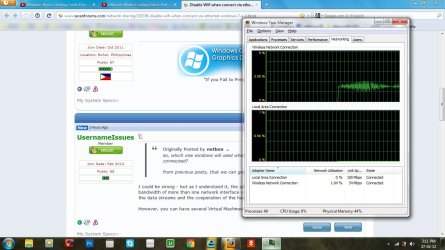
I don't know how you checked this but if you open Task Manager and click the Networking tab you can see which adaptor Windows is using.
 

My Computer My Computer

At a glance

Windows 7 Ultimate x64Intel Pentium Dual Core E5200 2.5GHz (3.77GHz...Corsair 4GB DDR2 (4x1GB CM2X1024-6400C4)Palit GeForce GTS 250 (1024MB)
Computer Manufacturer/Model Number
Self built
OS
Windows 7 Ultimate x64
CPU
Intel Pentium Dual Core E5200 2.5GHz (3.77GHz OC)
Motherboard
Asus P5Q-E
Memory
Corsair 4GB DDR2 (4x1GB CM2X1024-6400C4)
Graphics Card(s)
Palit GeForce GTS 250 (1024MB)
Sound Card
On Board (ADI AD2000B 8ch HD)
Monitor(s) Displays
Samsung 32in LCD TV
Screen Resolution
1360x768
Hard Drives
2 x 1TB Samsung 103SJ (Raid0)
2 x External 500GB Samsung 502IJ (NexStar 3 HD Enclosures)
PSU
550W Antec Neo HE 550
Case
Antec P180
Cooling
Xigmatex Red Scorpion CPU Cooler. 3x120mm Fans
Keyboard
Logitech MX5000 Laser (Combo)
Mouse
Logitech MX5000 Laser (Combo)
Internet Speed
ADSL2+ (avg 10 Mbps Down, 0.80 Mbps up)
Other Info
Gigabyte GN-WP01GS 54g Wireless Lan Card
If it truly does perfer to use your Wireless I found some info here that will help, Windows 7 - Why is the Network Adapter Priority ignored while - Microsoft Answers, in the post marked Answer at the top.

The only thing is there are two Metric settings one at the bottom and one under Default Gateways. If both adaptors are assigned Gateways then this will be the one that controls internet access, the one at the bottom most likly controls other network access like connecting to another computer.

Obviously if only one has a Gateway assigned then it will be the only one that can access the internet.

EDIT: Don't know how this will go disconnecting/reconnecting the cable. Whether or not it will retain the setting, mainly when using DHCP I would think static IP's should be ok.
 

My Computer My Computer

At a glance

Windows 7 Ultimate x64Intel Pentium Dual Core E5200 2.5GHz (3.77GHz...Corsair 4GB DDR2 (4x1GB CM2X1024-6400C4)Palit GeForce GTS 250 (1024MB)
Computer Manufacturer/Model Number
Self built
OS
Windows 7 Ultimate x64
CPU
Intel Pentium Dual Core E5200 2.5GHz (3.77GHz OC)
Motherboard
Asus P5Q-E
Memory
Corsair 4GB DDR2 (4x1GB CM2X1024-6400C4)
Graphics Card(s)
Palit GeForce GTS 250 (1024MB)
Sound Card
On Board (ADI AD2000B 8ch HD)
Monitor(s) Displays
Samsung 32in LCD TV
Screen Resolution
1360x768
Hard Drives
2 x 1TB Samsung 103SJ (Raid0)
2 x External 500GB Samsung 502IJ (NexStar 3 HD Enclosures)
PSU
550W Antec Neo HE 550
Case
Antec P180
Cooling
Xigmatex Red Scorpion CPU Cooler. 3x120mm Fans
Keyboard
Logitech MX5000 Laser (Combo)
Mouse
Logitech MX5000 Laser (Combo)
Internet Speed
ADSL2+ (avg 10 Mbps Down, 0.80 Mbps up)
Other Info
Gigabyte GN-WP01GS 54g Wireless Lan Card
so, which one windows will used when both wireless (wi-fi) and wired (lan cable) connected?

from previous posts, that we can get 100/mbps, (50 from wifi and 50 from cable)?
I could be wrong - but as I understand it, the ability for one operating system to combine the bandwidth of more than one network interface card at a time requires software/drivers that will merge the data streams and the cooperation of the hardware (router) that the NICs are connected to.

However, you can have several Virtual Machines running at the same time - each using a different NIC.

as im finding answers I tried it few minutes ago both connected from wireless and cable, and as I looked from the task manager, it only uses wifi connection not the lan cable... :(

ScreenShot00167.jpg
 

My Computer My Computer

At a glance

Win7 Pro SP1 x64AMD K10 Athlon(tm) II P340 Dual-Core Processo...DDR3 4.0GB (3.74 Usable)AMD M880G with ATI Mobility Radeon HD 4250 25...
Computer Manufacturer/Model Number
HP G62-340US Notebook
OS
Win7 Pro SP1 x64
CPU
AMD K10 Athlon(tm) II P340 Dual-Core Processor ~2.2GHz
Motherboard
Hewlett-Packard 1444 69.37/AMD 785GX/BIOS F29
Memory
DDR3 4.0GB (3.74 Usable)
Graphics Card(s)
AMD M880G with ATI Mobility Radeon HD 4250 256MB Video
Sound Card
ATI RS785/RS880 - High Definition Audio Controller
Monitor(s) Displays
SAMSUNG 156AT09-H04
Screen Resolution
1366x768 - 344 x 194 mm, Pixel Clock 69.30 MHz
Hard Drives
WDC WD3200BEVT-60A23T0 320GB
Other Info
Bought on July 03, 2011
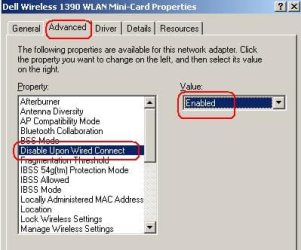
timlab1955,
When you make it back to this thread - please try this:

Go into device manager*
find and double click on the entry for your wireless NIC
click on the tab named Advanced
see if you can find "Disable Upon Wireless Connect" in the list of properties

NIC.JPG

Edit:
*To open device manager, type devmgmt.msc into Start's search field and press enter.
 

My Computer My Computer

At a glance

W7 Pro SP1 64biti78GBIntel HD Graphics
Computer type
Laptop
Computer Manufacturer/Model Number
Employer provided Dell Latitude
OS
W7 Pro SP1 64bit
CPU
i7
Memory
8GB
Graphics Card(s)
Intel HD Graphics
Hard Drives
crappy SSD
Antivirus
Employer mandated Symantec Endpoint Protection
Browser
Pale Moon 64bit, IE11 64bit & Chrome 64bit
We use a great solution that disable Wireless when Ethernet is connected and deployed it on all our users computers. It is automatically enforce wireless and Ethernet switching and prevent from standard users and local admin to remove it from their computers.

It is also support Bluetooth, Firewire, Infrared, Modems, Portable Wireless Phones, Removable USB and Wireless 802.11 and Broadband (3G / 4G / WiMax) network devices.

You can find more details about it on the following link:
Auto Disable Wireless When LAN Connected - Windows 7, 8, XP, Mac
 

My Computer My Computer

At a glance

All
Computer type
PC/Desktop
OS
All
Back
Top