
Disabling Windows Processes/Services before gaming?

martinlest

New member
Power User
VIP
Local time
9:38 PM
Messages
661
I have 16GB of RAM on my PC, just about enough to run X-Plane 11 decently. However, the PC does sometimes use up 95% of this and the page file kicks in - not ideal for performance, so I am looking for ways to reduce unnecessary RAM usage.

By the time things have 'settled down' after a reboot, I generally have a little over 14GBs of free RAM. But the list of active processes in Task Manager is pretty long: I am sure that many of them could be killed off (with a script probably) just before I run X-Plane with no ill effects. (Though Windows doesn't of course always return the RAM used up, just because the process that was using it has stopped).

There used to be standard recommendations for this kind of thing, but I don't seem to be able to find them now (it is several years since I tried this). Anyone any advice?

In Task Manager, apart from Explorer.exe, one instance of svchost.exe is the main user of memory. I have attached a condensed screenshot of the services linked to this process.

Thanks.
 

Attachments
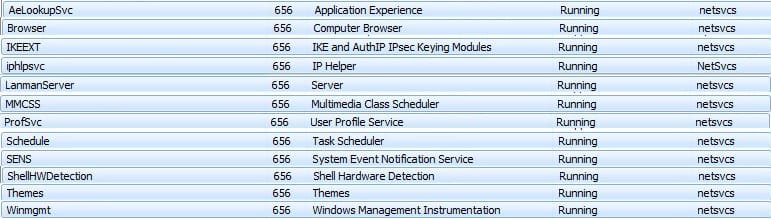
  • Services.jpg
    Services.jpg
    37.8 KB · Views: 0

My Computer My Computer

At a glance

Windows 7 Home Premium SP1 64-bitIntel Core i7-4790K CPU @ 4.5GHz16GB KINGSTON HYPER-X FURY DUAL-DDR3 1600MHz8GB NVIDIA GEFORCE GTX 1070
Computer type
PC/Desktop
Computer Manufacturer/Model Number
Custom Build
OS
Windows 7 Home Premium SP1 64-bit
CPU
Intel Core i7-4790K CPU @ 4.5GHz
Motherboard
Asus H97I-PLUS
Memory
16GB KINGSTON HYPER-X FURY DUAL-DDR3 1600MHz
Graphics Card(s)
8GB NVIDIA GEFORCE GTX 1070
Monitor(s) Displays
HannsG 28" & Dell 24"
Screen Resolution
1920x1200
Hard Drives
1 x 2TB Samsung Evo 860 SSD
2 x 500GB Samsung Evo 850 SSD
PSU
CORSAIR 650W CS SERIES
Case
Thermaltake Core V1 Mini ITX Cube
Cooling
NOCTUA NH-L12
Browser
Firefox
Other Info
Custom PC used for X-Plane 11
There's this guy who calls himself Black Viper who has a website devoted to helping you figure out what services you can do without. His "barebones" column is probably what you are looking for
Black Viper's Windows 7 Service Pack 1 Service Configurations | Black Viper | www.blackviper.com

Note that svchost is just a service the runs other processes at the service level so you usually see several instances of it. You can right click on any of the scvhost instances in Task Manager's services tab and select "Go To Process" to see what actual processes are using that specific instance of svchost
 

My Computer My Computer

At a glance

Win7 pro x64stock i7 7700kCorsair Vengeance LPX 16GB (2x8GB) DDR4 @ 320...integrated Intel HD 630
Computer type
PC/Desktop
Computer Manufacturer/Model Number
diy
OS
Win7 pro x64
CPU
stock i7 7700k
Motherboard
Gigabyte Z270N-WIFI mini-ITX
Memory
Corsair Vengeance LPX 16GB (2x8GB) DDR4 @ 3200MHz
Graphics Card(s)
integrated Intel HD 630
Sound Card
onboard Realtek ALC1220
Monitor(s) Displays
two vertically mounted samsung 55" 4k un55mu8000
Screen Resolution
1920x1280
Hard Drives
256GB Samsung EVO 960 M.2 pci-e NVMe SSD
PSU
SilverStone Nightjar ST45NF 450Watt Fanless
Case
No case. Motherboard is mounted directly onto power supply
Cooling
Evercool low profile 815EP with Panaflow 12L fan at 7v
Keyboard
Ortek MCK-86 mini
Mouse
Belkin 5-button USB
Internet Speed
spectrum 400mbps
Black Viper

There used to be standard recommendations for this kind of thing, but I don't seem to be able to find them now

Yes, that is exactly the fellow I was thinking of! Thanks for the reminder (and the link).
 

My Computer My Computer

At a glance

Windows 7 Home Premium SP1 64-bitIntel Core i7-4790K CPU @ 4.5GHz16GB KINGSTON HYPER-X FURY DUAL-DDR3 1600MHz8GB NVIDIA GEFORCE GTX 1070
Computer type
PC/Desktop
Computer Manufacturer/Model Number
Custom Build
OS
Windows 7 Home Premium SP1 64-bit
CPU
Intel Core i7-4790K CPU @ 4.5GHz
Motherboard
Asus H97I-PLUS
Memory
16GB KINGSTON HYPER-X FURY DUAL-DDR3 1600MHz
Graphics Card(s)
8GB NVIDIA GEFORCE GTX 1070
Monitor(s) Displays
HannsG 28" & Dell 24"
Screen Resolution
1920x1200
Hard Drives
1 x 2TB Samsung Evo 860 SSD
2 x 500GB Samsung Evo 850 SSD
PSU
CORSAIR 650W CS SERIES
Case
Thermaltake Core V1 Mini ITX Cube
Cooling
NOCTUA NH-L12
Browser
Firefox
Other Info
Custom PC used for X-Plane 11
net stop "service name" can be used from a command line or bat file to stop a service. From services right click on each and select properties. From there look at what it says beside service name. Note that if the name contains a space you must put the name in quotes or the command will fail.
 

My Computers My Computers

  • At a glance

    Windows 7 pro/Windows 10 ProIntel i7 860 Quad core 2.8 ghz8 gbATI Radeon HD 5770 1 gb ram
    Computer type
    PC/Desktop
    Computer Manufacturer/Model Number
    HP Pavillion Elite HPE-250f
    OS
    Windows 7 pro/Windows 10 Pro
    CPU
    Intel i7 860 Quad core 2.8 ghz
    Memory
    8 gb
    Graphics Card(s)
    ATI Radeon HD 5770 1 gb ram
    Monitor(s) Displays
    Alienware 25 AW2521HF & Viewsonic
    Screen Resolution
    1920 x1080 & 1680x1050
    Hard Drives
    WD blue 1 tb & 500 gb.
    Browser
    FF of course.
    Other Info
    https://www.bestbuy.com/site/hp-pavilion-elite-desktop-intel-core-i7-processor-8gb-memory-1tb-hard-drive/9921493.p?skuId=9921493
  • At a glance

    Windows 2012 R2 Data center/Linux Minti3 9100 3.6GHz, 8M cache, 4C/4T8GB 2666MT/s DDR4 ECC UDIMM
    Computer type
    PC/Desktop
    System Manufacturer/Model Number
    Dell Poweredge T140
    OS
    Windows 2012 R2 Data center/Linux Mint
    CPU
    i3 9100 3.6GHz, 8M cache, 4C/4T
    Memory
    8GB 2666MT/s DDR4 ECC UDIMM
    Monitor(s) Displays
    Viewsonic
    Screen Resolution
    1680x1050
    Hard Drives
    1 TB & 750 GB
    Other Info
    https://www.dell.com/en-us/work/shop/productdetailstxn/poweredge-t140?~ck=bt
Back
Top