Disappearing jpg files

guybo

New member
Local time
11:30 PM
Messages
2
I am running Win 7 Ultimate 32 bit. On occassion I go to a folder under my pictures that I know contains many pictures only to find the folder there but empty. On other occassions I have lost complete folders. A deep scan with recovery software finds nothing. I have show all folders checked. I am becoming very distrustful of Windows 7.
Any ideas of what to do, where to look?
 

My Computer My Computer

At a glance

Win 7 ultimate 32 bit
OS
Win 7 ultimate 32 bit
Hi guybo,
Welcome to Seven Forums.

Windows 7 in my experience has been very trustworthy, this issue sounds a little strange though.
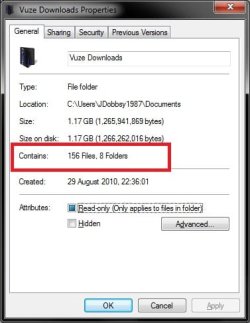
When you go to the folder that you believe to have pictures in, does the folder properties show that there are files in there?

Right Click the folder >> Click Properties >> Does it show any files??
Untitled.jpg

Regards,
JDobbsy1987
 

My Computer My Computer

At a glance

Windows 8.1 Pro x64Intel Core i5-2500K @ 3.30GHz - S11558GB Corsair DDR3 XMS3, PC3-12800NVIDIA GeForce GTX 650
Computer type
PC/Desktop
Computer Manufacturer/Model Number
Self Built
OS
Windows 8.1 Pro x64
CPU
Intel Core i5-2500K @ 3.30GHz - S1155
Motherboard
Asus P8P67 LE Rev3, Intel P67, S115
Memory
8GB Corsair DDR3 XMS3, PC3-12800
Graphics Card(s)
NVIDIA GeForce GTX 650
Sound Card
On-Board
Monitor(s) Displays
3 x 24" {Extended Display}
Screen Resolution
1920 x 1080
Hard Drives
300GB Seagate Barracuda 7200
PSU
550W Coolermaster GX550
Case
Silverstone Precision PS04B
Cooling
Stock
Keyboard
Logitech K120
Mouse
World of Warcraft Cataclysm MMO Gaming Mouse
Internet Speed
80 MB
Antivirus
MSE / Windows Defender
Browser
Chrome
The obvious question:

1) Does anyone else have access to your system (locally or remotely)?

As for where to look, I'd do a search for full or partial filenames that I know were in the folder. Search your entire system. I myself would use Windows Search, but some have issues with it, so you could downlod the free Everything .

You may also want to check out this tutorial on the chance that they've somehow been marked as 'Hidden':

http://www.sevenforums.com/tutorials/394-hidden-files-folders-show-hide.html


Also, regular imaging of your HD is a good thing

James
 

My Computer My Computer

At a glance

Win7U 64 RTMQ95508GB GskillASUS|EAH4850/HTDI/1GD3/A
OS
Win7U 64 RTM
CPU
Q9550
Motherboard
GA-EP45-UD3R
Memory
8GB Gskill
Graphics Card(s)
ASUS|EAH4850/HTDI/1GD3/A
Sound Card
xfi Plat
Monitor(s) Displays
Dell 2405fpw
Screen Resolution
1920x1200
Hard Drives
Seagate & WD sata Drives
PSU
Antec
Case
Antec
Keyboard
MS Natural Ergonomic 4000
Mouse
Logitech MX610 USB Cordless
what recovery did you do? for results you should note that recovery is unlikely to work if you have been doing any downloading/installing/defragging since the files were deleted/went missing.

Also make sure your recovery software is saving its results on another drive e.g. USB Drive or other internal hard drive.

Have you checked for viruses?

Have you run chkdsk in elevated command prompt?
 

My Computer My Computer

At a glance

Windows 7 Ultimate x64Intel Core2 Quad Q8300 2.5GhzKingston HyperX 4x1GB DDR2 1066MhzAsus/Nvidia 9500GT 1GB
Computer type
PC/Desktop
Computer Manufacturer/Model Number
Self Build
OS
Windows 7 Ultimate x64
CPU
Intel Core2 Quad Q8300 2.5Ghz
Motherboard
Asus P5QD Turbo
Memory
Kingston HyperX 4x1GB DDR2 1066Mhz
Graphics Card(s)
Asus/Nvidia 9500GT 1GB
Sound Card
On-Board HD
Monitor(s) Displays
22" Widescreen TFT
Screen Resolution
1920x1080
Hard Drives
2x 320Gb Seagate SATAII RAID 0
2x 80Gb Seagate SATAII RAID 0
1x 1tb hybrid (8gb ssd)
PSU
650w
Case
ATX
Cooling
140mm front, 120mm Rear, 80mm Chipset + stock CPU and GPU
Keyboard
Plastic one
Mouse
Plastic one
Internet Speed
4Mbps
Other Info
Laptop: HP Elitebook 2560p
i5 @2.7Ghz 4GB DDR3
The properties of the empty folders show 0 contents. I searched using the windows search and later a program called Recuva. Recuva took hours to deep scan my hard drive but still found nothing. The files are not shared. Defrag program was constantly running in the background--I have since shut it down. I have also copied all my jpg files to my laptop. Since doing so I have found files which have gone invisible on my desktop still present on my laptop. I am wondering if somehow the hd on my desktop could be faulty, although disk scan finds nothing wrong.
 

My Computer My Computer

At a glance

Win 7 ultimate 32 bit
OS
Win 7 ultimate 32 bit
I am wondering if somehow the hd on my desktop could be faulty, although disk scan finds nothing wrong.

Likely you already are doing this, but I would be copying important data to another drive until you get to the bottom of this.

It couldn't hurt to check here:

HD Diagnostic

James
 
Last edited:

My Computer My Computer

At a glance

Win7U 64 RTMQ95508GB GskillASUS|EAH4850/HTDI/1GD3/A
OS
Win7U 64 RTM
CPU
Q9550
Motherboard
GA-EP45-UD3R
Memory
8GB Gskill
Graphics Card(s)
ASUS|EAH4850/HTDI/1GD3/A
Sound Card
xfi Plat
Monitor(s) Displays
Dell 2405fpw
Screen Resolution
1920x1200
Hard Drives
Seagate & WD sata Drives
PSU
Antec
Case
Antec
Keyboard
MS Natural Ergonomic 4000
Mouse
Logitech MX610 USB Cordless
Back
Top