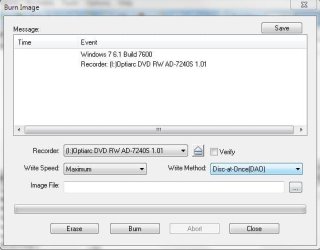
disk at once OR track at once?

neoasr

Security Freaks
Power User
VIP
Local time
2:18 PM
Messages
208
Location
INDIA
hey guys.. m using ultraiso, in burn image option , there z 2 ways to 2 burn , disk at once and track at once, which z better for iso burning?

or tell me another program for iso burning except nero
 

My Computer My Computer

OS
Windows 7 ultimate 32bit OEM 6.1 Build7600
CPU
Core 2 Duo CPU E7400 2.8GHz
Motherboard
Mercury PIG31T
Memory
2 GB RAM
Graphics Card(s)
NVIDIA GeForce 8400 GS
Sound Card
VIA HD
Monitor(s) Displays
Samsung SyncMaster 2033
Screen Resolution
1600*900
Hard Drives
500 GB
I've never seen that option for ISO. But for audio CD burning the Disk At Once is the preferred method.
 

My Computer My Computer

Computer type
PC/Desktop
Computer Manufacturer/Model Number
My Own Build
OS
Windows 10 64 bit
CPU
Intel i7 6700K
Motherboard
ASUS ROG Maximus VIII Hero
Memory
16GB Corsair Dominator
Graphics Card(s)
Intel CPU Graphics
Sound Card
RealTek
Monitor(s) Displays
27" Dell S2719dgf
Screen Resolution
2560X1440
Hard Drives
1 TB Samsung 850 EVO SSD for Win 10 Pro
500GB Samsung 850 EVO SSD for Win 10 Insider
2 TB drive for backup
PSU
EVGA Supernova 750G2
Case
BeQuiet Silent Base 600
Cooling
Deepcool Captain 120EX
Keyboard
Microsoft Wireless 2000
Mouse
Microsoft wireless
Internet Speed
100 MB/sec (Cable)
Antivirus
Microsoft Defender and Malwarebytes
Browser
Edge/Firefox
Other Info
Cakewalk (Sonar) by BandLab and Studio One 4.1 Pro recording studio software. MOTU 896Mk3 Hybrid recording interface, Frontier Tranzport wireless control unit, Behringer X-Touch Control Surface.
Five USB connected optical drives for CD Audio production using Nero BurningROM

Attachments

  • Capture.JPG
    Capture.JPG
    30.6 KB · Views: 51
  • Capture2.JPG
    Capture2.JPG
    29.5 KB · Views: 45

My Computer My Computer

OS
Windows 7 ultimate 32bit OEM 6.1 Build7600
CPU
Core 2 Duo CPU E7400 2.8GHz
Motherboard
Mercury PIG31T
Memory
2 GB RAM
Graphics Card(s)
NVIDIA GeForce 8400 GS
Sound Card
VIA HD
Monitor(s) Displays
Samsung SyncMaster 2033
Screen Resolution
1600*900
Hard Drives
500 GB
I use Imgburn. The instructions are very simple and its easy to use.
 

My Computer My Computer

Computer Manufacturer/Model Number
Samsung NP530U4B-S02IN
OS
Windows® 8 Pro (64-bit)
CPU
Intel® Core™ i5 Processor 2467M (1.60GHz, 3MB L3 Cache)
Motherboard
Samsung Electronics
Memory
6GB DDR3 System Memory at 1,333MHz (on BD 4GB + 2GB x 1)
Graphics Card(s)
AMD Radeon™ HD7550M 1GB DDR3 (Ext. Graphic)
Sound Card
Realtek High Definition Audio
Monitor(s) Displays
35.56cm (14.0) SuperBright 300nit HD LED Display
Screen Resolution
1366x768
Hard Drives
1TB S-ATA II Hard Drive (5400RPM) with ExpressCache 16GB SSD
Internet Speed
sucks
Antivirus
Microsoft Security Essentials
Browser
Google Chrome (Sync enabled)
thx
 

My Computer My Computer

OS
Windows 7 ultimate 32bit OEM 6.1 Build7600
CPU
Core 2 Duo CPU E7400 2.8GHz
Motherboard
Mercury PIG31T
Memory
2 GB RAM
Graphics Card(s)
NVIDIA GeForce 8400 GS
Sound Card
VIA HD
Monitor(s) Displays
Samsung SyncMaster 2033
Screen Resolution
1600*900
Hard Drives
500 GB
Back
Top