Solved Disk Check Won't Run

IHeartRocks

New member
Local time
7:48 AM
Messages
11
I'm having trouble getting the disk check tool to run on a laptop with Windows 7 Home Premium 64 bit. Whenever I schedule a disk check and restart the computer, absolutely nothing happens -- my system simply boots up as it normally does.

I ran the system file checker when I first encountered the problem; it told me that it couldn't fix all issues, and upon checking the log there is a problem with the autochk.exe system file. I found this Microsoft hotfix and tried to install it, but received a message that said "This update does not apply to your computer." I can't run a system restore to fix the problem because it's been over a year since I last checked the disk successfully, so the restore point that I need is almost certainly long gone. I also cannot perform a system repair because my computer manufacturer did not ship a Windows 7 installation CD with the laptop. I can revert my computer to it's original factory state, but as far as I know I can't simply repair system files, and I do not have a Windows 7 disk from which extract a new autochk.exe file.

Any suggestions would be greatly appreciated. Thank you.
 

My Computer My Computer

At a glance

Windows 7 Home Premium 64 bit4.00 GB
Computer type
Laptop
Computer Manufacturer/Model Number
Dell N5010
OS
Windows 7 Home Premium 64 bit
Memory
4.00 GB
Antivirus
Microsoft Security Essentials
Browser
Mozilla Firefox
Hello IHeartRocks, and welcome to Seven Forums.

You might see if downloading and running the 64-bit (x64) System Update Readiness Tool, restart the PC afterwards, and try the sfc /scannow command again may be able to repair it.

Hope this helps, :)
Shawn
 

My Computer My Computer

At a glance

64-bit Windows 11 Pro for WorkstationsIntel i7-8700K OC'd to 5 GHz64 GB (4x16GB) G.SKILL TridentZ RGB DDR4 3600...ASUS ROG-STRIX-GTX1080TI-O11G-GAMING
Computer type
PC/Desktop
Computer Manufacturer/Model Number
Self built custom
OS
64-bit Windows 11 Pro for Workstations
CPU
Intel i7-8700K OC'd to 5 GHz
Motherboard
ASUS ROG Maximus XI Formula Z390
Memory
64 GB (4x16GB) G.SKILL TridentZ RGB DDR4 3600 MHz
Graphics Card(s)
ASUS ROG-STRIX-GTX1080TI-O11G-GAMING
Sound Card
Integrated
Monitor(s) Displays
2 x Samsung Odyssey G7 27"
Screen Resolution
2560x1440
Hard Drives
1TB Samsung 990 PRO M.2,
4TB Samsung 990 PRO PRO M.2,
TerraMaster F8 SSD Plus NAS
PSU
Seasonic Prime Titanium 850W
Case
Thermaltake Core P3
Cooling
Corsair Hydro H115i
Keyboard
Logitech wireless K800
Mouse
Logitech MX Master 4
Internet Speed
2 Gb/s Download and 100 Mb/s Upload
Antivirus
Malwarebyte Anti-Malware Premium
Browser
Google Chrome
Other Info
Logitech Z625 speaker system,
Logitech BRIO 4K Pro webcam,
HP Color LaserJet Pro MFP M477fdn,
APC SMART-UPS RT 1000 XL - SURT1000XLI,
Galaxy S23 Plus phone
Thanks for the suggestion Brink, but it unfortunately did not resolve the issue.
 

My Computer My Computer

At a glance

Windows 7 Home Premium 64 bit4.00 GB
Computer type
Laptop
Computer Manufacturer/Model Number
Dell N5010
OS
Windows 7 Home Premium 64 bit
Memory
4.00 GB
Antivirus
Microsoft Security Essentials
Browser
Mozilla Firefox
You might see if downloading and running the 64-bit (x64) System Update Readiness Tool, restart the PC afterwards, and try the sfc /scannow command again may be able to repair it.

=>sfc command gave "no integrity errors"?

No errors in %SYSTEMROOT%\Logs\CBS\CheckSUR.log ?
 

My Computer My Computer

At a glance

Microsoft Windows 7 Home Premium 64-bits 7601...Intel(R) Core(TM) i3 CPU M 370 @ 2.40GHz4,00 GBATI Mobility Radeon HD 5400 Series
Computer type
Laptop
Computer Manufacturer/Model Number
ACER ASPIRE 5742G
OS
Microsoft Windows 7 Home Premium 64-bits 7601 Multiprocessor Free Service Pack 1
CPU
Intel(R) Core(TM) i3 CPU M 370 @ 2.40GHz
Motherboard
Acer Aspire 5742G
Memory
4,00 GB
Graphics Card(s)
ATI Mobility Radeon HD 5400 Series
Sound Card
(1) AMD High Definition Audio Device (2) Realtek High Defi
Screen Resolution
1366 x 768 x 32 bits (4294967296 colors) @ 60 Hz
Hard Drives
WDC WD5000BEVT-22ZAT0
Hi, Kaktussoft. After running the System Update Readiness Tool, restarting the computer, and running the SFC, there were indeed still errors.

This is the CheckSUR log after the scan:

Binary Version 6.1.7601.21645
Package Version 20.0
2013-10-15 13:22

Checking Windows Servicing Packages

Checking Package Manifests and Catalogs
(f) CBS MUM Corrupt 0x00000000 servicing\Packages\Microsoft-Windows-IE-Hyphenation-Parent-Package-English~31bf3856ad364e35~~~10.2.9200.16437.mum Expected file name Microsoft-Windows-IE-Hyphenation-Parent-Package-English~31bf3856ad364e35~neutral~~10.2.9200.16437.mum does not match the actual file name
(f) CBS MUM Corrupt 0x00000000 servicing\Packages\Microsoft-Windows-IE-Spelling-Parent-Package-English~31bf3856ad364e35~~~10.2.9200.16437.mum Expected file name Microsoft-Windows-IE-Spelling-Parent-Package-English~31bf3856ad364e35~neutral~~10.2.9200.16437.mum does not match the actual file name

Checking Package Watchlist

Checking Component Watchlist

Checking Packages

Checking Component Store

Summary:
Seconds executed: 1178
Found 2 errors
CBS MUM Corrupt Total count: 2

Unavailable repair files:
servicing\packages\Microsoft-Windows-IE-Hyphenation-Parent-Package-English~31bf3856ad364e35~~~10.2.9200.16437.mum
servicing\packages\Microsoft-Windows-IE-Spelling-Parent-Package-English~31bf3856ad364e35~~~10.2.9200.16437.mum
servicing\packages\Microsoft-Windows-IE-Hyphenation-Parent-Package-English~31bf3856ad364e35~~~10.2.9200.16437.cat
servicing\packages\Microsoft-Windows-IE-Spelling-Parent-Package-English~31bf3856ad364e35~~~10.2.9200.16437.cat
Also, I find the following string when I look in the CBS log and search for the phrase "cannot repair":

2013-10-15 13:48:47, Info CSI 00000049 [SR] Cannot repair member file [l:22{11}]"autochk.exe" of Microsoft-Windows-Autochk, Version = 6.1.7601.17514, pA = PROCESSOR_ARCHITECTURE_AMD64 (9), Culture neutral, VersionScope = 1 nonSxS, PublicKeyToken = {l:8 b:31bf3856ad364e35}, Type neutral, TypeName neutral, PublicKey neutral in the store, hash mismatch
 

My Computer My Computer

At a glance

Windows 7 Home Premium 64 bit4.00 GB
Computer type
Laptop
Computer Manufacturer/Model Number
Dell N5010
OS
Windows 7 Home Premium 64 bit
Memory
4.00 GB
Antivirus
Microsoft Security Essentials
Browser
Mozilla Firefox
checksur.log shows 2 errors. They are fasle positives however. So actually it's good.

cbs.log: That's the only "Cannot repair" error?

Check folder C:\Windows\winsxs\amd64_microsoft-windows-autochk_31bf3856ad364e35_6.1.7601.17514_none_4019f2b8d860ad30
autochk.exe is there? what is size and file date?

Same question for folder c:\windows\system32
 

My Computer My Computer

At a glance

Microsoft Windows 7 Home Premium 64-bits 7601...Intel(R) Core(TM) i3 CPU M 370 @ 2.40GHz4,00 GBATI Mobility Radeon HD 5400 Series
Computer type
Laptop
Computer Manufacturer/Model Number
ACER ASPIRE 5742G
OS
Microsoft Windows 7 Home Premium 64-bits 7601 Multiprocessor Free Service Pack 1
CPU
Intel(R) Core(TM) i3 CPU M 370 @ 2.40GHz
Motherboard
Acer Aspire 5742G
Memory
4,00 GB
Graphics Card(s)
ATI Mobility Radeon HD 5400 Series
Sound Card
(1) AMD High Definition Audio Device (2) Realtek High Defi
Screen Resolution
1366 x 768 x 32 bits (4294967296 colors) @ 60 Hz
Hard Drives
WDC WD5000BEVT-22ZAT0
Yes, that is the only error in the CBS log as far as I can tell.

For the folder that you asked about in C:\Windows\winsxs, autochk.exe is there. The "created" date is 9 March 2011, the "modified" date is 20 November 2010, and the file size is 760 KB.

For the folder in C:\Windows\system32, autochk.exe is again there with the same size and dates as the previous one.
 

My Computer My Computer

At a glance

Windows 7 Home Premium 64 bit4.00 GB
Computer type
Laptop
Computer Manufacturer/Model Number
Dell N5010
OS
Windows 7 Home Premium 64 bit
Memory
4.00 GB
Antivirus
Microsoft Security Essentials
Browser
Mozilla Firefox
Yes, that is the only error in the CBS log as far as I can tell.

For the folder that you asked about in C:\Windows\winsxs, autochk.exe is there. The "created" date is 9 March 2011, the "modified" date is 20 November 2010, and the file size is 760 KB.

For the folder in C:\Windows\system32, autochk.exe is again there with the same size and dates as the previous one.
Same as my machine. Only "date created" is different but that's normal.

What problems do you have exactly?
 

My Computer My Computer

At a glance

Microsoft Windows 7 Home Premium 64-bits 7601...Intel(R) Core(TM) i3 CPU M 370 @ 2.40GHz4,00 GBATI Mobility Radeon HD 5400 Series
Computer type
Laptop
Computer Manufacturer/Model Number
ACER ASPIRE 5742G
OS
Microsoft Windows 7 Home Premium 64-bits 7601 Multiprocessor Free Service Pack 1
CPU
Intel(R) Core(TM) i3 CPU M 370 @ 2.40GHz
Motherboard
Acer Aspire 5742G
Memory
4,00 GB
Graphics Card(s)
ATI Mobility Radeon HD 5400 Series
Sound Card
(1) AMD High Definition Audio Device (2) Realtek High Defi
Screen Resolution
1366 x 768 x 32 bits (4294967296 colors) @ 60 Hz
Hard Drives
WDC WD5000BEVT-22ZAT0
Whenever I try to schedule a disk check, either by typing it into the command line or right-clicking on the C: drive --> Properties --> Tools, it will not run. It doesn't start to run and then hang, it simply does not run at all. My system boots up exactly as it normally does, without notifying me that a disk check has been scheduled or displaying a countdown timer.
 

My Computer My Computer

At a glance

Windows 7 Home Premium 64 bit4.00 GB
Computer type
Laptop
Computer Manufacturer/Model Number
Dell N5010
OS
Windows 7 Home Premium 64 bit
Memory
4.00 GB
Antivirus
Microsoft Security Essentials
Browser
Mozilla Firefox
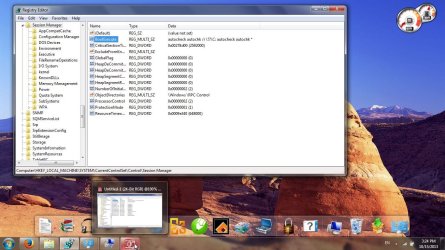
Open registry and browse to key HKEY_LOCAL_MACHINE\SYSTEM\CurrentControlSet\Control\Session Manager
post screenshot. On the right side is "BootExecute"
 

My Computer My Computer

At a glance

Microsoft Windows 7 Home Premium 64-bits 7601...Intel(R) Core(TM) i3 CPU M 370 @ 2.40GHz4,00 GBATI Mobility Radeon HD 5400 Series
Computer type
Laptop
Computer Manufacturer/Model Number
ACER ASPIRE 5742G
OS
Microsoft Windows 7 Home Premium 64-bits 7601 Multiprocessor Free Service Pack 1
CPU
Intel(R) Core(TM) i3 CPU M 370 @ 2.40GHz
Motherboard
Acer Aspire 5742G
Memory
4,00 GB
Graphics Card(s)
ATI Mobility Radeon HD 5400 Series
Sound Card
(1) AMD High Definition Audio Device (2) Realtek High Defi
Screen Resolution
1366 x 768 x 32 bits (4294967296 colors) @ 60 Hz
Hard Drives
WDC WD5000BEVT-22ZAT0
The registry value for BootExecute reads:

autocheck autochk /r \??\C: autocheck autochk *
 

My Computer My Computer

At a glance

Windows 7 Home Premium 64 bit4.00 GB
Computer type
Laptop
Computer Manufacturer/Model Number
Dell N5010
OS
Windows 7 Home Premium 64 bit
Memory
4.00 GB
Antivirus
Microsoft Security Essentials
Browser
Mozilla Firefox
Post screenshot of disk management as well please.
 

My Computer My Computer

At a glance

Microsoft Windows 7 Home Premium 64-bits 7601...Intel(R) Core(TM) i3 CPU M 370 @ 2.40GHz4,00 GBATI Mobility Radeon HD 5400 Series
Computer type
Laptop
Computer Manufacturer/Model Number
ACER ASPIRE 5742G
OS
Microsoft Windows 7 Home Premium 64-bits 7601 Multiprocessor Free Service Pack 1
CPU
Intel(R) Core(TM) i3 CPU M 370 @ 2.40GHz
Motherboard
Acer Aspire 5742G
Memory
4,00 GB
Graphics Card(s)
ATI Mobility Radeon HD 5400 Series
Sound Card
(1) AMD High Definition Audio Device (2) Realtek High Defi
Screen Resolution
1366 x 768 x 32 bits (4294967296 colors) @ 60 Hz
Hard Drives
WDC WD5000BEVT-22ZAT0

Attachments

  • Knipsel.JPG
    Knipsel.JPG
    9.4 KB · Views: 13

My Computer My Computer

At a glance

Microsoft Windows 7 Home Premium 64-bits 7601...Intel(R) Core(TM) i3 CPU M 370 @ 2.40GHz4,00 GBATI Mobility Radeon HD 5400 Series
Computer type
Laptop
Computer Manufacturer/Model Number
ACER ASPIRE 5742G
OS
Microsoft Windows 7 Home Premium 64-bits 7601 Multiprocessor Free Service Pack 1
CPU
Intel(R) Core(TM) i3 CPU M 370 @ 2.40GHz
Motherboard
Acer Aspire 5742G
Memory
4,00 GB
Graphics Card(s)
ATI Mobility Radeon HD 5400 Series
Sound Card
(1) AMD High Definition Audio Device (2) Realtek High Defi
Screen Resolution
1366 x 768 x 32 bits (4294967296 colors) @ 60 Hz
Hard Drives
WDC WD5000BEVT-22ZAT0
The screenshots are attached. I believe that I've already tried changing the BootExecute registry value, but I will try again to be sure and let you know the result.
 

Attachments

  • regedit SC.jpg
    regedit SC.jpg
    167.9 KB · Views: 3
  • DiskManagement SC.jpg
    DiskManagement SC.jpg
    130.5 KB · Views: 2

My Computer My Computer

At a glance

Windows 7 Home Premium 64 bit4.00 GB
Computer type
Laptop
Computer Manufacturer/Model Number
Dell N5010
OS
Windows 7 Home Premium 64 bit
Memory
4.00 GB
Antivirus
Microsoft Security Essentials
Browser
Mozilla Firefox

My Computer My Computer

At a glance

Microsoft Windows 7 Home Premium 64-bits 7601...Intel(R) Core(TM) i3 CPU M 370 @ 2.40GHz4,00 GBATI Mobility Radeon HD 5400 Series
Computer type
Laptop
Computer Manufacturer/Model Number
ACER ASPIRE 5742G
OS
Microsoft Windows 7 Home Premium 64-bits 7601 Multiprocessor Free Service Pack 1
CPU
Intel(R) Core(TM) i3 CPU M 370 @ 2.40GHz
Motherboard
Acer Aspire 5742G
Memory
4,00 GB
Graphics Card(s)
ATI Mobility Radeon HD 5400 Series
Sound Card
(1) AMD High Definition Audio Device (2) Realtek High Defi
Screen Resolution
1366 x 768 x 32 bits (4294967296 colors) @ 60 Hz
Hard Drives
WDC WD5000BEVT-22ZAT0
You simply want to check C drive, Or is a workaround okay?
Boot to "advanced boot options" then "repair your computer"->command prompt:

Code:
dir  c:
dir  d:

I think the win7 volume (labeled OS) has drive letter D (?)
Be sure the prompt is not D now.

Code:
chkdsk/f  D:

works?
 

My Computer My Computer

At a glance

Microsoft Windows 7 Home Premium 64-bits 7601...Intel(R) Core(TM) i3 CPU M 370 @ 2.40GHz4,00 GBATI Mobility Radeon HD 5400 Series
Computer type
Laptop
Computer Manufacturer/Model Number
ACER ASPIRE 5742G
OS
Microsoft Windows 7 Home Premium 64-bits 7601 Multiprocessor Free Service Pack 1
CPU
Intel(R) Core(TM) i3 CPU M 370 @ 2.40GHz
Motherboard
Acer Aspire 5742G
Memory
4,00 GB
Graphics Card(s)
ATI Mobility Radeon HD 5400 Series
Sound Card
(1) AMD High Definition Audio Device (2) Realtek High Defi
Screen Resolution
1366 x 768 x 32 bits (4294967296 colors) @ 60 Hz
Hard Drives
WDC WD5000BEVT-22ZAT0
Changing the BootExecute registry value did not work. I've also tried almost everything in the link that you suggested a few times now (I ran across that link in my own research earlier, and tried them a second time just now in order to be sure), but they also haven't worked. The only remedy that I haven't tried is step 4, which if I'm not mistaken doesn't apply since I'm using Windows 7.

As for opening a command prompt from Advanced Boot Options --> Repair, I'm a little confused about what to do once I get to the command prompt. What directory do I need to be in before I type "chkdsk/f D:"? And this will also check C?

Thanks for the time that you're taking to help me out with this. I greatly appreciate it.
 

My Computer My Computer

At a glance

Windows 7 Home Premium 64 bit4.00 GB
Computer type
Laptop
Computer Manufacturer/Model Number
Dell N5010
OS
Windows 7 Home Premium 64 bit
Memory
4.00 GB
Antivirus
Microsoft Security Essentials
Browser
Mozilla Firefox
Changing the BootExecute registry value did not work. I've also tried almost everything in the link that you suggested a few times now (I ran across that link in my own research earlier, and tried them a second time just now in order to be sure), but they also haven't worked. The only remedy that I haven't tried is step 4, which if I'm not mistaken doesn't apply since I'm using Windows 7.

As for opening a command prompt from Advanced Boot Options --> Repair, I'm a little confused about what to do once I get to the command prompt. What directory do I need to be in before I type "chkdsk/f D:"? And this will also check C?

Thanks for the time that you're taking to help me out with this. I greatly appreciate it.
Step 4 is about replacing autochk.exe. You have the correct version (same as mine).

Drive Letters are different in "recovery environmene". Since partition RECOVERY is ACTIVE and SYSTEM it has the bootmanager and bootmenu. I think it is called C is recovery managent. I think D is win7. You can easily check yourself

DIR C:
DIR D:

Now you know the drive leter you want to check. But don't have anything opened on that drive letter (normally nothing is open). Simply don't do a CD (change directory) to D:\ or D:\windows. Don't even type D:\. Otherwise chkdsk D: will fail

Code:
chkdsk/f  D:
works?
 

My Computer My Computer

At a glance

Microsoft Windows 7 Home Premium 64-bits 7601...Intel(R) Core(TM) i3 CPU M 370 @ 2.40GHz4,00 GBATI Mobility Radeon HD 5400 Series
Computer type
Laptop
Computer Manufacturer/Model Number
ACER ASPIRE 5742G
OS
Microsoft Windows 7 Home Premium 64-bits 7601 Multiprocessor Free Service Pack 1
CPU
Intel(R) Core(TM) i3 CPU M 370 @ 2.40GHz
Motherboard
Acer Aspire 5742G
Memory
4,00 GB
Graphics Card(s)
ATI Mobility Radeon HD 5400 Series
Sound Card
(1) AMD High Definition Audio Device (2) Realtek High Defi
Screen Resolution
1366 x 768 x 32 bits (4294967296 colors) @ 60 Hz
Hard Drives
WDC WD5000BEVT-22ZAT0
To repair the problem permanently:
  1. uninstall SP1: How to uninstall Windows 7 Service Pack 1 (SP1)
  2. check for updates. Service Pack 1 will be in the list. Install it (it has a fresh autochk.exe in it)
  3. Install other updates as well. But this can be done later!
Above procedure will only work if you installed SP1 on the machine. So not if you installed WIN7 with SP1 already included.


When SP1 has been reinstalled:
  • sfc/scannow : no more errors?
  • chkdsk works?
 

My Computer My Computer

At a glance

Microsoft Windows 7 Home Premium 64-bits 7601...Intel(R) Core(TM) i3 CPU M 370 @ 2.40GHz4,00 GBATI Mobility Radeon HD 5400 Series
Computer type
Laptop
Computer Manufacturer/Model Number
ACER ASPIRE 5742G
OS
Microsoft Windows 7 Home Premium 64-bits 7601 Multiprocessor Free Service Pack 1
CPU
Intel(R) Core(TM) i3 CPU M 370 @ 2.40GHz
Motherboard
Acer Aspire 5742G
Memory
4,00 GB
Graphics Card(s)
ATI Mobility Radeon HD 5400 Series
Sound Card
(1) AMD High Definition Audio Device (2) Realtek High Defi
Screen Resolution
1366 x 768 x 32 bits (4294967296 colors) @ 60 Hz
Hard Drives
WDC WD5000BEVT-22ZAT0
Uninstalling the Service Pack will not have any effect on documents and installed software, correct?
 

My Computer My Computer

At a glance

Windows 7 Home Premium 64 bit4.00 GB
Computer type
Laptop
Computer Manufacturer/Model Number
Dell N5010
OS
Windows 7 Home Premium 64 bit
Memory
4.00 GB
Antivirus
Microsoft Security Essentials
Browser
Mozilla Firefox
Back
Top