Disk Check

How to Run Disk Check in Windows 7

   Information
This will show you how to run Check Disk or chkdsk in Windows 7 to check a selected hard disk for file system errors and bad sectors on it.

   Note
Running a check disk may take a bit depending on the size of the selected hard disk. For faster and better results, do not use your computer while check disk is checking for errors.


You will have a choice to scan only, scan for and attempt to fix errors, scan for and attempt recovery of bad sectors, or scan for and attempt to fix errors and recovery of bad sectors.


OPTION ONE

To Run Chkdsk from Drive's Properties Page

1. Open the Start Menu and click on the Computer button on the right dark side.

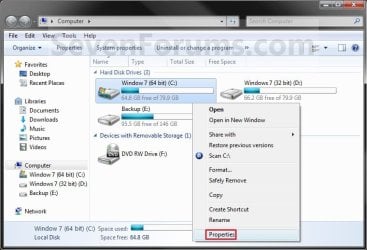
2. Right click the hard disk drive that you want to check, and click on Properties. (see screenshot below) Computer.jpg
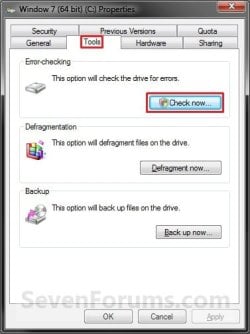
3. Click on the Tools tab, and click on the Check now button under Error-checking. (see screenshot below) Properties.jpg
4. You will now see this window. Do the steps below for what you would like to do. (see screenshot below) Options.jpg
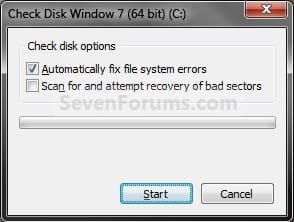
5. To Only Scan the Drive for Errors
NOTE: This will just give you a report if there are any drive errors or not, and will not attempt to fix them. A) Leave both boxes unchecked and click on the Start button. (see screenshot below step 4)
6. To Only Scan and Attempt Recovery of Bad Sectors
NOTE: This scan attempts to find and repair physical errors on the hard disk itself, and it can take much longer to complete. A) uncheck the Automatically fix file system errors box. (see screenshot below step 4)

B) Check the Scan for and attempt recovery of bad sectors box.
7. To Only Scan and Automatically Attempt to Fix Errors
NOTE: This will automatically attempt to repair problems with files and folders that the scan detects. A) Check the Automatically fix file system errors box. (see screenshot below step 4)

B) Uncheck the Scan for and attempt recovery of bad sectors box.
8. To Scan and Automatically Attempt to Fix Errors and Recover Bad Sectors
NOTE: This will scan for both file errors and physical errors (steps 6 and 7). It will then attempt to repair problems with files and folders, and recover physical errors. A) Check the Automatically fix file system errors box. (see screenshot below step 4)

B) Check the Scan for and attempt recovery of bad sectors box.
9. Click on the Start button, and do either step 10 or 11 below depending on if the drive is currently in use or not. (see screenshot below step 4)

10. If the selected hard disk is not in use, then you will see check disk start checking the disk now. (see screenshot below) Step4A.jpg
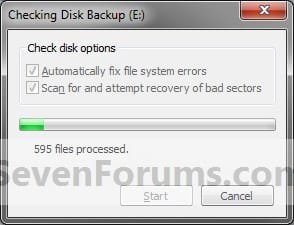
A) When the scan is complete, you will then see
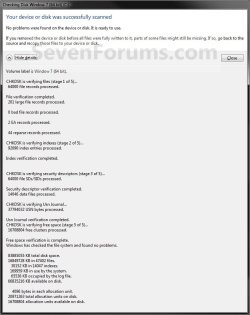
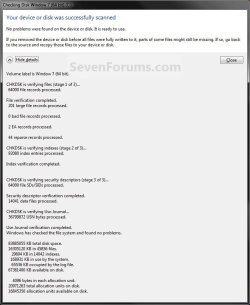
results similar to this. Click on Close. (see screenshots below) Details.jpg
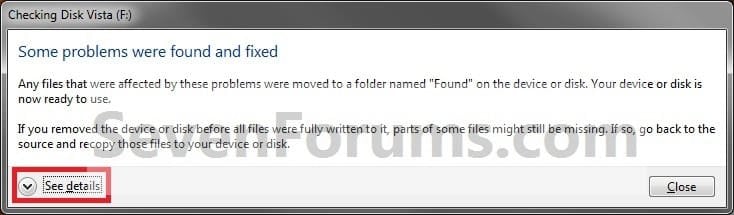
Scan_results2.jpg

B) Click on OK. (see screenshot below step 3)

C) Stop, you're done.
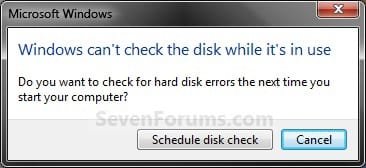
11. If the selected hard disk is in use, then click on the Schedule disk check button. (see screenshot below)
NOTE: If the hard disk that you selected in step 2 is in use (for example, the C: drive or partition that contains Windows 7), you'll be prompted to reschedule the disk check for the next time you restart your computer. Otherwise you will not see this window below. Schedule.jpg
A) Restart the computer.
B) During startup, you will only have 10 seconds to press a key to cancel the Disk Check from steps 7 or 8. (see screenshot below)
   Warning
Once the Disk Check scan starts, DO NOT STOP the scan to prevent possible damage to the data on your hard drive.
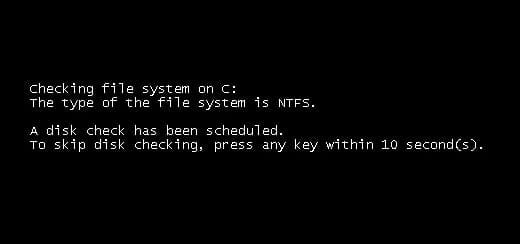
10-Seconds.jpg
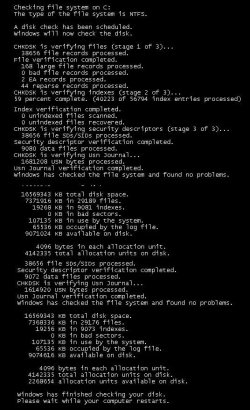
C) When the scan is complete you will see a report similar to this below briefly before the computer automatically restarts. Start-up.jpg


OPTION TWO

To Run Chkdsk from Command Prompt


NOTE: The chkdsk command can be used on a FAT32 or NTFS formatted disk. 1. Open a elevated command prompt or a command prompt at startup.

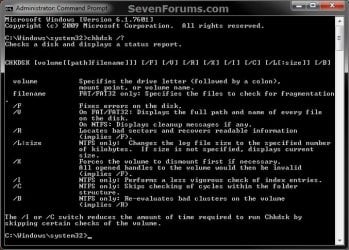
2. In the command prompt, type in the following command below followed by one or more switches that you would like to use below with a space between each switch and press Enter.
NOTE: For example, the most common command to run chkdsk on your C: drive is: chkdsk C: /F
chkdsk [drive letter]: [switches with space inbetween]


Switches that you can use in the command:
  • /F - Fixes errors on the disk. The disk must be locked. If chkdsk cannot lock the drive, a message appears that asks you if you want to check the drive the next time you restart the computer. For example, on the C: drive.
  • /V - Displays the name of each file in every directory as the disk is checked.
  • /R - Locates bad sectors and recovers readable information. The disk must be locked. /r includes the functionality of /f, with the additional analysis of physical disk errors.
  • /L:[size in KB] - Can only be used with a NTFS disk. Changes the chkdsk log file size to the number size in KB you type. If you omit the size parameter, typing /L by itself will display the current chkdsk log file size. For example, to have the default 65536 KB log file for the C: drive, you would type: chkdsk C: /F /L:65536
  • /X - Forces the volume to dismount first, if necessary. All open handles to the drive are invalidated. /x also includes the functionality of /f.
  • /I - Can only be used with a NTFS disk. Performs a less vigorous check of index entries, which reduces the amount of time required to run chkdsk.
  • /C - Can only be used with a NTFS disk. Does not check cycles within the folder structure, which reduces the amount of time required to run chkdsk.
  • /B - Can only be used with a NTFS disk. Clears the list of bad clusters on the volume and rescans all allocated and free clusters for errors. /b includes the functionality of /r. Use this parameter after imaging a volume to a new hard disk drive.
Command.jpg
That's it,
Shawn


Attachments

  • Scan_Results.jpg
    Scan_Results.jpg
    59.7 KB · Views: 786
Last edited:
Hello Greg,

chkdsk is basically used to check for HDD corruption by scannig for and attempt recovery of bad sectors on the HDD. ScanDisk from the old MS-DOS days was replaced by chkdsk.

sfc /scannow is basically used to scan Windows system files for corruption or modification, and attempt to repair them by restoring them back with a clean default copy.

The problem may be that you have it connected externally instead of internally since it's a OS drive and you are trying to create a image of it.

You may just need to take ownership and "Allow" your user account "Full Control" of the XP drive and/or files on it to be able to have full access.

However, you might check with the HDD manufacturer's website to see if they have a HDD diagnostic utility available in their support area for that specific brand and model. It will be able to help tell you if there is a problem with the drive itself or not.

Depending on what you are wanting to do with the XP drive, you could make a backup of anything that you do not want to lose on it, then format it to hopefully have it usable as a data drive if you like.
 

My Computer

Computer type
PC/Desktop
Computer Manufacturer/Model Number
Self built custom
OS
64-bit Windows 11 Pro for Workstations
CPU
Intel i7-8700K OC'd to 5 GHz
Motherboard
ASUS ROG Maximus XI Formula Z390
Memory
64 GB (4x16GB) G.SKILL TridentZ RGB DDR4 3600 MHz
Graphics Card(s)
ASUS ROG-STRIX-GTX1080TI-O11G-GAMING
Sound Card
Integrated
Monitor(s) Displays
2 x Samsung Odyssey G7 27"
Screen Resolution
2560x1440
Hard Drives
1TB Samsung 990 PRO M.2,
4TB Samsung 990 PRO PRO M.2,
TerraMaster F8 SSD Plus NAS
PSU
Seasonic Prime Titanium 850W
Case
Thermaltake Core P3
Cooling
Corsair Hydro H115i
Keyboard
Logitech wireless K800
Mouse
Logitech MX Master 4
Internet Speed
2 Gb/s Download and 100 Mb/s Upload
Antivirus
Malwarebyte Anti-Malware Premium
Browser
Google Chrome
Other Info
Logitech Z625 speaker system,
Logitech BRIO 4K Pro webcam,
HP Color LaserJet Pro MFP M477fdn,
APC SMART-UPS RT 1000 XL - SURT1000XLI,
Galaxy S23 Plus phone
Would it be appropriate to add to the top post any information about, or possible workarounds for, what I see as an ongoing problem with disk checks that Microsoft schedules for you (e.g. upon doing chkdsk /f from Windows): which is that they don't run upon reboot?

It's somewhat similar to one of the issues described here, but this can't be involved since all the sytems I use have Win7 SP1:
The Chkdsk.exe program does not start correctly on a Windows 7-based computer

I haven't found any workarounds, just possible causes. From the above article and from one post, I saw the blame put on IR (Infrared). Another blamed it on wireless keyboards (which could be IR, of course) sending connection messages to the computer, which misinterprets it and therefore cancels chkdsk. Even some USB keyboards can cause it to cancel somehow.

In situations where you're doing a chkdsk remotely, these hardware issues cannot be accounted for. It would be great if there was a way to do the equivalent of what MS tries to do for you (schedule a check for the next boot only) and have it work regardless of the hardware involved.
 

My Computer

OS
Win7 Ultimate x64 SP1
Hello Rseiler,

MS link added to help.

Unfortunately, there are to many reasons and unknown reasons why this could happen, and is usually best to create a new thread in the Performance & Maintenance forum area to get specific help on a case by case basis. :(
 

My Computer

Computer type
PC/Desktop
Computer Manufacturer/Model Number
Self built custom
OS
64-bit Windows 11 Pro for Workstations
CPU
Intel i7-8700K OC'd to 5 GHz
Motherboard
ASUS ROG Maximus XI Formula Z390
Memory
64 GB (4x16GB) G.SKILL TridentZ RGB DDR4 3600 MHz
Graphics Card(s)
ASUS ROG-STRIX-GTX1080TI-O11G-GAMING
Sound Card
Integrated
Monitor(s) Displays
2 x Samsung Odyssey G7 27"
Screen Resolution
2560x1440
Hard Drives
1TB Samsung 990 PRO M.2,
4TB Samsung 990 PRO PRO M.2,
TerraMaster F8 SSD Plus NAS
PSU
Seasonic Prime Titanium 850W
Case
Thermaltake Core P3
Cooling
Corsair Hydro H115i
Keyboard
Logitech wireless K800
Mouse
Logitech MX Master 4
Internet Speed
2 Gb/s Download and 100 Mb/s Upload
Antivirus
Malwarebyte Anti-Malware Premium
Browser
Google Chrome
Other Info
Logitech Z625 speaker system,
Logitech BRIO 4K Pro webcam,
HP Color LaserJet Pro MFP M477fdn,
APC SMART-UPS RT 1000 XL - SURT1000XLI,
Galaxy S23 Plus phone
Hi Shawn,
Thanks for your reply. I am not sure if it was you, or another poster here, but someone advised the command "chkdsk <drive:> /r /f" which I used and it worked! It repaired 2 (important) errors noted by Emsa Disk Check. The others seemed to be doc file errors - pathname or something. So I finally got over that hurdle.
Thanks.

Regards
Greg
 
Last edited by a moderator:

My Computer

OS
windows 7 home 64bit

My Computer

Computer type
PC/Desktop
Computer Manufacturer/Model Number
Self built custom
OS
64-bit Windows 11 Pro for Workstations
CPU
Intel i7-8700K OC'd to 5 GHz
Motherboard
ASUS ROG Maximus XI Formula Z390
Memory
64 GB (4x16GB) G.SKILL TridentZ RGB DDR4 3600 MHz
Graphics Card(s)
ASUS ROG-STRIX-GTX1080TI-O11G-GAMING
Sound Card
Integrated
Monitor(s) Displays
2 x Samsung Odyssey G7 27"
Screen Resolution
2560x1440
Hard Drives
1TB Samsung 990 PRO M.2,
4TB Samsung 990 PRO PRO M.2,
TerraMaster F8 SSD Plus NAS
PSU
Seasonic Prime Titanium 850W
Case
Thermaltake Core P3
Cooling
Corsair Hydro H115i
Keyboard
Logitech wireless K800
Mouse
Logitech MX Master 4
Internet Speed
2 Gb/s Download and 100 Mb/s Upload
Antivirus
Malwarebyte Anti-Malware Premium
Browser
Google Chrome
Other Info
Logitech Z625 speaker system,
Logitech BRIO 4K Pro webcam,
HP Color LaserJet Pro MFP M477fdn,
APC SMART-UPS RT 1000 XL - SURT1000XLI,
Galaxy S23 Plus phone
Hi,
My chkdsk is stuck in the message where it says "Windows will now check the disk". After that, there haven't been any kind of seen progress now for 2 hours. It just keeps saying that it will check the disk. Should I just wait patiently or what?

I have 500GB HDD and used /f and /r for parameters. I know that it can take up to several hours but should there be some kind of progress seen like in tutorial's screenshot (11. C) ).

-Zomm
 

My Computer

OS
Windows 7 Ultimate x64
Hello Zomm, and welcome to Seven Forums.

If there are issues with the HDD, then it could take some time finish. Are you noticing any HDD activity with either the HDD clicking away or HDD light on the case blinking?
 

My Computer

Computer type
PC/Desktop
Computer Manufacturer/Model Number
Self built custom
OS
64-bit Windows 11 Pro for Workstations
CPU
Intel i7-8700K OC'd to 5 GHz
Motherboard
ASUS ROG Maximus XI Formula Z390
Memory
64 GB (4x16GB) G.SKILL TridentZ RGB DDR4 3600 MHz
Graphics Card(s)
ASUS ROG-STRIX-GTX1080TI-O11G-GAMING
Sound Card
Integrated
Monitor(s) Displays
2 x Samsung Odyssey G7 27"
Screen Resolution
2560x1440
Hard Drives
1TB Samsung 990 PRO M.2,
4TB Samsung 990 PRO PRO M.2,
TerraMaster F8 SSD Plus NAS
PSU
Seasonic Prime Titanium 850W
Case
Thermaltake Core P3
Cooling
Corsair Hydro H115i
Keyboard
Logitech wireless K800
Mouse
Logitech MX Master 4
Internet Speed
2 Gb/s Download and 100 Mb/s Upload
Antivirus
Malwarebyte Anti-Malware Premium
Browser
Google Chrome
Other Info
Logitech Z625 speaker system,
Logitech BRIO 4K Pro webcam,
HP Color LaserJet Pro MFP M477fdn,
APC SMART-UPS RT 1000 XL - SURT1000XLI,
Galaxy S23 Plus phone
How do I go back and review the results of the Disk Check

Hello:

I ran a disk check as suggested. However, I didn't see the results appear. Where can I view the results of a previous disk check?
 

My Computer

OS
Windows 7 Professional

My Computer

Computer type
PC/Desktop
Computer Manufacturer/Model Number
Self built custom
OS
64-bit Windows 11 Pro for Workstations
CPU
Intel i7-8700K OC'd to 5 GHz
Motherboard
ASUS ROG Maximus XI Formula Z390
Memory
64 GB (4x16GB) G.SKILL TridentZ RGB DDR4 3600 MHz
Graphics Card(s)
ASUS ROG-STRIX-GTX1080TI-O11G-GAMING
Sound Card
Integrated
Monitor(s) Displays
2 x Samsung Odyssey G7 27"
Screen Resolution
2560x1440
Hard Drives
1TB Samsung 990 PRO M.2,
4TB Samsung 990 PRO PRO M.2,
TerraMaster F8 SSD Plus NAS
PSU
Seasonic Prime Titanium 850W
Case
Thermaltake Core P3
Cooling
Corsair Hydro H115i
Keyboard
Logitech wireless K800
Mouse
Logitech MX Master 4
Internet Speed
2 Gb/s Download and 100 Mb/s Upload
Antivirus
Malwarebyte Anti-Malware Premium
Browser
Google Chrome
Other Info
Logitech Z625 speaker system,
Logitech BRIO 4K Pro webcam,
HP Color LaserJet Pro MFP M477fdn,
APC SMART-UPS RT 1000 XL - SURT1000XLI,
Galaxy S23 Plus phone
Thanks so much!
 

My Computer

Computer type
PC/Desktop
Computer Manufacturer/Model Number
Custom Build
OS
Windows 7 x64 Ultimate
CPU
Intel 4770k
Motherboard
Asus Maximus VI Formula
Memory
Corsair Vengance DDR3 (2x8) 16GB
Graphics Card(s)
Zotac 580 GTX (nVidia)
Sound Card
Onboard
Monitor(s) Displays
Samsung XL2370
Screen Resolution
1920x1080p
Hard Drives
1 SSD Corsair Neutron
1 WD Blue
1 Seagate
PSU
Thermaltake 1000W
Case
NZXT Phantom 530
Cooling
4 case coolers, Zalman 9900MAX CPU and GPU stock cooler
Keyboard
Microsoft X4 Sidewinder
Mouse
G700 wireless Logitech
Internet Speed
10mb/s
Antivirus
Kaspersky PURE 3
Browser
Firefox and Thor
Other Info
DVD-ROM Sony Opticarc OEM
Glad it could help. :)
 

My Computer

Computer type
PC/Desktop
Computer Manufacturer/Model Number
Self built custom
OS
64-bit Windows 11 Pro for Workstations
CPU
Intel i7-8700K OC'd to 5 GHz
Motherboard
ASUS ROG Maximus XI Formula Z390
Memory
64 GB (4x16GB) G.SKILL TridentZ RGB DDR4 3600 MHz
Graphics Card(s)
ASUS ROG-STRIX-GTX1080TI-O11G-GAMING
Sound Card
Integrated
Monitor(s) Displays
2 x Samsung Odyssey G7 27"
Screen Resolution
2560x1440
Hard Drives
1TB Samsung 990 PRO M.2,
4TB Samsung 990 PRO PRO M.2,
TerraMaster F8 SSD Plus NAS
PSU
Seasonic Prime Titanium 850W
Case
Thermaltake Core P3
Cooling
Corsair Hydro H115i
Keyboard
Logitech wireless K800
Mouse
Logitech MX Master 4
Internet Speed
2 Gb/s Download and 100 Mb/s Upload
Antivirus
Malwarebyte Anti-Malware Premium
Browser
Google Chrome
Other Info
Logitech Z625 speaker system,
Logitech BRIO 4K Pro webcam,
HP Color LaserJet Pro MFP M477fdn,
APC SMART-UPS RT 1000 XL - SURT1000XLI,
Galaxy S23 Plus phone
Hello diplomat,

It would be either step 10 or step 11 at that point.

Could you give more details please? :)
 

My Computer

Computer type
PC/Desktop
Computer Manufacturer/Model Number
Self built custom
OS
64-bit Windows 11 Pro for Workstations
CPU
Intel i7-8700K OC'd to 5 GHz
Motherboard
ASUS ROG Maximus XI Formula Z390
Memory
64 GB (4x16GB) G.SKILL TridentZ RGB DDR4 3600 MHz
Graphics Card(s)
ASUS ROG-STRIX-GTX1080TI-O11G-GAMING
Sound Card
Integrated
Monitor(s) Displays
2 x Samsung Odyssey G7 27"
Screen Resolution
2560x1440
Hard Drives
1TB Samsung 990 PRO M.2,
4TB Samsung 990 PRO PRO M.2,
TerraMaster F8 SSD Plus NAS
PSU
Seasonic Prime Titanium 850W
Case
Thermaltake Core P3
Cooling
Corsair Hydro H115i
Keyboard
Logitech wireless K800
Mouse
Logitech MX Master 4
Internet Speed
2 Gb/s Download and 100 Mb/s Upload
Antivirus
Malwarebyte Anti-Malware Premium
Browser
Google Chrome
Other Info
Logitech Z625 speaker system,
Logitech BRIO 4K Pro webcam,
HP Color LaserJet Pro MFP M477fdn,
APC SMART-UPS RT 1000 XL - SURT1000XLI,
Galaxy S23 Plus phone
Thanks so much!
 

My Computer

Computer type
PC/Desktop
Computer Manufacturer/Model Number
Custom Build
OS
Windows 7 Home 64 bit
CPU
Intel i7 3770K
Motherboard
EVGA Z77 FTW
Memory
16gigs G.Skill RipjawsX DDR3 2133Mhz
Graphics Card(s)
EVGA GTX 680 Classified
Hard Drives
Western Digital WD VelociRaptor WD6000HLHX 600GB 10000 RPM 32MB Cache SATA 6.0Gb/s 3.5" Internal Hard Drive
Antivirus
Kaspersky
Browser
Firfox
Glad it could help Truther, and welcome to Seven Forums. :)
 

My Computer

Computer type
PC/Desktop
Computer Manufacturer/Model Number
Self built custom
OS
64-bit Windows 11 Pro for Workstations
CPU
Intel i7-8700K OC'd to 5 GHz
Motherboard
ASUS ROG Maximus XI Formula Z390
Memory
64 GB (4x16GB) G.SKILL TridentZ RGB DDR4 3600 MHz
Graphics Card(s)
ASUS ROG-STRIX-GTX1080TI-O11G-GAMING
Sound Card
Integrated
Monitor(s) Displays
2 x Samsung Odyssey G7 27"
Screen Resolution
2560x1440
Hard Drives
1TB Samsung 990 PRO M.2,
4TB Samsung 990 PRO PRO M.2,
TerraMaster F8 SSD Plus NAS
PSU
Seasonic Prime Titanium 850W
Case
Thermaltake Core P3
Cooling
Corsair Hydro H115i
Keyboard
Logitech wireless K800
Mouse
Logitech MX Master 4
Internet Speed
2 Gb/s Download and 100 Mb/s Upload
Antivirus
Malwarebyte Anti-Malware Premium
Browser
Google Chrome
Other Info
Logitech Z625 speaker system,
Logitech BRIO 4K Pro webcam,
HP Color LaserJet Pro MFP M477fdn,
APC SMART-UPS RT 1000 XL - SURT1000XLI,
Galaxy S23 Plus phone
my computer attempts to do the chkdsk on start up but when it says press any key to cancel ... before it starts anything.. it cancels its self and cant figure out why
 

My Computer

Computer type
Laptop
OS
64

My Computer

Computer type
PC/Desktop
Computer Manufacturer/Model Number
Self built custom
OS
64-bit Windows 11 Pro for Workstations
CPU
Intel i7-8700K OC'd to 5 GHz
Motherboard
ASUS ROG Maximus XI Formula Z390
Memory
64 GB (4x16GB) G.SKILL TridentZ RGB DDR4 3600 MHz
Graphics Card(s)
ASUS ROG-STRIX-GTX1080TI-O11G-GAMING
Sound Card
Integrated
Monitor(s) Displays
2 x Samsung Odyssey G7 27"
Screen Resolution
2560x1440
Hard Drives
1TB Samsung 990 PRO M.2,
4TB Samsung 990 PRO PRO M.2,
TerraMaster F8 SSD Plus NAS
PSU
Seasonic Prime Titanium 850W
Case
Thermaltake Core P3
Cooling
Corsair Hydro H115i
Keyboard
Logitech wireless K800
Mouse
Logitech MX Master 4
Internet Speed
2 Gb/s Download and 100 Mb/s Upload
Antivirus
Malwarebyte Anti-Malware Premium
Browser
Google Chrome
Other Info
Logitech Z625 speaker system,
Logitech BRIO 4K Pro webcam,
HP Color LaserJet Pro MFP M477fdn,
APC SMART-UPS RT 1000 XL - SURT1000XLI,
Galaxy S23 Plus phone
hmm i tried this morning and it stops automatically then tries again gets to 1 and stops saying it cannot run cause of a recent program i have installed..

I tried the post from above and downloaded the hotfix but it wouldnt instal onto my computer says this update is not acceptable for your computer
Yes i downloaded the right hotfix

I have windows 7 home premium 64 - bit sp1
 

My Computer

Computer type
Laptop
OS
64
Back
Top