Disk Check

How to Run Disk Check in Windows 7

   Information
This will show you how to run Check Disk or chkdsk in Windows 7 to check a selected hard disk for file system errors and bad sectors on it.

   Note
Running a check disk may take a bit depending on the size of the selected hard disk. For faster and better results, do not use your computer while check disk is checking for errors.


You will have a choice to scan only, scan for and attempt to fix errors, scan for and attempt recovery of bad sectors, or scan for and attempt to fix errors and recovery of bad sectors.


OPTION ONE

To Run Chkdsk from Drive's Properties Page

1. Open the Start Menu and click on the Computer button on the right dark side.

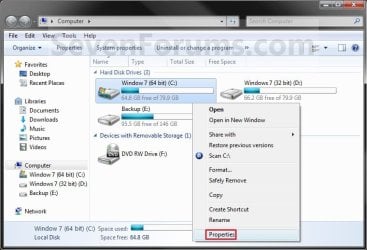
2. Right click the hard disk drive that you want to check, and click on Properties. (see screenshot below) Computer.jpg
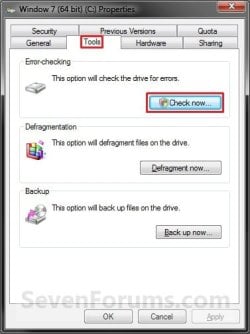
3. Click on the Tools tab, and click on the Check now button under Error-checking. (see screenshot below) Properties.jpg
4. You will now see this window. Do the steps below for what you would like to do. (see screenshot below) Options.jpg
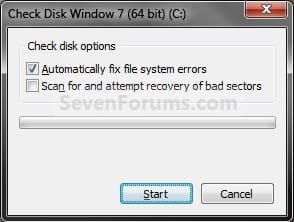
5. To Only Scan the Drive for Errors
NOTE: This will just give you a report if there are any drive errors or not, and will not attempt to fix them. A) Leave both boxes unchecked and click on the Start button. (see screenshot below step 4)
6. To Only Scan and Attempt Recovery of Bad Sectors
NOTE: This scan attempts to find and repair physical errors on the hard disk itself, and it can take much longer to complete. A) uncheck the Automatically fix file system errors box. (see screenshot below step 4)

B) Check the Scan for and attempt recovery of bad sectors box.
7. To Only Scan and Automatically Attempt to Fix Errors
NOTE: This will automatically attempt to repair problems with files and folders that the scan detects. A) Check the Automatically fix file system errors box. (see screenshot below step 4)

B) Uncheck the Scan for and attempt recovery of bad sectors box.
8. To Scan and Automatically Attempt to Fix Errors and Recover Bad Sectors
NOTE: This will scan for both file errors and physical errors (steps 6 and 7). It will then attempt to repair problems with files and folders, and recover physical errors. A) Check the Automatically fix file system errors box. (see screenshot below step 4)

B) Check the Scan for and attempt recovery of bad sectors box.
9. Click on the Start button, and do either step 10 or 11 below depending on if the drive is currently in use or not. (see screenshot below step 4)

10. If the selected hard disk is not in use, then you will see check disk start checking the disk now. (see screenshot below) Step4A.jpg
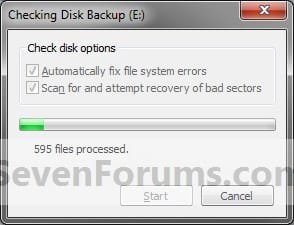
A) When the scan is complete, you will then see
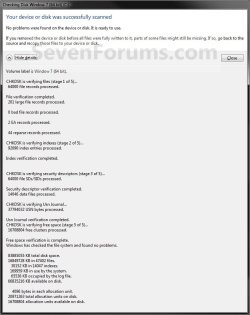
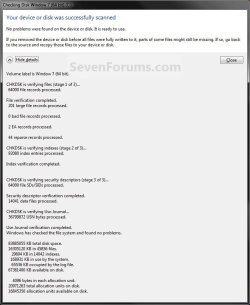
results similar to this. Click on Close. (see screenshots below) Details.jpg
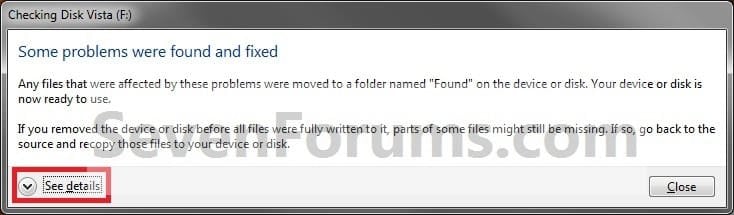
Scan_results2.jpg

B) Click on OK. (see screenshot below step 3)

C) Stop, you're done.
11. If the selected hard disk is in use, then click on the Schedule disk check button. (see screenshot below)
NOTE: If the hard disk that you selected in step 2 is in use (for example, the C: drive or partition that contains Windows 7), you'll be prompted to reschedule the disk check for the next time you restart your computer. Otherwise you will not see this window below. Schedule.jpg
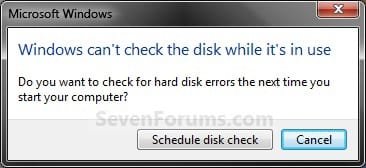
A) Restart the computer.
B) During startup, you will only have 10 seconds to press a key to cancel the Disk Check from steps 7 or 8. (see screenshot below)
   Warning
Once the Disk Check scan starts, DO NOT STOP the scan to prevent possible damage to the data on your hard drive.
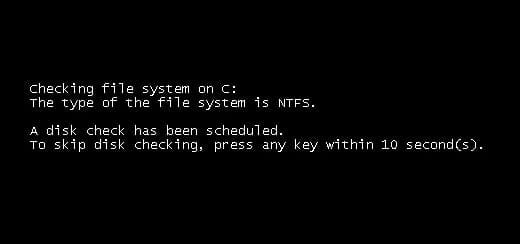
10-Seconds.jpg
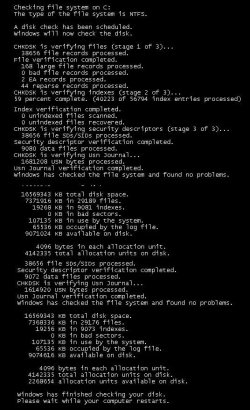
C) When the scan is complete you will see a report similar to this below briefly before the computer automatically restarts. Start-up.jpg


OPTION TWO

To Run Chkdsk from Command Prompt


NOTE: The chkdsk command can be used on a FAT32 or NTFS formatted disk. 1. Open a elevated command prompt or a command prompt at startup.

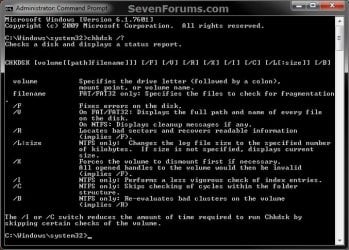
2. In the command prompt, type in the following command below followed by one or more switches that you would like to use below with a space between each switch and press Enter.
NOTE: For example, the most common command to run chkdsk on your C: drive is: chkdsk C: /F
chkdsk [drive letter]: [switches with space inbetween]


Switches that you can use in the command:
  • /F - Fixes errors on the disk. The disk must be locked. If chkdsk cannot lock the drive, a message appears that asks you if you want to check the drive the next time you restart the computer. For example, on the C: drive.
  • /V - Displays the name of each file in every directory as the disk is checked.
  • /R - Locates bad sectors and recovers readable information. The disk must be locked. /r includes the functionality of /f, with the additional analysis of physical disk errors.
  • /L:[size in KB] - Can only be used with a NTFS disk. Changes the chkdsk log file size to the number size in KB you type. If you omit the size parameter, typing /L by itself will display the current chkdsk log file size. For example, to have the default 65536 KB log file for the C: drive, you would type: chkdsk C: /F /L:65536
  • /X - Forces the volume to dismount first, if necessary. All open handles to the drive are invalidated. /x also includes the functionality of /f.
  • /I - Can only be used with a NTFS disk. Performs a less vigorous check of index entries, which reduces the amount of time required to run chkdsk.
  • /C - Can only be used with a NTFS disk. Does not check cycles within the folder structure, which reduces the amount of time required to run chkdsk.
  • /B - Can only be used with a NTFS disk. Clears the list of bad clusters on the volume and rescans all allocated and free clusters for errors. /b includes the functionality of /r. Use this parameter after imaging a volume to a new hard disk drive.
Command.jpg
That's it,
Shawn


Attachments

  • Scan_Results.jpg
    Scan_Results.jpg
    59.7 KB · Views: 786
Last edited:
By starting up my laptop with windows 7 build 7100 i always get step 12 & 13, what is the reason therefor? I don't like it:-)
 

My Computer

OS
Windows 7 RC / 32 bits / build 7100

My Computer

Computer type
PC/Desktop
Computer Manufacturer/Model Number
Self built custom
OS
64-bit Windows 11 Pro for Workstations
CPU
Intel i7-8700K OC'd to 5 GHz
Motherboard
ASUS ROG Maximus XI Formula Z390
Memory
64 GB (4x16GB) G.SKILL TridentZ RGB DDR4 3600 MHz
Graphics Card(s)
ASUS ROG-STRIX-GTX1080TI-O11G-GAMING
Sound Card
Integrated
Monitor(s) Displays
2 x Samsung Odyssey G7 27"
Screen Resolution
2560x1440
Hard Drives
1TB Samsung 990 PRO M.2,
4TB Samsung 990 PRO PRO M.2,
TerraMaster F8 SSD Plus NAS
PSU
Seasonic Prime Titanium 850W
Case
Thermaltake Core P3
Cooling
Corsair Hydro H115i
Keyboard
Logitech wireless K800
Mouse
Logitech MX Master 4
Internet Speed
2 Gb/s Download and 100 Mb/s Upload
Antivirus
Malwarebyte Anti-Malware Premium
Browser
Google Chrome
Other Info
Logitech Z625 speaker system,
Logitech BRIO 4K Pro webcam,
HP Color LaserJet Pro MFP M477fdn,
APC SMART-UPS RT 1000 XL - SURT1000XLI,
Galaxy S23 Plus phone
Thank you I'll try when I've got the time!!
 

My Computer

OS
Windows 7 RC / 32 bits / build 7100
Ok. Please let us know how it went for you. :)
 

My Computer

Computer type
PC/Desktop
Computer Manufacturer/Model Number
Self built custom
OS
64-bit Windows 11 Pro for Workstations
CPU
Intel i7-8700K OC'd to 5 GHz
Motherboard
ASUS ROG Maximus XI Formula Z390
Memory
64 GB (4x16GB) G.SKILL TridentZ RGB DDR4 3600 MHz
Graphics Card(s)
ASUS ROG-STRIX-GTX1080TI-O11G-GAMING
Sound Card
Integrated
Monitor(s) Displays
2 x Samsung Odyssey G7 27"
Screen Resolution
2560x1440
Hard Drives
1TB Samsung 990 PRO M.2,
4TB Samsung 990 PRO PRO M.2,
TerraMaster F8 SSD Plus NAS
PSU
Seasonic Prime Titanium 850W
Case
Thermaltake Core P3
Cooling
Corsair Hydro H115i
Keyboard
Logitech wireless K800
Mouse
Logitech MX Master 4
Internet Speed
2 Gb/s Download and 100 Mb/s Upload
Antivirus
Malwarebyte Anti-Malware Premium
Browser
Google Chrome
Other Info
Logitech Z625 speaker system,
Logitech BRIO 4K Pro webcam,
HP Color LaserJet Pro MFP M477fdn,
APC SMART-UPS RT 1000 XL - SURT1000XLI,
Galaxy S23 Plus phone
Sometimes it's much easier... Only took my windows 7 iso disc --> repair start up, and the problem is solved already:D
 

My Computer

OS
Windows 7 RC / 32 bits / build 7100
Jaap Aal, I'm happy to hear that you got it sorted. :)
 

My Computer

Computer type
PC/Desktop
Computer Manufacturer/Model Number
Self built custom
OS
64-bit Windows 11 Pro for Workstations
CPU
Intel i7-8700K OC'd to 5 GHz
Motherboard
ASUS ROG Maximus XI Formula Z390
Memory
64 GB (4x16GB) G.SKILL TridentZ RGB DDR4 3600 MHz
Graphics Card(s)
ASUS ROG-STRIX-GTX1080TI-O11G-GAMING
Sound Card
Integrated
Monitor(s) Displays
2 x Samsung Odyssey G7 27"
Screen Resolution
2560x1440
Hard Drives
1TB Samsung 990 PRO M.2,
4TB Samsung 990 PRO PRO M.2,
TerraMaster F8 SSD Plus NAS
PSU
Seasonic Prime Titanium 850W
Case
Thermaltake Core P3
Cooling
Corsair Hydro H115i
Keyboard
Logitech wireless K800
Mouse
Logitech MX Master 4
Internet Speed
2 Gb/s Download and 100 Mb/s Upload
Antivirus
Malwarebyte Anti-Malware Premium
Browser
Google Chrome
Other Info
Logitech Z625 speaker system,
Logitech BRIO 4K Pro webcam,
HP Color LaserJet Pro MFP M477fdn,
APC SMART-UPS RT 1000 XL - SURT1000XLI,
Galaxy S23 Plus phone
I am planning to run disk check soon, with both the options to fix it and recover bad sectors checked. I have a 300GB hard drive with 173GB free. Any idea on how long it would take to run the complete disk check? Are we talking about an hour, three hours, eight hours? I really have no idea. Thanks.
 

My Computer

Computer Manufacturer/Model Number
Dell Vostro 1500
OS
Windows 7 Professional
CPU
Intel Core2Duo T5270
Memory
3072MB
Graphics Card(s)
nVidia GeForce 8400M GS
Hard Drives
Western Digital 320GB Scorpio Blue SATAII
Mouse
Logitech VX Revolution
Internet Speed
Comcast Performance High Speed Internet
Hello Vic,

If nothing wrong is found on the drive, I would plan on at least around an hour. Longer if it finds anything and needs to fix it if able.
 

My Computer

Computer type
PC/Desktop
Computer Manufacturer/Model Number
Self built custom
OS
64-bit Windows 11 Pro for Workstations
CPU
Intel i7-8700K OC'd to 5 GHz
Motherboard
ASUS ROG Maximus XI Formula Z390
Memory
64 GB (4x16GB) G.SKILL TridentZ RGB DDR4 3600 MHz
Graphics Card(s)
ASUS ROG-STRIX-GTX1080TI-O11G-GAMING
Sound Card
Integrated
Monitor(s) Displays
2 x Samsung Odyssey G7 27"
Screen Resolution
2560x1440
Hard Drives
1TB Samsung 990 PRO M.2,
4TB Samsung 990 PRO PRO M.2,
TerraMaster F8 SSD Plus NAS
PSU
Seasonic Prime Titanium 850W
Case
Thermaltake Core P3
Cooling
Corsair Hydro H115i
Keyboard
Logitech wireless K800
Mouse
Logitech MX Master 4
Internet Speed
2 Gb/s Download and 100 Mb/s Upload
Antivirus
Malwarebyte Anti-Malware Premium
Browser
Google Chrome
Other Info
Logitech Z625 speaker system,
Logitech BRIO 4K Pro webcam,
HP Color LaserJet Pro MFP M477fdn,
APC SMART-UPS RT 1000 XL - SURT1000XLI,
Galaxy S23 Plus phone
Thanks. Is there any way I can look at the scan results if the scan completed and I was not there when it was done? I just want to know if there are any problems with my hard drive.

I ran the scan last night an hour before I went to bed. In the one hour, it only completed 13 percent, so I figured it would run for many more hours. I set the alarm to wake up four hours later, and when I did, I guess the scan had already completed because the screen just showed my desktop (like after the computer has started up).
 

My Computer

Computer Manufacturer/Model Number
Dell Vostro 1500
OS
Windows 7 Professional
CPU
Intel Core2Duo T5270
Memory
3072MB
Graphics Card(s)
nVidia GeForce 8400M GS
Hard Drives
Western Digital 320GB Scorpio Blue SATAII
Mouse
Logitech VX Revolution
Internet Speed
Comcast Performance High Speed Internet
Vic,

The Vista check disk log can be found at:
  • Control Panel
  • Administrative Tools
  • Event Viewer
  • Windows Logs (left pane)
  • Application (left pane)
  • In middle pane, scroll down the Application events looking for Wininit in the Source column.
  • All Winint entries are for Disk Check.
 

My Computer

Computer type
PC/Desktop
Computer Manufacturer/Model Number
Self built custom
OS
64-bit Windows 11 Pro for Workstations
CPU
Intel i7-8700K OC'd to 5 GHz
Motherboard
ASUS ROG Maximus XI Formula Z390
Memory
64 GB (4x16GB) G.SKILL TridentZ RGB DDR4 3600 MHz
Graphics Card(s)
ASUS ROG-STRIX-GTX1080TI-O11G-GAMING
Sound Card
Integrated
Monitor(s) Displays
2 x Samsung Odyssey G7 27"
Screen Resolution
2560x1440
Hard Drives
1TB Samsung 990 PRO M.2,
4TB Samsung 990 PRO PRO M.2,
TerraMaster F8 SSD Plus NAS
PSU
Seasonic Prime Titanium 850W
Case
Thermaltake Core P3
Cooling
Corsair Hydro H115i
Keyboard
Logitech wireless K800
Mouse
Logitech MX Master 4
Internet Speed
2 Gb/s Download and 100 Mb/s Upload
Antivirus
Malwarebyte Anti-Malware Premium
Browser
Google Chrome
Other Info
Logitech Z625 speaker system,
Logitech BRIO 4K Pro webcam,
HP Color LaserJet Pro MFP M477fdn,
APC SMART-UPS RT 1000 XL - SURT1000XLI,
Galaxy S23 Plus phone
Disk check

Currently, when i reboot my computer, it goes to the disk check screen and the countdown begins to start the disk check but if i press a key to skip, or if i let the timer go down to start the disk check nothing happens. It just stays on that screen and eventually the computer will go into sleep mode and when i turn it back on again i just get a blank screen and have to restart and do the same process again.
Any ideas for what to do?

thanks
 

My Computer

Computer Manufacturer/Model Number
ASUS
OS
Windows 7
Hello Ron, and welcome to Seven Forums.

You might see if resetting chkdsk may stop it from running at startup for you. Afterwards, run a sfc /scannow command to see if it finds and may fix any bad or corrupted system files.

Hope this helps,
Shawn
 

My Computer

Computer type
PC/Desktop
Computer Manufacturer/Model Number
Self built custom
OS
64-bit Windows 11 Pro for Workstations
CPU
Intel i7-8700K OC'd to 5 GHz
Motherboard
ASUS ROG Maximus XI Formula Z390
Memory
64 GB (4x16GB) G.SKILL TridentZ RGB DDR4 3600 MHz
Graphics Card(s)
ASUS ROG-STRIX-GTX1080TI-O11G-GAMING
Sound Card
Integrated
Monitor(s) Displays
2 x Samsung Odyssey G7 27"
Screen Resolution
2560x1440
Hard Drives
1TB Samsung 990 PRO M.2,
4TB Samsung 990 PRO PRO M.2,
TerraMaster F8 SSD Plus NAS
PSU
Seasonic Prime Titanium 850W
Case
Thermaltake Core P3
Cooling
Corsair Hydro H115i
Keyboard
Logitech wireless K800
Mouse
Logitech MX Master 4
Internet Speed
2 Gb/s Download and 100 Mb/s Upload
Antivirus
Malwarebyte Anti-Malware Premium
Browser
Google Chrome
Other Info
Logitech Z625 speaker system,
Logitech BRIO 4K Pro webcam,
HP Color LaserJet Pro MFP M477fdn,
APC SMART-UPS RT 1000 XL - SURT1000XLI,
Galaxy S23 Plus phone
HELP!

For the past few days I have been getting the message:-

"One of your disks needs to be checked for consistency. You may cancel the disk check but it is strongly recommended that you continue.
Windows will now check the disk.
Cannot open the volume for direct access.
Autochk cannot run due to an error caused by a recently installed software package.
Use the system restore feature from the control panel to restore the system to a point prior to the recent software package installation.
An unspcified error occurred (766f6c756d652e63 3f1)."

I have used the "Check now" option on the tools menu under Properties menu on Computer to schedule a disk check on startup and gone back to uninstall updates and the recent Firefox update, but to no avail.

Can anyone help. John Darné.
 

My Computer

Computer Manufacturer/Model Number
Asus P4C800 Deluxe
OS
Windows 7 Professional
CPU
Intel Pentium 4 CPU 3.2 GHz
Motherboard
Asus P4C800 Deluxe
Memory
2 Gb
Graphics Card(s)
PowerColor 9550
Monitor(s) Displays
Acer AL1717 LCD
Hard Drives
Maxtor STM380211AS ATA Device
ST3160023A ATA Device
Hello John, and welcome to Seven Forums.

You might see if doing a system restore using a restore point dated before you had this error may be able to fix it for you.

Hope this helps,
Shawn
 

My Computer

Computer type
PC/Desktop
Computer Manufacturer/Model Number
Self built custom
OS
64-bit Windows 11 Pro for Workstations
CPU
Intel i7-8700K OC'd to 5 GHz
Motherboard
ASUS ROG Maximus XI Formula Z390
Memory
64 GB (4x16GB) G.SKILL TridentZ RGB DDR4 3600 MHz
Graphics Card(s)
ASUS ROG-STRIX-GTX1080TI-O11G-GAMING
Sound Card
Integrated
Monitor(s) Displays
2 x Samsung Odyssey G7 27"
Screen Resolution
2560x1440
Hard Drives
1TB Samsung 990 PRO M.2,
4TB Samsung 990 PRO PRO M.2,
TerraMaster F8 SSD Plus NAS
PSU
Seasonic Prime Titanium 850W
Case
Thermaltake Core P3
Cooling
Corsair Hydro H115i
Keyboard
Logitech wireless K800
Mouse
Logitech MX Master 4
Internet Speed
2 Gb/s Download and 100 Mb/s Upload
Antivirus
Malwarebyte Anti-Malware Premium
Browser
Google Chrome
Other Info
Logitech Z625 speaker system,
Logitech BRIO 4K Pro webcam,
HP Color LaserJet Pro MFP M477fdn,
APC SMART-UPS RT 1000 XL - SURT1000XLI,
Galaxy S23 Plus phone
Hi Shawn,
I tried to do a system restore, but it tells me it need to do a disk check before it can restore. It says Windows has detected file system corruption on Main drive C:. You must check the disk for errors before it can be restored. I tried unchecking both option boxes and it does the check (without doing the fixes). But when i do the next step - restore - it says i need to check the disk for errors first. In the report after doing the check, it says i should run chkdsk with the /f option, but how do i do this? Maybe my only option is to re-format the drive and reinstall windows 7. what do you think.
John
 

My Computer

Computer Manufacturer/Model Number
Asus P4C800 Deluxe
OS
Windows 7 Professional
CPU
Intel Pentium 4 CPU 3.2 GHz
Motherboard
Asus P4C800 Deluxe
Memory
2 Gb
Graphics Card(s)
PowerColor 9550
Monitor(s) Displays
Acer AL1717 LCD
Hard Drives
Maxtor STM380211AS ATA Device
ST3160023A ATA Device

My Computer

Computer type
PC/Desktop
Computer Manufacturer/Model Number
Self built custom
OS
64-bit Windows 11 Pro for Workstations
CPU
Intel i7-8700K OC'd to 5 GHz
Motherboard
ASUS ROG Maximus XI Formula Z390
Memory
64 GB (4x16GB) G.SKILL TridentZ RGB DDR4 3600 MHz
Graphics Card(s)
ASUS ROG-STRIX-GTX1080TI-O11G-GAMING
Sound Card
Integrated
Monitor(s) Displays
2 x Samsung Odyssey G7 27"
Screen Resolution
2560x1440
Hard Drives
1TB Samsung 990 PRO M.2,
4TB Samsung 990 PRO PRO M.2,
TerraMaster F8 SSD Plus NAS
PSU
Seasonic Prime Titanium 850W
Case
Thermaltake Core P3
Cooling
Corsair Hydro H115i
Keyboard
Logitech wireless K800
Mouse
Logitech MX Master 4
Internet Speed
2 Gb/s Download and 100 Mb/s Upload
Antivirus
Malwarebyte Anti-Malware Premium
Browser
Google Chrome
Other Info
Logitech Z625 speaker system,
Logitech BRIO 4K Pro webcam,
HP Color LaserJet Pro MFP M477fdn,
APC SMART-UPS RT 1000 XL - SURT1000XLI,
Galaxy S23 Plus phone
Hi Guys,
Thanks a ton for all your help. MY PROBLEM IS SOLVED with your help. For future reference in case anyone else encounters the same problem as I did:- I tried Booting into Safe mode with the Command prompt and then running a chkdsf c: /f from there. I got the message that as the disk was in use it could not run the check disk and would I like to schedule it at the next startup. I typed yes and then restarted, but no luck there. Same error message as before.
I then booted into the Advanced Boot Options and selected Repair your computer. I entered the language, user name and password in the relevant screens, then chose the Command prompt option. From here I ran the chkdsk C: /f command and it ran perfectly. My pc no longer displays the error message I first queried.
Once again thanks for your expert help. John Darné.
 

My Computer

Computer Manufacturer/Model Number
Asus P4C800 Deluxe
OS
Windows 7 Professional
CPU
Intel Pentium 4 CPU 3.2 GHz
Motherboard
Asus P4C800 Deluxe
Memory
2 Gb
Graphics Card(s)
PowerColor 9550
Monitor(s) Displays
Acer AL1717 LCD
Hard Drives
Maxtor STM380211AS ATA Device
ST3160023A ATA Device
You're most welcome John. I'm happy to hear that you got your issue sorted. Thank you for posting back with your results. :)
 

My Computer

Computer type
PC/Desktop
Computer Manufacturer/Model Number
Self built custom
OS
64-bit Windows 11 Pro for Workstations
CPU
Intel i7-8700K OC'd to 5 GHz
Motherboard
ASUS ROG Maximus XI Formula Z390
Memory
64 GB (4x16GB) G.SKILL TridentZ RGB DDR4 3600 MHz
Graphics Card(s)
ASUS ROG-STRIX-GTX1080TI-O11G-GAMING
Sound Card
Integrated
Monitor(s) Displays
2 x Samsung Odyssey G7 27"
Screen Resolution
2560x1440
Hard Drives
1TB Samsung 990 PRO M.2,
4TB Samsung 990 PRO PRO M.2,
TerraMaster F8 SSD Plus NAS
PSU
Seasonic Prime Titanium 850W
Case
Thermaltake Core P3
Cooling
Corsair Hydro H115i
Keyboard
Logitech wireless K800
Mouse
Logitech MX Master 4
Internet Speed
2 Gb/s Download and 100 Mb/s Upload
Antivirus
Malwarebyte Anti-Malware Premium
Browser
Google Chrome
Other Info
Logitech Z625 speaker system,
Logitech BRIO 4K Pro webcam,
HP Color LaserJet Pro MFP M477fdn,
APC SMART-UPS RT 1000 XL - SURT1000XLI,
Galaxy S23 Plus phone
I couldn't find my win 7 installation dvd to do a repair install to fix my earlier default user junction problem.

I stumbled upon this and was wondering if this could do anything for me. I guess I can just try it and see if it will make "Default User" back to its original state...I mean, it IS a system file right? and a check disk fixes "file system errors", right? I don't see then why this was not recommended to me earlier...
 

My Computer

OS
Vista
Back
Top