Solved Disk Cleanup and older Restore Points

Highcountryride

New member
Member
Local time
7:15 AM
Messages
40
System is Win 7 HP SP1 running on a SSD. I wanted to recover some disk space on the SSD so I ran Disk Cleanup in order to delete all but the latest Restore Point. The Restore Point dialogue showed that I was using about 5.6 GB for Restore Points.
Figure 1
sys-restore3.jpg

I ran Disk Cleanup and selected Clean up system files. I then selected the More option and selected Clean up in the System Restore and Shadow Copies box to delete all restore points except the latest one and OK'd the prompts. Found out that I had to reboot for cleanup to finish.
Figure 2
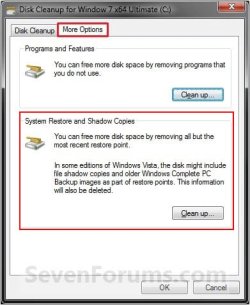
disk-cleanup.jpg

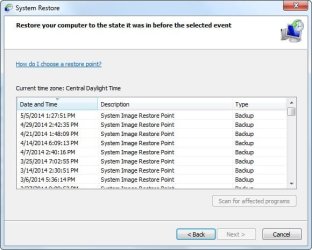
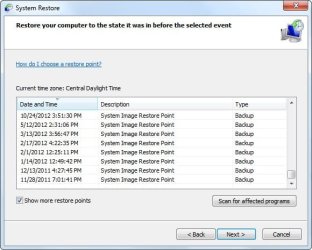
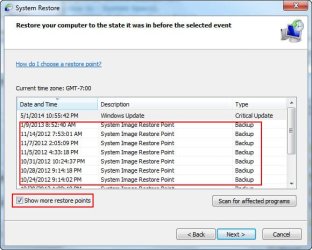
After I restarted I checked Restore Points and found that all but the last one had been deleted (figure 3) but when I selected Show more restore points I saw that a lot of much older restore points were still listed (figure 4).
Figure 3
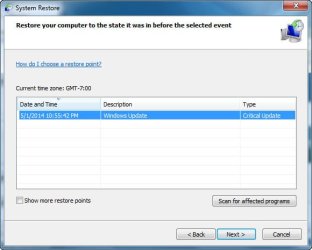
sys-restore1.jpg
Figure 4
sys-restore2.jpg

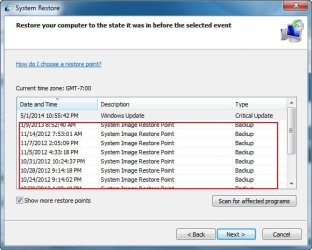
Checking the used space of my SSD I found that I had recovered about 5 GB total but the Disk Space Usage still showed 5.63 GB (see figure 1).

Anyone have information on why it appears that I gained back over 5 GB of disk space on the SSD but System Restore is still showing the much older restore points?

Some additional information: After initially setting up this system I created a second user (myself) and put it on a secondary HDD. The intent was to reduce the amount of normal writes to the SSD that occur for user accounts to AppData and any other writes to that user account. Having, as usual, over-thought the necessity to reduce writes to the SSD (first time experience with using a SSD), I stopped using the second user account and reverted to my initial first account. That second account had System Protection disabled for it so I don't think that these older restore points could be related to that and also I didn't set up the second user until after the dates shown in Figure 4.

Hope my descriptions are clear and would appreciate any responses.
 

My Computer My Computer

Computer type
PC/Desktop
Computer Manufacturer/Model Number
custom build
OS
Window 7 Home Premium 64bit
CPU
Intel i5 3570K
Motherboard
ASRock Z77 Pro4-M
Memory
16 GB Corsair PC3-1280 DDR3
Graphics Card(s)
EVGA e-GeForce GTX 650
Sound Card
N/A
Monitor(s) Displays
Acer K242HL
Screen Resolution
1280 x 1024
Hard Drives
Samsung 830 256GB SSD SATA 6 Gb/s
WD Black 500GB SATA 6 Gb/s
PSU
Corsair vx 550
Case
Silverstone Temjin J108b
Cooling
Cooler Master Hyper 212 EVO
Keyboard
Logitech K350 wireless
Mouse
Logitech K510 wireless
Internet Speed
50 Mbps down, 5 Mbps up
Antivirus
Bitdefender Total Security 2018
Browser
Firefox, Chrome
Let's try a quick fix. If it doesn't work then we can dig into the diagnostics. :)

Turn system protection off. Turn system protection on. Make one restore point. See what is shown for disk usage etc..
 

My Computer My Computer

Computer Manufacturer/Model Number
HP Media Center
OS
Windows 7 32 bit
CPU
AMD 5200+ dual core
Memory
2 GB
Graphics Card(s)
NVidia GeForce 6150SE 128 MB
Monitor(s) Displays
CRT
Screen Resolution
1280x1024
Hard Drives
500 GB Sata internal :

SIIG USB 3.0 docking stations w/WD Caviar Black 6 Gb/s drives
Keyboard
PS/2
Mouse
PS/2 Wheel Mouse
Other Info
SIIG USB 3.0 PCIexpress card.
Yeah, I was thinking of doing that but the only problem is that the only restore point that I would want to save is the latest one which was prior to the 5/1/14 MS update for IE (figure 3). I don't use IE as a rule but thought I would let that one settle in before I tried anything.

Kind of between the proverbial rock and hard spot here. Would like to do as you suggest but that would eliminate the only restore point I want to keep for a bit which was created before the latest MS update was installed.
 

My Computer My Computer

Computer type
PC/Desktop
Computer Manufacturer/Model Number
custom build
OS
Window 7 Home Premium 64bit
CPU
Intel i5 3570K
Motherboard
ASRock Z77 Pro4-M
Memory
16 GB Corsair PC3-1280 DDR3
Graphics Card(s)
EVGA e-GeForce GTX 650
Sound Card
N/A
Monitor(s) Displays
Acer K242HL
Screen Resolution
1280 x 1024
Hard Drives
Samsung 830 256GB SSD SATA 6 Gb/s
WD Black 500GB SATA 6 Gb/s
PSU
Corsair vx 550
Case
Silverstone Temjin J108b
Cooling
Cooler Master Hyper 212 EVO
Keyboard
Logitech K350 wireless
Mouse
Logitech K510 wireless
Internet Speed
50 Mbps down, 5 Mbps up
Antivirus
Bitdefender Total Security 2018
Browser
Firefox, Chrome
You have system protection On for E: and if I'm correct that Windows is on C: then you should be able to delete all the restore points except for the Update RP that you want to keep. Instead of Windows Disk Cleanup use CCleaner. It give you more control.

In the Tools menu click System Restore. You can then select which RPs to delete.
 

My Computer My Computer

Computer Manufacturer/Model Number
HP Media Center
OS
Windows 7 32 bit
CPU
AMD 5200+ dual core
Memory
2 GB
Graphics Card(s)
NVidia GeForce 6150SE 128 MB
Monitor(s) Displays
CRT
Screen Resolution
1280x1024
Hard Drives
500 GB Sata internal :

SIIG USB 3.0 docking stations w/WD Caviar Black 6 Gb/s drives
Keyboard
PS/2
Mouse
PS/2 Wheel Mouse
Other Info
SIIG USB 3.0 PCIexpress card.
Check whether those restore points (shadows) are real. Run this command in elevated command prompt:

vssadmin list shadows

Then if you want to redice your shadowstorage to e.g. 3% of the partition size, run this command - chnage the percentage if you want more or less.

vssadmin resize shadowstorage /For=C: /On=C: /MaxSize=3%
 

My Computer My Computer

Computer Manufacturer/Model Number
HP, Dell, Gateway, Toshiba - 4 laptops and 2 desktops
OS
Vista, Windows7, Mint Mate, Zorin, Windows 8
CPU
from 1.6GHz Duo to i7
Monitor(s) Displays
2x HP w2207
Hard Drives
5x HDD, 7x SSD, 12x Externals
Keyboard
with trackball - no mices
Mouse
Trackball mice
Internet Speed
DSL 6000
You have system protection On for E: and if I'm correct that Windows is on C: then you should be able to delete all the restore points except for the Update RP that you want to keep. Instead of Windows Disk Cleanup use CCleaner. It give you more control.

In the Tools menu click System Restore. You can then select which RPs to delete.
Yes, I didn't realize that when I was grabbing the screenshot. Actual size for the C drive was about 1.8 GB. I have CCleaner and will that check feature out.

I think if all seems OK with the 5/15/14 MS update in a few days, I will turn off system protection and then do as you suggested with turning off System Protection and see where I end up. It was my error during setup to select all the partitions on my secondary HDD (E, F, G and H) and include them in System Protection. I have looked at each partitions's properties and under Previous Versions see that there are a lot of Backups for each one. If I turn of System Protection will those "shadow copies" be deleted or do I have to do that manually?

Appreciate the help.
 

My Computer My Computer

Computer type
PC/Desktop
Computer Manufacturer/Model Number
custom build
OS
Window 7 Home Premium 64bit
CPU
Intel i5 3570K
Motherboard
ASRock Z77 Pro4-M
Memory
16 GB Corsair PC3-1280 DDR3
Graphics Card(s)
EVGA e-GeForce GTX 650
Sound Card
N/A
Monitor(s) Displays
Acer K242HL
Screen Resolution
1280 x 1024
Hard Drives
Samsung 830 256GB SSD SATA 6 Gb/s
WD Black 500GB SATA 6 Gb/s
PSU
Corsair vx 550
Case
Silverstone Temjin J108b
Cooling
Cooler Master Hyper 212 EVO
Keyboard
Logitech K350 wireless
Mouse
Logitech K510 wireless
Internet Speed
50 Mbps down, 5 Mbps up
Antivirus
Bitdefender Total Security 2018
Browser
Firefox, Chrome
Check whether those restore points (shadows) are real. Run this command in elevated command prompt:

vssadmin list shadows

Then if you want to redice your shadowstorage to e.g. 3% of the partition size, run this command - chnage the percentage if you want more or less.

vssadmin resize shadowstorage /For=C: /On=C: /MaxSize=3%
Thanks for the reply. I opened Command Prompt with Run as Administrator. It opened with the directory listed as c:\Windows\system32>. I ran your command. It returned about 25 entries for shadow copies for the E, F, G and H partitions so I assume they are real.

Will turning off System Protection delete these shadow copies or do I have do that manually? I did check the properties of each partition and under the Previous Versions tabs I saw backups with dates going way back. These were able to be opened and showed files and data as per my folder structure for each partition. Looks like I could recover older versions of files through this. Actually, I'm not really interested in doing that as I do weekly Acronis system images which I keep on a 2 TB external HDD and can recover files from there if necessary.

Really just looking to clean things up, get rid of restore points and also reduce writes to the system SSD.
 

My Computer My Computer

Computer type
PC/Desktop
Computer Manufacturer/Model Number
custom build
OS
Window 7 Home Premium 64bit
CPU
Intel i5 3570K
Motherboard
ASRock Z77 Pro4-M
Memory
16 GB Corsair PC3-1280 DDR3
Graphics Card(s)
EVGA e-GeForce GTX 650
Sound Card
N/A
Monitor(s) Displays
Acer K242HL
Screen Resolution
1280 x 1024
Hard Drives
Samsung 830 256GB SSD SATA 6 Gb/s
WD Black 500GB SATA 6 Gb/s
PSU
Corsair vx 550
Case
Silverstone Temjin J108b
Cooling
Cooler Master Hyper 212 EVO
Keyboard
Logitech K350 wireless
Mouse
Logitech K510 wireless
Internet Speed
50 Mbps down, 5 Mbps up
Antivirus
Bitdefender Total Security 2018
Browser
Firefox, Chrome
You have system protection On for E: and if I'm correct that Windows is on C: then you should be able to delete all the restore points except for the Update RP that you want to keep. Instead of Windows Disk Cleanup use CCleaner. It give you more control.

In the Tools menu click System Restore. You can then select which RPs to delete.
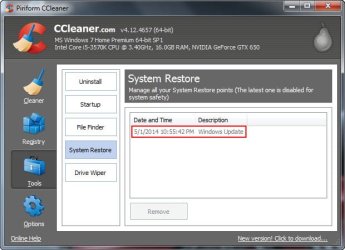
OK, this is interesting. Using CCleaner and checking Tools>System Restore it shows only the latest update which is the setting I did when I used Disk Cleanup. No sign of the other RPs as listed in figure 4 of my OP.

CCleaner grab:
ccleaner_sysem-restore.jpg
 

My Computer My Computer

Computer type
PC/Desktop
Computer Manufacturer/Model Number
custom build
OS
Window 7 Home Premium 64bit
CPU
Intel i5 3570K
Motherboard
ASRock Z77 Pro4-M
Memory
16 GB Corsair PC3-1280 DDR3
Graphics Card(s)
EVGA e-GeForce GTX 650
Sound Card
N/A
Monitor(s) Displays
Acer K242HL
Screen Resolution
1280 x 1024
Hard Drives
Samsung 830 256GB SSD SATA 6 Gb/s
WD Black 500GB SATA 6 Gb/s
PSU
Corsair vx 550
Case
Silverstone Temjin J108b
Cooling
Cooler Master Hyper 212 EVO
Keyboard
Logitech K350 wireless
Mouse
Logitech K510 wireless
Internet Speed
50 Mbps down, 5 Mbps up
Antivirus
Bitdefender Total Security 2018
Browser
Firefox, Chrome
Is E: an SSD? If so it may have something to do with deletion/reconditioning to avoid slow writes. When you delete stuff the driver gets around to scrubbing it when it has time. Until then it shows the space as used. Maybe not. I'm just guessing.

Edit: When you have system protection set to save versions of files it's not unusual for one RP to be several GB.
 

My Computer My Computer

Computer Manufacturer/Model Number
HP Media Center
OS
Windows 7 32 bit
CPU
AMD 5200+ dual core
Memory
2 GB
Graphics Card(s)
NVidia GeForce 6150SE 128 MB
Monitor(s) Displays
CRT
Screen Resolution
1280x1024
Hard Drives
500 GB Sata internal :

SIIG USB 3.0 docking stations w/WD Caviar Black 6 Gb/s drives
Keyboard
PS/2
Mouse
PS/2 Wheel Mouse
Other Info
SIIG USB 3.0 PCIexpress card.

My Computer My Computer

Computer Manufacturer/Model Number
HP, Dell, Gateway, Toshiba - 4 laptops and 2 desktops
OS
Vista, Windows7, Mint Mate, Zorin, Windows 8
CPU
from 1.6GHz Duo to i7
Monitor(s) Displays
2x HP w2207
Hard Drives
5x HDD, 7x SSD, 12x Externals
Keyboard
with trackball - no mices
Mouse
Trackball mice
Internet Speed
DSL 6000
Is E: an SSD? If so it may have something to do with deletion/reconditioning to avoid slow writes. When you delete stuff the driver gets around to scrubbing it when it has time. Until then it shows the space as used. Maybe not. I'm just guessing.

Edit: When you have system protection set to save versions of files it's not unusual for one RP to be several GB.
No, the C: system drive is the SSD. Partitions E, F, G & H are on a secondary 500 GB HDD. These partitions are for backups, data, downloads and programs that I don't want installed on the SSD.
 

My Computer My Computer

Computer type
PC/Desktop
Computer Manufacturer/Model Number
custom build
OS
Window 7 Home Premium 64bit
CPU
Intel i5 3570K
Motherboard
ASRock Z77 Pro4-M
Memory
16 GB Corsair PC3-1280 DDR3
Graphics Card(s)
EVGA e-GeForce GTX 650
Sound Card
N/A
Monitor(s) Displays
Acer K242HL
Screen Resolution
1280 x 1024
Hard Drives
Samsung 830 256GB SSD SATA 6 Gb/s
WD Black 500GB SATA 6 Gb/s
PSU
Corsair vx 550
Case
Silverstone Temjin J108b
Cooling
Cooler Master Hyper 212 EVO
Keyboard
Logitech K350 wireless
Mouse
Logitech K510 wireless
Internet Speed
50 Mbps down, 5 Mbps up
Antivirus
Bitdefender Total Security 2018
Browser
Firefox, Chrome
The E, F, G and H restore points may be useful if those are data partitions. But if they are not data partitions, I would just shut off system protection.

For data partitions I always keep a few restore points because thru those I can recover files that were accidently deleted. Here is how:

http://www.sevenforums.com/tutorials/132087-shadowexplorer-recover-lost-files-folders.html
Thanks for that info. Only one is a data partition. As stated earlier, the SSD is the C: system drive and E, F, G & H are partitions on a secondary HDD.

Sounds like what I could do is turn off System Protection, then check to see if all the older restore points are gone, turn System Protection back on and set it up to only work for the C and F partitions. I always thought that all the restore point data was kept on the system drive and could not be moved but is the RP data for the other partitions stored on those partitions? Very confusing to me! :confused:

Since I use Acronis True Image to make weekly system images of the C drive and also an image of the partitions on the secondary HDD I could probably live without System Protection at all but Restore Points have always seemed to be an easy way to fix a potential bad install or a MS update that doesn't work properly. Easier to use then restoring an Acronis image.

The main reason for the original post is to try to minimize writes to the SSD. The restore point sizes are not that large and would be OK. In order to do that I guess I will have to turn off System Protection and just rely on the Acronis images. Does this sound right?
 

My Computer My Computer

Computer type
PC/Desktop
Computer Manufacturer/Model Number
custom build
OS
Window 7 Home Premium 64bit
CPU
Intel i5 3570K
Motherboard
ASRock Z77 Pro4-M
Memory
16 GB Corsair PC3-1280 DDR3
Graphics Card(s)
EVGA e-GeForce GTX 650
Sound Card
N/A
Monitor(s) Displays
Acer K242HL
Screen Resolution
1280 x 1024
Hard Drives
Samsung 830 256GB SSD SATA 6 Gb/s
WD Black 500GB SATA 6 Gb/s
PSU
Corsair vx 550
Case
Silverstone Temjin J108b
Cooling
Cooler Master Hyper 212 EVO
Keyboard
Logitech K350 wireless
Mouse
Logitech K510 wireless
Internet Speed
50 Mbps down, 5 Mbps up
Antivirus
Bitdefender Total Security 2018
Browser
Firefox, Chrome
I always thought that all the restore point data was kept on the system drive and could not be moved
Restore points are being kept on the partition to which they pertain.
 

My Computer My Computer

Computer Manufacturer/Model Number
HP, Dell, Gateway, Toshiba - 4 laptops and 2 desktops
OS
Vista, Windows7, Mint Mate, Zorin, Windows 8
CPU
from 1.6GHz Duo to i7
Monitor(s) Displays
2x HP w2207
Hard Drives
5x HDD, 7x SSD, 12x Externals
Keyboard
with trackball - no mices
Mouse
Trackball mice
Internet Speed
DSL 6000
Thanks for the clarification. OK, what I'll do is turn off System Protection, which should make all the old Restore Points, including those on the E, F, G and H partitions, go away, right? Then I'll turn SP back on and enable it only for the C drive and the F partition. I guess I will sacrifice the writes to the C drive for the convenience of having restore points for installs and MS updates.
 

My Computer My Computer

Computer type
PC/Desktop
Computer Manufacturer/Model Number
custom build
OS
Window 7 Home Premium 64bit
CPU
Intel i5 3570K
Motherboard
ASRock Z77 Pro4-M
Memory
16 GB Corsair PC3-1280 DDR3
Graphics Card(s)
EVGA e-GeForce GTX 650
Sound Card
N/A
Monitor(s) Displays
Acer K242HL
Screen Resolution
1280 x 1024
Hard Drives
Samsung 830 256GB SSD SATA 6 Gb/s
WD Black 500GB SATA 6 Gb/s
PSU
Corsair vx 550
Case
Silverstone Temjin J108b
Cooling
Cooler Master Hyper 212 EVO
Keyboard
Logitech K350 wireless
Mouse
Logitech K510 wireless
Internet Speed
50 Mbps down, 5 Mbps up
Antivirus
Bitdefender Total Security 2018
Browser
Firefox, Chrome
Another good free backup tool is ERUNT. It backs up critical sections of the Registry only.

It has saved my bacon a few times. :)
 

My Computer My Computer

Computer Manufacturer/Model Number
HP Media Center
OS
Windows 7 32 bit
CPU
AMD 5200+ dual core
Memory
2 GB
Graphics Card(s)
NVidia GeForce 6150SE 128 MB
Monitor(s) Displays
CRT
Screen Resolution
1280x1024
Hard Drives
500 GB Sata internal :

SIIG USB 3.0 docking stations w/WD Caviar Black 6 Gb/s drives
Keyboard
PS/2
Mouse
PS/2 Wheel Mouse
Other Info
SIIG USB 3.0 PCIexpress card.
I would not worry about writing to the SSD. My oldest SSD is from 2008 and is still going strong. And I always write restore points.
 

My Computer My Computer

Computer Manufacturer/Model Number
HP, Dell, Gateway, Toshiba - 4 laptops and 2 desktops
OS
Vista, Windows7, Mint Mate, Zorin, Windows 8
CPU
from 1.6GHz Duo to i7
Monitor(s) Displays
2x HP w2207
Hard Drives
5x HDD, 7x SSD, 12x Externals
Keyboard
with trackball - no mices
Mouse
Trackball mice
Internet Speed
DSL 6000
Those entries are from Creating a System Image through Windows 7. System Image Restore Point

I have old System Image Restore Point's dating back to 11/28/2011, and have not found a way to get rid of them.
Turning off System Protection will not get rid of them either.

I just Created a System Image.
System Image Restore Points-1.jpg
System Image Restore Points-2.jpg

[Resolved] What is a System Image Restore Point? - WindowsBBS Forum
 

My Computer My Computer

Computer type
PC/Desktop
Computer Manufacturer/Model Number
Dell Inspiron 530
OS
Windows 7 Professional SP1 64-bit
CPU
Intel Core 2 Duo Processor E8300 @ 2.83GHz
Motherboard
Dell Inc. 0RY007 (Socket 775)
Memory
4.00 GB Dual-Channel DDR2 @ 332MHz (5-5-5-15)
Graphics Card(s)
Intel(R) G33/G31 Express Chipset Family
Sound Card
Integrated 7.1 Channel Audio
Monitor(s) Displays
Acer G245HQL 23.6" LED(1920x1080@60Hz)
Screen Resolution
1920 x 1080
Hard Drives
Disk 0 HITACHI 1TB OS Installed - Disk 1 HITACHI 1TB For Backups
Keyboard
Dell USB Keyboard
Mouse
Dell Optical USB Mouse
Internet Speed
DSL 10 meg
Antivirus
Symantec(SEP)
Browser
Pale Moon
I don't think those are real unless you have a huge shadowstorage. Checkk with vssadmin. You can always drastically reduce the shadowstorage. That will delete them.
 

My Computer My Computer

Computer Manufacturer/Model Number
HP, Dell, Gateway, Toshiba - 4 laptops and 2 desktops
OS
Vista, Windows7, Mint Mate, Zorin, Windows 8
CPU
from 1.6GHz Duo to i7
Monitor(s) Displays
2x HP w2207
Hard Drives
5x HDD, 7x SSD, 12x Externals
Keyboard
with trackball - no mices
Mouse
Trackball mice
Internet Speed
DSL 6000

My Computer My Computer

Computer Manufacturer/Model Number
HP Media Center
OS
Windows 7 32 bit
CPU
AMD 5200+ dual core
Memory
2 GB
Graphics Card(s)
NVidia GeForce 6150SE 128 MB
Monitor(s) Displays
CRT
Screen Resolution
1280x1024
Hard Drives
500 GB Sata internal :

SIIG USB 3.0 docking stations w/WD Caviar Black 6 Gb/s drives
Keyboard
PS/2
Mouse
PS/2 Wheel Mouse
Other Info
SIIG USB 3.0 PCIexpress card.
OK, I've turned off System Protection for partitions E, F, G & H (all on secondary HDD) and the space used returned to zero and the Previous Versions for each partition have been removed. I'll be turning off SP for my C drive in a day or so and hopefully the same will happen. My one concern is the so called "ghost" restore points that appear when I select Show more restore points.
Figure 1
sys-restore2-a.jpg

I found an older forum post that seemed to address this and I'm wondering if this would be valid for removing them. The solution is post #4 and was posted by maxseven. There is some mention of this working with Windows Server editions and just wondering if it would work with Win 7.
 

My Computer My Computer

Computer type
PC/Desktop
Computer Manufacturer/Model Number
custom build
OS
Window 7 Home Premium 64bit
CPU
Intel i5 3570K
Motherboard
ASRock Z77 Pro4-M
Memory
16 GB Corsair PC3-1280 DDR3
Graphics Card(s)
EVGA e-GeForce GTX 650
Sound Card
N/A
Monitor(s) Displays
Acer K242HL
Screen Resolution
1280 x 1024
Hard Drives
Samsung 830 256GB SSD SATA 6 Gb/s
WD Black 500GB SATA 6 Gb/s
PSU
Corsair vx 550
Case
Silverstone Temjin J108b
Cooling
Cooler Master Hyper 212 EVO
Keyboard
Logitech K350 wireless
Mouse
Logitech K510 wireless
Internet Speed
50 Mbps down, 5 Mbps up
Antivirus
Bitdefender Total Security 2018
Browser
Firefox, Chrome
Back
Top