Solved Disk Cleanup and older Restore Points

You are backed up with Acronis so I think it's worth a go. It sure sounds like the same problem. I never heard of wbadmin but, sure enough there's a wbadmin.exe on my machine.
 

My Computer My Computer

Computer Manufacturer/Model Number
HP Media Center
OS
Windows 7 32 bit
CPU
AMD 5200+ dual core
Memory
2 GB
Graphics Card(s)
NVidia GeForce 6150SE 128 MB
Monitor(s) Displays
CRT
Screen Resolution
1280x1024
Hard Drives
500 GB Sata internal :

SIIG USB 3.0 docking stations w/WD Caviar Black 6 Gb/s drives
Keyboard
PS/2
Mouse
PS/2 Wheel Mouse
Other Info
SIIG USB 3.0 PCIexpress card.
I always thought that all the restore point data was kept on the system drive and could not be moved
Restore points are being kept on the partition to which they pertain.
Just wondering if you saw my post (# 20) in this thread. The older forum post I referred to had your comments on using vbadmin commands to remove the backup catalogs. Maxseven posted that he had used this to eliminate the System Image Restore Backup points that still remain after turning of System Protection. In your opinion is this a valid way to do it in Windows 7?
 

My Computer My Computer

Computer type
PC/Desktop
Computer Manufacturer/Model Number
custom build
OS
Window 7 Home Premium 64bit
CPU
Intel i5 3570K
Motherboard
ASRock Z77 Pro4-M
Memory
16 GB Corsair PC3-1280 DDR3
Graphics Card(s)
EVGA e-GeForce GTX 650
Sound Card
N/A
Monitor(s) Displays
Acer K242HL
Screen Resolution
1280 x 1024
Hard Drives
Samsung 830 256GB SSD SATA 6 Gb/s
WD Black 500GB SATA 6 Gb/s
PSU
Corsair vx 550
Case
Silverstone Temjin J108b
Cooling
Cooler Master Hyper 212 EVO
Keyboard
Logitech K350 wireless
Mouse
Logitech K510 wireless
Internet Speed
50 Mbps down, 5 Mbps up
Antivirus
Bitdefender Total Security 2018
Browser
Firefox, Chrome
I have successfuly used wbadmin to create restore points in Windows 7. The latest MS write-up, however, does not include Windows 7 as a supported environment - although it does include Vista and Windows 8. So I wonder whether that is just an erroneous omission.It says:

Applies To: Windows 8, Windows Server 2008, Windows Server 2008 R2, Windows Server 2012, Windows Server 2012 R2, Windows Vista

Sourece: Wbadmin

For removal, you can always make a trial run with the wbadmin delete systemstatebackup command.
 

My Computer My Computer

Computer Manufacturer/Model Number
HP, Dell, Gateway, Toshiba - 4 laptops and 2 desktops
OS
Vista, Windows7, Mint Mate, Zorin, Windows 8
CPU
from 1.6GHz Duo to i7
Monitor(s) Displays
2x HP w2207
Hard Drives
5x HDD, 7x SSD, 12x Externals
Keyboard
with trackball - no mices
Mouse
Trackball mice
Internet Speed
DSL 6000
OK, thanks for the clarification. I think what I will be doing is turning off SP for the C system drive under the Configure option and then in the Disk Space Usage section setting Max Usage to O%. I will then check in the System Restore app to see if any of the older restore points still show up when I select Show more restore points. If so, I'll try your suggestion for vbadmin.

I think I've beat this thread to death long enough, so other than posting back the results of the above I'll be marking it solved soon. Many thanks to all who took the time to reply.:thumbsup:
 

My Computer My Computer

Computer type
PC/Desktop
Computer Manufacturer/Model Number
custom build
OS
Window 7 Home Premium 64bit
CPU
Intel i5 3570K
Motherboard
ASRock Z77 Pro4-M
Memory
16 GB Corsair PC3-1280 DDR3
Graphics Card(s)
EVGA e-GeForce GTX 650
Sound Card
N/A
Monitor(s) Displays
Acer K242HL
Screen Resolution
1280 x 1024
Hard Drives
Samsung 830 256GB SSD SATA 6 Gb/s
WD Black 500GB SATA 6 Gb/s
PSU
Corsair vx 550
Case
Silverstone Temjin J108b
Cooling
Cooler Master Hyper 212 EVO
Keyboard
Logitech K350 wireless
Mouse
Logitech K510 wireless
Internet Speed
50 Mbps down, 5 Mbps up
Antivirus
Bitdefender Total Security 2018
Browser
Firefox, Chrome
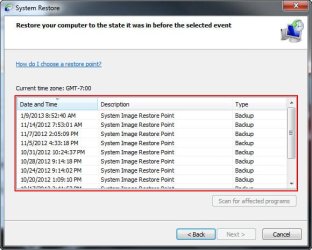
Well, I did the complete turn off of System Protection for all drives. After that I turned SP back on for the C: drive, selected the Configure button and chose Delete to delete all previous restore points and versions (figure 1). I then did a check using the System Restore button and all the very old restore points were still listed (figure 2).

Looks like I will have to try the vbadmin command option as described in previous posts. Before doing that and because I don't want to run any commands that might cause damage or delete necessary files, does anyone have any suggestions about using vbadmin or any other way I can eliminate these pesky "ghost" restore points?

Figure 1
system-restore2_050914.jpg

Figure 2
system-restore_050914.jpg
 

My Computer My Computer

Computer type
PC/Desktop
Computer Manufacturer/Model Number
custom build
OS
Window 7 Home Premium 64bit
CPU
Intel i5 3570K
Motherboard
ASRock Z77 Pro4-M
Memory
16 GB Corsair PC3-1280 DDR3
Graphics Card(s)
EVGA e-GeForce GTX 650
Sound Card
N/A
Monitor(s) Displays
Acer K242HL
Screen Resolution
1280 x 1024
Hard Drives
Samsung 830 256GB SSD SATA 6 Gb/s
WD Black 500GB SATA 6 Gb/s
PSU
Corsair vx 550
Case
Silverstone Temjin J108b
Cooling
Cooler Master Hyper 212 EVO
Keyboard
Logitech K350 wireless
Mouse
Logitech K510 wireless
Internet Speed
50 Mbps down, 5 Mbps up
Antivirus
Bitdefender Total Security 2018
Browser
Firefox, Chrome
I believe Ccleaner only looks at the partition it is installed on for restore points.
 

My Computer My Computer

Computer type
PC/Desktop
Computer Manufacturer/Model Number
Home made Desktop
OS
Windows 10 Pro. 64/ version 1709 Windows 7 Pro/64
CPU
Intel i7-6800K @ 4.3
Motherboard
ASUS X-99 Deluxe II
Memory
Corsair Platinum 16 gig @2400
Graphics Card(s)
EVGA GTX 1070 OC
Monitor(s) Displays
Asus 27" LED LCD/VE278Q
Screen Resolution
1920-1080 or 1280-720 HDMI
Hard Drives
INTEL SSD 730-240 Gb Sata 3.0/
PSU
EVGA Platium 1200W
Case
Phanteks Luxe Tempered Glass 8 fans/ one radiator
Cooling
XSPC/ Water Cooled CPU
Keyboard
Das 4 Professional
Mouse
Logitech M705/MX Anywhere 2-S
Internet Speed
100 mbits
Antivirus
Microsoft Security Essentials/ Malwarebytes Premium 3.0/ SAS
Browser
I.E. 11 default/Firefox/ ISP Time Warner Cable/Spectrum
Other Info
LG BluRay Burner/
Sound system-KLipsch-THX/
Icy Dock ssd Hot Swap bays.
I believe Ccleaner only looks at the partition it is installed on for restore points.
I think you're right. CCleaner shows absolutely no restore points on my system and yet these older restore points are still visible in the System Restore window.
 

My Computer My Computer

Computer type
PC/Desktop
Computer Manufacturer/Model Number
custom build
OS
Window 7 Home Premium 64bit
CPU
Intel i5 3570K
Motherboard
ASRock Z77 Pro4-M
Memory
16 GB Corsair PC3-1280 DDR3
Graphics Card(s)
EVGA e-GeForce GTX 650
Sound Card
N/A
Monitor(s) Displays
Acer K242HL
Screen Resolution
1280 x 1024
Hard Drives
Samsung 830 256GB SSD SATA 6 Gb/s
WD Black 500GB SATA 6 Gb/s
PSU
Corsair vx 550
Case
Silverstone Temjin J108b
Cooling
Cooler Master Hyper 212 EVO
Keyboard
Logitech K350 wireless
Mouse
Logitech K510 wireless
Internet Speed
50 Mbps down, 5 Mbps up
Antivirus
Bitdefender Total Security 2018
Browser
Firefox, Chrome
If I may point out something, you keep typing vbadmin the syntax is wbadmin.

I just ran the command with no ill effects afterwards, I don't have windows backup setup or use it any more.

Since you are using Acronis and not windows backup I think you are safe in deleting the backup catalog.

It did not delete any regular restore points, I didn't have any system image restore points like you do though.

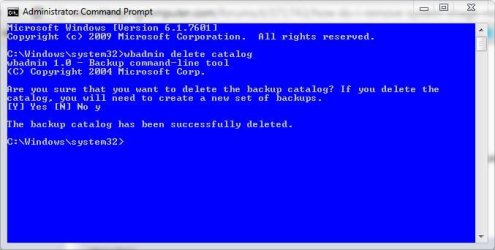
wbadmin delete catalog

wbadmin.JPG
 

My Computer My Computer

Computer type
PC/Desktop
Computer Manufacturer/Model Number
Self Built
OS
Win 10 Pro x64
CPU
Intel I5-2500K @3.3GHz
Motherboard
Asrock P67 Extreme4
Memory
16GB G.Skill Ripjaws X (4x4GB)
Graphics Card(s)
EVGA GeForce 750 Ti SC 2GB
Sound Card
ASUS Xonar DG 5.1 Channels 24-bit 96KHz PCI Interface Sound
Monitor(s) Displays
auria eq2367
Screen Resolution
1920 x 1080
Hard Drives
250GB Samsung 850 EVO SSD
1TB WD Blue
1TB Hitachi
PSU
SeaSonic X 650W 80 Plus Gold
Case
Corsair Obsidian 750D
Cooling
Corsair H60, Three 140mm case fans
Keyboard
Logitech Wireless Keyboard K520
Mouse
Logitech Wireless Mouse M310
Internet Speed
Wave Broadband ~ 100 dn 5 up
Antivirus
Windows Defender, Malwarebytes Premium
Browser
Edge, IE11, Chrome
Other Info
Laptop specs: HP g7-1365dx /
CPU: AMD A6-3420M APU with Radeon(tm) HD Graphics /
RAM: Crucial 8Gb (2x4Gb) /
SSD: Crucial M4-CT128M4SSD2 ATA Device/ FW 000F /
GFX: AMD Radeon HD 6520G /
OS: Windows 10 Pro x64
Thanks for the clarification. I had mis-read the information from the old forum post and substituted v for w. I claim a "senior moment" excuse! :doh:

I will try this command line (using wbadmin) and see what the results are. Is it correct in assuming that if I run the delete catalog command and then re-enable System Protection for the C drive and create a new restore point that the catalog will be rebuilt?
 
Last edited:

My Computer My Computer

Computer type
PC/Desktop
Computer Manufacturer/Model Number
custom build
OS
Window 7 Home Premium 64bit
CPU
Intel i5 3570K
Motherboard
ASRock Z77 Pro4-M
Memory
16 GB Corsair PC3-1280 DDR3
Graphics Card(s)
EVGA e-GeForce GTX 650
Sound Card
N/A
Monitor(s) Displays
Acer K242HL
Screen Resolution
1280 x 1024
Hard Drives
Samsung 830 256GB SSD SATA 6 Gb/s
WD Black 500GB SATA 6 Gb/s
PSU
Corsair vx 550
Case
Silverstone Temjin J108b
Cooling
Cooler Master Hyper 212 EVO
Keyboard
Logitech K350 wireless
Mouse
Logitech K510 wireless
Internet Speed
50 Mbps down, 5 Mbps up
Antivirus
Bitdefender Total Security 2018
Browser
Firefox, Chrome
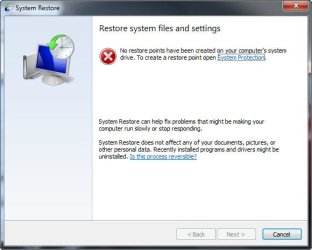
OK! Problem resolved. Ran the wbadmin from a elevated command prompt and did the get versions command first. It showed all the old restore points that I have been trying to get rid of. I then ran the delete catalog command and after OKing the warning it showed that the backup catalog had been deleted. Opened System Restore and it showed this:
system-restore3_050914.jpg

I created a new restore point for my C drive and it worked fine and showed no other restore points when selecting Show older restore points.

A lot of noodling to get the results I wanted but successful in the end. Many thanks to all that took the time to respond and to offer help.

Only one tiny concern: I accidentally did a search for wbadmin.exe and then right clicked on it and selected Run as administrator. There was a quick command window flash on the screen and then nothing else showed. I then opened an elevated command prompt and did the process mentioned above. Rebooted the system and all seems fine. Just wondering what running the wbadmin.exe as an administrator might have triggered. As stated, the command window was just a flash so no idea what occurred. Anyone have any idea what running wbadmin outside the command prompt might do? Any way to check a log of some kind for info on what it may have done?
 

My Computer My Computer

Computer type
PC/Desktop
Computer Manufacturer/Model Number
custom build
OS
Window 7 Home Premium 64bit
CPU
Intel i5 3570K
Motherboard
ASRock Z77 Pro4-M
Memory
16 GB Corsair PC3-1280 DDR3
Graphics Card(s)
EVGA e-GeForce GTX 650
Sound Card
N/A
Monitor(s) Displays
Acer K242HL
Screen Resolution
1280 x 1024
Hard Drives
Samsung 830 256GB SSD SATA 6 Gb/s
WD Black 500GB SATA 6 Gb/s
PSU
Corsair vx 550
Case
Silverstone Temjin J108b
Cooling
Cooler Master Hyper 212 EVO
Keyboard
Logitech K350 wireless
Mouse
Logitech K510 wireless
Internet Speed
50 Mbps down, 5 Mbps up
Antivirus
Bitdefender Total Security 2018
Browser
Firefox, Chrome
Only one tiny concern: I accidentally did a search for wbadmin.exe and then right clicked on it and selected Run as administrator. There was a quick command window flash on the screen and then nothing else showed. I then opened an elevated command prompt and did the process mentioned above. Rebooted the system and all seems fine. Just wondering what running the wbadmin.exe as an administrator might have triggered. As stated, the command window was just a flash so no idea what occurred. Anyone have any idea what running wbadmin outside the command prompt might do? Any way to check a log of some kind for info on what it may have done?

Glad you got rid of them finally.

Running that wbadmin.exe didn't do anything to your system, it is just the command line interface.

I did the same thing you did, nothing to worry about.
 

My Computer My Computer

Computer type
PC/Desktop
Computer Manufacturer/Model Number
Self Built
OS
Win 10 Pro x64
CPU
Intel I5-2500K @3.3GHz
Motherboard
Asrock P67 Extreme4
Memory
16GB G.Skill Ripjaws X (4x4GB)
Graphics Card(s)
EVGA GeForce 750 Ti SC 2GB
Sound Card
ASUS Xonar DG 5.1 Channels 24-bit 96KHz PCI Interface Sound
Monitor(s) Displays
auria eq2367
Screen Resolution
1920 x 1080
Hard Drives
250GB Samsung 850 EVO SSD
1TB WD Blue
1TB Hitachi
PSU
SeaSonic X 650W 80 Plus Gold
Case
Corsair Obsidian 750D
Cooling
Corsair H60, Three 140mm case fans
Keyboard
Logitech Wireless Keyboard K520
Mouse
Logitech Wireless Mouse M310
Internet Speed
Wave Broadband ~ 100 dn 5 up
Antivirus
Windows Defender, Malwarebytes Premium
Browser
Edge, IE11, Chrome
Other Info
Laptop specs: HP g7-1365dx /
CPU: AMD A6-3420M APU with Radeon(tm) HD Graphics /
RAM: Crucial 8Gb (2x4Gb) /
SSD: Crucial M4-CT128M4SSD2 ATA Device/ FW 000F /
GFX: AMD Radeon HD 6520G /
OS: Windows 10 Pro x64
Back
Top