
disk constantly working, activity spikes

saphia

New member
Local time
12:15 AM
Messages
2
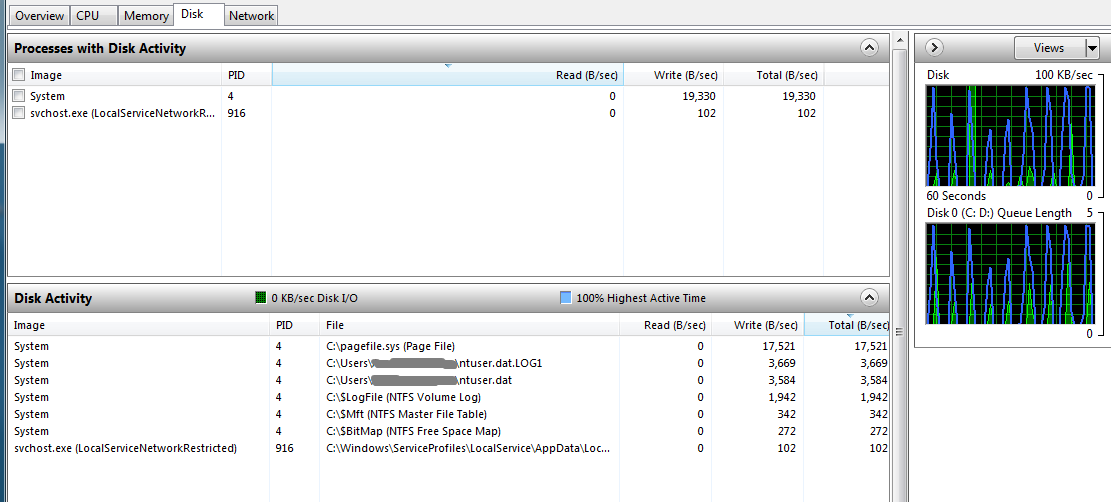
Some time ago I've noticed that the hard drive on my laptop is constantly doing something in short bursts even when I'm not doing anything at my computer. The resource monitor showed a series of short duration spikes with the disk going from no to 80-100% activity every few seconds. When I'm running multiple programs these spikes are causing a bit of lag, nothing major but enough for me to notice.

Picture (this is while idling):
MIJD2Bn.png


Defrag was performed.
I've ran the anti-virus - nothing found.
Ran chkdsk - no problems detected.
Ran memory diagnostic too - no problems with the memory.
The system isn't new.

so I am not sure what is causing this? :confused: and could these constant bursts of activity cause disk failure eventually?
 

My Computer

Computer type
Laptop
OS
Windows 7
bump! still haven't found a solution to this
 

My Computer

Computer type
Laptop
OS
Windows 7
Have you tried to correlate the spikes with the various processes running on the PC at that same exact moment?

If nothing else, there ought to be something in Event Viewer that correlates to the spikes.

Have you run anti-malware as well as anti-virus?

Do these spikes occur even with a bare minimum of startup programs running? I'd at least turn off all the startup stuff and see if the spikes continue.
 

My Computer

Computer type
PC/Desktop
Computer Manufacturer/Model Number
Ignatz Special; 4 speed manual gearbox; factory air conditioning; one of one
OS
Windows 7 Home Premium SP1, 64-bit
CPU
Intel Skylake i5-6600K, not overclocked
Motherboard
AsRock Z170M Extreme 4, micro ATX
Memory
8 GB HyperX DDR4-2666 (2 x 4 GB)
Graphics Card(s)
none; graphics are integrated on CPU
Sound Card
onboard: Realtek ALC1150; external: USB Behringer UF0-202
Monitor(s) Displays
Dell S2340M 23 inch IPS
Screen Resolution
1600 x 900
Hard Drives
System: Crucial MX100 series SSD, 128 GB;
Data: Samsung Spinpoint 103SJ, 1 TB;
Backup: WD Caviar Green WD30EZRX-00D8PB0, 3 TB
PSU
Rosewill SilentNight 500 watt fanless, semi-modular
Case
Antec Solo II
Cooling
Noctua NH-U12S; Noctua F12 intake, Noctua S12A exhaust
Keyboard
Microsoft 200 6JH-00001 USB
Mouse
Dell or Microsoft optical wired; USB
Antivirus
Microsoft Security Essentials and Malwarebytes Premium
Browser
Pale Moon
Other Info
All fans PWM; speeds at idle: CPU circa 500 rpm; intake circa 600 rpm; exhaust circa 600 rpm; CPU temps 27 idle and 47 C load in a warm room (27 C/81 F) when running Intel Extreme Tuning Utility stress test.
To do what ignatzatsonic suggested about startup items, go to start, type in msconfig, and press enter. Enter in your administrator password (if applicable) and then click yes. Then, go to the startup tab and uncheck everything except your antivirus, java auto updater (if applicable), and Adobe Reader and Acrobat Manager. Once you have done that, click on Apply and then click on OK. It will prompt you to reboot your computer. Save all open documents etc. and click on Restart.
 

My Computer

Computer type
PC/Desktop
Computer Manufacturer/Model Number
HP Pavilion P7-1010
OS
Windows 7 Professional x64 Service Pack 1
CPU
AMD Athlon X4 645
Motherboard
Foxxcon N-Alvorix RS880
Memory
6GB DDR3 1066
Graphics Card(s)
Sapphire Radeon HD 5670 512MB GDDR5
Sound Card
Realtek Integrated Audio
Monitor(s) Displays
HP 2011x
Screen Resolution
1600x900
Hard Drives
1. Crucial M4 128GB SSD
2. 1TB Seagate Barracuda 7200.12 RPM
3. 1TB Western Digital Caviar Green 5400RPM
PSU
Seasonic S12 II Bronze 380 Watt
Case
HP OEM
Cooling
Coolermaster Heatsink, AVC Case Fan
Keyboard
HP OEM- Made by Chicony
Mouse
HP OEM- Made by Logitech
Internet Speed
20MBit Down/4 Up
Antivirus
Microsoft Security Essentials
Browser
Internet Explorer 10
Back
Top