
You are using an out of date browser. It may not display this or other websites correctly.
You should upgrade or use an alternative browser.
You should upgrade or use an alternative browser.
Disk Defrag isnt working in Windows 7?
- Thread starter zaytsevi
- Start date

having analyze, why don't you try defragmenting it
My Computer
- OS
- window's 7
- CPU
- core 2 quad
- Motherboard
- gigabyte
- Memory
- 2gb corsair
- Graphics Card(s)
- ati hd4850
- Monitor(s) Displays
- lg
- Screen Resolution
- 1600 X 900
- Case
- power logic
- Other Info
- none of the spec above is accurate

try with this alternative called defraggler Defraggler - File and Disk Defragmentation - Free Download
My Computer
- OS
- Windows 7 Ultimate 64bit
- CPU
- AMD Phenom II X4 945 @3.0ghz
- Motherboard
- Asrock
- Memory
- 4gb kingston hyperX
- Graphics Card(s)
- 1gb Radeon HD 5670

Hi zaytsevi,
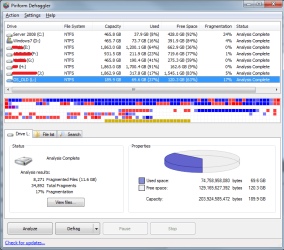
I have some rather large drives too, so I thought I'd try Krispy1's suggestion to give you a point of reference. Mine are fine and all de-fragemented, with two exceptions.
1. My Server 2008 drive which is a dual boot to this OS does not have the correct permissions to allow de-fragmentation from Win7.
2. My OS_OLD drive (I just rebuilt last week) is connected via USB at the moment, so it's not normally there.
Everything else is 0% or 1% telling me that the windows defragmenter is working (and was working before my rebuild). Hope this helps.
Tim
I have some rather large drives too, so I thought I'd try Krispy1's suggestion to give you a point of reference. Mine are fine and all de-fragemented, with two exceptions.
1. My Server 2008 drive which is a dual boot to this OS does not have the correct permissions to allow de-fragmentation from Win7.
2. My OS_OLD drive (I just rebuilt last week) is connected via USB at the moment, so it's not normally there.
Everything else is 0% or 1% telling me that the windows defragmenter is working (and was working before my rebuild). Hope this helps.
Tim
Attachments
My Computer
- Computer Manufacturer/Model Number
- Custom Hack job
- OS
- Windows 7 Ultimate 64 bit
- CPU
- Intel(R) Core(TM)2 Quad CPU Q8200 @ 2.33GHz
- Motherboard
- GigaByte EP45-UD3
- Memory
- 8 GB Kingston
- Graphics Card(s)
- Nvidia GeForce 9600GT
- Sound Card
- Soundblaster Audigy
- Monitor(s) Displays
- AOC x2 22"
- Hard Drives
- 2 x Samsung 500GB (RAID)
2 x Samsung 2TB
1 x WD Green 2TB
1 x Seagate 1TB
1 x Samsung 500GB
- PSU
- Thermaltake QFan 750W
- Case
- CM Scout Gaming
- Cooling
- Coolermaster V10
- Keyboard
- Microsoft Wireless Keyboard 1000
- Mouse
- Microsoft Wireless Optical 2000
- Internet Speed
- 320
- Other Info
- Winfast PVR2000CP
LG DVD-RAM DVD/RW/DL Super Multi
Linksys WMP300Nx2 Wireless Adapter

- Local time
- 2:51 PM
- Messages
- 5,053
Is your E: drive configured to run defrag on a schedule? In that case, defrag would run in the background and keep the drive unfragmented without your intervention.
My Computer
- Computer Manufacturer/Model Number
- Too many to describe...
- OS
- Windows 7 x64 pro/ Windows 7 x86 Pro/ XP SP3 x86
yeah. agree with bill. i think auto schedule defrag does its job
My Computer
- OS
- window's 7
- CPU
- core 2 quad
- Motherboard
- gigabyte
- Memory
- 2gb corsair
- Graphics Card(s)
- ati hd4850
- Monitor(s) Displays
- lg
- Screen Resolution
- 1600 X 900
- Case
- power logic
- Other Info
- none of the spec above is accurate
Is your E: drive configured to run defrag on a schedule? In that case, defrag would run in the background and keep the drive unfragmented without your intervention.
I too should have clarified if you had scheduled this..... and let you know that mine is scheduled (for relevance to my earlier post)

My Computer
- Computer Manufacturer/Model Number
- Custom Hack job
- OS
- Windows 7 Ultimate 64 bit
- CPU
- Intel(R) Core(TM)2 Quad CPU Q8200 @ 2.33GHz
- Motherboard
- GigaByte EP45-UD3
- Memory
- 8 GB Kingston
- Graphics Card(s)
- Nvidia GeForce 9600GT
- Sound Card
- Soundblaster Audigy
- Monitor(s) Displays
- AOC x2 22"
- Hard Drives
- 2 x Samsung 500GB (RAID)
2 x Samsung 2TB
1 x WD Green 2TB
1 x Seagate 1TB
1 x Samsung 500GB
- PSU
- Thermaltake QFan 750W
- Case
- CM Scout Gaming
- Cooling
- Coolermaster V10
- Keyboard
- Microsoft Wireless Keyboard 1000
- Mouse
- Microsoft Wireless Optical 2000
- Internet Speed
- 320
- Other Info
- Winfast PVR2000CP
LG DVD-RAM DVD/RW/DL Super Multi
Linksys WMP300Nx2 Wireless Adapter
yea bill may be correct because by default windows 7 defrags in the backround once a week
My Computer
- OS
- Windows 7 Ultimate 64bit
- CPU
- AMD Phenom II X4 945 @3.0ghz
- Motherboard
- Asrock
- Memory
- 4gb kingston hyperX
- Graphics Card(s)
- 1gb Radeon HD 5670

- Local time
- 12:51 PM
- Messages
- 50,634
May I suggest the Auslogics Disk and Registry defraggers.
Both are free, and when run after CCleaner disk and Registry cleaning keep my installs whistle clean and perfectly ordered.
These are the state-of-the-art tools for cleaning and leave nothing to be desired.
Both are free, and when run after CCleaner disk and Registry cleaning keep my installs whistle clean and perfectly ordered.
These are the state-of-the-art tools for cleaning and leave nothing to be desired.
- Local time
- 2:51 PM
- Messages
- 292
My 2 cents
I downloaded this defragger and used it, and optimized. I think I see an improvement in performance. I use Ccleaner for cleaning only, and now I will use this defragger for defragging instead of Windows defragger, but..... I don't recommend using ANYTHING other than Windows 7's built in systems for messing with the registry. DON'T MESS WITH THE REGISTRY UNLESS YOU ARE A PRO, AND YOU HAVE A KNOWN PROBLEM AND A KNOWN SOLUTION FOR THAT SPECIFIC PROBLEM! This is the voice of experience talking here.
I downloaded this defragger and used it, and optimized. I think I see an improvement in performance. I use Ccleaner for cleaning only, and now I will use this defragger for defragging instead of Windows defragger, but..... I don't recommend using ANYTHING other than Windows 7's built in systems for messing with the registry. DON'T MESS WITH THE REGISTRY UNLESS YOU ARE A PRO, AND YOU HAVE A KNOWN PROBLEM AND A KNOWN SOLUTION FOR THAT SPECIFIC PROBLEM! This is the voice of experience talking here.
My Computer
- Computer type
- Laptop
- Computer Manufacturer/Model Number
- Dell Vostro 3750
- OS
- Windows 7 Professional
- CPU
- Core I5
- Memory
- 8GB
- Hard Drives
- Seagate 600 240GB SSD
- Antivirus
- MSE
- Browser
- Chrome, IE, Firfox
- Local time
- 12:51 PM
- Messages
- 50,634
I downloaded this defragger and used it, and optimized. I think I see an improvement in performance. I use Ccleaner for cleaning only, and now I will use this defragger for defragging instead of Windows defragger, but..... I don't recommend using ANYTHING other than Windows 7's built in systems for messing with the registry. DON'T MESS WITH THE REGISTRY UNLESS YOU ARE A PRO, AND YOU HAVE A KNOWN PROBLEM AND A KNOWN SOLUTION FOR THAT SPECIFIC PROBLEM! This is the voice of experience talking here.
The CCleaner is the recognized state-of-the-art cleaner both for disk and registry.
In hundreds of installs over 10 years time, I have never had CCleaner mess up with its registry cleaner, as it is not targeted at anything which is still an active key. It simply doesn't make mistakes.
If you are nervous about it, accept it's offered backup of deleted Registry keys which can easily be merged back in if necessary. I stopped bothering with this after about the thousandth time.
- Local time
- 2:51 PM
- Messages
- 292
Agree
I have used Ccleaner registry cleaner several times too, with no adverse results. I have also read many comments about Windows 7 not requiring a registry cleaner. Not sure which is right, and their registry cleaner never shows anything to clean on my unit anyway.
thanks,
Bill
I have used Ccleaner registry cleaner several times too, with no adverse results. I have also read many comments about Windows 7 not requiring a registry cleaner. Not sure which is right, and their registry cleaner never shows anything to clean on my unit anyway.
thanks,
Bill
My Computer
- Computer type
- Laptop
- Computer Manufacturer/Model Number
- Dell Vostro 3750
- OS
- Windows 7 Professional
- CPU
- Core I5
- Memory
- 8GB
- Hard Drives
- Seagate 600 240GB SSD
- Antivirus
- MSE
- Browser
- Chrome, IE, Firfox

A partition not used as a system and swap file partition will not be fragmented, there is no reason for it to be fragmented. If I understood your post correctly, and you are using that just to store media and such, then from a defragging standpoint I think the Windows Defragmenter is being truthful about that 0%.
My Computer
- Computer Manufacturer/Model Number
- Asus N73SV
- OS
- Windows 7 x64 Ultimate SP1
- CPU
- Core i7-2630QM
- Motherboard
- Intel HM 65
- Memory
- 6 GB DDR3
- Graphics Card(s)
- Nvidia GT 540M / Intel HD 3000 - Optimus switching
- Sound Card
- HD Audio (Intel Azalia/Realtek) ALC269
- Monitor(s) Displays
- LED flat panel
- Screen Resolution
- 1920 x 1080
- Hard Drives
- 2x Seagate Momentus 640 GB - 1,28 TB in total
- Internet Speed
- 4 MB/256 kbps
- Other Info
- External HDs
WD Elements 1,5 TB
WD MyBook 500 GB
- Local time
- 12:51 PM
- Messages
- 50,634
For some reason, after install including all programs I get up to 100 registry cleanup items found by CCleaner. Auslogics Disk Defragger can take up to 20-30 minutes.
After Revo'ing a lot of bloatware programs without a clean reinstall (which is really needed), CCleaner can find up to a gig in disk cleanup and several hundred registry items. Auslogics Defragger can take nearly an hour when it normally completes in minutes.
These may sound strange, but are well worth the bother. It makes a huge difference in performance to have your HD clean and ordered.
After Revo'ing a lot of bloatware programs without a clean reinstall (which is really needed), CCleaner can find up to a gig in disk cleanup and several hundred registry items. Auslogics Defragger can take nearly an hour when it normally completes in minutes.
These may sound strange, but are well worth the bother. It makes a huge difference in performance to have your HD clean and ordered.
Last edited:
- Local time
- 2:51 PM
- Messages
- 292
Confused?
I am not clear on what you are saying. Do you like or dislike Ccleaner? Do you like or dislike the Auslogics Disk Defragger?
Thanks,
Bill
I am not clear on what you are saying. Do you like or dislike Ccleaner? Do you like or dislike the Auslogics Disk Defragger?
Thanks,
Bill
My Computer
- Computer type
- Laptop
- Computer Manufacturer/Model Number
- Dell Vostro 3750
- OS
- Windows 7 Professional
- CPU
- Core I5
- Memory
- 8GB
- Hard Drives
- Seagate 600 240GB SSD
- Antivirus
- MSE
- Browser
- Chrome, IE, Firfox
- Local time
- 12:51 PM
- Messages
- 50,634
I like CCleaner and Auslogics Disk and Registry defraggers, have used both for about 10 years on hundreds of installs with nary a problem.
I was only commenting that it is strange I get Registry entries to clean up after a clean install and setup, sometimes quite a few. I understand why I get them when doing an uninstall of bloatware, but not during a clean install or reinstall.
I was only commenting that it is strange I get Registry entries to clean up after a clean install and setup, sometimes quite a few. I understand why I get them when doing an uninstall of bloatware, but not during a clean install or reinstall.
- Local time
- 2:51 PM
- Messages
- 292
Got it. Thanks. That is strange to have all that after a clean install isn't it?
My Computer
- Computer type
- Laptop
- Computer Manufacturer/Model Number
- Dell Vostro 3750
- OS
- Windows 7 Professional
- CPU
- Core I5
- Memory
- 8GB
- Hard Drives
- Seagate 600 240GB SSD
- Antivirus
- MSE
- Browser
- Chrome, IE, Firfox
Similar threads
- Replies
- 7
- Views
- 5K

- Replies
- 0
- Views
- 7K
- Replies
- 4
- Views
- 1K