Solved disk full???

Dramx

New member
Member
Local time
6:30 PM
Messages
64
Pardon this question, but I'm not a Win guy, but this has me mystified. My 287GB C disk on my HP Pavillion is just about full. How did it get that way??? It sure wasn't that way a few months ago.

When I examine the contents, Computer->HP(C), and look individually (Organize->Properties) at each element, the total is only about 80GB.

I naturally did "Disk Cleanup", and that bought me maybe 5GB. I've scanned the disk with MS Security Essentials, and nothing bad is found.

How can I understand WHERE all that disk space is going??? Who is using it??? Help!
 

My Computer

OS
Windows 7

My Computer

Computer type
PC/Desktop
Computer Manufacturer/Model Number
Self built using existing case
OS
Windows 7 Home Premium 64 bit sp1
CPU
Intel i5 3570 3.4Ghz Ivy Bridge SKT 1155 quad core
Motherboard
Gigabyte Z77-HD3 SKT 1155 2xSata 3, 4x USB 3.0
Memory
G-Skill Rip Jaws 16Gb (8x2) DDR3 -1600 PC3 12800 CL 10 red
Graphics Card(s)
Gigabyte NVIDIA GT610 1Gb DDR3 810/1200 PCI-E 2.0 Silent
Sound Card
NVIDIA High Definition & Realtech High Definition Audio
Monitor(s) Displays
2 x Philips 226V4L 16:9 aspect ratio
Screen Resolution
1920 x 1080 HD
Hard Drives
Samsung 840 Pro 256gb SSD, SATA 3.
Hitachi Touro Portable 1tb, USB 3.0 HDD used for image b/ups.
PSU
Corsair VS450
Case
Codeng
Cooling
PSU fan & CPU fan
Keyboard
Logitech
Mouse
Logitech Wireless trackball M570
Internet Speed
Wireless 3G. 3mg down & 550kb up.
Antivirus
Bitdefender Internet Security 2020
Browser
Opera (Current Version) & Firefox
Other Info
MS Office 2013 Pro. Davis weather station software. MGE Nova 600 avr UPS.
Thank you. That's a helpful tool, but it tells me that my drive C has a total of 91.7 GB in it. That's a sensible number. The OS, however, thinks that there is "1.61 GB free out of 287 GB". So Tree Size seems to be missing a HUGE chunk.

The number that Win7 comes up with is the pertinent one, because I get complaints from my software (e.g. Dropbox), that not enough room is available.
 

My Computer

OS
Windows 7
Well, I should elaborate. When I command examination of Drive C, Tree Size gives a report for my that says

"This folder: Size 91.4 GB" and
"Drive: C:\ Size 287.1 GB" and

Name: C:\ Size 91.4 GB"

Duh? Makes no sense.

So I've told it to look at Drive C. What's this about a "folder"? TreeSize can't seem to make up it's mind how big C is.
 

My Computer

OS
Windows 7

My Computer

Computer type
PC/Desktop
Computer Manufacturer/Model Number
Self built using existing case
OS
Windows 7 Home Premium 64 bit sp1
CPU
Intel i5 3570 3.4Ghz Ivy Bridge SKT 1155 quad core
Motherboard
Gigabyte Z77-HD3 SKT 1155 2xSata 3, 4x USB 3.0
Memory
G-Skill Rip Jaws 16Gb (8x2) DDR3 -1600 PC3 12800 CL 10 red
Graphics Card(s)
Gigabyte NVIDIA GT610 1Gb DDR3 810/1200 PCI-E 2.0 Silent
Sound Card
NVIDIA High Definition & Realtech High Definition Audio
Monitor(s) Displays
2 x Philips 226V4L 16:9 aspect ratio
Screen Resolution
1920 x 1080 HD
Hard Drives
Samsung 840 Pro 256gb SSD, SATA 3.
Hitachi Touro Portable 1tb, USB 3.0 HDD used for image b/ups.
PSU
Corsair VS450
Case
Codeng
Cooling
PSU fan & CPU fan
Keyboard
Logitech
Mouse
Logitech Wireless trackball M570
Internet Speed
Wireless 3G. 3mg down & 550kb up.
Antivirus
Bitdefender Internet Security 2020
Browser
Opera (Current Version) & Firefox
Other Info
MS Office 2013 Pro. Davis weather station software. MGE Nova 600 avr UPS.
Nope. Not partitioned. The OS says disk C: is "4.60GB free of 287 GB".

See capture attached.
 

Attachments

  • Capturex.jpg
    Capturex.jpg
    39.1 KB · Views: 0

My Computer

OS
Windows 7
Thanks for that screen shot, but you did not include the full width of window to show the percentage free etc.

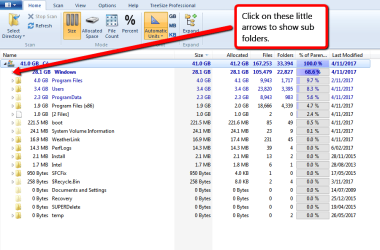
When you used Tree Size did you click on the little arrows on the side to expand the folder to show the sub folders. Like I have shown in these screen shots.

Trees_Size_1.png

Tree_Size_2.png

Click on each of those arrows where the folder size is fairly large.

If you use Hibernate it will take up a lot of disc space & check the size of the Page file. Also check to see if you have a lot of Restore Points as these can occupy a lot of space if you have a lot of them.
 

My Computer

Computer type
PC/Desktop
Computer Manufacturer/Model Number
Self built using existing case
OS
Windows 7 Home Premium 64 bit sp1
CPU
Intel i5 3570 3.4Ghz Ivy Bridge SKT 1155 quad core
Motherboard
Gigabyte Z77-HD3 SKT 1155 2xSata 3, 4x USB 3.0
Memory
G-Skill Rip Jaws 16Gb (8x2) DDR3 -1600 PC3 12800 CL 10 red
Graphics Card(s)
Gigabyte NVIDIA GT610 1Gb DDR3 810/1200 PCI-E 2.0 Silent
Sound Card
NVIDIA High Definition & Realtech High Definition Audio
Monitor(s) Displays
2 x Philips 226V4L 16:9 aspect ratio
Screen Resolution
1920 x 1080 HD
Hard Drives
Samsung 840 Pro 256gb SSD, SATA 3.
Hitachi Touro Portable 1tb, USB 3.0 HDD used for image b/ups.
PSU
Corsair VS450
Case
Codeng
Cooling
PSU fan & CPU fan
Keyboard
Logitech
Mouse
Logitech Wireless trackball M570
Internet Speed
Wireless 3G. 3mg down & 550kb up.
Antivirus
Bitdefender Internet Security 2020
Browser
Opera (Current Version) & Firefox
Other Info
MS Office 2013 Pro. Davis weather station software. MGE Nova 600 avr UPS.
OK, see attached. Are we really getting any closer to a solution here? I don't see any evidence for large (200GB-ish) blocks of disk usage.
 

Attachments

My Computer

OS
Windows 7
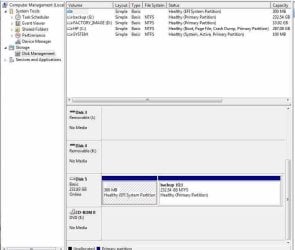
Why isn't your HP C: Drive being shown in Disc Management. All that is showing is Disc 5 with 300 Mb & another partition called Backup G. This drive also appears to be a UEFI system installation, whereas as your main system looks like it's the usual Legacy MBR installation.

The HP C: Drive is mentioned in the specs at the top but is not listed in the lower section. We need to see that to see what is happening there.
 

My Computer

Computer type
PC/Desktop
Computer Manufacturer/Model Number
Self built using existing case
OS
Windows 7 Home Premium 64 bit sp1
CPU
Intel i5 3570 3.4Ghz Ivy Bridge SKT 1155 quad core
Motherboard
Gigabyte Z77-HD3 SKT 1155 2xSata 3, 4x USB 3.0
Memory
G-Skill Rip Jaws 16Gb (8x2) DDR3 -1600 PC3 12800 CL 10 red
Graphics Card(s)
Gigabyte NVIDIA GT610 1Gb DDR3 810/1200 PCI-E 2.0 Silent
Sound Card
NVIDIA High Definition & Realtech High Definition Audio
Monitor(s) Displays
2 x Philips 226V4L 16:9 aspect ratio
Screen Resolution
1920 x 1080 HD
Hard Drives
Samsung 840 Pro 256gb SSD, SATA 3.
Hitachi Touro Portable 1tb, USB 3.0 HDD used for image b/ups.
PSU
Corsair VS450
Case
Codeng
Cooling
PSU fan & CPU fan
Keyboard
Logitech
Mouse
Logitech Wireless trackball M570
Internet Speed
Wireless 3G. 3mg down & 550kb up.
Antivirus
Bitdefender Internet Security 2020
Browser
Opera (Current Version) & Firefox
Other Info
MS Office 2013 Pro. Davis weather station software. MGE Nova 600 avr UPS.
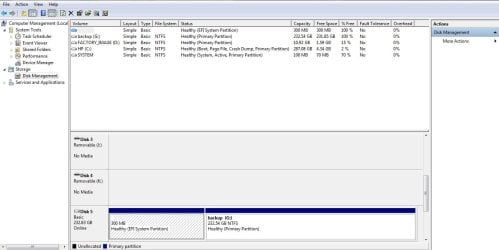
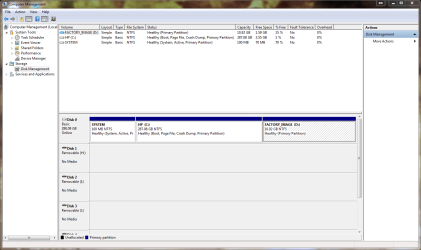
Disk C is listed in the management panel. It's right there, showing 287.08GB. But the snip didn't scroll down and get all the drives at the bottom. I removed the G drive, and this Disk Management pane now shows everything. Disc 0 (C) is the boot drive, and the issue is that it SAYS it's almost full. As you can see from the TreeSize, it really only has ~90GB of stuff on it. Something unidentified is sucking up 200GB of disk space!
 

Attachments

  • snip.PNG
    snip.PNG
    44.1 KB · Views: 3

My Computer

OS
Windows 7
Yes, something is taking up that space. Do you have any unneeded programs on the computer.

What Anti Virus program are you using & have you done a full scan to check on any malware etc..

I did ask if you used Hibernate, if so disable it as it can use a lot of space & set how many System Restore points you have as this can also take up a lot of space.

You could also run System File Checker to see if there are other problems as well. This Forum tutorial explains how to do this.

SFC /SCANNOW Command - System File Checker - Windows 7 Help Forums

How long has the C Drive in service & have you ever reinstalled Windows at all. It might have a lot of old files on it that are not showing up in Tree Size & you may have to consider a reformat & reinstalling Windows again.

You do list a Backup Drive. What is it used for?. Do you have any Imaging software on the C Drive?.
 

My Computer

Computer type
PC/Desktop
Computer Manufacturer/Model Number
Self built using existing case
OS
Windows 7 Home Premium 64 bit sp1
CPU
Intel i5 3570 3.4Ghz Ivy Bridge SKT 1155 quad core
Motherboard
Gigabyte Z77-HD3 SKT 1155 2xSata 3, 4x USB 3.0
Memory
G-Skill Rip Jaws 16Gb (8x2) DDR3 -1600 PC3 12800 CL 10 red
Graphics Card(s)
Gigabyte NVIDIA GT610 1Gb DDR3 810/1200 PCI-E 2.0 Silent
Sound Card
NVIDIA High Definition & Realtech High Definition Audio
Monitor(s) Displays
2 x Philips 226V4L 16:9 aspect ratio
Screen Resolution
1920 x 1080 HD
Hard Drives
Samsung 840 Pro 256gb SSD, SATA 3.
Hitachi Touro Portable 1tb, USB 3.0 HDD used for image b/ups.
PSU
Corsair VS450
Case
Codeng
Cooling
PSU fan & CPU fan
Keyboard
Logitech
Mouse
Logitech Wireless trackball M570
Internet Speed
Wireless 3G. 3mg down & 550kb up.
Antivirus
Bitdefender Internet Security 2020
Browser
Opera (Current Version) & Firefox
Other Info
MS Office 2013 Pro. Davis weather station software. MGE Nova 600 avr UPS.
Dramx, I find the visual representations of something like Spacemonger or Spacesniffer to be most useful. You might want to give one of those a try.
 

My Computer

Computer type
PC/Desktop
Computer Manufacturer/Model Number
Dell Optiplex 7050
OS
Windows 7/8.1/10 multiboot
CPU
Intel Core i7-7700
Motherboard
Dell, Intel Q270 chipset
Memory
48GB (2x16GB Crucial DDR4-3200 + 2x8GB Hynix DDR4-2400)
Graphics Card(s)
Intel HD630 + AMD Radeon R7 450 PCIe
Monitor(s) Displays
Asus VC279 (27")
Screen Resolution
1920x1080
Hard Drives
Toshiba M.2 NVMe (256GB),
Samsung 960 Evo (500GB),
WD Red Plus 80EFBX (8TB)
just throwing my 2 cents in.

from the pdf, theres over 25GB of log detail - way to high, would imply that somethings wrong with the system.
My guess is your CBS folder, Windows updates failing?? and then trying again..........
System restore logs are also included here
would be handy to see where the bulk is
@Ranger4 - does treesize show/include crashdumps


Roy
 

My Computer

Computer type
PC/Desktop
Computer Manufacturer/Model Number
medionl/Aspire 6930G/acer x55a
OS
W7 home premium 32bit/W7HP 64bit/w10 tp insider ring
CPU
E5300 dual core
Motherboard
medion MS7366
Memory
3gb
Graphics Card(s)
Nvidia Geforce 7100 Nforce 630i
Monitor(s) Displays
avixc
Internet Speed
n (isp resticted to 72)
Antivirus
mse/pands
Browser
palemoon
Other Info
Belkin Fd7050 n USB using Railink RT2870 drivers, more upto date
Yes, something is taking up that space. Do you have any unneeded programs on the computer.

What Anti Virus program are you using & have you done a full scan to check on any malware etc..

I just use Malwarebytes and MS Security Essentials. They say everything is fine.

I did ask if you used Hibernate, if so disable it as it can use a lot of space & set how many System Restore points you have as this can also take up a lot of space.

I do not use Hibernate, and it doesn't seem to be on my system.

You could also run System File Checker to see if there are other problems as well. This Forum tutorial explains how to do this.

I will do that.

How long has the C Drive in service & have you ever reinstalled Windows at all. It might have a lot of old files on it that are not showing up in Tree Size & you may have to consider a reformat & reinstalling Windows again.

This is a recently inherited machine. From someone who wouldn't have had a clue how to do anything big. Probably 10 years old.

You do list a Backup Drive. What is it used for?. Do you have any Imaging software on the C Drive?.

I just plugged in a backup drive. That's when I noticed that the C drive was awesomely full. That backup drive is unrelated to this problem.
 

My Computer

OS
Windows 7
just throwing my 2 cents in.

from the pdf, theres over 25GB of log detail - way to high, would imply that somethings wrong with the system.
My guess is your CBS folder, Windows updates failing?? and then trying again..........
System restore logs are also included here
would be handy to see where the bulk is
@Ranger4 - does treesize show/include crashdumps


Roy

Yes, there is something huge hiding on my disk that Treesize just can't see. In principle, if I can see it, I can delete it!
 

My Computer

OS
Windows 7
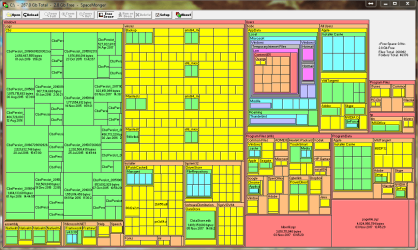
OK, here's the result from Spacemonger. I'm not completely sure how to interpret the panel it produces, but it looks to me like Windows logs have a whole lotta stuff in them. Cbs and winxs? Can someone interpret this for me?
 

Attachments

  • spacemonger.PNG
    spacemonger.PNG
    39.8 KB · Views: 4

My Computer

OS
Windows 7
well according to your last post
Hibernate is still using space

and my guess re CBS is right
(CBS persistant logs are compressed but can be deleted but not recommended)
(i also suspect that hidden SYSTEM folders ie crashdumps are not being shown)

You did not answer my question re updating.
reckon there was a major problem at some point


is this purely >>> your user system <<< (read your other posts re remote usage)
im also confused as to why an UEFI setup is present on a system this old

What do you want to achieve
Are you prepaired to do either
a repair or clean install

Roy
 
Last edited:

My Computer

Computer type
PC/Desktop
Computer Manufacturer/Model Number
medionl/Aspire 6930G/acer x55a
OS
W7 home premium 32bit/W7HP 64bit/w10 tp insider ring
CPU
E5300 dual core
Motherboard
medion MS7366
Memory
3gb
Graphics Card(s)
Nvidia Geforce 7100 Nforce 630i
Monitor(s) Displays
avixc
Internet Speed
n (isp resticted to 72)
Antivirus
mse/pands
Browser
palemoon
Other Info
Belkin Fd7050 n USB using Railink RT2870 drivers, more upto date
Excuse my naivite. I'm really not a Win expert. I really have no awareness of Hibernate. What is it, and how do I get rid of it? What does it do?

I am not prepared to do a clean install, as I think the original system disks disappeared. In fact, what I was getting ready to do was to clone the system to a backup disk as insurance.

I guess one question is how I get rid of all the trash, but another question is why all the trash is accumulating! Can I just do a "del *.log" in command prompt?

This is indeed PURELY my system. No one else is connected. Just a lone desktop.

Many thanks for your patience here.
 

My Computer

OS
Windows 7
Hi Dramx,

look at it this way
WHAT do you want at the end of the day.

YOU STILL HAVE NOT ANSWERED MY QUESTIONS.

cloning a system will NOT get rid of the problem, it will copy everything on it.

Getting a W7 SP1 Iso is NOT a problem, providing ths results from this tool is OK, might even explain why CBS is so large.
http://go.microsoft.com/fwlink/?LinkID=52012

note please provide COMPLETE system specs for this computer
 

My Computer

Computer type
PC/Desktop
Computer Manufacturer/Model Number
medionl/Aspire 6930G/acer x55a
OS
W7 home premium 32bit/W7HP 64bit/w10 tp insider ring
CPU
E5300 dual core
Motherboard
medion MS7366
Memory
3gb
Graphics Card(s)
Nvidia Geforce 7100 Nforce 630i
Monitor(s) Displays
avixc
Internet Speed
n (isp resticted to 72)
Antivirus
mse/pands
Browser
palemoon
Other Info
Belkin Fd7050 n USB using Railink RT2870 drivers, more upto date
i believe the trash is accumulating because of the windows update problem.


Roy
 

My Computer

Computer type
PC/Desktop
Computer Manufacturer/Model Number
medionl/Aspire 6930G/acer x55a
OS
W7 home premium 32bit/W7HP 64bit/w10 tp insider ring
CPU
E5300 dual core
Motherboard
medion MS7366
Memory
3gb
Graphics Card(s)
Nvidia Geforce 7100 Nforce 630i
Monitor(s) Displays
avixc
Internet Speed
n (isp resticted to 72)
Antivirus
mse/pands
Browser
palemoon
Other Info
Belkin Fd7050 n USB using Railink RT2870 drivers, more upto date
Back
Top