Disk Management Blocking Use Of Mode "H"

NewW7User

Member
Member
VIP
Local time
10:15 AM
Messages
152
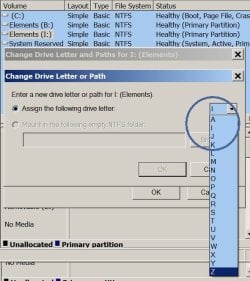
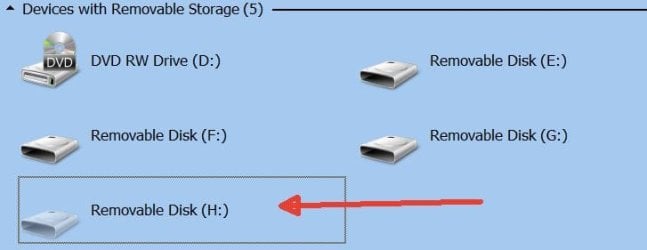
I'm trying to change the defaulted letter "I" and assign "H" to an external disk drive. But Disk Management is not showing "H" as available (see attachment Mode Letter Problem - 1). That is probably because in Computer -> Devices it is showing "H" as being assigned to a "Removable Disk" (see attachment Mode Letter Problem - 2). But I did not put a disk in there at "H" and then detach it. And the left frame in Explorer showing all of the disks does not show "H" assigned. It's possible that many months ago something may have been defaulted and briefly assigned "H" but if so that was a very long time ago.
How do I fix this?
 

Attachments

  • Mode Letter Problem - 1.jpg
    Mode Letter Problem - 1.jpg
    54.1 KB · Views: 7
  • Mode Letter Problem - 2.jpg
    Mode Letter Problem - 2.jpg
    17.3 KB · Views: 7

My Computers My Computers

  • At a glance

    W7 Pro 648G
    Computer type
    PC/Desktop
    Computer Manufacturer/Model Number
    Dell XPS 8300
    OS
    W7 Pro 64
    Memory
    8G
    Sound Card
    RealTek High Definition Audio
    Monitor(s) Displays
    Asus
    Hard Drives
    WD Elements, Samsung Story Station, Samsung EVO 860 / 870
    Mouse
    Logitech M310
    Antivirus
    Avast, Malwarebytes, SUPERAntiSpyware
    Browser
    Firefox, Avast Secure Browser
  • At a glance

    Win10
    Computer type
    Laptop
    System Manufacturer/Model Number
    HP
    OS
    Win10
    Keyboard
    external
    Mouse
    wireless
    Browser
    Firefox, Avast
    Antivirus
    Avast / Malwarebytes / Superantispyware
Thank you F22 Simpilot. I installed USBView but it does not help. It shows four (4) drive letters all on one device (see attached). And I don't even know what that device is. I use "F" for USB disk for backups (disconnected now); "G" is for a USB disk on a different computer (on the LAN); "E" is the same story as "H" - it may have been automatically default assigned once but that was a long time ago.

Any ideas?
 

Attachments

  • Display - 1.jpg
    Display - 1.jpg
    28.4 KB · Views: 0

My Computers My Computers

  • At a glance

    W7 Pro 648G
    Computer type
    PC/Desktop
    Computer Manufacturer/Model Number
    Dell XPS 8300
    OS
    W7 Pro 64
    Memory
    8G
    Sound Card
    RealTek High Definition Audio
    Monitor(s) Displays
    Asus
    Hard Drives
    WD Elements, Samsung Story Station, Samsung EVO 860 / 870
    Mouse
    Logitech M310
    Antivirus
    Avast, Malwarebytes, SUPERAntiSpyware
    Browser
    Firefox, Avast Secure Browser
  • At a glance

    Win10
    Computer type
    Laptop
    System Manufacturer/Model Number
    HP
    OS
    Win10
    Keyboard
    external
    Mouse
    wireless
    Browser
    Firefox, Avast
    Antivirus
    Avast / Malwarebytes / Superantispyware
HKEY_LOCAL_MACHINE\SYSTEM\MountedDevices

look in the right pane for \DosDevices\H:

and delete it
 

My Computers My Computers

  • At a glance

    7 X64i5 84002x8gb 3200mhz
    Computer type
    PC/Desktop
    OS
    7 X64
    CPU
    i5 8400
    Motherboard
    gigabyte b365m ds3h
    Memory
    2x8gb 3200mhz
    Hard Drives
    various
    PSU
    pure power 11 400w cm
    Case
    Coolermaster
    Cooling
    cryorig m9i
  • At a glance

    7x64g54008gb ddr4 2400
    Computer type
    PC/Desktop
    OS
    7x64
    CPU
    g5400
    Motherboard
    ga b365m ds3h
    Memory
    8gb ddr4 2400
    PSU
    xfx pro 450w
... I installed USBView but it does not help. It shows four (4) drive letters all on one device (see attached). And I don't even know what that device is. Any ideas?
This is usually an SD card reader that can support up to 4 cards, but without any cards inserted at present.
 

My Computers My Computers

  • At a glance

    Windows 7 Home Premium x64AMD V1204GB
    Computer type
    Laptop
    Computer Manufacturer/Model Number
    Toshiba satellite C650D
    OS
    Windows 7 Home Premium x64
    CPU
    AMD V120
    Memory
    4GB
    Internet Speed
    150 Mbps
    Antivirus
    MSE
    Browser
    IE11, Edge, Firefox
    Other Info
    I also have W7 Pro on my System Two, and several W7 Hyper-V VMs. My other machines run Windows 10/11. Their specs are in my Ten Forums & Eleven Forum profiles.
  • At a glance

    Windows 7 Pro x64Intel i5-3320M8 GB
    Computer type
    Laptop
    System Manufacturer/Model Number
    Lenovo Thinkpad T430
    OS
    Windows 7 Pro x64
    CPU
    Intel i5-3320M
    Memory
    8 GB
    Hard Drives
    250GB Samsung SSD 860 EVO
    Antivirus
    MSE
Bree,
I didn't get this computer new and don't have a card reader attached to it (unless it's hidden under the covers).

SIW2,
I came across some warnings on a website about HKLM Mounted Devices entries being cross-linked to other keys and therefore deleting is a big risk in just deleting them. Is that not correct? Oddly (or interestingly) - the data entries in Mounted Devices for the four letters that I noted above are identical.
 

My Computers My Computers

  • At a glance

    W7 Pro 648G
    Computer type
    PC/Desktop
    Computer Manufacturer/Model Number
    Dell XPS 8300
    OS
    W7 Pro 64
    Memory
    8G
    Sound Card
    RealTek High Definition Audio
    Monitor(s) Displays
    Asus
    Hard Drives
    WD Elements, Samsung Story Station, Samsung EVO 860 / 870
    Mouse
    Logitech M310
    Antivirus
    Avast, Malwarebytes, SUPERAntiSpyware
    Browser
    Firefox, Avast Secure Browser
  • At a glance

    Win10
    Computer type
    Laptop
    System Manufacturer/Model Number
    HP
    OS
    Win10
    Keyboard
    external
    Mouse
    wireless
    Browser
    Firefox, Avast
    Antivirus
    Avast / Malwarebytes / Superantispyware
You could always A) create a system restore point and B) right click that registry key and export. I'd do both. Besides, you should have periodic disk clones anyway.
 

My Computer My Computer

At a glance

Windows 7 Ultimate x64
Computer type
PC/Desktop
OS
Windows 7 Ultimate x64
Back
Top