Disk Management cannot detect any Primary Drives

ZekeQR

New member
Local time
3:30 AM
Messages
3
Hi all,

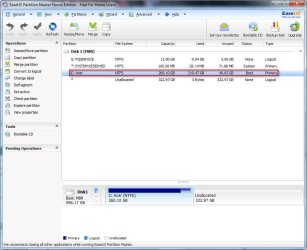
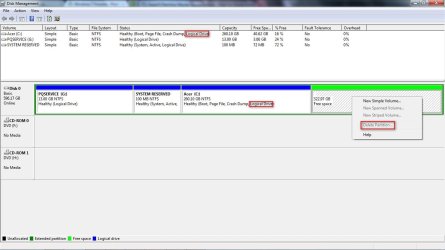
My Disk Management detects my C: Drive as a Logical Drive instead of a Primary drive while EaseUS Partition Master detects it as a Primary drive.

The problem now is that because it because Disk Manage detects it as a Logical Drive, I am not able to delete Free Space to change it into unallocated space to install dual boot Windows 8. (Triple, including Windows 7 and Ubuntu)

Why are the two programs getting different results ?

By right, C Drive should never be a Logical Drive in the first place.

Is there a way to change it back to Primary so I can create Unallocated Space again ?

I had no problems with installing Ubuntu at all.... hope to solve this issue ASAP.

Thanks !

Regards,
Zeke

PS: Please refer to attached Screen shots for more information
 

Attachments
  • DiskManagement.jpg
    DiskManagement.jpg
    79.7 KB · Views: 11
  • easeUS.jpg
    easeUS.jpg
    68.3 KB · Views: 9

My Computer

OS
Singapore
I'd probably use Partition Wizard bootable disk to see what it says. It's more reliable and flexible than Disk Management.

I'd guess Disk Management is wrong. It shows System Reserved as logical, system, and active. It's my understanding that Windows can't boot if system and active flags are on a logical partition. It's OK for C to be logical, but not System Reserved.

Can you do what you want to do in EaseUS?
 

My Computer

Computer type
PC/Desktop
Computer Manufacturer/Model Number
Ignatz Special; 4 speed manual gearbox; factory air conditioning; one of one
OS
Windows 7 Home Premium SP1, 64-bit
CPU
Intel Skylake i5-6600K, not overclocked
Motherboard
AsRock Z170M Extreme 4, micro ATX
Memory
8 GB HyperX DDR4-2666 (2 x 4 GB)
Graphics Card(s)
none; graphics are integrated on CPU
Sound Card
onboard: Realtek ALC1150; external: USB Behringer UF0-202
Monitor(s) Displays
Dell S2340M 23 inch IPS
Screen Resolution
1600 x 900
Hard Drives
System: Crucial MX100 series SSD, 128 GB;
Data: Samsung Spinpoint 103SJ, 1 TB;
Backup: WD Caviar Green WD30EZRX-00D8PB0, 3 TB
PSU
Rosewill SilentNight 500 watt fanless, semi-modular
Case
Antec Solo II
Cooling
Noctua NH-U12S; Noctua F12 intake, Noctua S12A exhaust
Keyboard
Microsoft 200 6JH-00001 USB
Mouse
Dell or Microsoft optical wired; USB
Antivirus
Microsoft Security Essentials and Malwarebytes Premium
Browser
Pale Moon
Other Info
All fans PWM; speeds at idle: CPU circa 500 rpm; intake circa 600 rpm; exhaust circa 600 rpm; CPU temps 27 idle and 47 C load in a warm room (27 C/81 F) when running Intel Extreme Tuning Utility stress test.
In EaseUS, the free space is already marked as Unallocated. But the thing is when I run the Windows 8 setup, they follow what is shown on Disk Management, not on EaseUS so I can't install it...
 

My Computer

OS
Singapore
What I would do is make Recovery Disks, then using only PW CD delete PQ Service, rightclick each of the other partitions to Modify>Set to Primary, OK. Then rightclick SysReserved, grab and slide it all the way to the left, click OK. Ditto Win7 partition, OK, Apply all steps.

If you keep PQ Service it needs to be converted to Primary to ever boot. This should reveal that SysReserved is indeed Primary, or you can convert it too, then install WIn8 and Linux distro to Logical partitions you create in Free Space.
 
Back
Top