Links Herz
New member
- Local time
- 4:23 AM
- Messages
- 7
I dual boot Windows 7 with Ubuntu. I have allocated 10GB as a partition to hold Ubuntu and any of the relatively small amounts of data I would store there, Ubuntu had the ability to look at and open the files on Windows anyway-- but Windows cannot read the Linux partition format.
When I originally partitioned the drive, I noticed that I hadn't really done it efficiently, because 109GB of data became "unallocated", after being part of the Windows C drive. I ignored this back then, because I couldn't fix it with Disk Management. Now I would like to get the partitions in order, but I have no idea what to do without risking making my computer unbootable (its happened before).
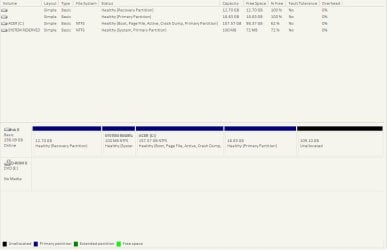
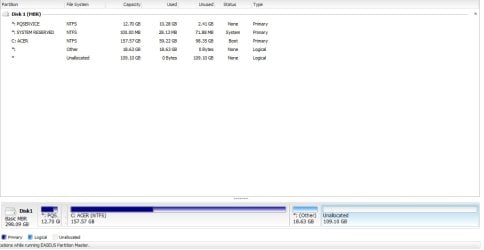
My partitions are split as follows:
12.7GB to pqservice, Acer's backup files are stored here, to allow factory resetting.
100MB to System Reserve.
157GB to C Drive
10GB to Ubuntu
And, because the maximum number of partitions is 4, 109GB unallocated.
Windows Disk Management, of course, won't let me extend C drive by 109GB because the unallocated space is not next to it. I cannot create a new partition, because the maximum is 4, and I cannot merge any of them either.
So how am I supposed to extend C Drive by 109GB through Disk Management, or any 3rd party program, for that matter?
When I originally partitioned the drive, I noticed that I hadn't really done it efficiently, because 109GB of data became "unallocated", after being part of the Windows C drive. I ignored this back then, because I couldn't fix it with Disk Management. Now I would like to get the partitions in order, but I have no idea what to do without risking making my computer unbootable (its happened before).
My partitions are split as follows:
12.7GB to pqservice, Acer's backup files are stored here, to allow factory resetting.
100MB to System Reserve.
157GB to C Drive
10GB to Ubuntu
And, because the maximum number of partitions is 4, 109GB unallocated.
Windows Disk Management, of course, won't let me extend C drive by 109GB because the unallocated space is not next to it. I cannot create a new partition, because the maximum is 4, and I cannot merge any of them either.
So how am I supposed to extend C Drive by 109GB through Disk Management, or any 3rd party program, for that matter?
My Computer
At a glance
Windows 7 Home Premium 64bitIntel Pentium T44002GBIntel GMA 4500M
- Computer Manufacturer/Model Number
- Acer Aspire 5738Z
- OS
- Windows 7 Home Premium 64bit
- CPU
- Intel Pentium T4400
- Memory
- 2GB
- Graphics Card(s)
- Intel GMA 4500M
- Monitor(s) Displays
- 15.6" LCD
- Hard Drives
- 320GB Hitachi