
You are using an out of date browser. It may not display this or other websites correctly.
You should upgrade or use an alternative browser.
You should upgrade or use an alternative browser.
Solved Disk Management Window
- Thread starter Rus2
- Start date

Post a picture of your disk management. Then we'll see.
My Computer
- Computer Manufacturer/Model Number
- HP, Dell, Gateway, Toshiba - 4 laptops and 2 desktops
- OS
- Vista, Windows7, Mint Mate, Zorin, Windows 8
- CPU
- from 1.6GHz Duo to i7
- Monitor(s) Displays
- 2x HP w2207
- Hard Drives
- 5x HDD, 7x SSD, 12x Externals
- Keyboard
- with trackball - no mices
- Mouse
- Trackball mice
- Internet Speed
- DSL 6000
Post a picture of your disk management. Then we'll see.
I don't know how. It is in a box to the left of the box with the C Drive.
my SSD is 125 GB but I only have 88.1 GB available. I have the recvery disks so I don't need a recovery partition.
My Computer
- OS
- win 7

Hello Rus,
The tutorial below can help show you how to.
http://www.sevenforums.com/tutorials/274797-disk-management-post-screen-capture-image.html
The tutorial below can help show you how to.
http://www.sevenforums.com/tutorials/274797-disk-management-post-screen-capture-image.html
My Computer
- Computer type
- PC/Desktop
- Computer Manufacturer/Model Number
- Self built custom
- OS
- 64-bit Windows 11 Pro for Workstations
- CPU
- Intel i7-8700K OC'd to 5 GHz
- Motherboard
- ASUS ROG Maximus XI Formula Z390
- Memory
- 64 GB (4x16GB) G.SKILL TridentZ RGB DDR4 3600 MHz
- Graphics Card(s)
- ASUS ROG-STRIX-GTX1080TI-O11G-GAMING
- Sound Card
- Integrated
- Monitor(s) Displays
- 2 x Samsung Odyssey G7 27"
- Screen Resolution
- 2560x1440
- Hard Drives
- 1TB Samsung 990 PRO M.2,
4TB Samsung 990 PRO PRO M.2,
TerraMaster F8 SSD Plus NAS
- PSU
- Seasonic Prime Titanium 850W
- Case
- Thermaltake Core P3
- Cooling
- Corsair Hydro H115i
- Keyboard
- Logitech wireless K800
- Mouse
- Logitech MX Master 4
- Internet Speed
- 2 Gb/s Download and 100 Mb/s Upload
- Antivirus
- Malwarebyte Anti-Malware Premium
- Browser
- Google Chrome
- Other Info
- Logitech Z625 speaker system,
Logitech BRIO 4K Pro webcam,
HP Color LaserJet Pro MFP M477fdn,
APC SMART-UPS RT 1000 XL - SURT1000XLI,
Galaxy S23 Plus phone
We really need the picture. Your recovery partition is unusual in size and it could be active. So we have to have a look.
http://www.sevenforums.com/tutorials/274797-disk-management-post-screen-capture-image.html
Hmm, Shawn beat me, lol.
http://www.sevenforums.com/tutorials/274797-disk-management-post-screen-capture-image.html
Hmm, Shawn beat me, lol.
My Computer
- Computer Manufacturer/Model Number
- HP, Dell, Gateway, Toshiba - 4 laptops and 2 desktops
- OS
- Vista, Windows7, Mint Mate, Zorin, Windows 8
- CPU
- from 1.6GHz Duo to i7
- Monitor(s) Displays
- 2x HP w2207
- Hard Drives
- 5x HDD, 7x SSD, 12x Externals
- Keyboard
- with trackball - no mices
- Mouse
- Trackball mice
- Internet Speed
- DSL 6000
We really need the picture. Your recovery partition is unusual in size and it could be active. So we have to have a look.
http://www.sevenforums.com/tutorials/274797-disk-management-post-screen-capture-image.html
Hmm, Shawn beat me, lol.
Couldn't fine the paper clip and I'm totally confused. There are two boxes. The one one the left shows 31.09 GB Healthy (Recovery Partition) and the one on the right shows:
TI106234WOC (C
88.15 GB NTFS
Healthy (System, Boot, Active, Crash Dump, Primary Partition)
Sorry, but it's the best I can do.
My SSD is a 124 GB.
My Computer
- OS
- win 7
Without a picture of disk management we cannot help you. There are too many variables and we don't want to brick your system. The info you gave up to now does not really help.
But if you want to take chances, let us know. It's your responsibility then.
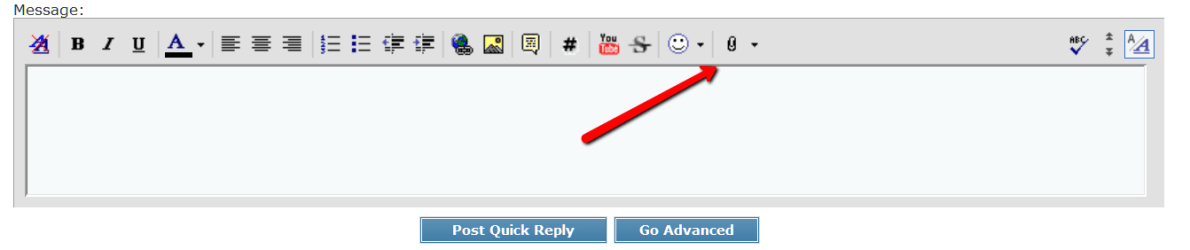
PS, the paper clip:
But if you want to take chances, let us know. It's your responsibility then.
PS, the paper clip:
Attachments
My Computer
- Computer Manufacturer/Model Number
- HP, Dell, Gateway, Toshiba - 4 laptops and 2 desktops
- OS
- Vista, Windows7, Mint Mate, Zorin, Windows 8
- CPU
- from 1.6GHz Duo to i7
- Monitor(s) Displays
- 2x HP w2207
- Hard Drives
- 5x HDD, 7x SSD, 12x Externals
- Keyboard
- with trackball - no mices
- Mouse
- Trackball mice
- Internet Speed
- DSL 6000
Without a picture of disk management we cannot help you. There are too many variables and we don't want to brick your system. The info you gave up to now does not really help.
But if you want to take chances, let us know. It's your responsibility then.
PS, the paper clip:
My Disk Management screen shows the two boxes as I've best described them. OK, give me what you have and I'll decide.
My Computer
- OS
- win 7

Post thr requested image...its not hard.
My Computer
- Computer type
- PC/Desktop
- Computer Manufacturer/Model Number
- Golden Mk. I.4
- OS
- Windows 10 Pro x64 ; Xubuntu x64
- CPU
- Intel i7 860 @ 2.80 GHz O/C'ed to 4.0GHz
- Motherboard
- Gigabyte P55A-UD3R Rev.1. Award BIOS F13
- Memory
- 16GB Corsair Vengance DDR3 @ 661 MHz Dual Channel (9-9-9-24)
- Graphics Card(s)
- EVGA NVidia GTX 560 1024MB
- Sound Card
- Realtek Integrated
- Monitor(s) Displays
- Dual Samsung SyncMaster 2494HS
- Screen Resolution
- 1920*1080 and 1920*1080
- Hard Drives
- 1*Samsung 840 EVO 120GB SSD;
1*OCZ Vertex 2 60GB SSD;
2*Samsung F3 SpinPoint 1TB in RAID0;
1*Samsung F1 SpinPoint 1TB;
2*Western Digital 1TB External USB 3.0
1*Western Digital 500GB External USB 3.0
1*Seagate 500GB External USB 2.0
- PSU
- Thermaltake ToughPower QFan 750W
- Case
- Thermaltake Element S VK60001W2Z
- Cooling
- Corsair H60 Water Cooling, 2*230mm and 2*80mm case fans
- Keyboard
- Logitech G110
- Mouse
- Logitech MX518
A few questions first:
1. Why is that recovery partition 31GBs. Normally they are around 10GB. How much freespace is in that partition.
2. Did you burn the recovery DVD from the recovery partition. If not, it will be difficult to reinstall the system when it crashes or has a virus.. It is not impossible, but you may have a lot of trouble.
3. Do you have an external disk to which you could make images. That could substitute for the recovery partition.
4. How much RAM do you have.
5. Did you explore other possibilities to gain space on your SSD - like deleting the hiberfile, reducing the pagefile, etc.
6. Is this a laptop or a desktop where you also have a HDD.
1. Why is that recovery partition 31GBs. Normally they are around 10GB. How much freespace is in that partition.
2. Did you burn the recovery DVD from the recovery partition. If not, it will be difficult to reinstall the system when it crashes or has a virus.. It is not impossible, but you may have a lot of trouble.
3. Do you have an external disk to which you could make images. That could substitute for the recovery partition.
4. How much RAM do you have.
5. Did you explore other possibilities to gain space on your SSD - like deleting the hiberfile, reducing the pagefile, etc.
6. Is this a laptop or a desktop where you also have a HDD.
My Computer
- Computer Manufacturer/Model Number
- HP, Dell, Gateway, Toshiba - 4 laptops and 2 desktops
- OS
- Vista, Windows7, Mint Mate, Zorin, Windows 8
- CPU
- from 1.6GHz Duo to i7
- Monitor(s) Displays
- 2x HP w2207
- Hard Drives
- 5x HDD, 7x SSD, 12x Externals
- Keyboard
- with trackball - no mices
- Mouse
- Trackball mice
- Internet Speed
- DSL 6000

Open up Disk Management fully, now press the Prt Scr key on your keyboard.
Now open up paint and click on paste, now click on the icon right above paste, this will open up a small window, now click on save as, save the picture as a jpeg and save it to your desktop.
Now make a reply to your thread and use the paperclip to upload the picture you just saved to your desktop.
Ah, nevermind, go to sleep LOL
Now open up paint and click on paste, now click on the icon right above paste, this will open up a small window, now click on save as, save the picture as a jpeg and save it to your desktop.
Now make a reply to your thread and use the paperclip to upload the picture you just saved to your desktop.
Ah, nevermind, go to sleep LOL
My Computer
- Computer type
- PC/Desktop
- Computer Manufacturer/Model Number
- Skylake Special #666
- OS
- Windows 10 Pro x64
- CPU
- Intel Core i7 6700K
- Motherboard
- Asus Sabertooth Z170 Mark 1
- Memory
- GSkill TridentZ RGB 16GB 3600 16-16-16-36
- Graphics Card(s)
- EVGA GTX 980 Ti SC x2
- Sound Card
- Realtek High Definition
- Monitor(s) Displays
- AOC G2460PG
- Screen Resolution
- 1920 x 1080 144Hz
- Hard Drives
- Samsung 860 Pro 256GB, Seagate Barracuda 4TB x2
- PSU
- EVGA 1000 P2, EVGA White Custom Braided Cables
- Case
- Corsair Vengeance C70 Gunmetal Black
- Cooling
- Corsair H100i v2, Corsair ML120 x2, Thermal Grizzly Kryonaut
- Keyboard
- Logitech G910 Orion Spectrum
- Mouse
- Logitech G700s
- Internet Speed
- Verizon Fios Quantum Gateway 75/75
- Antivirus
- Windows Defender, Malwarebytes Free 3.8.3
- Browser
- Chrome
- Other Info
- Corsair SP120 x4, LG Blu-ray Drive, Durabrand HT-395 100 Watt Dolby Digital Amp, Corsair H2100 Wireless 7.1 Headset
Without a picture of disk management we cannot help you. There are too many variables and we don't want to brick your system. The info you gave up to now does not really help.
But if you want to take chances, let us know. It's your responsibility then.
PS, the paper clip:
I'll try to post a picture of my screen.

My Computer
- OS
- win 7
1. It is good we looked because that so-called recovery partition is your active boot partition containing the bootmgr. You first have to move the bootmgr to C, else your system becomes unbootable.
http://www.sevenforums.com/tutorials/209885-bootmgr-move-c-easybcd.html
Apart from the bootmgr, this partition seems to be completely empty. Is that correct. Open it and have a look.
2. Once you moved the bootmgr, you will have to delete that partition and volume to gain unallocated space. For that it is best to use the bootable CD of Partition Wizard (the .iso is in the last item on the website). Burn that to CD and boot with that CD.
Free download Magic Partition Manager Software, partition magic alternative, free partition magic, partition magic Windows 7 and server partition software - Partition Wizard Online
Here is a tutorial on how to go about it.
Delete Partition - Partition Wizard Help Video
3. Next you'll have to make an image of your C drive to an external disk - this is to be on the safe side. Here is how:
http://www.sevenforums.com/tutorials/73828-imaging-free-macrium.html?ltr=I
4. Then you download the Macrium recovery .iso from my Skydrive. Burn that also to CD to have it handy in case something happens during the next step. You can also use that CD to make the image. Then you don't have to install Macrium.
https://skydrive.live.com/?cid=475a0a48ca6d4035&provision=1&ref=3&wa=wsignin1.0&sa=412485191#cid=475A0A48CA6D4035&id=475A0A48CA6D4035%211812
5. Now you can use the Partition Wizard CD and extend your partition. Here is how:
How to extend partition easily with partition magic ? Partition Wizard video help.
Let us know when you encounter any problems or when you are done.
http://www.sevenforums.com/tutorials/209885-bootmgr-move-c-easybcd.html
Apart from the bootmgr, this partition seems to be completely empty. Is that correct. Open it and have a look.
2. Once you moved the bootmgr, you will have to delete that partition and volume to gain unallocated space. For that it is best to use the bootable CD of Partition Wizard (the .iso is in the last item on the website). Burn that to CD and boot with that CD.
Free download Magic Partition Manager Software, partition magic alternative, free partition magic, partition magic Windows 7 and server partition software - Partition Wizard Online
Here is a tutorial on how to go about it.
Delete Partition - Partition Wizard Help Video
3. Next you'll have to make an image of your C drive to an external disk - this is to be on the safe side. Here is how:
http://www.sevenforums.com/tutorials/73828-imaging-free-macrium.html?ltr=I
4. Then you download the Macrium recovery .iso from my Skydrive. Burn that also to CD to have it handy in case something happens during the next step. You can also use that CD to make the image. Then you don't have to install Macrium.
https://skydrive.live.com/?cid=475a0a48ca6d4035&provision=1&ref=3&wa=wsignin1.0&sa=412485191#cid=475A0A48CA6D4035&id=475A0A48CA6D4035%211812
5. Now you can use the Partition Wizard CD and extend your partition. Here is how:
How to extend partition easily with partition magic ? Partition Wizard video help.
Let us know when you encounter any problems or when you are done.
My Computer
- Computer Manufacturer/Model Number
- HP, Dell, Gateway, Toshiba - 4 laptops and 2 desktops
- OS
- Vista, Windows7, Mint Mate, Zorin, Windows 8
- CPU
- from 1.6GHz Duo to i7
- Monitor(s) Displays
- 2x HP w2207
- Hard Drives
- 5x HDD, 7x SSD, 12x Externals
- Keyboard
- with trackball - no mices
- Mouse
- Trackball mice
- Internet Speed
- DSL 6000
1. It is good we looked because that so-called recovery partition is your active boot partition containing the bootmgr. You first have to move the bootmgr to C, else your system becomes unbootable.
http://www.sevenforums.com/tutorials/209885-bootmgr-move-c-easybcd.html
Apart from the bootmgr, this partition seems to be completely empty. Is that correct. Open it and have a look.
2. Once you moved the bootmgr, you will have to delete that partition and volume to gain unallocated space. For that it is best to use the bootable CD of Partition Wizard (the .iso is in the last item on the website). Burn that to CD and boot with that CD.
Free download Magic Partition Manager Software, partition magic alternative, free partition magic, partition magic Windows 7 and server partition software - Partition Wizard Online
Here is a tutorial on how to go about it.
Delete Partition - Partition Wizard Help Video
3. Next you'll have to make an image of your C drive to an external disk - this is to be on the safe side. Here is how:
http://www.sevenforums.com/tutorials/73828-imaging-free-macrium.html?ltr=I
4. Then you download the Macrium recovery .iso from my Skydrive. Burn that also to CD to have it handy in case something happens during the next step. You can also use that CD to make the image. Then you don't have to install Macrium.
https://skydrive.live.com/?cid=475a0a48ca6d4035&provision=1&ref=3&wa=wsignin1.0&sa=412485191#cid=475A0A48CA6D4035&id=475A0A48CA6D4035%211812
5. Now you can use the Partition Wizard CD and extend your partition. Here is how:
How to extend partition easily with partition magic ? Partition Wizard video help.
Let us know when you encounter any problems or when you are done.
How do you know it has the boot manager?
Regarding your #3 I have a HDD cloned of my SSD and I have recovery disks also. Is that enough?
My Computer
- OS
- win 7
The recovery partition is marked active. That means it is flagged in the MBR as bootmgr partition.
My Computer
- Computer Manufacturer/Model Number
- HP, Dell, Gateway, Toshiba - 4 laptops and 2 desktops
- OS
- Vista, Windows7, Mint Mate, Zorin, Windows 8
- CPU
- from 1.6GHz Duo to i7
- Monitor(s) Displays
- 2x HP w2207
- Hard Drives
- 5x HDD, 7x SSD, 12x Externals
- Keyboard
- with trackball - no mices
- Mouse
- Trackball mice
- Internet Speed
- DSL 6000
Sure it's free. Look at the link in the tutorial.
My Computer
- Computer Manufacturer/Model Number
- HP, Dell, Gateway, Toshiba - 4 laptops and 2 desktops
- OS
- Vista, Windows7, Mint Mate, Zorin, Windows 8
- CPU
- from 1.6GHz Duo to i7
- Monitor(s) Displays
- 2x HP w2207
- Hard Drives
- 5x HDD, 7x SSD, 12x Externals
- Keyboard
- with trackball - no mices
- Mouse
- Trackball mice
- Internet Speed
- DSL 6000
I am not going to answer that. You do some more reading and find out yourself.
My Computer
- Computer Manufacturer/Model Number
- HP, Dell, Gateway, Toshiba - 4 laptops and 2 desktops
- OS
- Vista, Windows7, Mint Mate, Zorin, Windows 8
- CPU
- from 1.6GHz Duo to i7
- Monitor(s) Displays
- 2x HP w2207
- Hard Drives
- 5x HDD, 7x SSD, 12x Externals
- Keyboard
- with trackball - no mices
- Mouse
- Trackball mice
- Internet Speed
- DSL 6000
Similar threads
- Replies
- 5
- Views
- 2K

- Replies
- 6
- Views
- 8K

- Replies
- 3
- Views
- 3K
- Replies
- 7
- Views
- 4K
