
Solved Disk Manager extremely slow to respond

1foxracing

New member
Power User
Local time
9:14 PM
Messages
55
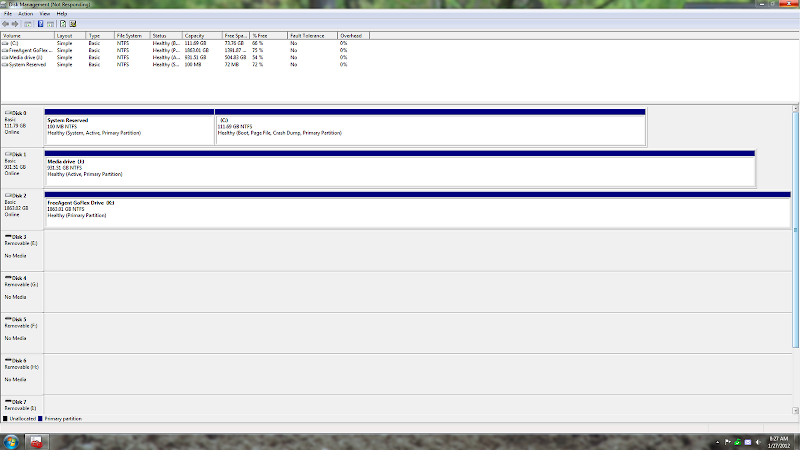
I recently installed a new Mushkin SSD to my system and it runs great. The only problem that I am having is disk manger takes minutes to open and 2 of my other hard drives will not appear. The 2 missing drives do show on the BIOS flash screen. BIOS and all drivers are up to date from Gigabytes website.
Capture.PNG
 

My Computer

Computer Manufacturer/Model Number
Home Brew
OS
Windows 7 Pro 64bit
CPU
Intel i5 2500K ( 4.2 GHz)
Motherboard
GIGABYTE GA-Z77X-UD5H LGA 1155 Z77 ATX
Memory
Mushkin Enhanced 8GB (2x4GB) DDR3 PC3-12800 9-9-9-24 Blackli
Graphics Card(s)
GIGABYTE GeForce GTX 560 1GB GDDR5 (GV-N56GOC-1GI)
Monitor(s) Displays
ASUS VH242H
Screen Resolution
1080p, 1920x1080
Hard Drives
Mushkin Enhanced Chronos Deluxe MKNSSDCR120GB-DX 2.5" 120GB SATA III MLC Internal Solid State Drive ( OS & Photoshop CS-5)
Intel 320 Series 40 GB SATA 3.0 Gb-s 2.5-Inch SSD
WD Caviar Black 500GB Serial ATA HD 7200/32MB/SATA-3G
Seagate 1TB
Seaga
PSU
Mushkin Enhanced Joule 700 W
Case
Corsair Carbide 400R
Cooling
Scythe Mugen 3, COUGAR CF-V14H (x6), COUGAR CF-V12H (x2)
Keyboard
Microsoft Sidewinder X4
Mouse
Gigabyte M6800
Other Info
Scythe 4 CH fan controller
Aft Pro57U USB3.0 Media card reader
Mushkin Enhanced Ventura 32GB USB 3.0 Flash Drive
My guess would be that the 2 problems are related. As a first attempt to fix it, I would run a sfc /scannow and see what it says.
 

My Computer

Computer Manufacturer/Model Number
HP, Dell, Gateway, Toshiba - 4 laptops and 2 desktops
OS
Vista, Windows7, Mint Mate, Zorin, Windows 8
CPU
from 1.6GHz Duo to i7
Monitor(s) Displays
2x HP w2207
Hard Drives
5x HDD, 7x SSD, 12x Externals
Keyboard
with trackball - no mices
Mouse
Trackball mice
Internet Speed
DSL 6000
Done, results- " Windows Resource Protection did not find any integrity violations."
 

My Computer

Computer Manufacturer/Model Number
Home Brew
OS
Windows 7 Pro 64bit
CPU
Intel i5 2500K ( 4.2 GHz)
Motherboard
GIGABYTE GA-Z77X-UD5H LGA 1155 Z77 ATX
Memory
Mushkin Enhanced 8GB (2x4GB) DDR3 PC3-12800 9-9-9-24 Blackli
Graphics Card(s)
GIGABYTE GeForce GTX 560 1GB GDDR5 (GV-N56GOC-1GI)
Monitor(s) Displays
ASUS VH242H
Screen Resolution
1080p, 1920x1080
Hard Drives
Mushkin Enhanced Chronos Deluxe MKNSSDCR120GB-DX 2.5" 120GB SATA III MLC Internal Solid State Drive ( OS & Photoshop CS-5)
Intel 320 Series 40 GB SATA 3.0 Gb-s 2.5-Inch SSD
WD Caviar Black 500GB Serial ATA HD 7200/32MB/SATA-3G
Seagate 1TB
Seaga
PSU
Mushkin Enhanced Joule 700 W
Case
Corsair Carbide 400R
Cooling
Scythe Mugen 3, COUGAR CF-V14H (x6), COUGAR CF-V12H (x2)
Keyboard
Microsoft Sidewinder X4
Mouse
Gigabyte M6800
Other Info
Scythe 4 CH fan controller
Aft Pro57U USB3.0 Media card reader
Mushkin Enhanced Ventura 32GB USB 3.0 Flash Drive
Did Disk Management always work correctly before you installed the SSD ?? Has this been the only H/W and S/W change in the system since it worked ??
 

My Computer

Computer Manufacturer/Model Number
HP, Dell, Gateway, Toshiba - 4 laptops and 2 desktops
OS
Vista, Windows7, Mint Mate, Zorin, Windows 8
CPU
from 1.6GHz Duo to i7
Monitor(s) Displays
2x HP w2207
Hard Drives
5x HDD, 7x SSD, 12x Externals
Keyboard
with trackball - no mices
Mouse
Trackball mice
Internet Speed
DSL 6000
Yes disk Man worked fine before. This was a clean install for the new SSD. No other software or hardware has been added since.
 

My Computer

Computer Manufacturer/Model Number
Home Brew
OS
Windows 7 Pro 64bit
CPU
Intel i5 2500K ( 4.2 GHz)
Motherboard
GIGABYTE GA-Z77X-UD5H LGA 1155 Z77 ATX
Memory
Mushkin Enhanced 8GB (2x4GB) DDR3 PC3-12800 9-9-9-24 Blackli
Graphics Card(s)
GIGABYTE GeForce GTX 560 1GB GDDR5 (GV-N56GOC-1GI)
Monitor(s) Displays
ASUS VH242H
Screen Resolution
1080p, 1920x1080
Hard Drives
Mushkin Enhanced Chronos Deluxe MKNSSDCR120GB-DX 2.5" 120GB SATA III MLC Internal Solid State Drive ( OS & Photoshop CS-5)
Intel 320 Series 40 GB SATA 3.0 Gb-s 2.5-Inch SSD
WD Caviar Black 500GB Serial ATA HD 7200/32MB/SATA-3G
Seagate 1TB
Seaga
PSU
Mushkin Enhanced Joule 700 W
Case
Corsair Carbide 400R
Cooling
Scythe Mugen 3, COUGAR CF-V14H (x6), COUGAR CF-V12H (x2)
Keyboard
Microsoft Sidewinder X4
Mouse
Gigabyte M6800
Other Info
Scythe 4 CH fan controller
Aft Pro57U USB3.0 Media card reader
Mushkin Enhanced Ventura 32GB USB 3.0 Flash Drive
I would do 2 things:

1. Check whether there is a firmware update. It is apparently caused by the SSD. The Disk Management seems to be hung up on it. And then it may never get to the 2 missing HDDs.

2. There is a Mushkin Forum. I would ask these guys whether they have ever encoutered something like that. This SSD is relatively rare and around here there may not be many people who have experience with it.
 

My Computer

Computer Manufacturer/Model Number
HP, Dell, Gateway, Toshiba - 4 laptops and 2 desktops
OS
Vista, Windows7, Mint Mate, Zorin, Windows 8
CPU
from 1.6GHz Duo to i7
Monitor(s) Displays
2x HP w2207
Hard Drives
5x HDD, 7x SSD, 12x Externals
Keyboard
with trackball - no mices
Mouse
Trackball mice
Internet Speed
DSL 6000
I am a member on the Mushkin forum as well so I will see what Sean has to say.
Thank you.
 

My Computer

Computer Manufacturer/Model Number
Home Brew
OS
Windows 7 Pro 64bit
CPU
Intel i5 2500K ( 4.2 GHz)
Motherboard
GIGABYTE GA-Z77X-UD5H LGA 1155 Z77 ATX
Memory
Mushkin Enhanced 8GB (2x4GB) DDR3 PC3-12800 9-9-9-24 Blackli
Graphics Card(s)
GIGABYTE GeForce GTX 560 1GB GDDR5 (GV-N56GOC-1GI)
Monitor(s) Displays
ASUS VH242H
Screen Resolution
1080p, 1920x1080
Hard Drives
Mushkin Enhanced Chronos Deluxe MKNSSDCR120GB-DX 2.5" 120GB SATA III MLC Internal Solid State Drive ( OS & Photoshop CS-5)
Intel 320 Series 40 GB SATA 3.0 Gb-s 2.5-Inch SSD
WD Caviar Black 500GB Serial ATA HD 7200/32MB/SATA-3G
Seagate 1TB
Seaga
PSU
Mushkin Enhanced Joule 700 W
Case
Corsair Carbide 400R
Cooling
Scythe Mugen 3, COUGAR CF-V14H (x6), COUGAR CF-V12H (x2)
Keyboard
Microsoft Sidewinder X4
Mouse
Gigabyte M6800
Other Info
Scythe 4 CH fan controller
Aft Pro57U USB3.0 Media card reader
Mushkin Enhanced Ventura 32GB USB 3.0 Flash Drive
Well after a week of chasing this problem I finally got it solved thanks to Mushkin Sean. The problem turned out to be the Intel driver 10.​8.​0.​1003. After reverting back to the stock W7 driver all is good with all drives appearing/functioning as they should.
If you like you can read about it here.
Mushkin Enhanced Forums • View topic - Problem with Disk manager
 

My Computer

Computer Manufacturer/Model Number
Home Brew
OS
Windows 7 Pro 64bit
CPU
Intel i5 2500K ( 4.2 GHz)
Motherboard
GIGABYTE GA-Z77X-UD5H LGA 1155 Z77 ATX
Memory
Mushkin Enhanced 8GB (2x4GB) DDR3 PC3-12800 9-9-9-24 Blackli
Graphics Card(s)
GIGABYTE GeForce GTX 560 1GB GDDR5 (GV-N56GOC-1GI)
Monitor(s) Displays
ASUS VH242H
Screen Resolution
1080p, 1920x1080
Hard Drives
Mushkin Enhanced Chronos Deluxe MKNSSDCR120GB-DX 2.5" 120GB SATA III MLC Internal Solid State Drive ( OS & Photoshop CS-5)
Intel 320 Series 40 GB SATA 3.0 Gb-s 2.5-Inch SSD
WD Caviar Black 500GB Serial ATA HD 7200/32MB/SATA-3G
Seagate 1TB
Seaga
PSU
Mushkin Enhanced Joule 700 W
Case
Corsair Carbide 400R
Cooling
Scythe Mugen 3, COUGAR CF-V14H (x6), COUGAR CF-V12H (x2)
Keyboard
Microsoft Sidewinder X4
Mouse
Gigabyte M6800
Other Info
Scythe 4 CH fan controller
Aft Pro57U USB3.0 Media card reader
Mushkin Enhanced Ventura 32GB USB 3.0 Flash Drive
Back
Top