
Disk Usage Bar in "My Computer"

scorpio93

New member
Local time
9:13 PM
Messages
4
Hi everyone,

Does anybody know how to set Windows 7 64 bits to show the disk usage bar below Disk Icons?

I've already had those bars (they're blue while disk usage is normal and turn red when you are close to the limit) but they disappear and I would love it to put them back.

Thanks.

PS: Sorry for my English, I'm Portuguese... :confused:
 

My Computer

Computer Manufacturer/Model Number
asus n61 JQ
OS
windows 7 ultimate 64 bits
CPU
i7 720 QM
Motherboard
asus
Memory
4GB
Graphics Card(s)
HD5730
Sound Card
asus
Monitor(s) Displays
asus
Hard Drives
500 GB
PSU
asus
Case
asus
Cooling
asus
Hello there.

Arrange the icons by "Mosaico" and that'll bring the usage bar back :)
 

My Computer

Computer type
PC/Desktop
OS
Windows
Hello there.

Arrange the icons by "Mosaico" and that'll bring the usage bar back :)

"tiles" :)

hi scorpio93, and welcome to sevenforums,

...or you get really long bars with 'content' view.
 

My Computer

Computer Manufacturer/Model Number
mickey megabyte 1234
OS
ultimate 64 sp1
CPU
i5 2500K [email protected]
Motherboard
MSI P67A-GD53
Memory
8 gigs GSkill Ripjaws 1600
Graphics Card(s)
amd hd6950
Sound Card
creative x-fi gamer
Monitor(s) Displays
samsung 24"
Screen Resolution
1920x1080
Hard Drives
ocz vertex 2e 60 gig, samsung f3 1tb, buffalo 2tb ext
PSU
antec 550
Case
antec three hundred
Cooling
i'm a cooling fan
Keyboard
saitek eclipse ii
Mouse
logitech g3
Internet Speed
about 4 Mbps
Other Info
i love win7
Hehe yeah i know Mickey, but he's Portuguese and probably his OS is in Portuguese too. Tiles in portuguese is Mosaico :p unless he has the english version :huh:
 

My Computer

Computer type
PC/Desktop
OS
Windows
Thank you so much

I've already arranged the icons by "Mosaicos Expandidos" ("extended tiles") but the bars doesn't appear.

Here is an image of my situation.:(:huh:

And Here is what I'm trying to get back.:D

Any idea? :o

Thanks again. ;)
 

My Computer

Computer Manufacturer/Model Number
asus n61 JQ
OS
windows 7 ultimate 64 bits
CPU
i7 720 QM
Motherboard
asus
Memory
4GB
Graphics Card(s)
HD5730
Sound Card
asus
Monitor(s) Displays
asus
Hard Drives
500 GB
PSU
asus
Case
asus
Cooling
asus
Huh, that's weird, scorpio.

Try to tun a System File Check:

http://www.sevenforums.com/tutorials/1538-sfc-scannow-command-system-file-checker.html

If that doesn't work :huh: check your computer for Malware.

Malwarebytes' Anti Malware has a really good detection rate. download it, install it, boot into safe mode (F8 on BIOS before startup) and perform a full scan.

Malwarebytes' Anti-Malware: Malwarebytes

And if your PC comes out clean, then i guess the next step could be a Repair Install

http://www.sevenforums.com/tutorials/3413-repair-install.html

Of course, we want to do all these things first before getting to a much severe solution :geek:

Post back your results.
 

My Computer

Computer type
PC/Desktop
OS
Windows
Hi Punkster,

The Scan result was this

I hope it isn't too serious:sick:. Anyway, I was thinking briefly to reinstall the windows and, if it's necessary a "severe" solution to get back the bars, I just prefer reinstall the entire operating system.
Thanks...
 

My Computer

Computer Manufacturer/Model Number
asus n61 JQ
OS
windows 7 ultimate 64 bits
CPU
i7 720 QM
Motherboard
asus
Memory
4GB
Graphics Card(s)
HD5730
Sound Card
asus
Monitor(s) Displays
asus
Hard Drives
500 GB
PSU
asus
Case
asus
Cooling
asus
OK, check your CBS.log

Or even better, perform another System File Check, if the results are: there are no violations on the system files. or 0% errors. you'll be fine.

If it keeps showing and fixing errors, there might be another thing causing it. did you run the Malware Scan?

Also, you could upload the images using the paperclip button on the comment box. right next to the smiley face. :)
 

My Computer

Computer type
PC/Desktop
OS
Windows
I didn't run the malware scan (I have Bit Defender and it's running a deep system scan).

However, I got bars again (not in prefered scheme, but I got them) - see the image.

With "tiles" they just don't appear, but for now, I think I will keep things untill I reinstall the windows.

I thought it was just a simple definition or something like that, but if there is malware on my computer (or any kind of "errors") I really prefer clean everything through a disk format and a windows reinstall.

Thanks for all...
 

Attachments

  • bars.jpg
    bars.jpg
    57.7 KB · Views: 66

My Computer

Computer Manufacturer/Model Number
asus n61 JQ
OS
windows 7 ultimate 64 bits
CPU
i7 720 QM
Motherboard
asus
Memory
4GB
Graphics Card(s)
HD5730
Sound Card
asus
Monitor(s) Displays
asus
Hard Drives
500 GB
PSU
asus
Case
asus
Cooling
asus
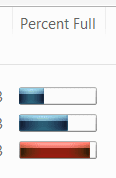
wow, never noticed the 'percent full' column before.

centfull.PNG

you can learn a lot from this forum!
 

My Computer

Computer Manufacturer/Model Number
mickey megabyte 1234
OS
ultimate 64 sp1
CPU
i5 2500K [email protected]
Motherboard
MSI P67A-GD53
Memory
8 gigs GSkill Ripjaws 1600
Graphics Card(s)
amd hd6950
Sound Card
creative x-fi gamer
Monitor(s) Displays
samsung 24"
Screen Resolution
1920x1080
Hard Drives
ocz vertex 2e 60 gig, samsung f3 1tb, buffalo 2tb ext
PSU
antec 550
Case
antec three hundred
Cooling
i'm a cooling fan
Keyboard
saitek eclipse ii
Mouse
logitech g3
Internet Speed
about 4 Mbps
Other Info
i love win7
Yes, Mickey, we learn here everyday, indeed. :geek:
 

My Computer

Computer type
PC/Desktop
OS
Windows
Back
Top