Solved diskpart/clean by accident....need to recover partitions,begging :'(

sorry for the delay. Im via my phone and can't comment much fast. For the last question, yes they were all NTFS and exact sizes but not the used space.
Now the full scan is runing and i can see a 10mb as BOOT, then 100mb reserved. 100.01gb as c(thatz the exact size. And lot of 3mb partitions and its not allowed to scroll.
Should I cancel the scan and run a quick one even used data is wrong?
used data is correct on full scan?
100MB partition isn't very important. Did you format C: prior to clean?
No other partitions were on disk prior to clean? Little bit confused
 

My Computer My Computer

At a glance

Microsoft Windows 7 Home Premium 64-bits 7601...Intel(R) Core(TM) i3 CPU M 370 @ 2.40GHz4,00 GBATI Mobility Radeon HD 5400 Series
Computer type
Laptop
Computer Manufacturer/Model Number
ACER ASPIRE 5742G
OS
Microsoft Windows 7 Home Premium 64-bits 7601 Multiprocessor Free Service Pack 1
CPU
Intel(R) Core(TM) i3 CPU M 370 @ 2.40GHz
Motherboard
Acer Aspire 5742G
Memory
4,00 GB
Graphics Card(s)
ATI Mobility Radeon HD 5400 Series
Sound Card
(1) AMD High Definition Audio Device (2) Realtek High Defi
Screen Resolution
1366 x 768 x 32 bits (4294967296 colors) @ 60 Hz
Hard Drives
WDC WD5000BEVT-22ZAT0
okay, i will try to post a pic, for that i need to have computer and scan is yet runing.
And yes, it shows exact sizes. Quick scan and now.
I had 100mb reserved, then 100gb for windows, 200 gb as D:, and 296gb as E. Thatz all of it I had when I open disk management window.
200 gb as D:, and 296gb as E are on another physical drive?
 

My Computer My Computer

At a glance

Microsoft Windows 7 Home Premium 64-bits 7601...Intel(R) Core(TM) i3 CPU M 370 @ 2.40GHz4,00 GBATI Mobility Radeon HD 5400 Series
Computer type
Laptop
Computer Manufacturer/Model Number
ACER ASPIRE 5742G
OS
Microsoft Windows 7 Home Premium 64-bits 7601 Multiprocessor Free Service Pack 1
CPU
Intel(R) Core(TM) i3 CPU M 370 @ 2.40GHz
Motherboard
Acer Aspire 5742G
Memory
4,00 GB
Graphics Card(s)
ATI Mobility Radeon HD 5400 Series
Sound Card
(1) AMD High Definition Audio Device (2) Realtek High Defi
Screen Resolution
1366 x 768 x 32 bits (4294967296 colors) @ 60 Hz
Hard Drives
WDC WD5000BEVT-22ZAT0
so, guys, are you sugesting me to go for the corrections even that used space is wrong? Would I lose data which was in my D? Or even though, after the corections, would I be able to recover them with a data recovery software?

So, i am going to cancel the ful scan now. It took 2hours to reach 15%. Shal I cancel and go for the quick recovery?
I repeat, partition sizes were perfect. But not the used space. My concern is on that 100 lost in D :'(
 

My Computer My Computer

At a glance

Windows 7 Ultimate x64Core I5 - 24306GB DDR3 1333Intel HD 3000 with ATI Radeon HD 6470
Computer Manufacturer/Model Number
HP Pavilion G6
OS
Windows 7 Ultimate x64
CPU
Core I5 - 2430
Memory
6GB DDR3 1333
Graphics Card(s)
Intel HD 3000 with ATI Radeon HD 6470
Monitor(s) Displays
HP BrightView LED
Screen Resolution
1366x768
Hard Drives
Hitachi 5400RPM 640GB
Cooling
Sitting on custom made laptop cooler
Internet Speed
21mbps downlink, 2mbps uplink
Sorry didn't read the posts very well. Only important partition is D .. you wanna recover that. It is listed right size. but wrong used size

Is that what's the problem?
 

My Computer My Computer

At a glance

Microsoft Windows 7 Home Premium 64-bits 7601...Intel(R) Core(TM) i3 CPU M 370 @ 2.40GHz4,00 GBATI Mobility Radeon HD 5400 Series
Computer type
Laptop
Computer Manufacturer/Model Number
ACER ASPIRE 5742G
OS
Microsoft Windows 7 Home Premium 64-bits 7601 Multiprocessor Free Service Pack 1
CPU
Intel(R) Core(TM) i3 CPU M 370 @ 2.40GHz
Motherboard
Acer Aspire 5742G
Memory
4,00 GB
Graphics Card(s)
ATI Mobility Radeon HD 5400 Series
Sound Card
(1) AMD High Definition Audio Device (2) Realtek High Defi
Screen Resolution
1366 x 768 x 32 bits (4294967296 colors) @ 60 Hz
Hard Drives
WDC WD5000BEVT-22ZAT0
okay, i will try to post a pic, for that i need to have computer and scan is yet runing.
And yes, it shows exact sizes. Quick scan and now.
I had 100mb reserved, then 100gb for windows, 200 gb as D:, and 296gb as E. Thatz all of it I had when I open disk management window.
200 gb as D:, and 296gb as E are on another physical drive?

No, no, its the same disk. This is my notebook. Look at my spec. Its 640gb drive. It was partitioned as I mentioned before.
 

My Computer My Computer

At a glance

Windows 7 Ultimate x64Core I5 - 24306GB DDR3 1333Intel HD 3000 with ATI Radeon HD 6470
Computer Manufacturer/Model Number
HP Pavilion G6
OS
Windows 7 Ultimate x64
CPU
Core I5 - 2430
Memory
6GB DDR3 1333
Graphics Card(s)
Intel HD 3000 with ATI Radeon HD 6470
Monitor(s) Displays
HP BrightView LED
Screen Resolution
1366x768
Hard Drives
Hitachi 5400RPM 640GB
Cooling
Sitting on custom made laptop cooler
Internet Speed
21mbps downlink, 2mbps uplink
sorry for the delay. Im via my phone and can't comment much fast. For the last question, yes they were all NTFS and exact sizes but not the used space.
Now the full scan is runing and i can see a 10mb as BOOT, then 100mb reserved. 100.01gb as c(thatz the exact size. And lot of 3mb partitions and its not allowed to scroll.
Should I cancel the scan and run a quick one even used data is wrong?
used data is correct on full scan?
100MB partition isn't very important. Did you format C: prior to clean?
No other partitions were on disk prior to clean? Little bit confused

Full scan isnt finished yet and it doesn't allow me to scroll. So yet i cant confirm that wheather they are corect or wrong because I cant see.

And yes, I format my C: before I execute clean. So no need to worry about c:. Cuz it is intended to format.
Sorry for the trouble. Im trying to give info as clear as possible.
 

My Computer My Computer

At a glance

Windows 7 Ultimate x64Core I5 - 24306GB DDR3 1333Intel HD 3000 with ATI Radeon HD 6470
Computer Manufacturer/Model Number
HP Pavilion G6
OS
Windows 7 Ultimate x64
CPU
Core I5 - 2430
Memory
6GB DDR3 1333
Graphics Card(s)
Intel HD 3000 with ATI Radeon HD 6470
Monitor(s) Displays
HP BrightView LED
Screen Resolution
1366x768
Hard Drives
Hitachi 5400RPM 640GB
Cooling
Sitting on custom made laptop cooler
Internet Speed
21mbps downlink, 2mbps uplink
If only D is imporant only recovery that 200GB partition. full scan or quick scan gave the same used space I assume(?)
I don't know why but PW (Partition Wizard) sees it but tells you wrong used space. You have to do simething! Try to recover it and do a "file system check" of that partition in PW (check only!! not repair). Post results.

also do How to Explore Partition - help of partition manager - Partition Wizard.
And have a look if files are on it
 

My Computer My Computer

At a glance

Microsoft Windows 7 Home Premium 64-bits 7601...Intel(R) Core(TM) i3 CPU M 370 @ 2.40GHz4,00 GBATI Mobility Radeon HD 5400 Series
Computer type
Laptop
Computer Manufacturer/Model Number
ACER ASPIRE 5742G
OS
Microsoft Windows 7 Home Premium 64-bits 7601 Multiprocessor Free Service Pack 1
CPU
Intel(R) Core(TM) i3 CPU M 370 @ 2.40GHz
Motherboard
Acer Aspire 5742G
Memory
4,00 GB
Graphics Card(s)
ATI Mobility Radeon HD 5400 Series
Sound Card
(1) AMD High Definition Audio Device (2) Realtek High Defi
Screen Resolution
1366 x 768 x 32 bits (4294967296 colors) @ 60 Hz
Hard Drives
WDC WD5000BEVT-22ZAT0
GO SLOWLY. Don't know how well you can see this on your phone, but do you remember what you stated in your first post:

But im afraid to execute any action without proper guidance. Google says that i have only deleted my mbr and partition table and this can be recovered most times. But im afraid becuz I thnk i only got one shot here? Am I right or can i try as many times?

So guys, please help me. Im begging you. All my life is in this 500gb. I didnt put any backups because it contains very confidetial data i value like my life and all my work.

What you found with Google is pretty accurate. Everything should still be there, but you should consider every write to the disk as potentially detrimental. So GO SLOWLY.
 

My Computer My Computer

At a glance

Windows 7 Ultimate x64
OS
Windows 7 Ultimate x64
diskpart "clean" command is very fast. It just cleans the partition tabel. Links to start and end LBA of all the partitions. All data is still there! Since recovery partitions finds them by scanning blocks and find special contents that looks like the start of a partition you are lucky. It finds the right size, so most likely the right stuff. Used space should be as it was before!

Recover that partition and eventually reboot to PW and take a look at used space again (now it's a real partition). used space is fine now?
 

My Computer My Computer

At a glance

Microsoft Windows 7 Home Premium 64-bits 7601...Intel(R) Core(TM) i3 CPU M 370 @ 2.40GHz4,00 GBATI Mobility Radeon HD 5400 Series
Computer type
Laptop
Computer Manufacturer/Model Number
ACER ASPIRE 5742G
OS
Microsoft Windows 7 Home Premium 64-bits 7601 Multiprocessor Free Service Pack 1
CPU
Intel(R) Core(TM) i3 CPU M 370 @ 2.40GHz
Motherboard
Acer Aspire 5742G
Memory
4,00 GB
Graphics Card(s)
ATI Mobility Radeon HD 5400 Series
Sound Card
(1) AMD High Definition Audio Device (2) Realtek High Defi
Screen Resolution
1366 x 768 x 32 bits (4294967296 colors) @ 60 Hz
Hard Drives
WDC WD5000BEVT-22ZAT0
yes, of course f5ing, thatz what im trying to do. My hard is healthy as far as I thnk, because now its being like 8months and every month, i do a disk check and it never came up with bad sectors. This month of course i couldnt because I just finished year end exams in campus.

I have canceled the ful scan. I wil try to upload a photo of quick scan now. I tried twice but it failed.

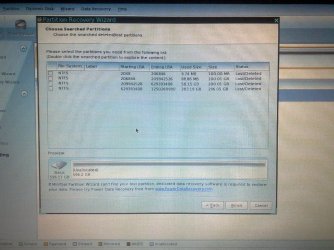
And Kaktussoft - yes, Quick scan shows wrong used space is the headache now. But these sizes are exact matches and starting and ending LBAs having only 2 sector gap. You will see in the pic. And also, it was quick clean. Without any parameters.

So, what u guys sugest? And I dont know how to thank all of you. Just I dont know how to expres, now im having little hope that I wil have my data back.

So, what should I do next? Or should we wait until greg and siw comes. They were first to instruct me. You know, i need all of you.
 

My Computer My Computer

At a glance

Windows 7 Ultimate x64Core I5 - 24306GB DDR3 1333Intel HD 3000 with ATI Radeon HD 6470
Computer Manufacturer/Model Number
HP Pavilion G6
OS
Windows 7 Ultimate x64
CPU
Core I5 - 2430
Memory
6GB DDR3 1333
Graphics Card(s)
Intel HD 3000 with ATI Radeon HD 6470
Monitor(s) Displays
HP BrightView LED
Screen Resolution
1366x768
Hard Drives
Hitachi 5400RPM 640GB
Cooling
Sitting on custom made laptop cooler
Internet Speed
21mbps downlink, 2mbps uplink
All looks fine.... only the used space is a problem.
I suggest:

  1. Recover that 200GB partition
  2. reboot to PW
  3. check used space again
  4. Perform a filesystem chck (check only!!) on partition
  5. explore that partition and see if there are files
The only thing you did by this operations:
  • changed partition table
  • looked in that partition: filesystem check (check only) and explore
You can always delete it again (in PW) and start over! Or do a "diskpart clean"
 

My Computer My Computer

At a glance

Microsoft Windows 7 Home Premium 64-bits 7601...Intel(R) Core(TM) i3 CPU M 370 @ 2.40GHz4,00 GBATI Mobility Radeon HD 5400 Series
Computer type
Laptop
Computer Manufacturer/Model Number
ACER ASPIRE 5742G
OS
Microsoft Windows 7 Home Premium 64-bits 7601 Multiprocessor Free Service Pack 1
CPU
Intel(R) Core(TM) i3 CPU M 370 @ 2.40GHz
Motherboard
Acer Aspire 5742G
Memory
4,00 GB
Graphics Card(s)
ATI Mobility Radeon HD 5400 Series
Sound Card
(1) AMD High Definition Audio Device (2) Realtek High Defi
Screen Resolution
1366 x 768 x 32 bits (4294967296 colors) @ 60 Hz
Hard Drives
WDC WD5000BEVT-22ZAT0
before I execute corections, please take a look at the scan result picture. Ah that C shows 88mb used and 100mb reserved is the one with 9.74mb used. I typed them in memory while full scan runs. So, here I am trying to post a pic, dnt how well it would go. If u can imagine what i see now, i have typed lot about cluster sizes. If i cant upload, I wil typ the results as it is appears.
 

My Computer My Computer

At a glance

Windows 7 Ultimate x64Core I5 - 24306GB DDR3 1333Intel HD 3000 with ATI Radeon HD 6470
Computer Manufacturer/Model Number
HP Pavilion G6
OS
Windows 7 Ultimate x64
CPU
Core I5 - 2430
Memory
6GB DDR3 1333
Graphics Card(s)
Intel HD 3000 with ATI Radeon HD 6470
Monitor(s) Displays
HP BrightView LED
Screen Resolution
1366x768
Hard Drives
Hitachi 5400RPM 640GB
Cooling
Sitting on custom made laptop cooler
Internet Speed
21mbps downlink, 2mbps uplink
Take no notice of any drive letter assignments. They will be different. You have to go by volume labels (if any) and partition size/location.
 

My Computer My Computer

At a glance

Microsoft Windows 7 Home Premium 64-bit Servi...Intel(R) Core(TM) i3 CPU M 330 @ 2.13GHz8 GB DDR3Intel(R) HD Graphics
Computer type
Laptop
Computer Manufacturer/Model Number
Hewlett-Packard/G62-107SA Notebook
OS
Microsoft Windows 7 Home Premium 64-bit Service Pack 1
CPU
Intel(R) Core(TM) i3 CPU M 330 @ 2.13GHz
Motherboard
Hewlett-Packard 1425
Memory
8 GB DDR3
Graphics Card(s)
Intel(R) HD Graphics
Sound Card
Realtek High Definition Audio
Monitor(s) Displays
Builtin
Screen Resolution
1366 x 768 x 32 bits (4294967296 colors) @ 60 Hz
Hard Drives
250 GB SATA Hard Disk Drive 7200 rpm
2TB Seagate GoFlex USB 2 Drive
1TB Iomega Prestige USB 2 Drive
1.5TB Iomega Prestige USB 2 Drive (Samsung)
2TB WD MyBook Live NAS.
Mouse
Logitech Anywhere MX
Internet Speed
152 Mbs download 10 Mbs upload
Antivirus
Norton 360
Browser
Chrome
Still waiting for picture
 

My Computer My Computer

At a glance

Microsoft Windows 7 Home Premium 64-bits 7601...Intel(R) Core(TM) i3 CPU M 370 @ 2.40GHz4,00 GBATI Mobility Radeon HD 5400 Series
Computer type
Laptop
Computer Manufacturer/Model Number
ACER ASPIRE 5742G
OS
Microsoft Windows 7 Home Premium 64-bits 7601 Multiprocessor Free Service Pack 1
CPU
Intel(R) Core(TM) i3 CPU M 370 @ 2.40GHz
Motherboard
Acer Aspire 5742G
Memory
4,00 GB
Graphics Card(s)
ATI Mobility Radeon HD 5400 Series
Sound Card
(1) AMD High Definition Audio Device (2) Realtek High Defi
Screen Resolution
1366 x 768 x 32 bits (4294967296 colors) @ 60 Hz
Hard Drives
WDC WD5000BEVT-22ZAT0
All looks fine.... only the used space is a problem.
I suggest:

  1. Recover that 200GB partition
  2. reboot to PW
  3. check used space again
  4. Perform a filesystem chck (check only!!) on partition
  5. explore that partition and see if there are files
The only thing you did by this operations:
  • changed partition table
  • looked in that partition: filesystem check (check only) and explore
You can always delete it again (in PW) and start over! Or do a "diskpart clean"

Kaktussoft, im do not doubt your knowledge and expierience.
But is this safe? Can I change my partition table 3 4 tyms without damaging how it was?

And, of course, D: is my main concern. But If its posible, i wouldnt like to lose e: too. Cuz thats loadz of downloads. Project pics, software setups, lot of linux distros etc.
So, I think I didnt got exactly what you said. But take a look at my pic.
And you rely not giving me tym to upload ah :D
 

My Computer My Computer

At a glance

Windows 7 Ultimate x64Core I5 - 24306GB DDR3 1333Intel HD 3000 with ATI Radeon HD 6470
Computer Manufacturer/Model Number
HP Pavilion G6
OS
Windows 7 Ultimate x64
CPU
Core I5 - 2430
Memory
6GB DDR3 1333
Graphics Card(s)
Intel HD 3000 with ATI Radeon HD 6470
Monitor(s) Displays
HP BrightView LED
Screen Resolution
1366x768
Hard Drives
Hitachi 5400RPM 640GB
Cooling
Sitting on custom made laptop cooler
Internet Speed
21mbps downlink, 2mbps uplink
C: 88MB-> you did format it. 88MB is sort of description of the blocks that are used and unused. So even a empty formatted partition has used space

system reserved: only about 8MB used of 100MB? looks like it's empty as well. Did you format? Anyway not an important partition
 

My Computer My Computer

At a glance

Microsoft Windows 7 Home Premium 64-bits 7601...Intel(R) Core(TM) i3 CPU M 370 @ 2.40GHz4,00 GBATI Mobility Radeon HD 5400 Series
Computer type
Laptop
Computer Manufacturer/Model Number
ACER ASPIRE 5742G
OS
Microsoft Windows 7 Home Premium 64-bits 7601 Multiprocessor Free Service Pack 1
CPU
Intel(R) Core(TM) i3 CPU M 370 @ 2.40GHz
Motherboard
Acer Aspire 5742G
Memory
4,00 GB
Graphics Card(s)
ATI Mobility Radeon HD 5400 Series
Sound Card
(1) AMD High Definition Audio Device (2) Realtek High Defi
Screen Resolution
1366 x 768 x 32 bits (4294967296 colors) @ 60 Hz
Hard Drives
WDC WD5000BEVT-22ZAT0
05072012384-001.jpg
 

My Computer My Computer

At a glance

Windows 7 Ultimate x64Core I5 - 24306GB DDR3 1333Intel HD 3000 with ATI Radeon HD 6470
Computer Manufacturer/Model Number
HP Pavilion G6
OS
Windows 7 Ultimate x64
CPU
Core I5 - 2430
Memory
6GB DDR3 1333
Graphics Card(s)
Intel HD 3000 with ATI Radeon HD 6470
Monitor(s) Displays
HP BrightView LED
Screen Resolution
1366x768
Hard Drives
Hitachi 5400RPM 640GB
Cooling
Sitting on custom made laptop cooler
Internet Speed
21mbps downlink, 2mbps uplink
Let's recap....
"system reserved" and C ..... you don't mind losing them
200GB very important
Other partitions: Very glad if it's recoverable. (they have correct used size?)

Once again.... I don't do anything with the data ...only partition table. Procedure can be done many times! Very safe if you do what I said.

Waiting for camshot. If not possible.... describe as good as possible what you see. C and "system reserved" no description needed
 

My Computer My Computer

At a glance

Microsoft Windows 7 Home Premium 64-bits 7601...Intel(R) Core(TM) i3 CPU M 370 @ 2.40GHz4,00 GBATI Mobility Radeon HD 5400 Series
Computer type
Laptop
Computer Manufacturer/Model Number
ACER ASPIRE 5742G
OS
Microsoft Windows 7 Home Premium 64-bits 7601 Multiprocessor Free Service Pack 1
CPU
Intel(R) Core(TM) i3 CPU M 370 @ 2.40GHz
Motherboard
Acer Aspire 5742G
Memory
4,00 GB
Graphics Card(s)
ATI Mobility Radeon HD 5400 Series
Sound Card
(1) AMD High Definition Audio Device (2) Realtek High Defi
Screen Resolution
1366 x 768 x 32 bits (4294967296 colors) @ 60 Hz
Hard Drives
WDC WD5000BEVT-22ZAT0
thank god it worked, I cant upload 2 photos at once and cant include a comment. So thatz the result from quick scan. Took it with my phone 5mp and had to resize to 2mp as it doesnt allow uploads more than 1mb. So is it clear enough? I mean the pic :)
 

My Computer My Computer

At a glance

Windows 7 Ultimate x64Core I5 - 24306GB DDR3 1333Intel HD 3000 with ATI Radeon HD 6470
Computer Manufacturer/Model Number
HP Pavilion G6
OS
Windows 7 Ultimate x64
CPU
Core I5 - 2430
Memory
6GB DDR3 1333
Graphics Card(s)
Intel HD 3000 with ATI Radeon HD 6470
Monitor(s) Displays
HP BrightView LED
Screen Resolution
1366x768
Hard Drives
Hitachi 5400RPM 640GB
Cooling
Sitting on custom made laptop cooler
Internet Speed
21mbps downlink, 2mbps uplink
Thanx for screenshot

Recover 200GB partition only. Reboot to PW and look at the used space. Do a "file system check" (check only) of that partition. Any errors? Explore that partition. you see files?
 

My Computer My Computer

At a glance

Microsoft Windows 7 Home Premium 64-bits 7601...Intel(R) Core(TM) i3 CPU M 370 @ 2.40GHz4,00 GBATI Mobility Radeon HD 5400 Series
Computer type
Laptop
Computer Manufacturer/Model Number
ACER ASPIRE 5742G
OS
Microsoft Windows 7 Home Premium 64-bits 7601 Multiprocessor Free Service Pack 1
CPU
Intel(R) Core(TM) i3 CPU M 370 @ 2.40GHz
Motherboard
Acer Aspire 5742G
Memory
4,00 GB
Graphics Card(s)
ATI Mobility Radeon HD 5400 Series
Sound Card
(1) AMD High Definition Audio Device (2) Realtek High Defi
Screen Resolution
1366 x 768 x 32 bits (4294967296 colors) @ 60 Hz
Hard Drives
WDC WD5000BEVT-22ZAT0
Back
Top