Display Language - Change

How to Change the Display Language in Vista and Windows 7 Ultimate and Enterprise

   Information
This will show you how to change the display language that Vista and Windows 7 Ultimate and Enterprise uses to display text in wizards, dialog boxes, menus, and other items in the user interface (UI).

By default Windows uses the language selected during it's installation.

   Note
When you install a language pack and change the display language to it, this will also automatically add a keyboard input language for this language in the Language bar.

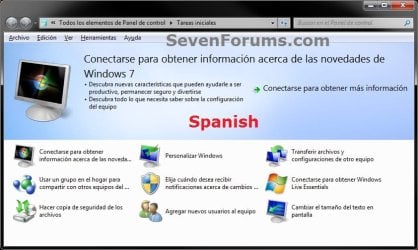
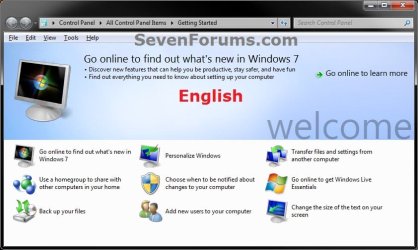
EXAMPLE: BEFORE and AFTER Display Language Change Default.jpg
Spanish.jpg


OPTION ONE

To Change the UI Display Language in only Your User Account


NOTE: This option will only be applied to the user account that this is done in. 1. Open the Control Panel (icon view), and click on the Region and Language icon.

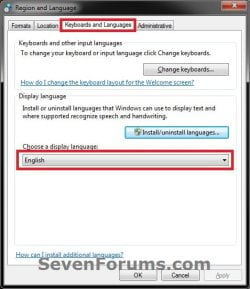
2. Click on the Keyboards and Languages tab, then choose a display language and click on OK. (see screenshots below)
NOTE: If you do not see a Choose a display language option or the language that you want, then this means that you will need to install the language pack that you want to change the display language to first. Change-1A.jpgChange-1B.jpg
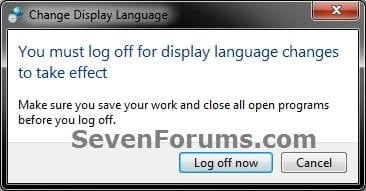
3. Click Log off now. (see screenshot below)
WARNING: This will log you off immediately. Be sure to save and close all work and opened programs first. Change-2.jpg


OPTION TWO

To Change the System UI Display Language


NOTE: This have the administrator's display language applied in the Welcome screen (log on) and in system accounts. 1. Log on to an administrator account.

2. Do OPTION ONE first to set the administrator account's display language to be the what you want to be applied to the system, then log back on to the same administrator account.

3. Use step 4 in the tutorial below to check the Welcome screen and system acccounts box. How to Copy Your Region and Language Settings to New Users and Welcome Screen


OPTION THREE

To Change the Default UI Display Language of New User Accounts


NOTE: This will have any new user account created on the computer to have the administrator's display language applied to it. Existing user accounts aren't affected. 1. Log on to an administrator account.

2. Do OPTION ONE first to set the administrator account's display language to be the what you want to be applied to the system, then log back on to the same administrator account.

3. Use step 5 in the tutorial below to check the New user accounts box. How to Copy Your Region and Language Settings to New Users and Welcome Screen
That's it,
Shawn


Last edited:
Hi brink,
I brought a mini netbook in poland and the language is in polish,,,this is with wimdow 7starter and i want a lot to change it to english plz hel me...coz when i open the computer everything in polish and i dont get much about it plz do help me jo
 

My Computer

Computer Manufacturer/Model Number
Dell Inspiron Mini 1018 Black
OS
Windows 7
Memory
1GB
Graphics Card(s)
intel GMA 3150
Sound Card
way for microphone
Monitor(s) Displays
10.1 cali
Hard Drives
250GB
Hello Jo, and welcome to Seven Forums.

I'm sorry, but you can only change the display language in the Windows 7 Ultimate and Enterprise editions. The Windows 7 Starter editions can only use the same language as you purchased it as. :(

However, you are able to change the keyboard input language to another one in Windows 7 Starter.
 

My Computer

Computer type
PC/Desktop
Computer Manufacturer/Model Number
Self built custom
OS
64-bit Windows 11 Pro for Workstations
CPU
Intel i7-8700K OC'd to 5 GHz
Motherboard
ASUS ROG Maximus XI Formula Z390
Memory
64 GB (4x16GB) G.SKILL TridentZ RGB DDR4 3600 MHz
Graphics Card(s)
ASUS ROG-STRIX-GTX1080TI-O11G-GAMING
Sound Card
Integrated
Monitor(s) Displays
2 x Samsung Odyssey G7 27"
Screen Resolution
2560x1440
Hard Drives
1TB Samsung 990 PRO M.2,
4TB Samsung 990 PRO PRO M.2,
TerraMaster F8 SSD Plus NAS
PSU
Seasonic Prime Titanium 850W
Case
Thermaltake Core P3
Cooling
Corsair Hydro H115i
Keyboard
Logitech wireless K800
Mouse
Logitech MX Master 4
Internet Speed
2 Gb/s Download and 100 Mb/s Upload
Antivirus
Malwarebyte Anti-Malware Premium
Browser
Google Chrome
Other Info
Logitech Z625 speaker system,
Logitech BRIO 4K Pro webcam,
HP Color LaserJet Pro MFP M477fdn,
APC SMART-UPS RT 1000 XL - SURT1000XLI,
Galaxy S23 Plus phone
:(its ok brink thank you for replying.
 

My Computer

Computer Manufacturer/Model Number
Dell Inspiron Mini 1018 Black
OS
Windows 7
Memory
1GB
Graphics Card(s)
intel GMA 3150
Sound Card
way for microphone
Monitor(s) Displays
10.1 cali
Hard Drives
250GB
You're welcome. Sorry about that. :(
 

My Computer

Computer type
PC/Desktop
Computer Manufacturer/Model Number
Self built custom
OS
64-bit Windows 11 Pro for Workstations
CPU
Intel i7-8700K OC'd to 5 GHz
Motherboard
ASUS ROG Maximus XI Formula Z390
Memory
64 GB (4x16GB) G.SKILL TridentZ RGB DDR4 3600 MHz
Graphics Card(s)
ASUS ROG-STRIX-GTX1080TI-O11G-GAMING
Sound Card
Integrated
Monitor(s) Displays
2 x Samsung Odyssey G7 27"
Screen Resolution
2560x1440
Hard Drives
1TB Samsung 990 PRO M.2,
4TB Samsung 990 PRO PRO M.2,
TerraMaster F8 SSD Plus NAS
PSU
Seasonic Prime Titanium 850W
Case
Thermaltake Core P3
Cooling
Corsair Hydro H115i
Keyboard
Logitech wireless K800
Mouse
Logitech MX Master 4
Internet Speed
2 Gb/s Download and 100 Mb/s Upload
Antivirus
Malwarebyte Anti-Malware Premium
Browser
Google Chrome
Other Info
Logitech Z625 speaker system,
Logitech BRIO 4K Pro webcam,
HP Color LaserJet Pro MFP M477fdn,
APC SMART-UPS RT 1000 XL - SURT1000XLI,
Galaxy S23 Plus phone
PLEASE HELP ME

HOW I CAN CHANGE LANG FROM ARABIC TI ENG IN WIN 7 HOME PREMIUM :cry::cry::(:(?????
 

My Computer

OS
WIN 7 HOME PREMIUM 64bit
To have a true english interface, you need to have win7 enterprise or ultimate, those editions let you download free language packs through windows update. With home premium, you can switch to an english keyboard layout and date time format etc. but the display language, all menus including start menu and messages will remain arabic, so not the ideal situation.

Your options are:

1) Anytime upgrade to Ultimate, then download and install the english language pack.

2) I'm not 100 % sure this'll work but if you have the time and inclination, you can back up everything on this computer (if this is OEM preinstalled, create a set of recovery disks), then borrow or download an english language win7 install disk, install home premium and activate with the COA key/retail key/whatever key you got with the purchase. Now, this may or may not work so you must be prepared to go back to the original install.

A word of caution- there are hacks and tools floating around that claim to change the language on ineligible editions. Stay away from those, they'll mess up your activation and licensing files.
 

My Computer

Computer Manufacturer/Model Number
Too many to describe...
OS
Windows 7 x64 pro/ Windows 7 x86 Pro/ XP SP3 x86
can somebody tell me how do I change the language from German to English...
 

My Computer

OS
32 bit
can somebody tell me how do I change the language from German to English...

What version (enterprise, ultimate, pro, home, etc) do you have?
 

My Computer

Computer Manufacturer/Model Number
HP Pavillion dv-7 1005 Tx
OS
Win 8 Release candidate 8400
CPU
[email protected]
Memory
4 gigs
Graphics Card(s)
Nvidia 9600M
Sound Card
HD built-in
Monitor(s) Displays
17" Wxga
Screen Resolution
1440x900
Cooling
none
Internet Speed
45Mb down 5Mb up
well actually, I do not really know :S:S ...where can I see what version is it?
 

My Computer

OS
32 bit

My Computer

Computer Manufacturer/Model Number
HP Pavillion dv-7 1005 Tx
OS
Win 8 Release candidate 8400
CPU
[email protected]
Memory
4 gigs
Graphics Card(s)
Nvidia 9600M
Sound Card
HD built-in
Monitor(s) Displays
17" Wxga
Screen Resolution
1440x900
Cooling
none
Internet Speed
45Mb down 5Mb up
this is what I got from typing that:

Microsoft Windows
Version 6.1 (build 7601: Service Pack 1)
Copyright (c) 2009 Microsoft Corporation. Alle Rechte vorbehalten.
Das Betriebssystem Windows 7 Starter und die zugehorige Benutzeroberflache sind durch Marken- und andere rechtshangige bzw. bestehende gewerbliche Schutz- und urheberrechte in den vereingten Staaten und anderen Landern geschutzt

Dieses Produkt ist unter den Microsoft-Softwarelizenbedingungen lizenziert fur: Saturn
 

My Computer

OS
32 bit
Hello Punky, and welcome to Seven Forums.

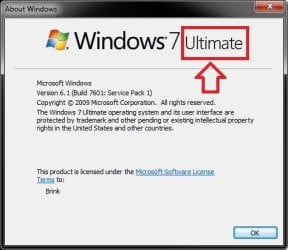
Right above all that, you should see what edition you have instead like below. :)

winver.jpg
 

My Computer

Computer type
PC/Desktop
Computer Manufacturer/Model Number
Self built custom
OS
64-bit Windows 11 Pro for Workstations
CPU
Intel i7-8700K OC'd to 5 GHz
Motherboard
ASUS ROG Maximus XI Formula Z390
Memory
64 GB (4x16GB) G.SKILL TridentZ RGB DDR4 3600 MHz
Graphics Card(s)
ASUS ROG-STRIX-GTX1080TI-O11G-GAMING
Sound Card
Integrated
Monitor(s) Displays
2 x Samsung Odyssey G7 27"
Screen Resolution
2560x1440
Hard Drives
1TB Samsung 990 PRO M.2,
4TB Samsung 990 PRO PRO M.2,
TerraMaster F8 SSD Plus NAS
PSU
Seasonic Prime Titanium 850W
Case
Thermaltake Core P3
Cooling
Corsair Hydro H115i
Keyboard
Logitech wireless K800
Mouse
Logitech MX Master 4
Internet Speed
2 Gb/s Download and 100 Mb/s Upload
Antivirus
Malwarebyte Anti-Malware Premium
Browser
Google Chrome
Other Info
Logitech Z625 speaker system,
Logitech BRIO 4K Pro webcam,
HP Color LaserJet Pro MFP M477fdn,
APC SMART-UPS RT 1000 XL - SURT1000XLI,
Galaxy S23 Plus phone
thnx for welcoming me....and I'm really sorry cuz right now I am feeling like an amateur LOL ... It's Windows 7 Starter :)
 

My Computer

OS
32 bit
thnx for welcoming me....and I'm really sorry cuz right now I am feeling like an amateur LOL ... It's Windows 7 Starter :)

Cant change it.
 

My Computer

Computer Manufacturer/Model Number
HP Pavillion dv-7 1005 Tx
OS
Win 8 Release candidate 8400
CPU
[email protected]
Memory
4 gigs
Graphics Card(s)
Nvidia 9600M
Sound Card
HD built-in
Monitor(s) Displays
17" Wxga
Screen Resolution
1440x900
Cooling
none
Internet Speed
45Mb down 5Mb up
do you know if there's a way I could install Windows XP in it ???
 

My Computer

OS
32 bit

My Computer

Computer Manufacturer/Model Number
HP Pavillion dv-7 1005 Tx
OS
Win 8 Release candidate 8400
CPU
[email protected]
Memory
4 gigs
Graphics Card(s)
Nvidia 9600M
Sound Card
HD built-in
Monitor(s) Displays
17" Wxga
Screen Resolution
1440x900
Cooling
none
Internet Speed
45Mb down 5Mb up
Punky,

Sure, you could boot from your Windows XP installation DVD, and start the installation process to format the HDD and install XP. However, you need to make sure that you have XP driver versions for all of your devices and have them downloaded and saved somewhere before doing so to install them after you done with installing XP.
 

My Computer

Computer type
PC/Desktop
Computer Manufacturer/Model Number
Self built custom
OS
64-bit Windows 11 Pro for Workstations
CPU
Intel i7-8700K OC'd to 5 GHz
Motherboard
ASUS ROG Maximus XI Formula Z390
Memory
64 GB (4x16GB) G.SKILL TridentZ RGB DDR4 3600 MHz
Graphics Card(s)
ASUS ROG-STRIX-GTX1080TI-O11G-GAMING
Sound Card
Integrated
Monitor(s) Displays
2 x Samsung Odyssey G7 27"
Screen Resolution
2560x1440
Hard Drives
1TB Samsung 990 PRO M.2,
4TB Samsung 990 PRO PRO M.2,
TerraMaster F8 SSD Plus NAS
PSU
Seasonic Prime Titanium 850W
Case
Thermaltake Core P3
Cooling
Corsair Hydro H115i
Keyboard
Logitech wireless K800
Mouse
Logitech MX Master 4
Internet Speed
2 Gb/s Download and 100 Mb/s Upload
Antivirus
Malwarebyte Anti-Malware Premium
Browser
Google Chrome
Other Info
Logitech Z625 speaker system,
Logitech BRIO 4K Pro webcam,
HP Color LaserJet Pro MFP M477fdn,
APC SMART-UPS RT 1000 XL - SURT1000XLI,
Galaxy S23 Plus phone
Cuz my dad tried this procedure yesterday but it did not work :(:( that's why I'm asking...
 

My Computer

OS
32 bit
Back
Top