Display options problem

smudge120681

New member
Local time
6:27 PM
Messages
1
Hi. I have a strange problem and not sure how to fix it. I have a destop acer aspire z5761, i have it nest to my hd 42 inch tv. Until today i have been running a dual monitor with no problems. However today the display on the tv which is usually fine went blank. I was able to see my desktop background but nothing else could be dragged onto it. So i did a system restore and this is where it gets odd, my computer decided to change the main display to the tv rather than the monitor, this wouldnt normally be a problem however now when turning on my computer with the cable for the tv inserted the display only appears on the tv screen and leaves my monitor blank. However the cursor is on screen but cant be moved and no key strokes work so i am unable to do anything until i unplug the cable leading to the tv for the computer. The question is really how can i change the dual screen display options without the cable being plugged into my computer as when its inserted i am not able to move the cursor or use any short cut keys??? please help. P.s i have run system restores which have not worked, i a have tried using old drivers for the display with no luck and also unistalled and re installed all drivers. I have run in safe mode, however it doesnt recognise dual screen when in safe mode so please help. thanks
 

My Computer My Computer

Computer type
PC/Desktop
Computer Manufacturer/Model Number
Acer
OS
windows 7 32 bit
smudge120681,

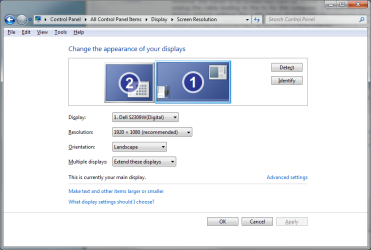
Welcome to the forums. Could you please update your specs (you can use the link in my sig). What cable type are you using for the tv ? I googled you pc it appears to be one of the all in one type pc. If it uses an nvidia card, unplug the tv, restart and then try to connect the tv again and use the multiple monitors section of the nvidia control panel. Or you could go to control panel>display>change display settings and see if it is then set up for multiple displays.

display.png
 
Last edited:

My Computer My Computer

Computer type
PC/Desktop
Computer Manufacturer/Model Number
Dude Build
OS
Windows 10 Pro X64
CPU
Intel(R) Core(TM) i5-3570K CPU OC@ 4.5GHZ Turbo
Motherboard
MSI Z77A-G45 Gaming
Memory
8.00 GB DDR3 1600Mhz
Graphics Card(s)
MSI Gaming X GTX 1070
Sound Card
Realtek High Definition
Monitor(s) Displays
Dell S23O9W, HP L1710
Screen Resolution
DELL-1920 x 1080 HP-1280 x1024
Hard Drives
Crucial m4 256 SSD, WD 7200RPM 500GB WD 1TB
PSU
Seasonic X650 GOLD
Case
Zalman Z12
Cooling
Antec Kuhler 920
Keyboard
Logitech
Mouse
MSI DS100 Interceptor
Internet Speed
50 down and 5 up
Antivirus
MSE
Browser
Chrome, IE 11
Other Info
Logitech X-620 Speakers

My Computers My Computers

System One System Two

  • Computer type
    PC/Desktop
    Computer Manufacturer/Model Number
    ALWAYS UNDER CONSTRUCTION
    OS
    Windows 11 Pro
    CPU
    Ryzen 9 5900X
    Motherboard
    Asus X570 Crosshair Viii Hero
    Memory
    32GB G Skill DDR4-3600
    Graphics Card(s)
    EVGA RTX 3080 FTW 3 Ultra
    Sound Card
    On Board/Sennheiser PC37X Headset
    Monitor(s) Displays
    3 X Asus 27"
    Screen Resolution
    2560x1440
    Hard Drives
    2 X 1 TB NVME drives
    PSU
    EVGA 850
    Case
    Phanteks Eclipse P400A
    Cooling
    EVGA 280 AIO
    Keyboard
    Logitech G510s/ Logitech G13
    Mouse
    Logitech G502
    Internet Speed
    24/1
    Antivirus
    ESET/MBAM Pro/SAS Pro
    Browser
    Chrome/ Firefox/ Edge
  • Computer type
    Laptop
    System Manufacturer/Model Number
    Dell 16 Plus
    OS
    Windows 11 Pro
    CPU
    Intel Ultra 9 288V
    Memory
    32 GB LPDDR5X 8533
    Monitor(s) Displays
    16" Mini-LED HDR600 Touch 90 Hz
    Screen Resolution
    2560X1600
    Hard Drives
    1 TB NVME
Back
Top