Documents and My Documents got swapped; win7 pro x64, hppro dtpc

seekertom

New member
Local time
12:40 PM
Messages
5
Using windows explorer to do all of this...

Not realizing how this file system works, she deleted all files in Documents because many dupe files made it look like they were accidentally copied there multi times. On realizing what she had done, I promptly restored the recycle bin, hoping everything would return to normal, but all files went into the My Documents folder while the Documents folder ended up with a bunch of (mostly) empty folders originally from My Documents.

Normally, all you see in the Documents folder are documents, but in My Documents there may be sub-folders as well as files. After the gyrations, there were folders in the right pane of explorer under Documents, and only files in the right pane under My Documents, as if Documents and My Documents got swapped around. To make it more confusing, rt clk on My Documents, properties showed the number of files plus 66 folders! But no folders show up in either explorer pane.

I copied everything from the two folders to another folder for safety, then tried restoring the two folders. The result was to have only files in My Documents and folders in Documents as before, so, no help. No backups either. oye!

Any help will be gratefully accepted. tom
 

My Computer My Computer

At a glance

win7 pro x648gb
Computer type
PC/Desktop
Computer Manufacturer/Model Number
hp8gb
OS
win7 pro x64
Memory
8gb
Hard Drives
2tb
Antivirus
avira pro
Browser
firefox and opera

My Computer My Computer

At a glance

Windows 7 Home Premium 64 bit sp1Intel i5 3570 3.4Ghz Ivy Bridge SKT 1155 quad...G-Skill Rip Jaws 16Gb (8x2) DDR3 -1600 PC3 12...Gigabyte NVIDIA GT610 1Gb DDR3 810/1200 PCI-E...
Computer type
PC/Desktop
Computer Manufacturer/Model Number
Self built using existing case
OS
Windows 7 Home Premium 64 bit sp1
CPU
Intel i5 3570 3.4Ghz Ivy Bridge SKT 1155 quad core
Motherboard
Gigabyte Z77-HD3 SKT 1155 2xSata 3, 4x USB 3.0
Memory
G-Skill Rip Jaws 16Gb (8x2) DDR3 -1600 PC3 12800 CL 10 red
Graphics Card(s)
Gigabyte NVIDIA GT610 1Gb DDR3 810/1200 PCI-E 2.0 Silent
Sound Card
NVIDIA High Definition & Realtech High Definition Audio
Monitor(s) Displays
2 x Philips 226V4L 16:9 aspect ratio
Screen Resolution
1920 x 1080 HD
Hard Drives
Samsung 840 Pro 256gb SSD, SATA 3.
Hitachi Touro Portable 1tb, USB 3.0 HDD used for image b/ups.
PSU
Corsair VS450
Case
Codeng
Cooling
PSU fan & CPU fan
Keyboard
Logitech
Mouse
Logitech Wireless trackball M570
Internet Speed
Wireless 3G. 3mg down & 550kb up.
Antivirus
Bitdefender Internet Security 2020
Browser
Opera (Current Version) & Firefox
Other Info
MS Office 2013 Pro. Davis weather station software. MGE Nova 600 avr UPS.
learning more about w7 structure.

Well, my problem began when my friend deleted everything while looking at Documents. I saw things unfamiliar to me and left the track, so to speak. Now I'm back on track, thanks to this forum!

What I have learned so far is this: w7 Documents shows available document files from all locations. NEVER delete a file from here!
w7 My Documents shows document files that I, as logged user, have created.

Both folders display according to "arrange by" setting, upper right part of screen. If Folders is selected, then both folders will display any folders involved. If by name is chosen, then both folders show files and no folders.

My pcs have been set as name for Documents and folder for My Documents. When these were accidentally changed, it through me into chaos. Now, after reading stuff from here and listening to y'all, I have un-chaossed myself and am able to focus on the real issue: re-collecting my data files and putting them back into My Documents as necessary.

In short, viewing files from Documents and My Documents is controlled by "arrange by" selection.:p
 

My Computer My Computer

At a glance

win7 pro x648gb
Computer type
PC/Desktop
Computer Manufacturer/Model Number
hp8gb
OS
win7 pro x64
Memory
8gb
Hard Drives
2tb
Antivirus
avira pro
Browser
firefox and opera
For what it is worth:
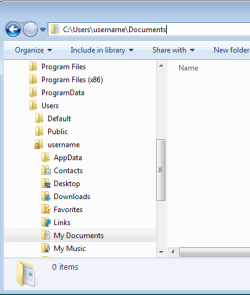
There is no "My Documents" folder. The "My Documents" name is an alias for the "Documents" folder.

The real name of the folder appears if you select the address bar in Windows (file) Explorer:

1-MD.PNG


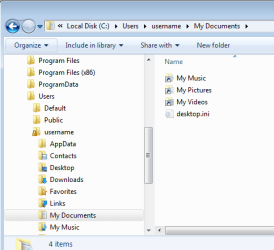
If you set Windows (file) Explorer to show protected system files (and display more file extensions), you should see the desktop.ini file as shown below:

2-MD.PNG


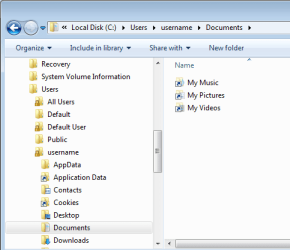
Deleting that desktop.ini file and closing/re-opening the Windows (file) Explorer should get rid of that stupid/confusing alias naming scheme.

3-MD.PNG
 

My Computer My Computer

At a glance

W7 Pro SP1 64biti78GBIntel HD Graphics
Computer type
Laptop
Computer Manufacturer/Model Number
Employer provided Dell Latitude
OS
W7 Pro SP1 64bit
CPU
i7
Memory
8GB
Graphics Card(s)
Intel HD Graphics
Hard Drives
crappy SSD
Antivirus
Employer mandated Symantec Endpoint Protection
Browser
Pale Moon 64bit, IE11 64bit & Chrome 64bit
Thanks. Adds more to my knowledge base. Understood about not really a folder.... actually I preferred the olden ways of calling them directories and sub-directories, but either way, my learning quotient is determined by the depth of my errors and mistakes. Thanks for the added info. tom
 

My Computer My Computer

At a glance

win7 pro x648gb
Computer type
PC/Desktop
Computer Manufacturer/Model Number
hp8gb
OS
win7 pro x64
Memory
8gb
Hard Drives
2tb
Antivirus
avira pro
Browser
firefox and opera
Back
Top