Solved Don't have permission to format a drive

jamd315

New member
Local time
7:50 AM
Messages
19
Location
A2 Michigan
I have 3 500GB WD drives; one with my old OS, one with my current OS, and one for extra junk. Working off my current OS, I want to format the old OS dirve. When I go to do that, it says that "Windows was unable to complete the format". So I deleted everything using a batch with
Code:
del /f/s/q foldername > nul
rmdir /s/q foldername
Except that I didn't delete everything, some stuff was Access Denied. So I tried running the batch with elevated permissions. It deletes a couple more. When I try to manually delete the files, it tells me that I need permission from Administrator, to TrustedInstaller, to SYSTEM. I really want to format and use this drive, and I'm not above data destruction software.
 

My Computer My Computer

At a glance

Windows 7 Ultimate x64AMD FX 413016GB 1600MHzNVIDIA GeForce GTS 250
Computer type
PC/Desktop
Computer Manufacturer/Model Number
Custom Build
OS
Windows 7 Ultimate x64
CPU
AMD FX 4130
Motherboard
M5A97 LE R2.0
Memory
16GB 1600MHz
Graphics Card(s)
NVIDIA GeForce GTS 250
Screen Resolution
1920x1080
Hard Drives
3x WDC WD50 500GB
Case
Thermaltake Soprano RS
Antivirus
Norton 360
Browser
Google Chrome

My Computer My Computer

At a glance

Windows 10 Pro x64Intel Core i7 6700KGSkill TridentZ RGB 16GB 3600 16-16-16-36EVGA GTX 980 Ti SC x2
Computer type
PC/Desktop
Computer Manufacturer/Model Number
Skylake Special #666
OS
Windows 10 Pro x64
CPU
Intel Core i7 6700K
Motherboard
Asus Sabertooth Z170 Mark 1
Memory
GSkill TridentZ RGB 16GB 3600 16-16-16-36
Graphics Card(s)
EVGA GTX 980 Ti SC x2
Sound Card
Realtek High Definition
Monitor(s) Displays
AOC G2460PG
Screen Resolution
1920 x 1080 144Hz
Hard Drives
Samsung 860 Pro 256GB, Seagate Barracuda 4TB x2
PSU
EVGA 1000 P2, EVGA White Custom Braided Cables
Case
Corsair Vengeance C70 Gunmetal Black
Cooling
Corsair H100i v2, Corsair ML120 x2, Thermal Grizzly Kryonaut
Keyboard
Logitech G910 Orion Spectrum
Mouse
Logitech G700s
Internet Speed
Verizon Fios Quantum Gateway 75/75
Antivirus
Windows Defender, Malwarebytes Free 3.8.3
Browser
Chrome
Other Info
Corsair SP120 x4, LG Blu-ray Drive, Durabrand HT-395 100 Watt Dolby Digital Amp, Corsair H2100 Wireless 7.1 Headset

My Computer My Computer

At a glance

Windows 7 Ultimate x64AMD FX 413016GB 1600MHzNVIDIA GeForce GTS 250
Computer type
PC/Desktop
Computer Manufacturer/Model Number
Custom Build
OS
Windows 7 Ultimate x64
CPU
AMD FX 4130
Motherboard
M5A97 LE R2.0
Memory
16GB 1600MHz
Graphics Card(s)
NVIDIA GeForce GTS 250
Screen Resolution
1920x1080
Hard Drives
3x WDC WD50 500GB
Case
Thermaltake Soprano RS
Antivirus
Norton 360
Browser
Google Chrome

My Computer My Computer

At a glance

Vista, Windows7, Mint Mate, Zorin, Windows 8from 1.6GHz Duo to i7
Computer Manufacturer/Model Number
HP, Dell, Gateway, Toshiba - 4 laptops and 2 desktops
OS
Vista, Windows7, Mint Mate, Zorin, Windows 8
CPU
from 1.6GHz Duo to i7
Monitor(s) Displays
2x HP w2207
Hard Drives
5x HDD, 7x SSD, 12x Externals
Keyboard
with trackball - no mices
Mouse
Trackball mice
Internet Speed
DSL 6000
A: is for floppy drives.

If you have a OS on I: that should C:

A: is ACTIVE & SYSTEM Partition, you can not delete.
 

My Computer My Computer

At a glance

ME/XP/Vista/Win7
OS
ME/XP/Vista/Win7
Drive A can't be formatted or deleted because it is booting Win7 on I now. You must have installed Win7 from another OS because it normally boots as C if it is correctly installed from its booted installer. If you dont' mind it this way you can keep it, otherwise unplug all other HD's to reinstall to DISK0 correctly following Clean Install Windows 7.

If you want to keep Win7 on I then to move its boot files there unplug all other HD's, boot the WIn7 installer or System Repair Disk to run Startup Repair - Run up to 3 Separate Times until Win7 boots on its own and holds the System Active Boot flags.

You can then plug back in the other HD's, mark A Inactive: Partition - Mark as Inactive - Windows 7 Forums .

To get A the cleanest I would wipe it using Diskpart Clean Command . Otherwise after marking it Inactive it should delete in Disk Mgmt. You can then repartition it for data.

Another problem is that DISK2 has converted to Dynamic which is only meant to span a partition across Multiple HD's. If you're not doing that then you'll need to use the non-destructive option 1 in Convert a Dynamic Disk to a Basic Disk.
 
That whole install needs to be done again, it is seriously wrong. ;)
 

My Computer My Computer

At a glance

Windows 10 Pro x64Intel Core i7 6700KGSkill TridentZ RGB 16GB 3600 16-16-16-36EVGA GTX 980 Ti SC x2
Computer type
PC/Desktop
Computer Manufacturer/Model Number
Skylake Special #666
OS
Windows 10 Pro x64
CPU
Intel Core i7 6700K
Motherboard
Asus Sabertooth Z170 Mark 1
Memory
GSkill TridentZ RGB 16GB 3600 16-16-16-36
Graphics Card(s)
EVGA GTX 980 Ti SC x2
Sound Card
Realtek High Definition
Monitor(s) Displays
AOC G2460PG
Screen Resolution
1920 x 1080 144Hz
Hard Drives
Samsung 860 Pro 256GB, Seagate Barracuda 4TB x2
PSU
EVGA 1000 P2, EVGA White Custom Braided Cables
Case
Corsair Vengeance C70 Gunmetal Black
Cooling
Corsair H100i v2, Corsair ML120 x2, Thermal Grizzly Kryonaut
Keyboard
Logitech G910 Orion Spectrum
Mouse
Logitech G700s
Internet Speed
Verizon Fios Quantum Gateway 75/75
Antivirus
Windows Defender, Malwarebytes Free 3.8.3
Browser
Chrome
Other Info
Corsair SP120 x4, LG Blu-ray Drive, Durabrand HT-395 100 Watt Dolby Digital Amp, Corsair H2100 Wireless 7.1 Headset
Re-install

gregrocker, thanks for your help, I will start on that now. How do I tell apart the three drives? Unplug untill the right one is identified?:huh:
 

My Computer My Computer

At a glance

Windows 7 Ultimate x64AMD FX 413016GB 1600MHzNVIDIA GeForce GTS 250
Computer type
PC/Desktop
Computer Manufacturer/Model Number
Custom Build
OS
Windows 7 Ultimate x64
CPU
AMD FX 4130
Motherboard
M5A97 LE R2.0
Memory
16GB 1600MHz
Graphics Card(s)
NVIDIA GeForce GTS 250
Screen Resolution
1920x1080
Hard Drives
3x WDC WD50 500GB
Case
Thermaltake Soprano RS
Antivirus
Norton 360
Browser
Google Chrome
If you rightclick on the Disk Mgmt drive map panel which says DISK0/1/2 on it, then choose Properties, it will tell you the make/model of HD plugged into that port. You can then figure out which is which by their placement in the tower drive bays.
 
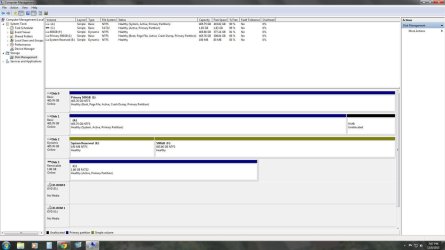
I finished fixing the drives, and I sent my important files to a cloud based server, and a flash drive. THis i s my updated disk management screen, after renaming some partitions, deleting a bunch of junk, converting from dynamic to basic, and setting the correct order.
new.png

I plugged C: in first, botted, plugged in D:, re-booted, and then plugged in F: (I chose to skip E: because a couple of old programs I wrote before environment variables refer to F:/)
 

My Computer My Computer

At a glance

Windows 7 Ultimate x64AMD FX 413016GB 1600MHzNVIDIA GeForce GTS 250
Computer type
PC/Desktop
Computer Manufacturer/Model Number
Custom Build
OS
Windows 7 Ultimate x64
CPU
AMD FX 4130
Motherboard
M5A97 LE R2.0
Memory
16GB 1600MHz
Graphics Card(s)
NVIDIA GeForce GTS 250
Screen Resolution
1920x1080
Hard Drives
3x WDC WD50 500GB
Case
Thermaltake Soprano RS
Antivirus
Norton 360
Browser
Google Chrome
2 things I see, C: should read as Disk 0 ( actually just 1 now that I see you wanted to skip E: )

Having C: as disk 0 is just a pet peeve of mine, I don`t like to see it any where else.

Something else I always do, I change the letter of the cd/dvd drive to X, Y, or Z. Just so when you add another drive or make more partitions, they will grab the next letters of the alphabet.

And D: is still showing as active, did you get rid of the OS on that drive ? Did you format it ?
 

My Computer My Computer

At a glance

Windows 10 Pro x64Intel Core i7 6700KGSkill TridentZ RGB 16GB 3600 16-16-16-36EVGA GTX 980 Ti SC x2
Computer type
PC/Desktop
Computer Manufacturer/Model Number
Skylake Special #666
OS
Windows 10 Pro x64
CPU
Intel Core i7 6700K
Motherboard
Asus Sabertooth Z170 Mark 1
Memory
GSkill TridentZ RGB 16GB 3600 16-16-16-36
Graphics Card(s)
EVGA GTX 980 Ti SC x2
Sound Card
Realtek High Definition
Monitor(s) Displays
AOC G2460PG
Screen Resolution
1920 x 1080 144Hz
Hard Drives
Samsung 860 Pro 256GB, Seagate Barracuda 4TB x2
PSU
EVGA 1000 P2, EVGA White Custom Braided Cables
Case
Corsair Vengeance C70 Gunmetal Black
Cooling
Corsair H100i v2, Corsair ML120 x2, Thermal Grizzly Kryonaut
Keyboard
Logitech G910 Orion Spectrum
Mouse
Logitech G700s
Internet Speed
Verizon Fios Quantum Gateway 75/75
Antivirus
Windows Defender, Malwarebytes Free 3.8.3
Browser
Chrome
Other Info
Corsair SP120 x4, LG Blu-ray Drive, Durabrand HT-395 100 Watt Dolby Digital Amp, Corsair H2100 Wireless 7.1 Headset
Yes, only the drive intended to boot the OS should be marked Active.

If Win7 HD is not in Disk0 position, then during Startup Repair or Reinstall the System boot files can be derailed to a preceding Primary partition - especially if that partition is marked Active, or the other HD's are not unplugged.

So if possible I'd switch cables between Disk0 and DIsk2, assure Win7 is then set first HD to boot in BIOS setup before trying to start it again.
 
Ok, marked D: as inactive, formatting shortly
 

My Computer My Computer

At a glance

Windows 7 Ultimate x64AMD FX 413016GB 1600MHzNVIDIA GeForce GTS 250
Computer type
PC/Desktop
Computer Manufacturer/Model Number
Custom Build
OS
Windows 7 Ultimate x64
CPU
AMD FX 4130
Motherboard
M5A97 LE R2.0
Memory
16GB 1600MHz
Graphics Card(s)
NVIDIA GeForce GTS 250
Screen Resolution
1920x1080
Hard Drives
3x WDC WD50 500GB
Case
Thermaltake Soprano RS
Antivirus
Norton 360
Browser
Google Chrome
Back
Top