Solved Dota 2 lagging

fegsdc

New member
Member
VIP
Local time
8:04 PM
Messages
165
Location
Angola
Hi group.

Today I removed 4 of my 8GB Ram from my Lenovo which is not working and inserted it into my EliteBook 8470p.

I noticed that it is a bit faster when I use google Chrome but when I try playing Dota 2, it is still laggy. I use South African servers and I am living in Angola.

I just checked the Ping and it says 72ms.
When I open and use the game, the Ram usage goes to over 6GB. The game is still lagging the same way it was when I was using 4GB ram, maybe not as much but still lagging.

So I am confused now if the problem the Ram or is it the connection?? Is there any way I can fix this?
 
Last edited:

My Computer

Computer type
PC/Desktop
OS
Windows 7
Hello,

The minimum RAM for Dota 2 is 4 GB. If your computer is using 6 GB then that could be because the game can take advantage of the additional RAM, or it is because your machine has programs and add-ons running in the background.

To diagnose if the laggy symptoms are RAM or internet, first try a Clean Boot (also called a Clean Startup) .

If a Clean Boot does not reveal anything, then try changing your game server.

Also, what sort of disk drive does the computer have installed? Is it a Hard Disk Drive (HDD) or a Solid State Disk Drive (SSD)?
 
Last edited:

My Computer

Computer type
PC/Desktop
OS
Windows 7 x64, Vista x64, 8.1 smartphone
CPU
Intel E8400 65W 64-bit
Motherboard
Gigabyte EP45-UD3LR
Memory
DDR2 2 x 2GB, 1GB x 2
Graphics Card(s)
XFX Radeon HD5750
Sound Card
AMD High Definition Audio; Realtek High Definition Audio
Monitor(s) Displays
iiyama prolite X2377HDS
Screen Resolution
1920 x 1080
Hard Drives
500GB 7200 rpm Seagate ST3500413AS 16MB, 500GB 5400 rpm Toshiba MQ02ABF050H 32MB, 200GB 7200 rpm Seagate ST3200820AS 8MB, 2TB 7200 rpm Western Digital WD20EZRX 64MB
PSU
Enermax Liberty Modular
Case
Antec P193 Midi Tower
Keyboard
Mionix ZIBAL 60
Mouse
Razer USB 2.0 Diamondback Mouse or Huion Graphics Tablet
Browser
Internet Explorer, Lunascape, Firefox, Opera, Avast Safezone
I just checked it, it says it is a Fixed Hard Disk.
I close everything all the time before I play Dota 2 or any other game on Steam (like Call of Duty). So I don't think open programs are the problem.
How is restarting the pc going to solve anything? I always restart the PC every day and open my browser with more or less 23 pages, then i close it and everything else and run Steam..and it still lags.
 

My Computer

Computer type
PC/Desktop
OS
Windows 7
Hi, some services startup automatically in the background, and you do not know they are there. A Clean Startup is a quick way of helping diagnose if the computer has any computationally intensive services causing CPU overhead, when you launch game.

I merely recommend you try STEP 1 of the tutorial, then launch your game. This will help diagnose your issue.
 

My Computer

Computer type
PC/Desktop
OS
Windows 7 x64, Vista x64, 8.1 smartphone
CPU
Intel E8400 65W 64-bit
Motherboard
Gigabyte EP45-UD3LR
Memory
DDR2 2 x 2GB, 1GB x 2
Graphics Card(s)
XFX Radeon HD5750
Sound Card
AMD High Definition Audio; Realtek High Definition Audio
Monitor(s) Displays
iiyama prolite X2377HDS
Screen Resolution
1920 x 1080
Hard Drives
500GB 7200 rpm Seagate ST3500413AS 16MB, 500GB 5400 rpm Toshiba MQ02ABF050H 32MB, 200GB 7200 rpm Seagate ST3200820AS 8MB, 2TB 7200 rpm Western Digital WD20EZRX 64MB
PSU
Enermax Liberty Modular
Case
Antec P193 Midi Tower
Keyboard
Mionix ZIBAL 60
Mouse
Razer USB 2.0 Diamondback Mouse or Huion Graphics Tablet
Browser
Internet Explorer, Lunascape, Firefox, Opera, Avast Safezone
Hey! I just restarted the PC on a Clean Startup mode and disabled all the non-Microsort services programs but I still got other programs at startup like Discord, Opera, Dropbox, iCloud, Canon Solution Menu Ex, Slack, Youtube Downloader, Memeo, Facebook Gameroom.

So anyways i disabled all of these and the Ram usage while playing the game is over 4GB Ram but it still lags. So there is still lagging on over 4GB Ram usage....

There are a couple of error messages from hpConnectionManager.exe and i checked the program on Msconfig and it is disabled, do i enable it so that the error messages disappear on startup? Or is there any other way to fix it....
 
Last edited:

My Computer

Computer type
PC/Desktop
OS
Windows 7
That is a lot of Startup items, if you don't mind me saying.

I do not know why you should experience error messages. What do the messages say? Maybe we can find the cause of the Error(s).

Do you really need both hpConnectionManager and Canon Solution Ex? Do you have both HP and Canon printers/scanners connected? You would only need both, if you are using both those makes of printer/scanner.

Did the Clean Startup improve your game lagging, at all?
 

My Computer

Computer type
PC/Desktop
OS
Windows 7 x64, Vista x64, 8.1 smartphone
CPU
Intel E8400 65W 64-bit
Motherboard
Gigabyte EP45-UD3LR
Memory
DDR2 2 x 2GB, 1GB x 2
Graphics Card(s)
XFX Radeon HD5750
Sound Card
AMD High Definition Audio; Realtek High Definition Audio
Monitor(s) Displays
iiyama prolite X2377HDS
Screen Resolution
1920 x 1080
Hard Drives
500GB 7200 rpm Seagate ST3500413AS 16MB, 500GB 5400 rpm Toshiba MQ02ABF050H 32MB, 200GB 7200 rpm Seagate ST3200820AS 8MB, 2TB 7200 rpm Western Digital WD20EZRX 64MB
PSU
Enermax Liberty Modular
Case
Antec P193 Midi Tower
Keyboard
Mionix ZIBAL 60
Mouse
Razer USB 2.0 Diamondback Mouse or Huion Graphics Tablet
Browser
Internet Explorer, Lunascape, Firefox, Opera, Avast Safezone
Well, the Clean Startup did a difference, but very little. Before it was laggy, now it is a little less laggy but still laggy. Very very little change.

The error message is in Portuguese, it says: The Service of Hp Connection manager Stopped responding. Leave the application and restart it.

It is unselected at Msconfig if i am not wrong. Canon Solution Ex is for my scanner and I think it is disabled on startup and yes I need it.

I do not know what hpConnectionManager.exe is though.
 

My Computer

Computer type
PC/Desktop
OS
Windows 7
I'm sorry, I thought hpConnectionManager.exe was to do with a HP Printer. hpConnectionManager.exe is actually to do with Network Connections on a HP Notebook.

If you want to disable hpConnectionManager.exe, you would have to find the relevant HP service in Services.msc . If you can disable that service, then I think that should stop your error messages from this program.
 

My Computer

Computer type
PC/Desktop
OS
Windows 7 x64, Vista x64, 8.1 smartphone
CPU
Intel E8400 65W 64-bit
Motherboard
Gigabyte EP45-UD3LR
Memory
DDR2 2 x 2GB, 1GB x 2
Graphics Card(s)
XFX Radeon HD5750
Sound Card
AMD High Definition Audio; Realtek High Definition Audio
Monitor(s) Displays
iiyama prolite X2377HDS
Screen Resolution
1920 x 1080
Hard Drives
500GB 7200 rpm Seagate ST3500413AS 16MB, 500GB 5400 rpm Toshiba MQ02ABF050H 32MB, 200GB 7200 rpm Seagate ST3200820AS 8MB, 2TB 7200 rpm Western Digital WD20EZRX 64MB
PSU
Enermax Liberty Modular
Case
Antec P193 Midi Tower
Keyboard
Mionix ZIBAL 60
Mouse
Razer USB 2.0 Diamondback Mouse or Huion Graphics Tablet
Browser
Internet Explorer, Lunascape, Firefox, Opera, Avast Safezone
Well i am not sure what it is but it keeps appearing whenever i restart the PC, even after selecting it. Whether I select it or unselect it it keeps appearing after restart. Do you have any idea of how i could get rid of the error message?
 

My Computer

Computer type
PC/Desktop
OS
Windows 7
I deleted the app after trying to re-use it and re-downloading and getting error messages all the time so i don´t get them anymore now....

By the way today i tried playing dota2 and the Ram usage was under 4, and there was a horrible lag...It doesn't make any sense...I think the problem is somewhere else either graphics card or something else because this PC was upgraded from 4 GB to 8GB and it still lags with enough Ram....
 

My Computer

Computer type
PC/Desktop
OS
Windows 7
It sounds like the RAM is not the real issue, for that game. A Ping of between 20ms and 100ms is also good. Do you know what the CPU is? Perhaps check the CPU spec.
 

My Computer

Computer type
PC/Desktop
OS
Windows 7 x64, Vista x64, 8.1 smartphone
CPU
Intel E8400 65W 64-bit
Motherboard
Gigabyte EP45-UD3LR
Memory
DDR2 2 x 2GB, 1GB x 2
Graphics Card(s)
XFX Radeon HD5750
Sound Card
AMD High Definition Audio; Realtek High Definition Audio
Monitor(s) Displays
iiyama prolite X2377HDS
Screen Resolution
1920 x 1080
Hard Drives
500GB 7200 rpm Seagate ST3500413AS 16MB, 500GB 5400 rpm Toshiba MQ02ABF050H 32MB, 200GB 7200 rpm Seagate ST3200820AS 8MB, 2TB 7200 rpm Western Digital WD20EZRX 64MB
PSU
Enermax Liberty Modular
Case
Antec P193 Midi Tower
Keyboard
Mionix ZIBAL 60
Mouse
Razer USB 2.0 Diamondback Mouse or Huion Graphics Tablet
Browser
Internet Explorer, Lunascape, Firefox, Opera, Avast Safezone
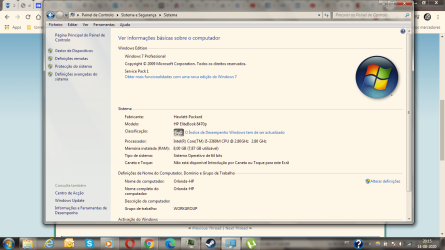
You can see the CPU properties on the screenshot....
 

Attachments

  • Cpu properties.png
    Cpu properties.png
    289.3 KB · Views: 2

My Computer

Computer type
PC/Desktop
OS
Windows 7
A 2.8Ghz dual core processor should be fine for DOTA2.
 

My Computer

Computer type
PC/Desktop
OS
Windows 7 x64, Vista x64, 8.1 smartphone
CPU
Intel E8400 65W 64-bit
Motherboard
Gigabyte EP45-UD3LR
Memory
DDR2 2 x 2GB, 1GB x 2
Graphics Card(s)
XFX Radeon HD5750
Sound Card
AMD High Definition Audio; Realtek High Definition Audio
Monitor(s) Displays
iiyama prolite X2377HDS
Screen Resolution
1920 x 1080
Hard Drives
500GB 7200 rpm Seagate ST3500413AS 16MB, 500GB 5400 rpm Toshiba MQ02ABF050H 32MB, 200GB 7200 rpm Seagate ST3200820AS 8MB, 2TB 7200 rpm Western Digital WD20EZRX 64MB
PSU
Enermax Liberty Modular
Case
Antec P193 Midi Tower
Keyboard
Mionix ZIBAL 60
Mouse
Razer USB 2.0 Diamondback Mouse or Huion Graphics Tablet
Browser
Internet Explorer, Lunascape, Firefox, Opera, Avast Safezone
I'm having another Error message now, it says "nao e possivel iniciar a aplicacao. Contacte o fabricante da aplicacao".
Do you know how to fix this? It doesn't say which app is causing it....


when i click details on the error message i get this:

INFORMAÇÕES DA VERSÃO DA PLATAFORMA
Windows : 6.1.7601.65536 (Win32NT)
Common Language Runtime : 4.0.30319.42000
System.Deployment.dll : 4.8.3761.0 built by: NET48REL1
clr.dll : 4.8.4110.0 built by: NET48REL1LAST_B
dfdll.dll : 4.8.3761.0 built by: NET48REL1

ORIGENS
URL da implementação : https://gslbeacon.lijit.com/beacon?...VFsT65NFDmEd&w=498139398&langs=pt&v=1.2&dnr=1

RESUMO DOS ERROS
Segue-se um resumo dos erros; os detalhes destes erros são apresentados posteriormente no registo.
* A activação de https://gslbeacon.lijit.com/beacon?...VFsT65NFDmEd&w=498139398&langs=pt&v=1.2&dnr=1 resultou em excepção. Foram detectadas as seguintes mensagens de falha:
+ Excepção de tempo limite de bloqueio.

RESUMO DE FALHAS DE TRANSAÇÃO DE ARQUIVO DE COMPONENTES
Não foi detectado nenhum erro de transação.

AVISOS
Não houve avisos durante esta operação.

ESTADO DO PROGRESSO DAS OPERAÇÕES
* [14-08-2020 21:47:13] : A activação de https://gslbeacon.lijit.com/beacon?...VFsT65NFDmEd&w=498139398&langs=pt&v=1.2&dnr=1 foi iniciada.

DETALHES DOS ERROS
Foram detectados os seguintes erros durante esta operação.
* [14-08-2020 21:49:13] System.Deployment.Application.DeploymentException (LockTimeout)
- Excepção de tempo limite de bloqueio.
- Origem: System.Deployment
- Rastreio da pilha:
em System.Deployment.Application.LockedFile.AcquireLock(String path, TimeSpan timeout, Boolean writer)
em System.Deployment.Application.SubscriptionStore..ctor(String deployPath, String tempPath, ComponentStoreType storeType)
em System.Deployment.Application.SubscriptionStore.get_CurrentUser()
em System.Deployment.Application.ApplicationActivator.PerformDeploymentActivation(Uri activationUri, Boolean isShortcut, String textualSubId, String deploymentProviderUrlFromExtension, BrowserSettings browserSettings, String& errorPageUrl, Uri& deploymentUri)
em System.Deployment.Application.ApplicationActivator.PerformDeploymentActivationWithRetry(Uri activationUri, Boolean isShortcut, String textualSubId, String deploymentProviderUrlFromExtension, BrowserSettings browserSettings, String& errorPageUrl)
--- Fim do rastreio da pilha da localização anterior em que a excepção foi emitida ---
em System.Runtime.ExceptionServices.ExceptionDispatchInfo.Throw()
em System.Deployment.Application.ApplicationActivator.PerformDeploymentActivationWithRetry(Uri activationUri, Boolean isShortcut, String textualSubId, String deploymentProviderUrlFromExtension, BrowserSettings browserSettings, String& errorPageUrl)
em System.Deployment.Application.ApplicationActivator.ActivateDeploymentWorker(Object state)

DETALHES DE TRANSAÇÃO DE ARQUIVO DE COMPONENTES
Não existem informações de transação disponíveis.

 

My Computer

Computer type
PC/Desktop
OS
Windows 7
Yes, it says .Net Framework 4.8 is the source of your problem. First do a Malware scan, then try repair .Net Framework 4.8.
 

My Computer

Computer type
PC/Desktop
OS
Windows 7 x64, Vista x64, 8.1 smartphone
CPU
Intel E8400 65W 64-bit
Motherboard
Gigabyte EP45-UD3LR
Memory
DDR2 2 x 2GB, 1GB x 2
Graphics Card(s)
XFX Radeon HD5750
Sound Card
AMD High Definition Audio; Realtek High Definition Audio
Monitor(s) Displays
iiyama prolite X2377HDS
Screen Resolution
1920 x 1080
Hard Drives
500GB 7200 rpm Seagate ST3500413AS 16MB, 500GB 5400 rpm Toshiba MQ02ABF050H 32MB, 200GB 7200 rpm Seagate ST3200820AS 8MB, 2TB 7200 rpm Western Digital WD20EZRX 64MB
PSU
Enermax Liberty Modular
Case
Antec P193 Midi Tower
Keyboard
Mionix ZIBAL 60
Mouse
Razer USB 2.0 Diamondback Mouse or Huion Graphics Tablet
Browser
Internet Explorer, Lunascape, Firefox, Opera, Avast Safezone
So what do you think is causing lag whenever i play dota2??
 

My Computer

Computer type
PC/Desktop
OS
Windows 7
Hey, I updated my processor drivers (is that the CPU?) and a couple of network drivers and it works better now, with much less lag, minor lag.
 

My Computer

Computer type
PC/Desktop
OS
Windows 7
I also found out where the rest of the lag was coming from, it is my internet connection. When i use wireless it lags, i just played a game now without any lag with an Ethernet cable and i did not get any lag, i just get disconnected a lot so i guess the problem now is my internet.
 

My Computer

Computer type
PC/Desktop
OS
Windows 7
Back
Top