Solved Double windows 7 option when booting.

sinketh

New member
Member
Local time
10:35 AM
Messages
25
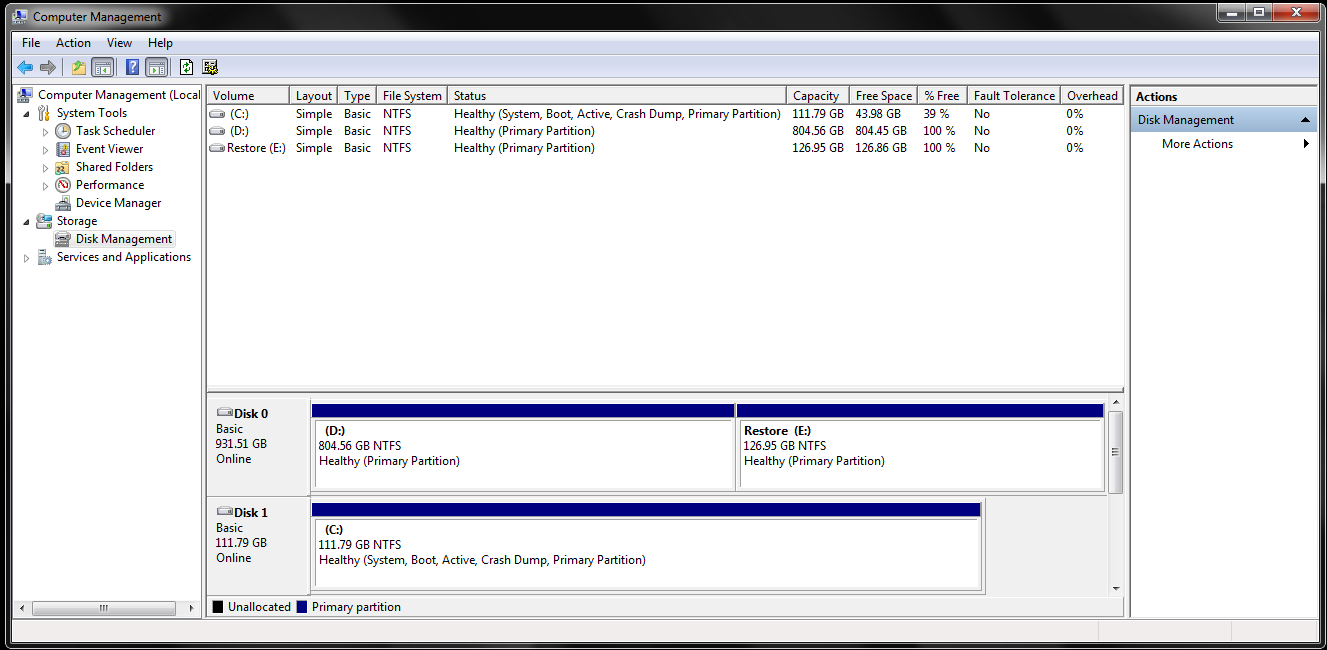
Hello, I've been having a problem when booting my computer today. When it gets past POST and loads operating systems (Like if I were to dual boot linux and 7) it shows windows 7 twice. At first, it was because I was installing windows to my new SSD, and left the old install on my HDD, which I planned to format and use as data storage after everything was done. I tried to delete it from my HDD, but it wouldn't let me while in windows, so I used my DVD and formatted my HDD with that, and left my SSD as active partition with boot. Soon as I restarted the computer it said something like "Bootmgr missing press ctrl+alt+delete to restart" I did that, and used my disc again to repair it but now its back to having 2 different drives with both active on their list in disk management, and two windows 7 options at boot start.
BNHR69W.png
(Disk 1 is my SSD and Disk 0 is my HDD)

What I want to know is, how can I delete system reserve from my HDD and put it on my SSD without having two windows 7 options (once again I formatted the HDD so it shouldn't even have windows on it.) and put the crash dump option on to the HDD. Also why both drives are showing up as active. Thanks in advance.
 

My Computer My Computer

Computer Manufacturer/Model Number
CybertronPC Syclone II GM4242C Desktop
OS
64 bit Windows 7 Home premium
CPU
AMD 6 core FX6100
Motherboard
Gigabyte GA970A-UD3
Memory
16 GB Ballistix
Graphics Card(s)
Nvidia GTX 660 Factory Superclocked EVGA
Sound Card
Realtek HD
Monitor(s) Displays
Asus 24" VS247
Screen Resolution
1920x1080
Hard Drives
1TB
128GB OCZ aglity 3
PSU
In win Commander II 850w
Case
Star Cruiser
Cooling
Corsair H50 Hydro Cooler, Cooler Master 120mm 2000rpm
Keyboard
Razer Lycosa
Mouse
Razer Death adder
Internet Speed
50Mbps
You didn`t unplug disk 0 during the new install did you ?

Why do you want to put the SR partition on C ? C looks fine.
 

My Computer My Computer

Computer type
PC/Desktop
Computer Manufacturer/Model Number
Skylake Special #666
OS
Windows 10 Pro x64
CPU
Intel Core i7 6700K
Motherboard
Asus Sabertooth Z170 Mark 1
Memory
GSkill TridentZ RGB 16GB 3600 16-16-16-36
Graphics Card(s)
EVGA GTX 980 Ti SC x2
Sound Card
Realtek High Definition
Monitor(s) Displays
AOC G2460PG
Screen Resolution
1920 x 1080 144Hz
Hard Drives
Samsung 860 Pro 256GB, Seagate Barracuda 4TB x2
PSU
EVGA 1000 P2, EVGA White Custom Braided Cables
Case
Corsair Vengeance C70 Gunmetal Black
Cooling
Corsair H100i v2, Corsair ML120 x2, Thermal Grizzly Kryonaut
Keyboard
Logitech G910 Orion Spectrum
Mouse
Logitech G700s
Internet Speed
Verizon Fios Quantum Gateway 75/75
Antivirus
Windows Defender, Malwarebytes Free 3.8.3
Browser
Chrome
Other Info
Corsair SP120 x4, LG Blu-ray Drive, Durabrand HT-395 100 Watt Dolby Digital Amp, Corsair H2100 Wireless 7.1 Headset
You didn`t unplug disk 0 during the new install did you ?

Why do you want to put the SR partition on C ? C looks fine.
No, but that shouldn't be causing two windows boot options since I reformatted the entire drive, should it?

Also I was thinking putting system reserve on Disk 1 would fix something, I don't know why it would, but I was very tired when I wrote the original post..

As your HD set up is about the same, have look at my post here:

Follow this base tutorial:
http://www.sevenforums.com/general-...-me-get-windows-7-boot-again.html#post1518114

Did make sure you mark the old Windows 7 HD Drive INACTIVE:
http://www.sevenforums.com/tutorials/197157-partition-mark-inactive.html
Thanks, I'll try these when I get back from class today.
 

My Computer My Computer

Computer Manufacturer/Model Number
CybertronPC Syclone II GM4242C Desktop
OS
64 bit Windows 7 Home premium
CPU
AMD 6 core FX6100
Motherboard
Gigabyte GA970A-UD3
Memory
16 GB Ballistix
Graphics Card(s)
Nvidia GTX 660 Factory Superclocked EVGA
Sound Card
Realtek HD
Monitor(s) Displays
Asus 24" VS247
Screen Resolution
1920x1080
Hard Drives
1TB
128GB OCZ aglity 3
PSU
In win Commander II 850w
Case
Star Cruiser
Cooling
Corsair H50 Hydro Cooler, Cooler Master 120mm 2000rpm
Keyboard
Razer Lycosa
Mouse
Razer Death adder
Internet Speed
50Mbps
Unplug Disk0 and plug its cable into C HD so Win7 is in Disk0.

Boot into Win7 DVD or Repair CD to run Startup Repair - Run up to 3 Separate Times
until Win7 boots and C is marked System Active.

Now you can plug the other HD back in, making sure Win7 remains HD first to boot in BIOS setup. Mark the System Reserved partition Inactive, then Delete it in Disk Mgmt: Partition - Mark as Inactive - Windows 7 Forums

If the ghost listing remains on Windows Boot Manager delete any extra listing in msconfig>Boot tab. If no extra listing is there, install EasyBCD to delete the extra listing on Edit OS Menu tab. EasyBCD (click Download - no Name or Email required)
 
Unplug Disk0 and plug its cable into C HD so Win7 is in Disk0.

Boot into Win7 DVD or Repair CD to run Startup Repair - Run up to 3 Separate Times
until Win7 boots and C is marked System Active.

Now you can plug the other HD back in, making sure Win7 remains HD first to boot in BIOS setup. Mark the System Reserved partition Inactive, then Delete it in Disk Mgmt: Partition - Mark as Inactive - Windows 7 Forums

If the ghost listing remains on Windows Boot Manager delete any extra listing in msconfig>Boot tab. If no extra listing is there, install EasyBCD to delete the extra listing on Edit OS Menu tab. EasyBCD (click Download - no Name or Email required)

Alright, I'll try it this weekend. Thanks for the help guys.
 

My Computer My Computer

Computer Manufacturer/Model Number
CybertronPC Syclone II GM4242C Desktop
OS
64 bit Windows 7 Home premium
CPU
AMD 6 core FX6100
Motherboard
Gigabyte GA970A-UD3
Memory
16 GB Ballistix
Graphics Card(s)
Nvidia GTX 660 Factory Superclocked EVGA
Sound Card
Realtek HD
Monitor(s) Displays
Asus 24" VS247
Screen Resolution
1920x1080
Hard Drives
1TB
128GB OCZ aglity 3
PSU
In win Commander II 850w
Case
Star Cruiser
Cooling
Corsair H50 Hydro Cooler, Cooler Master 120mm 2000rpm
Keyboard
Razer Lycosa
Mouse
Razer Death adder
Internet Speed
50Mbps
I found a fix today while messing with my startup applications through msconfig.exe.
After selecting boot tab, it showed two versions of windows 7 one on my C drive, and the other on my D drive. I selected the one on D, deleted it, and made my computer restart. Sure enough, it started right up without me having to select a windows version to use, and booted up with no problems at all.
DOj94x3.png
 

My Computer My Computer

Computer Manufacturer/Model Number
CybertronPC Syclone II GM4242C Desktop
OS
64 bit Windows 7 Home premium
CPU
AMD 6 core FX6100
Motherboard
Gigabyte GA970A-UD3
Memory
16 GB Ballistix
Graphics Card(s)
Nvidia GTX 660 Factory Superclocked EVGA
Sound Card
Realtek HD
Monitor(s) Displays
Asus 24" VS247
Screen Resolution
1920x1080
Hard Drives
1TB
128GB OCZ aglity 3
PSU
In win Commander II 850w
Case
Star Cruiser
Cooling
Corsair H50 Hydro Cooler, Cooler Master 120mm 2000rpm
Keyboard
Razer Lycosa
Mouse
Razer Death adder
Internet Speed
50Mbps
That is no fix, you simply hid the ghost listing.

You still have your System boot files on another HD. This is not correct and should be repaired using the steps I gave you earlier.

Are you sure you deleted the Win7 that was on D? The correct way to uninstall an OS is to delete it's partition. Is that what you did? If not you may still have Win7 on D. Post up a screenshot of the D folder if in doubt.
 
This is what I have. http://i.imgur.com/O4Fy4xi.png Mostly I just wanted the double windows at boot to go away. Can having it installed on the other HDD cause problems? Because if not, I'll just leave it alone for the time being.
 

My Computer My Computer

Computer Manufacturer/Model Number
CybertronPC Syclone II GM4242C Desktop
OS
64 bit Windows 7 Home premium
CPU
AMD 6 core FX6100
Motherboard
Gigabyte GA970A-UD3
Memory
16 GB Ballistix
Graphics Card(s)
Nvidia GTX 660 Factory Superclocked EVGA
Sound Card
Realtek HD
Monitor(s) Displays
Asus 24" VS247
Screen Resolution
1920x1080
Hard Drives
1TB
128GB OCZ aglity 3
PSU
In win Commander II 850w
Case
Star Cruiser
Cooling
Corsair H50 Hydro Cooler, Cooler Master 120mm 2000rpm
Keyboard
Razer Lycosa
Mouse
Razer Death adder
Internet Speed
50Mbps
You can leave it however you want, but it`s not right.

As Greg mentioned C (disk 1) should be plugged into sata port 1 on the motherboard. The 1 TB drive should be unplugged and the system files should be written to to C drive using startup repair. You can then plug the 1 TB drive back into sata port 2. Then you could delete the system reserved partition if you wanted to.
 

My Computer My Computer

Computer type
PC/Desktop
Computer Manufacturer/Model Number
Skylake Special #666
OS
Windows 10 Pro x64
CPU
Intel Core i7 6700K
Motherboard
Asus Sabertooth Z170 Mark 1
Memory
GSkill TridentZ RGB 16GB 3600 16-16-16-36
Graphics Card(s)
EVGA GTX 980 Ti SC x2
Sound Card
Realtek High Definition
Monitor(s) Displays
AOC G2460PG
Screen Resolution
1920 x 1080 144Hz
Hard Drives
Samsung 860 Pro 256GB, Seagate Barracuda 4TB x2
PSU
EVGA 1000 P2, EVGA White Custom Braided Cables
Case
Corsair Vengeance C70 Gunmetal Black
Cooling
Corsair H100i v2, Corsair ML120 x2, Thermal Grizzly Kryonaut
Keyboard
Logitech G910 Orion Spectrum
Mouse
Logitech G700s
Internet Speed
Verizon Fios Quantum Gateway 75/75
Antivirus
Windows Defender, Malwarebytes Free 3.8.3
Browser
Chrome
Other Info
Corsair SP120 x4, LG Blu-ray Drive, Durabrand HT-395 100 Watt Dolby Digital Amp, Corsair H2100 Wireless 7.1 Headset
You can leave it however you want, but it`s not right.

As Greg mentioned C (disk 1) should be plugged into sata port 1 on the motherboard. The 1 TB drive should be unplugged and the system files should be written to to C drive using startup repair. You can then plug the 1 TB drive back into sata port 2. Then you could delete the system reserved partition if you wanted to.

Alright, just wanted to make sure there was no major problems that can happen. I'll be dusting out my computer soon, so I will definitely make sure to do this. Thanks for the help guys!
 

My Computer My Computer

Computer Manufacturer/Model Number
CybertronPC Syclone II GM4242C Desktop
OS
64 bit Windows 7 Home premium
CPU
AMD 6 core FX6100
Motherboard
Gigabyte GA970A-UD3
Memory
16 GB Ballistix
Graphics Card(s)
Nvidia GTX 660 Factory Superclocked EVGA
Sound Card
Realtek HD
Monitor(s) Displays
Asus 24" VS247
Screen Resolution
1920x1080
Hard Drives
1TB
128GB OCZ aglity 3
PSU
In win Commander II 850w
Case
Star Cruiser
Cooling
Corsair H50 Hydro Cooler, Cooler Master 120mm 2000rpm
Keyboard
Razer Lycosa
Mouse
Razer Death adder
Internet Speed
50Mbps
Did I just completely waste my time writing out these steps for you? Is there some reason you'd ask for help here and then ignore customized steps that were written out for you based upon what has worked for countless thousands of others since before Win7 was even released? It's maddening! :sick:

Unplug Disk0 and plug its cable into C HD so Win7 is in Disk0.

Boot into Win7 DVD or Repair CD to run Startup Repair - Run up to 3 Separate Times
until Win7 boots and C is marked System Active.

Now you can plug the other HD back in, making sure Win7 remains HD first to boot in BIOS setup. Mark the System Reserved partition Inactive, then Delete it in Disk Mgmt: Partition - Mark as Inactive - Windows 7 Forums

If the ghost listing remains on Windows Boot Manager delete any extra listing in msconfig>Boot tab. If no extra listing is there, install EasyBCD to delete the extra listing on Edit OS Menu tab. EasyBCD (click Download - no Name or Email required)
 
No, you didn't waste time. I said I'm going to do it, I just don't have the time right now to take apart my computer... I'm grateful you took the time to help me, but right now my college work is more important, and I need my computer on to get it done. I apologize if it seems like I'm ignoring you, but I'm not. I have it all written down, and I will apply this fix when I take my computer out for dusting this week.
 

My Computer My Computer

Computer Manufacturer/Model Number
CybertronPC Syclone II GM4242C Desktop
OS
64 bit Windows 7 Home premium
CPU
AMD 6 core FX6100
Motherboard
Gigabyte GA970A-UD3
Memory
16 GB Ballistix
Graphics Card(s)
Nvidia GTX 660 Factory Superclocked EVGA
Sound Card
Realtek HD
Monitor(s) Displays
Asus 24" VS247
Screen Resolution
1920x1080
Hard Drives
1TB
128GB OCZ aglity 3
PSU
In win Commander II 850w
Case
Star Cruiser
Cooling
Corsair H50 Hydro Cooler, Cooler Master 120mm 2000rpm
Keyboard
Razer Lycosa
Mouse
Razer Death adder
Internet Speed
50Mbps
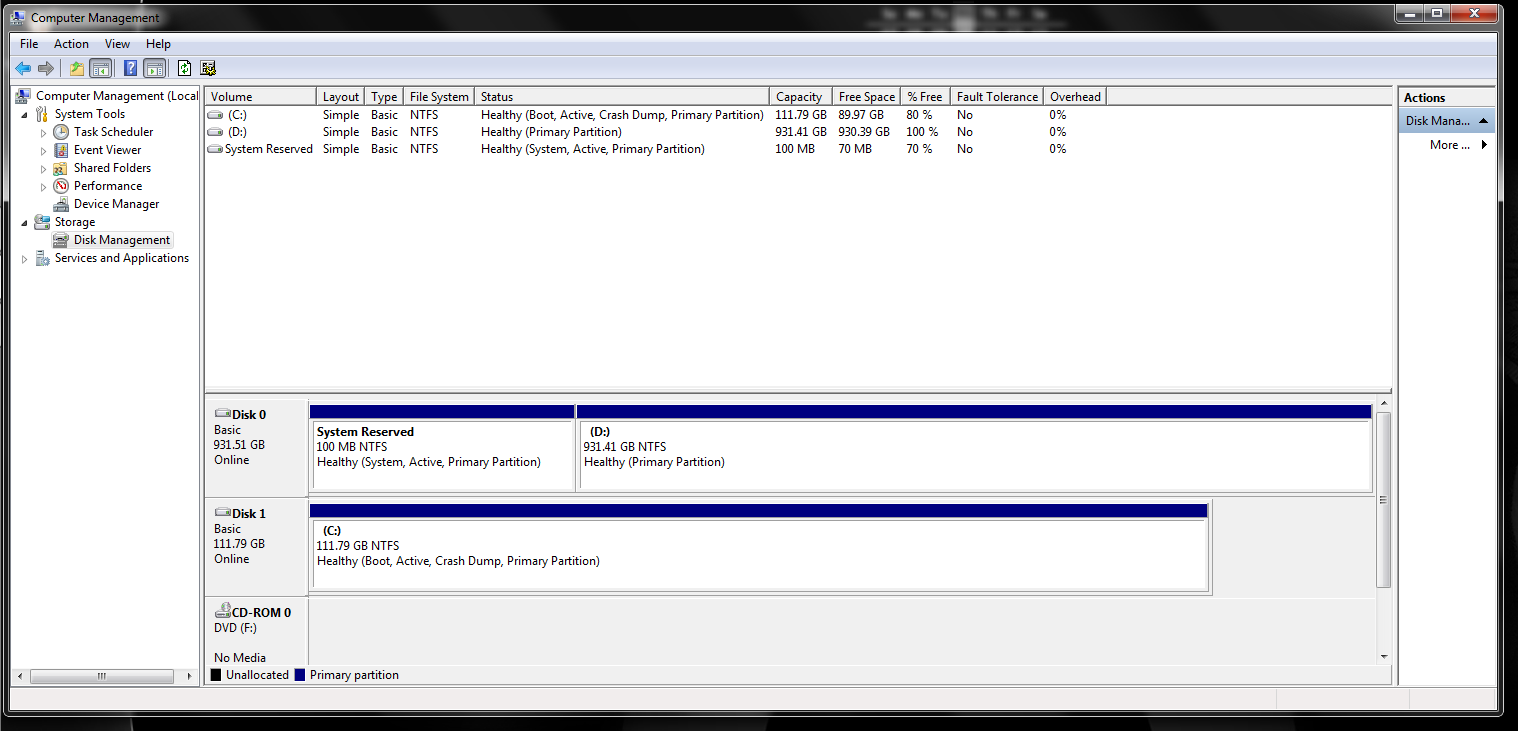
It worked! I took my computer out today to clean it, and followed your instructions. Its working just fine now with no errors after 4 reboots.
4RtRu3q.png

Thank you very much for your help.
 

My Computer My Computer

Computer Manufacturer/Model Number
CybertronPC Syclone II GM4242C Desktop
OS
64 bit Windows 7 Home premium
CPU
AMD 6 core FX6100
Motherboard
Gigabyte GA970A-UD3
Memory
16 GB Ballistix
Graphics Card(s)
Nvidia GTX 660 Factory Superclocked EVGA
Sound Card
Realtek HD
Monitor(s) Displays
Asus 24" VS247
Screen Resolution
1920x1080
Hard Drives
1TB
128GB OCZ aglity 3
PSU
In win Commander II 850w
Case
Star Cruiser
Cooling
Corsair H50 Hydro Cooler, Cooler Master 120mm 2000rpm
Keyboard
Razer Lycosa
Mouse
Razer Death adder
Internet Speed
50Mbps
The reason you were to swap Disk 0 cable to C is so that it would be in the first HD slot. It should remain there so that reinstalling to C will not derail the System boot files again to D, since the installer will often place another HD's Win7 System boot files on the first Primary partition in order.

If you swap the cables or disks now make sure C is set first HD to boot in BIOS setup.
 
Oops... I forgot to set the BIOS options, but I did switch the position of the cords. I had to unplug them from the motherboard and switch them because the one for my SSD is a SATA 3 the others are not. I will do the BIOS thing on my next restart. Thanks again!
 

My Computer My Computer

Computer Manufacturer/Model Number
CybertronPC Syclone II GM4242C Desktop
OS
64 bit Windows 7 Home premium
CPU
AMD 6 core FX6100
Motherboard
Gigabyte GA970A-UD3
Memory
16 GB Ballistix
Graphics Card(s)
Nvidia GTX 660 Factory Superclocked EVGA
Sound Card
Realtek HD
Monitor(s) Displays
Asus 24" VS247
Screen Resolution
1920x1080
Hard Drives
1TB
128GB OCZ aglity 3
PSU
In win Commander II 850w
Case
Star Cruiser
Cooling
Corsair H50 Hydro Cooler, Cooler Master 120mm 2000rpm
Keyboard
Razer Lycosa
Mouse
Razer Death adder
Internet Speed
50Mbps
Back
Top