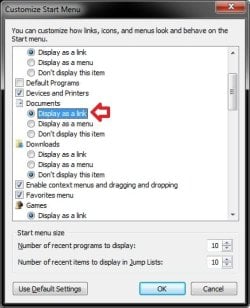
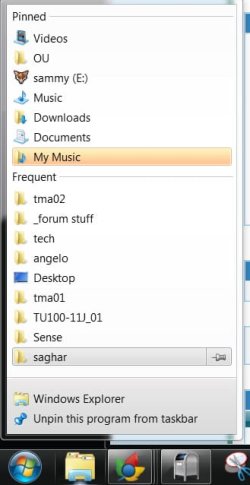
On computer #1 in Explorer under Libraries, I have Documents, Download, Music, etc. The properties of this Download shows Downloads is empty, no folder
On the right (black) pane of the Start Menu is Downloads and the Properties shows the files in user/download.
But unlike Documents, My Documents and files or Pictures, My Pics and then files, this Download has no second My Download. One just sees the files by hovering over Downloads, just like Recent Items or Computer.
On computer #2 Libraries has User, Documents, Pictures (but no Downloads) and you must click on them and an Explorer window opens to see the files.
Thanks for your good help.
On the right (black) pane of the Start Menu is Downloads and the Properties shows the files in user/download.
But unlike Documents, My Documents and files or Pictures, My Pics and then files, this Download has no second My Download. One just sees the files by hovering over Downloads, just like Recent Items or Computer.
On computer #2 Libraries has User, Documents, Pictures (but no Downloads) and you must click on them and an Explorer window opens to see the files.
- How do I get any Library to show on the right pane of the Start Menu if it is supposed to be there? (is that what is called the jump list?) In other words, how do I get a Documents window on #2 like is on #1.
- How do I get the Start Menu right side Library Items to just show the documents without the redundant step steps of either My Documents or the Explorer windows?
Thanks for your good help.
My Computer
- Computer Manufacturer/Model Number
- Dell Inspiron 580S
- OS
- Win7 Home Prem. x64
- CPU
- Intel Core i3 CPU 550 @3.20GHz
- Motherboard
- Dell 0C2KJT Chip:Intel PCH H57 BIOS:A07 ROM 8MB SMBios 2.6
- Memory
- 8 GB RAM 4-Hynix Semicon. DDR3-SDRAM (1333MHz)
- Graphics Card(s)
- ati radeon hd 5450 DrVer 8.740.0.0 5-17-2010
- Sound Card
- Realtek HiDef DrVer6.0.1.6043, 2-3-2010
- Monitor(s) Displays
- 2 generic pnp monitors
- Hard Drives
- Samsung HD103SJ ATA 1 TB