Downloaded files not saved to library?

bluegrunt

New member
Local time
12:27 AM
Messages
9
I can't believe I'm asking this about version 7 of the world's most popular operating system, but here goes.
I am trying to save certain files from the internet; I get the option to specify a location on my pc and I select the location. The browser (IE8) saves the file (apparently) but when I go to the library on my pc the file ain't there. If I go back to the internet and do file save as again, it shows the files which it believes are on my hard disk.
Where are these files I've downloaded?
 

My Computer My Computer

OS
Windows 7 64 bit
I believe the default download location is C:\Users\(your user name)\Downloads. There should be a link to it in your start menu.
 

My Computer My Computer

Computer type
PC/Desktop
Computer Manufacturer/Model Number
Home Built
OS
Windows 10 Education 64 bit
CPU
AMD Phenom II X4 980 Black Edition Deneb 3.7GHz
Motherboard
Asus M4N68T-M V2 µATX Motherboard
Memory
8GB 4GBx2 Kingston PC10600 DDR3 1333 Memory
Graphics Card(s)
Zotac NVIDIA Geforce GT640 2 Gig DDR3 PCIe
Sound Card
VIA VT1708s High Definition Audio 8-channel Onboard
Monitor(s) Displays
22" LG E2242 1080p and 2 19" I-INC AG191D
Screen Resolution
1280x1024 - 1920x1080 - 1280x1024
Hard Drives
Crucial M100 256 GB SSD and 500 GB WD Blue SATA
PSU
Thermaltake TR 620
Case
Power Up Black ATX Mid-Tower Case
Cooling
Stock heatsink and fan
Keyboard
Logitech Wireless K350 Wave
Mouse
Logitech Wireless M570 Trackman Wheel
Internet Speed
80 Mbps Down 30 Mbps Up
Antivirus
Windows Defender
Browser
Internet Explorer 11
Other Info
HP DVD1040e Lightscribe - External USB2
Thanks, but I think that is the default location for program files. Regardless, I had saved the file (a jpg file) to a folder within "my documents". But it's not there.

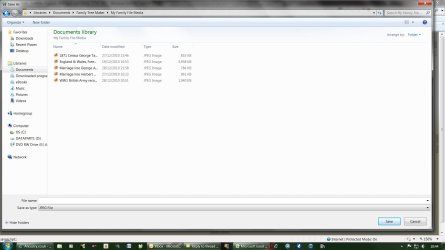
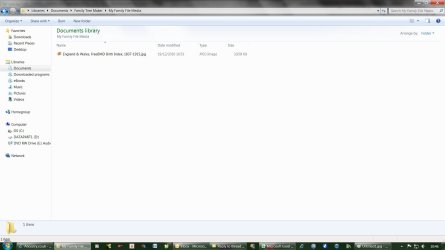
The weird thing is that in the "file save as" box within IE8 I can see the files in the folder. But when I navigate there on my pc there's nothing there. Also nothing in recent places, also windows search doesn't find them.
 

My Computer My Computer

OS
Windows 7 64 bit
There are duplicate folders for documents, pictures, music, etc in C:\Users\Public\. These folders are linked to your libraries by default too. If you open say your Pictures library, it probably says "Includes 2 locations" at the top. I remove all the public ones as I never use them. If I right click and "save as" a picture it ends up in my Pictures folder.
 

My Computer My Computer

Computer type
PC/Desktop
Computer Manufacturer/Model Number
Home Built
OS
Windows 10 Education 64 bit
CPU
AMD Phenom II X4 980 Black Edition Deneb 3.7GHz
Motherboard
Asus M4N68T-M V2 µATX Motherboard
Memory
8GB 4GBx2 Kingston PC10600 DDR3 1333 Memory
Graphics Card(s)
Zotac NVIDIA Geforce GT640 2 Gig DDR3 PCIe
Sound Card
VIA VT1708s High Definition Audio 8-channel Onboard
Monitor(s) Displays
22" LG E2242 1080p and 2 19" I-INC AG191D
Screen Resolution
1280x1024 - 1920x1080 - 1280x1024
Hard Drives
Crucial M100 256 GB SSD and 500 GB WD Blue SATA
PSU
Thermaltake TR 620
Case
Power Up Black ATX Mid-Tower Case
Cooling
Stock heatsink and fan
Keyboard
Logitech Wireless K350 Wave
Mouse
Logitech Wireless M570 Trackman Wheel
Internet Speed
80 Mbps Down 30 Mbps Up
Antivirus
Windows Defender
Browser
Internet Explorer 11
Other Info
HP DVD1040e Lightscribe - External USB2
Is it here: C:\Users\]USERNAME]\AppData\Local\VirtualStore ?
 

My Computer My Computer

Computer type
PC/Desktop
Computer Manufacturer/Model Number
Alienware Aurora ALX R4
OS
Windows 10 Pro (x64)
CPU
Intel Core i7-3930K (3.2GHz - 4.5GHz)
Motherboard
Alienware Aurora-R4 x79
Memory
4x Samsung 4GB PC3-12800 DDR3 (16GB 1600MHz)
Graphics Card(s)
Nvidia Geforce GTX 690
Sound Card
SteelSeries Siberia Elite
Monitor(s) Displays
Dell UltraSharp U3011
Screen Resolution
2560x1600
Hard Drives
Samsung 850 Pro 256 GB, Seagate 1TB Desktop Hybrid HDD, 2x Western Digital 4TB Green HDD
PSU
875W Some Dell PSU <.<
Case
Alienware Aurora ALX
Cooling
Custom Liquid Cooling (EK CPU & GPU blocks) dual EK 480RAD
Keyboard
Logitech G710+ Mechanical
Mouse
Logitech G700s
Internet Speed
Verizon Fios (50 mbps average)
Other Info
Server: Intel NUC D54250WYK: i5-4250U, 16GB, 256 GB mSATA, Windows Server 2012 R2
The files have not saved to my pc - they aren't found in any search. They're not in users\public nor in virtualstore.
 

My Computer My Computer

OS
Windows 7 64 bit
I'm running the IE9 beta, so it might be slightly different for you. Try following these steps:

  1. Download the file in Internet Explorer.
  2. When the download is finished, you should see a window with a few options in it.
  3. Click on Open Folder.
  4. A Windows Explorer window will pop up displaying the folder where you saved the file. The file should be selected.
 

My Computer My Computer

Computer Manufacturer/Model Number
Lenovo ThinkPad W520 (4270CT)
OS
Windows 7 Professional x64
CPU
Intel Core i7-2720QM
Memory
4GB (2 x 2GB)
Graphics Card(s)
NVIDIA Quadro 2000M (with Optimus)
Hard Drives
500 GB @ 7200 RPM
Thanks Brice. I may have misled folks when I described this as a download problem. The website I am using offers the opportunity to save jpegs from their site - effectively using a "save as" function. I click on save as, it opens a Windows Explorer page and I navigate to where I want to put the file, and click "ok".

But after the dialogue box closes and I open Windows Explorer to open the file, it's not there. Yet when I go back into the website to re-run the file save routine, the file save as Windows Explorer box is showing the file.
 

My Computer My Computer

OS
Windows 7 64 bit
Thanks Brice. I may have misled folks when I described this as a download problem. The website I am using offers the opportunity to save jpegs from their site - effectively using a "save as" function. I click on save as, it opens a Windows Explorer page and I navigate to where I want to put the file, and click "ok".

But after the dialogue box closes and I open Windows Explorer to open the file, it's not there. Yet when I go back into the website to re-run the file save routine, the file save as Windows Explorer box is showing the file.

Unfortunately, there is no way to sugar coat this. You are not looking in the same place when you save the file and when you go back to look for it. Please give the EXACT full path of the file save location. I'm certain you will shortly see that you have made an error when going back to find the file.
 

My Computer My Computer

Computer Manufacturer/Model Number
Custom
OS
Windows 7 Ultimate RTM (Technet)
CPU
3.00 gigahertz Intel Core2 Duo E8400
Motherboard
ASUSTeK Computer INC. P5K/EPU Rev 1.xx
Memory
4GB
Graphics Card(s)
ATI Radeon X1950 Pro
Sound Card
Built in HD Audio
Monitor(s) Displays
22" Gateway LCD
Screen Resolution
1920 x 1200
Hard Drives
ST3160023A [Hard drive] (160.04 GB) -- drive 0, rev 8.01, ST3500630AS [Hard drive] (500.11 GB) -- drive 2, rev 3.AAK
ST3500630AS [Hard drive] (500.11 GB) -- drive 1, rev 3.AAK
Keyboard
Logitech G11
Mouse
Microsoft Wireless Laser Mouse 5000
Internet Speed
13.44 Mbps
I am using the window 7 , I want to reload my Os, is there is any free version of window 7 online...
 

My Computer My Computer

OS
vista
No there isn't a free download available...
 

My Computer My Computer

Computer type
PC/Desktop
Computer Manufacturer/Model Number
LENOVO K450 @3.0GHZ
OS
64-bit Windows 8.1 Pro
CPU
Core(TM) i5 CPU 4330 Haswell @ 3.20GHz
Motherboard
LENOVO
Memory
12.00 GB
Graphics Card(s)
Intel(R) HD Graphics
Sound Card
Intel HD integtrated
Monitor(s) Displays
HP 25' ISP Monitor
Screen Resolution
1900/1020
Hard Drives
(1) ST1000DM003-1CH162 (2) Generic STORAGE DEVICE USB Device (3) Generic STORAGE DEVICE USB Device
Internet Speed
100mb down/10mb up
Unfortunately, there is no way to sugar coat this. You are not looking in the same place when you save the file and when you go back to look for it. Please give the EXACT full path of the file save location. I'm certain you will shortly see that you have made an error when going back to find the file.
Thanks Mac, if I'm wrong I'll be happy to admit it.

Untitled1.jpg is a screenshot of the "save as" window when I try to save the jpeg. You can see that the files appear to be there...

Untitled2.jpg is a screenshot of the same folder (I think!) when looked at through Windows Explorer.
 

Attachments

  • Untitled1.jpg
    Untitled1.jpg
    113.4 KB · Views: 42
  • Untitled2.jpg
    Untitled2.jpg
    74.8 KB · Views: 34

My Computer My Computer

OS
Windows 7 64 bit
bluegrunt
Can you give us a link to the website you are downloading from so we can give it a try? Or if you prefer, PM me the link!
 

My Computer My Computer

Computer type
PC/Desktop
OS
Microsoft Windows 7 Home Premium 64-bit 7601 Multiprocessor Free Service Pack 1
CPU
Intel(R) Core(TM) i7-3770 CPU @ 3.40GHz
Motherboard
ASUSTeK COMPUTER INC. P8H77-M
Memory
8.00 GB
Graphics Card(s)
Intel(R) HD Graphics 4000
Sound Card
On Board
Monitor(s) Displays
Dell 24"
Screen Resolution
1920 x 1080
Hard Drives
(1) INTEL SSDSC2CT180A3 ATA Device (2) ST500DM002-1BD142 ATA Device (3) WDC WD3200AAKS-75L9A0 ATA Device (4) Generic- Compact Flash USB Device (5) Generic- MS/MS-Pro USB Device (6) Generic- SD/MMC USB Device (7) Generic- SM/xD-Picture USB
PSU
500w Corsair
Case
Cooler Master
Cooling
3 Fans
Keyboard
Logitech MK300
Mouse
Logitech WOM
Internet Speed
75Mb
Antivirus
Norton 360
Browser
Firefox, Opera, IE
I don't seem to have access to PM functionality. However the site is a subscription based site so you wouldn't be able to have a go. The site is ancestry.co.uk and I'm just trying to save a jpeg of a marriage certificate.
 

My Computer My Computer

OS
Windows 7 64 bit
probably a silly question. Have they been downloaded as hidden files?
 

My Computer My Computer

Computer type
Laptop
Computer Manufacturer/Model Number
Hewlett-Packard/G62-107SA Notebook
OS
Microsoft Windows 7 Home Premium 64-bit Service Pack 1
CPU
Intel(R) Core(TM) i3 CPU M 330 @ 2.13GHz
Motherboard
Hewlett-Packard 1425
Memory
8 GB DDR3
Graphics Card(s)
Intel(R) HD Graphics
Sound Card
Realtek High Definition Audio
Monitor(s) Displays
Builtin
Screen Resolution
1366 x 768 x 32 bits (4294967296 colors) @ 60 Hz
Hard Drives
250 GB SATA Hard Disk Drive 7200 rpm
2TB Seagate GoFlex USB 2 Drive
1TB Iomega Prestige USB 2 Drive
1.5TB Iomega Prestige USB 2 Drive (Samsung)
2TB WD MyBook Live NAS.
Mouse
Logitech Anywhere MX
Internet Speed
152 Mbs download 10 Mbs upload
Antivirus
Norton 360
Browser
Chrome
Try downloading the file again to a different folder on your C drive!
 

My Computer My Computer

Computer type
PC/Desktop
OS
Microsoft Windows 7 Home Premium 64-bit 7601 Multiprocessor Free Service Pack 1
CPU
Intel(R) Core(TM) i7-3770 CPU @ 3.40GHz
Motherboard
ASUSTeK COMPUTER INC. P8H77-M
Memory
8.00 GB
Graphics Card(s)
Intel(R) HD Graphics 4000
Sound Card
On Board
Monitor(s) Displays
Dell 24"
Screen Resolution
1920 x 1080
Hard Drives
(1) INTEL SSDSC2CT180A3 ATA Device (2) ST500DM002-1BD142 ATA Device (3) WDC WD3200AAKS-75L9A0 ATA Device (4) Generic- Compact Flash USB Device (5) Generic- MS/MS-Pro USB Device (6) Generic- SD/MMC USB Device (7) Generic- SM/xD-Picture USB
PSU
500w Corsair
Case
Cooler Master
Cooling
3 Fans
Keyboard
Logitech MK300
Mouse
Logitech WOM
Internet Speed
75Mb
Antivirus
Norton 360
Browser
Firefox, Opera, IE
Unfortunately, there is no way to sugar coat this. You are not looking in the same place when you save the file and when you go back to look for it. Please give the EXACT full path of the file save location. I'm certain you will shortly see that you have made an error when going back to find the file.
Thanks Mac, if I'm wrong I'll be happy to admit it.

Untitled1.jpg is a screenshot of the "save as" window when I try to save the jpeg. You can see that the files appear to be there...

Untitled2.jpg is a screenshot of the same folder (I think!) when looked at through Windows Explorer.

These screenshots do not show the paths in question. A library can have multiple paths stored within it. Click the arrow in the left panel next to "Documents" and see how many locations are stored in the Documents library. I would be willing to bet that there are at least two, one of which you are downloading to and another where you are looking for what you downloaded.

If there is no arrow next to "Documents," then right click on it and choose Properties.
 

My Computer My Computer

Computer Manufacturer/Model Number
Custom
OS
Windows 7 Ultimate RTM (Technet)
CPU
3.00 gigahertz Intel Core2 Duo E8400
Motherboard
ASUSTeK Computer INC. P5K/EPU Rev 1.xx
Memory
4GB
Graphics Card(s)
ATI Radeon X1950 Pro
Sound Card
Built in HD Audio
Monitor(s) Displays
22" Gateway LCD
Screen Resolution
1920 x 1200
Hard Drives
ST3160023A [Hard drive] (160.04 GB) -- drive 0, rev 8.01, ST3500630AS [Hard drive] (500.11 GB) -- drive 2, rev 3.AAK
ST3500630AS [Hard drive] (500.11 GB) -- drive 1, rev 3.AAK
Keyboard
Logitech G11
Mouse
Microsoft Wireless Laser Mouse 5000
Internet Speed
13.44 Mbps
Try downloading the file again to a different folder on your C drive!

Let's not cloud the issue...I think the OP may be misunderstanding how Libraries work.
 

My Computer My Computer

Computer Manufacturer/Model Number
Custom
OS
Windows 7 Ultimate RTM (Technet)
CPU
3.00 gigahertz Intel Core2 Duo E8400
Motherboard
ASUSTeK Computer INC. P5K/EPU Rev 1.xx
Memory
4GB
Graphics Card(s)
ATI Radeon X1950 Pro
Sound Card
Built in HD Audio
Monitor(s) Displays
22" Gateway LCD
Screen Resolution
1920 x 1200
Hard Drives
ST3160023A [Hard drive] (160.04 GB) -- drive 0, rev 8.01, ST3500630AS [Hard drive] (500.11 GB) -- drive 2, rev 3.AAK
ST3500630AS [Hard drive] (500.11 GB) -- drive 1, rev 3.AAK
Keyboard
Logitech G11
Mouse
Microsoft Wireless Laser Mouse 5000
Internet Speed
13.44 Mbps
These screenshots do not show the paths in question. A library can have multiple paths stored within it. Click the arrow in the left panel next to "Documents" and see how many locations are stored in the Documents library. I would be willing to bet that there are at least two, one of which you are downloading to and another where you are looking for what you downloaded.

If there is no arrow next to "Documents," then right click on it and choose Properties.
I don't think that would be the problem. If he saves the file to one folder in the Documents library (My Documents by default), he should be able to see that file when he looks in the same library.
 

My Computer My Computer

Computer Manufacturer/Model Number
Lenovo ThinkPad W520 (4270CT)
OS
Windows 7 Professional x64
CPU
Intel Core i7-2720QM
Memory
4GB (2 x 2GB)
Graphics Card(s)
NVIDIA Quadro 2000M (with Optimus)
Hard Drives
500 GB @ 7200 RPM
Back
Top