

First, if you haven't downloaded the DPC latency checker do it now, it's a great tool for checking system real time performance. While there, grab the PDF product sheet as well.
DPC Latency Checker
My Windows 7 machine is used mainly for audio recording and MIDI sequencing so I'm always looking for ways to optimize system performance. By "optimize" I'm not talking about getting every last bit of brute force power out of the system but instead, reducing the effect of the operating system and associated drivers on "real time" performance.
One of the best tools available is the above mentioned DPC Latency checker.
The last time I checked DPC latency I was getting a few spikes in the 600us range, still well within the green so I didn't pay it much mind. The past few days I'd been testing which "services" were unneeded for my use, I had moved several to manual start without any ill effects. Yesterday I just happened to check DPC latency....
Surprise!
The highest reading was 47us.
Here's a pic.
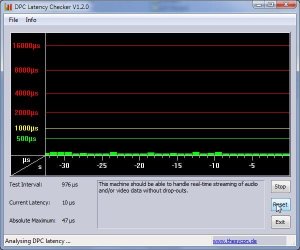
I hate to admit it, I wasn't keeping track of which services I switched to "manual start", DPC latency wasn't my concern so I didn't use my usual method of changing only one thing at a time. While I never had the unusually high spikes in the red, this shows that both services and drivers can affect DPC latency.
Ap
p.s. after this weekend I'll be running checks to find the "offending" :sarc: background service.
DPC Latency Checker
My Windows 7 machine is used mainly for audio recording and MIDI sequencing so I'm always looking for ways to optimize system performance. By "optimize" I'm not talking about getting every last bit of brute force power out of the system but instead, reducing the effect of the operating system and associated drivers on "real time" performance.
One of the best tools available is the above mentioned DPC Latency checker.
The last time I checked DPC latency I was getting a few spikes in the 600us range, still well within the green so I didn't pay it much mind. The past few days I'd been testing which "services" were unneeded for my use, I had moved several to manual start without any ill effects. Yesterday I just happened to check DPC latency....
Surprise!
The highest reading was 47us.
Here's a pic.
I hate to admit it, I wasn't keeping track of which services I switched to "manual start", DPC latency wasn't my concern so I didn't use my usual method of changing only one thing at a time. While I never had the unusually high spikes in the red, this shows that both services and drivers can affect DPC latency.
Ap
p.s. after this weekend I'll be running checks to find the "offending" :sarc: background service.
Last edited:
My Computer
- Computer Manufacturer/Model Number
- Assembled in my workshop
- OS
- Windows 7 Home Premium
- CPU
- Intel Core 2 Duo @ 3.00gHz
- Motherboard
- Gigabyte GA-P35-S3G
- Memory
- 4 GB
- Graphics Card(s)
- ATI Radeon HD 2600 XT
- Sound Card
- RME 24/96 Card, Realtek Internal Audio PreSonus FireStudio
- Monitor(s) Displays
- Acer 1917 (x2)
- Screen Resolution
- 1280 x 1024 on both monitors
- Hard Drives
- Three 250GB Seagate SATA Barracuda 7200rpm
- PSU
- Rosewill 500-watt
- Case
- Rosewill mid-tower
- Cooling
- Noctua NH-U9B (CPU), PwrSupply fan + single large case Fan
- Keyboard
- Macally w/2/USB ports.
- Mouse
- Trackman Wheel
- Other Info
- Event 20/20 bas studio monitors, Yamaha sub.
Rackmount Korg/Roland/Yamaha synthesizers,
Cubase MIDI/audio recording. Sony Soundforge audio/mastering software. CD Architect Mastering. RME & Presonus audio interfaces.


