Draw delay in win7?

Sounds like we're onto something here.
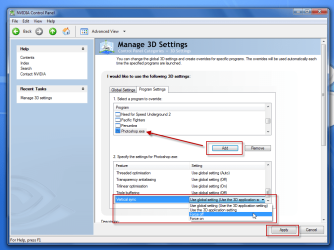
in the NVIDIA CP, have you tried adding Photoshop to the 'Manage 3d settings' window and changing the values from there.
(Screeny to show you what i mean, if you have a different CP, soz! :p)

yytt.png
 

My Computer

Computer Manufacturer/Model Number
HP Touchsmart IQ771.uk
OS
Windows 7 Ultimate x64
CPU
AMD Turion(tm) 64 X2 Mobile Technology TL-56
Motherboard
ASUS Pheonix
Memory
3GB Nanya PC2-6400 DDR2-SDRAM SO-DIM (400MHz)
Graphics Card(s)
NVIDIA GeForce Go 7600 256MB GDDR3 SDRAM
Sound Card
High Definition Intergrated NVIDIA MCP51
Monitor(s) Displays
46" Sony Bravia HDTV
Screen Resolution
1600x1200
Hard Drives
1.5TB Samsug
320GB Seagate ST3320820AS - SATA 3Gb/s 8MB
500GB Maxtor Basics STM305003EHD301-RK
Internet Speed
↓6.32 Mb/s ↑0.35 Mb/s ↔26ms
Other Info
BIOS - American Megatrends Inc. 5.07
Ethernet Port - NVIDIA nForce 10/100/1000 Mbps
DVD Drive - TSSTcorp DVDR/RW TS-T632L
i had played with that. I've actually found that forcing vsync off globally, then restarting helps out a lot. I can tell there's still a drag, but it's much faster to catch up. Forcing it in photoshop but not globally didn't seem to work. I also set my multi-display setting to single display performance mode, and that seemed to give a slight boost.
 

My Computer

OS
Windows 7 Home Premium 64-bit
CPU
Intel Q6600 2.4ghz
Motherboard
MSI P6N Diamond SLI
Memory
4 gig Corsair
Graphics Card(s)
EVGA 8800 GTS(512)
Sound Card
Soundblaster X-Fi Titanium
Monitor(s) Displays
HP LP2275w
Screen Resolution
1680x1050
Hard Drives
2 80 gig raptor drives
1 320 gig WD
PSU
750w
Case
lian li
Hmmmm, this one is really bugging me!! There's no reason this should be happening at all, your hardware is more than capable, drivers are up to date, Application software is good etc.
you shouldn't have to be jumping through hoops just to get the selection box on the desktop synced!!
I'll sleep on it and let you know tomorrow. I can't think of anything now...sorry :)
 

My Computer

Computer Manufacturer/Model Number
HP Touchsmart IQ771.uk
OS
Windows 7 Ultimate x64
CPU
AMD Turion(tm) 64 X2 Mobile Technology TL-56
Motherboard
ASUS Pheonix
Memory
3GB Nanya PC2-6400 DDR2-SDRAM SO-DIM (400MHz)
Graphics Card(s)
NVIDIA GeForce Go 7600 256MB GDDR3 SDRAM
Sound Card
High Definition Intergrated NVIDIA MCP51
Monitor(s) Displays
46" Sony Bravia HDTV
Screen Resolution
1600x1200
Hard Drives
1.5TB Samsug
320GB Seagate ST3320820AS - SATA 3Gb/s 8MB
500GB Maxtor Basics STM305003EHD301-RK
Internet Speed
↓6.32 Mb/s ↑0.35 Mb/s ↔26ms
Other Info
BIOS - American Megatrends Inc. 5.07
Ethernet Port - NVIDIA nForce 10/100/1000 Mbps
DVD Drive - TSSTcorp DVDR/RW TS-T632L
from what i've played around with in the windows performance options, it's the "Enable desktop composition" that adds the delay. Which also appears to be the option that adds all the cool stuff. Maybe I'll try uninstalling/reinstalling my video card. driver wise.
 

My Computer

OS
Windows 7 Home Premium 64-bit
CPU
Intel Q6600 2.4ghz
Motherboard
MSI P6N Diamond SLI
Memory
4 gig Corsair
Graphics Card(s)
EVGA 8800 GTS(512)
Sound Card
Soundblaster X-Fi Titanium
Monitor(s) Displays
HP LP2275w
Screen Resolution
1680x1050
Hard Drives
2 80 gig raptor drives
1 320 gig WD
PSU
750w
Case
lian li

My Computer

Computer Manufacturer/Model Number
HP Touchsmart IQ771.uk
OS
Windows 7 Ultimate x64
CPU
AMD Turion(tm) 64 X2 Mobile Technology TL-56
Motherboard
ASUS Pheonix
Memory
3GB Nanya PC2-6400 DDR2-SDRAM SO-DIM (400MHz)
Graphics Card(s)
NVIDIA GeForce Go 7600 256MB GDDR3 SDRAM
Sound Card
High Definition Intergrated NVIDIA MCP51
Monitor(s) Displays
46" Sony Bravia HDTV
Screen Resolution
1600x1200
Hard Drives
1.5TB Samsug
320GB Seagate ST3320820AS - SATA 3Gb/s 8MB
500GB Maxtor Basics STM305003EHD301-RK
Internet Speed
↓6.32 Mb/s ↑0.35 Mb/s ↔26ms
Other Info
BIOS - American Megatrends Inc. 5.07
Ethernet Port - NVIDIA nForce 10/100/1000 Mbps
DVD Drive - TSSTcorp DVDR/RW TS-T632L
Always worth a try, use the one i linked to earlier in the thread.

NVIDIA DRIVERS 191.07 WHQL


Yeah. I did. But i thought maybe windows had installed something before it and then I installed over the top. I don't even think that's possible, but i thought it might be worth wiping it out and trying again.

Adjusting the nvidia vsync stuff has actually gotten it to a point where it responds fast enough for normal usage. I'd just rather have immediate response and not have to disable vsync for everything. although i could set my games individually to allow vsync. I guess if it keeps bothering me I can just disable the desktop composition.
 

My Computer

OS
Windows 7 Home Premium 64-bit
CPU
Intel Q6600 2.4ghz
Motherboard
MSI P6N Diamond SLI
Memory
4 gig Corsair
Graphics Card(s)
EVGA 8800 GTS(512)
Sound Card
Soundblaster X-Fi Titanium
Monitor(s) Displays
HP LP2275w
Screen Resolution
1680x1050
Hard Drives
2 80 gig raptor drives
1 320 gig WD
PSU
750w
Case
lian li
well reinstalling doesn't work. short of wiping out the whole system again I don't know what to try. and really I don't think that would solve anything.

The best I've come up with is forcing vsync off globally, setting to single display performance mode, and possible turning of Physx, but i can't tell if that makes a difference, so it probably doesn't. Otherwise I guess if it gets annoying I'll have to just disable desktop composition. I have no idea why it would cause this problem. seems odd. Maybe related only to my particular GPU?

Too bad we can't get someone else to compare. Is there any free desktop vid capture I could use to show? Any sort of diagnostic info sheet I could post to see if there are conflicts?
 

My Computer

OS
Windows 7 Home Premium 64-bit
CPU
Intel Q6600 2.4ghz
Motherboard
MSI P6N Diamond SLI
Memory
4 gig Corsair
Graphics Card(s)
EVGA 8800 GTS(512)
Sound Card
Soundblaster X-Fi Titanium
Monitor(s) Displays
HP LP2275w
Screen Resolution
1680x1050
Hard Drives
2 80 gig raptor drives
1 320 gig WD
PSU
750w
Case
lian li
i'm gonna get on nvidia's forums and see if there's anyone else having a similar problem.
 

My Computer

OS
Windows 7 Home Premium 64-bit
CPU
Intel Q6600 2.4ghz
Motherboard
MSI P6N Diamond SLI
Memory
4 gig Corsair
Graphics Card(s)
EVGA 8800 GTS(512)
Sound Card
Soundblaster X-Fi Titanium
Monitor(s) Displays
HP LP2275w
Screen Resolution
1680x1050
Hard Drives
2 80 gig raptor drives
1 320 gig WD
PSU
750w
Case
lian li

My Computer

Computer Manufacturer/Model Number
HP Touchsmart IQ771.uk
OS
Windows 7 Ultimate x64
CPU
AMD Turion(tm) 64 X2 Mobile Technology TL-56
Motherboard
ASUS Pheonix
Memory
3GB Nanya PC2-6400 DDR2-SDRAM SO-DIM (400MHz)
Graphics Card(s)
NVIDIA GeForce Go 7600 256MB GDDR3 SDRAM
Sound Card
High Definition Intergrated NVIDIA MCP51
Monitor(s) Displays
46" Sony Bravia HDTV
Screen Resolution
1600x1200
Hard Drives
1.5TB Samsug
320GB Seagate ST3320820AS - SATA 3Gb/s 8MB
500GB Maxtor Basics STM305003EHD301-RK
Internet Speed
↓6.32 Mb/s ↑0.35 Mb/s ↔26ms
Other Info
BIOS - American Megatrends Inc. 5.07
Ethernet Port - NVIDIA nForce 10/100/1000 Mbps
DVD Drive - TSSTcorp DVDR/RW TS-T632L
i will. so far no responses though. I guess it could be a driver issue. A friend of mine sent me this: Photoshop Brush Lag Studdering with Vista

but it's not quite the same thing, and the solution he posted doesn't work. Maybe there's a bottleneck on my system somewhere and it's choking on it.
 

My Computer

OS
Windows 7 Home Premium 64-bit
CPU
Intel Q6600 2.4ghz
Motherboard
MSI P6N Diamond SLI
Memory
4 gig Corsair
Graphics Card(s)
EVGA 8800 GTS(512)
Sound Card
Soundblaster X-Fi Titanium
Monitor(s) Displays
HP LP2275w
Screen Resolution
1680x1050
Hard Drives
2 80 gig raptor drives
1 320 gig WD
PSU
750w
Case
lian li
Keep us updated & good luck! ;)

A friend of mine mentioned it sounds something like an issue in older OS's where it wouldn't be using any or all of the hardware acceleration. Is there any setting in win7 for using or not using hardware acceleration?

I remember seeing settings like that too a long time ago.

I know my motherboard drivers are somewhat out of date too. I wonder if that's part of the issue. MSI only has vista drivers. They don't have 7 drivers yet, and since my board is older they may never.
 

My Computer

OS
Windows 7 Home Premium 64-bit
CPU
Intel Q6600 2.4ghz
Motherboard
MSI P6N Diamond SLI
Memory
4 gig Corsair
Graphics Card(s)
EVGA 8800 GTS(512)
Sound Card
Soundblaster X-Fi Titanium
Monitor(s) Displays
HP LP2275w
Screen Resolution
1680x1050
Hard Drives
2 80 gig raptor drives
1 320 gig WD
PSU
750w
Case
lian li
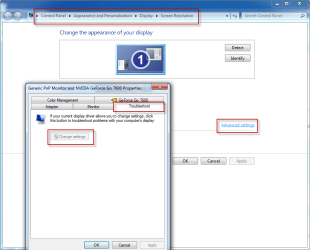
Windows does have an option for disabling/enabling hardware acceleration.
1.png
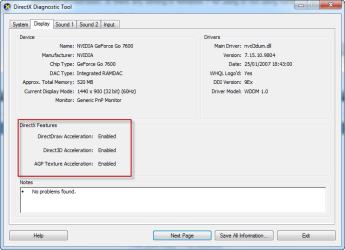
You can check the current status of your hardware acceleration in dxdiag and also see any reports of problems it finds.
2.png
 

My Computer

Computer Manufacturer/Model Number
HP Touchsmart IQ771.uk
OS
Windows 7 Ultimate x64
CPU
AMD Turion(tm) 64 X2 Mobile Technology TL-56
Motherboard
ASUS Pheonix
Memory
3GB Nanya PC2-6400 DDR2-SDRAM SO-DIM (400MHz)
Graphics Card(s)
NVIDIA GeForce Go 7600 256MB GDDR3 SDRAM
Sound Card
High Definition Intergrated NVIDIA MCP51
Monitor(s) Displays
46" Sony Bravia HDTV
Screen Resolution
1600x1200
Hard Drives
1.5TB Samsug
320GB Seagate ST3320820AS - SATA 3Gb/s 8MB
500GB Maxtor Basics STM305003EHD301-RK
Internet Speed
↓6.32 Mb/s ↑0.35 Mb/s ↔26ms
Other Info
BIOS - American Megatrends Inc. 5.07
Ethernet Port - NVIDIA nForce 10/100/1000 Mbps
DVD Drive - TSSTcorp DVDR/RW TS-T632L
all green. change settings under troubleshoot is greyed out. maybe my card isn't up to snuff though that doesn't make sense to me. I just happened to notice while playing world in conflict that the selection box would lag behind the mouse cursor like it would on the desktop. but I figured that had more to do with the massive amount of work the card was doing.
 

My Computer

OS
Windows 7 Home Premium 64-bit
CPU
Intel Q6600 2.4ghz
Motherboard
MSI P6N Diamond SLI
Memory
4 gig Corsair
Graphics Card(s)
EVGA 8800 GTS(512)
Sound Card
Soundblaster X-Fi Titanium
Monitor(s) Displays
HP LP2275w
Screen Resolution
1680x1050
Hard Drives
2 80 gig raptor drives
1 320 gig WD
PSU
750w
Case
lian li
the thing that really bugs me is that crappy little ms paint shows no delay no matter what i have set up. could be because it's not a real burden on the processor. but it bothers me.
 

My Computer

OS
Windows 7 Home Premium 64-bit
CPU
Intel Q6600 2.4ghz
Motherboard
MSI P6N Diamond SLI
Memory
4 gig Corsair
Graphics Card(s)
EVGA 8800 GTS(512)
Sound Card
Soundblaster X-Fi Titanium
Monitor(s) Displays
HP LP2275w
Screen Resolution
1680x1050
Hard Drives
2 80 gig raptor drives
1 320 gig WD
PSU
750w
Case
lian li
OK HeroGhost, i'm afraid i'm all out of ideas :(
I'm going to have to hand the reins over to someone who knows more about this than I.
I'm sorry i can't solve this problem for you.
Good luck!
 

My Computer

Computer Manufacturer/Model Number
HP Touchsmart IQ771.uk
OS
Windows 7 Ultimate x64
CPU
AMD Turion(tm) 64 X2 Mobile Technology TL-56
Motherboard
ASUS Pheonix
Memory
3GB Nanya PC2-6400 DDR2-SDRAM SO-DIM (400MHz)
Graphics Card(s)
NVIDIA GeForce Go 7600 256MB GDDR3 SDRAM
Sound Card
High Definition Intergrated NVIDIA MCP51
Monitor(s) Displays
46" Sony Bravia HDTV
Screen Resolution
1600x1200
Hard Drives
1.5TB Samsug
320GB Seagate ST3320820AS - SATA 3Gb/s 8MB
500GB Maxtor Basics STM305003EHD301-RK
Internet Speed
↓6.32 Mb/s ↑0.35 Mb/s ↔26ms
Other Info
BIOS - American Megatrends Inc. 5.07
Ethernet Port - NVIDIA nForce 10/100/1000 Mbps
DVD Drive - TSSTcorp DVDR/RW TS-T632L
maybe there is no solution. I've just been living without the desktop effects. I'll see if anything changes when I eventually upgrade and overclock.
 

My Computer

OS
Windows 7 Home Premium 64-bit
CPU
Intel Q6600 2.4ghz
Motherboard
MSI P6N Diamond SLI
Memory
4 gig Corsair
Graphics Card(s)
EVGA 8800 GTS(512)
Sound Card
Soundblaster X-Fi Titanium
Monitor(s) Displays
HP LP2275w
Screen Resolution
1680x1050
Hard Drives
2 80 gig raptor drives
1 320 gig WD
PSU
750w
Case
lian li
I suspect this has nothing to do with your processor, thus overclocking will have no effect on this issue. I reckon it's a problem with your GPU.
Please do keep us informed though! :D
 

My Computer

Computer Manufacturer/Model Number
HP Touchsmart IQ771.uk
OS
Windows 7 Ultimate x64
CPU
AMD Turion(tm) 64 X2 Mobile Technology TL-56
Motherboard
ASUS Pheonix
Memory
3GB Nanya PC2-6400 DDR2-SDRAM SO-DIM (400MHz)
Graphics Card(s)
NVIDIA GeForce Go 7600 256MB GDDR3 SDRAM
Sound Card
High Definition Intergrated NVIDIA MCP51
Monitor(s) Displays
46" Sony Bravia HDTV
Screen Resolution
1600x1200
Hard Drives
1.5TB Samsug
320GB Seagate ST3320820AS - SATA 3Gb/s 8MB
500GB Maxtor Basics STM305003EHD301-RK
Internet Speed
↓6.32 Mb/s ↑0.35 Mb/s ↔26ms
Other Info
BIOS - American Megatrends Inc. 5.07
Ethernet Port - NVIDIA nForce 10/100/1000 Mbps
DVD Drive - TSSTcorp DVDR/RW TS-T632L
HELP!!!

I'm expieriencing the same problem. This is driving me crazy. If anyone found a solution to this please post!

I'm the first at my company to get the windows 7 upgrade, I'm a concept artist and spend 8-10 hours a day in photoshop and this is killing me. In the next two weeks the rest of the 30ish artists here will be getting the upgrade and if they run into this same problem its going to be a nightmare.

Could it be that I'm running Cs2? Do i need to upgrade to a new version of photoshop?

Thanks!
-B
 

My Computer

OS
windows 7
I just built a new PC with decent hardware (i5 750, nvidia GTS 250 1GB) so this definitely is not hardware performance related. Hopefully there is a fix soon!
 
Last edited:

My Computer

OS
win7 64
CPU
i5 750
Motherboard
gigabyte p55-ud3r
Graphics Card(s)
nvidia gts 250
I'm expieriencing the same problem. This is driving me crazy. If anyone found a solution to this please post!

I'm the first at my company to get the windows 7 upgrade, I'm a concept artist and spend 8-10 hours a day in photoshop and this is killing me. In the next two weeks the rest of the 30ish artists here will be getting the upgrade and if they run into this same problem its going to be a nightmare.

Could it be that I'm running Cs2? Do i need to upgrade to a new version of photoshop?

Thanks!
-B

I'm running CS4, i don't think it's version specific.
quick fix is to disable all of the desktop effects.

Here is the example of the performance settings: http://www.sevenforums.com/performance-maintenance/31915-draw-delay-win7.html#post331284


What video card do you have?

I'm starting to wonder if this is an nvidia problem.
 

My Computer

OS
Windows 7 Home Premium 64-bit
CPU
Intel Q6600 2.4ghz
Motherboard
MSI P6N Diamond SLI
Memory
4 gig Corsair
Graphics Card(s)
EVGA 8800 GTS(512)
Sound Card
Soundblaster X-Fi Titanium
Monitor(s) Displays
HP LP2275w
Screen Resolution
1680x1050
Hard Drives
2 80 gig raptor drives
1 320 gig WD
PSU
750w
Case
lian li
Back
Top