Solved Drive C partition unallocated

zirch

New member
Member
Local time
11:03 AM
Messages
42
I have Windows 7 Ultimate 32bit installed on drive C of the internal hard disk of my laptop. Yesterday, after I put my laptop in the hibernate mode, upon resume, there is a blank screen with a message that says unable to find the operating system. After rebooting, it is still the same, with the blank screen and message. Prior to this, my drive C has been quite filled up with not much free space left.

I tried booting up Linux Mint from a USB drive, but my internal hard drive could not be mounted. In GParted, the drive is shown as unallocated. I tried to use Windows Recovery, but it could not detect the operating system.

Not knowing much, I tried the suggestions listed on this webpage: » How To Fix: External Disk Drive Suddenly Became RAW
then upon booting up, no more blank screen, but there was a BSOD. I tried again to boot into Linux Mint from a USB drive, and this time, I could access partition D on my internal hard disk. However, partition C is still unaccessible and unallocated. Windows Recovery still could not detect the operating system.

Is there any way I can restore the partition? I would like to retrieve my data from partition C. Thanks in advance.
 

My Computer

OS
Windows 7 Ultimate 32bit
I have Windows 7 Ultimate 32bit installed on drive C of the internal hard disk of my laptop. Yesterday, after I put my laptop in the hibernate mode, upon resume, there is a blank screen with a message that says unable to find the operating system. After rebooting, it is still the same, with the blank screen and message. Prior to this, my drive C has been quite filled up with not much free space left.

I tried booting up Linux Mint from a USB drive, but my internal hard drive could not be mounted. In GParted, the drive is shown as unallocated. I tried to use Windows Recovery, but it could not detect the operating system.

Not knowing much, I tried the suggestions listed on this webpage: » How To Fix: External Disk Drive Suddenly Became RAW
then upon booting up, no more blank screen, but there was a BSOD. I tried again to boot into Linux Mint from a USB drive, and this time, I could access partition D on my internal hard disk. However, partition C is still unaccessible and unallocated. Windows Recovery still could not detect the operating system.

Is there any way I can restore the partition? I would like to retrieve my data from partition C. Thanks in advance.
Download partition wizard bootable CD (last from list) Free download Magic Partition Manager Software, partition magic alternative, free partition magic, partition magic Windows 7 and server partition software - Partition Wizard Online
Burn it and boot from it. Of course boot on sick machine

  • what primary partitions do you see (size, label,type)?
  • which primary partition is active?
  • what logical partitions do you see?
  • How many partitions are gone?
Best thing to do is make a camshot and post.

"then upon booting up, no more blank screen, but there was a BSOD"=>only one disk in system then? What info on bsod?
 

My Computer

Computer type
Laptop
Computer Manufacturer/Model Number
ACER ASPIRE 5742G
OS
Microsoft Windows 7 Home Premium 64-bits 7601 Multiprocessor Free Service Pack 1
CPU
Intel(R) Core(TM) i3 CPU M 370 @ 2.40GHz
Motherboard
Acer Aspire 5742G
Memory
4,00 GB
Graphics Card(s)
ATI Mobility Radeon HD 5400 Series
Sound Card
(1) AMD High Definition Audio Device (2) Realtek High Defi
Screen Resolution
1366 x 768 x 32 bits (4294967296 colors) @ 60 Hz
Hard Drives
WDC WD5000BEVT-22ZAT0
And while you are in Partition Wizard you could use the tool to "Rebuild MBR" (Master Boot Record).
It sounds like it got corrupted or deleted.
 

My Computer

Computer type
PC/Desktop
Computer Manufacturer/Model Number
Home Built - Jan 2013
OS
Windows 7 64 Bit Home Premium SP1
CPU
i7-3820
Motherboard
Asus P9X79-PRO - Bios 4608
Memory
GSkill F3-14900CL9Q - 16GB
Graphics Card(s)
EVGA GeForce GTX660 - Driver 352.86
Sound Card
On board Realtek ALC898
Monitor(s) Displays
Acer S271HL
Screen Resolution
1920 x 1080
Hard Drives
#1- Samsung 840 Pro Series
#2- Western Digital WD1002FAEX Sata3 Black
#3- Western Digital WD1002FAEX Sata3 Black
PSU
Corsair CMPSU-850TX-V2 - 850 watt (by Seasonic)
Case
Corsair Obsidian 550D
Cooling
Standard 3 120mm case fans, Cooler Master Hyper 212 EVO
Keyboard
MS KC-0405
Mouse
Intellimouse 5-button
Internet Speed
56 Mbits/Sec (on a good day)
Antivirus
Avast & Malwarebytes
Browser
Firefox
Other Info
Asus DVD - DRW-24B1ST 24X
Download partition wizard bootable CD (last from list) Free download Magic Partition Manager Software, partition magic alternative, free partition magic, partition magic Windows 7 and server partition software - Partition Wizard Online
Burn it and boot from it. Of course boot on sick machine

  • what primary partitions do you see (size, label,type)?
  • which primary partition is active?
  • what logical partitions do you see?
  • How many partitions are gone?
Best thing to do is make a camshot and post.

"then upon booting up, no more blank screen, but there was a BSOD"=>only one disk in system then? What info on bsod?

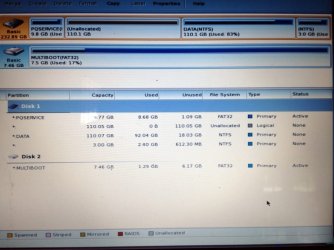
1. The primary partitions are:
- PQSERVICE (9.77GB, FAT32)
- DATA (110.07GB, NTFS)
- (3GB, NTFS)

2. The active primary partition is PQSERVICE.

3. The logical partition is the one unallocated, which I presume to be drive C which I'm trying to recover. There is no label for that partition.

4. As far as I can see, there is no partition gone. However, there are 2 partitions without label, 1 of which is the unallocated partition and the other is the 3GB primary partition.

Here is the camshot:
image.jpg

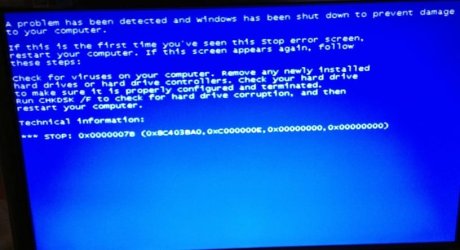
Yes, I have only one internal hard disk, with 2 partitions, C and D. Here is the shot of the BSOD:
image 1.jpg
 

My Computer

OS
Windows 7 Ultimate 32bit
And while you are in Partition Wizard you could use the tool to "Rebuild MBR" (Master Boot Record).
It sounds like it got corrupted or deleted.

I did a "Rebuild MBR" while in the Partition Wizard. Now it is booting up into System Recovery. It still cannot detect the Windows 7 installation on partition C. It only detects the recovery partition X: PQSERVICE.
 

My Computer

OS
Windows 7 Ultimate 32bit
I don't know if this is of any significant, but I have messed up with the drive's MBR before. The OS could not be booted but the drive and all the files were still accessible. I used Windows Recovery, entered command prompt and fixed the MBR via the command
Code:
bootrec.exe /fixmbr
. After that, all was working well until I put the system to hibernate this time.
 
Last edited:

My Computer

OS
Windows 7 Ultimate 32bit
MBR is just sector 0 of physical disk. It consists of:
  • Disk signature. Just sort of label to uniquely identify the disk....sort of label.
  • Boot code. You did refresh that (bootrec.exe /fixmbr) (rebuild mbr). Boot code looks for first active partition and executes it's volume boot record.
Both are NOT the problem! MBR also consists of:
  • Partition table.
And that the reason! I don't why ... but you have a lot of unallocated space! There's no pointer in partition table to this space so it things it's unallocated.

I hope your data is still in the unallocated space. Try to recover it using partition wizard, explanation here
How to perform lost partition recovery and deleted partition recovery under Windows? Partition Recovery Help.
Of course select DATA and PQSERVICE as well if you want to keep them. Try to recover in "unallocated space" and do "quick scan".
 

My Computer

Computer type
Laptop
Computer Manufacturer/Model Number
ACER ASPIRE 5742G
OS
Microsoft Windows 7 Home Premium 64-bits 7601 Multiprocessor Free Service Pack 1
CPU
Intel(R) Core(TM) i3 CPU M 370 @ 2.40GHz
Motherboard
Acer Aspire 5742G
Memory
4,00 GB
Graphics Card(s)
ATI Mobility Radeon HD 5400 Series
Sound Card
(1) AMD High Definition Audio Device (2) Realtek High Defi
Screen Resolution
1366 x 768 x 32 bits (4294967296 colors) @ 60 Hz
Hard Drives
WDC WD5000BEVT-22ZAT0
MBR is just sector 0 of physical disk. It consists of:
  • Disk signature. Just sort of label to uniquely identify the disk....sort of label.
  • Boot code. You did refresh that (bootrec.exe /fixmbr) (rebuild mbr). Boot code looks for first active partition and executes it's volume boot record.
Both are NOT the problem! MBR also consists of:
  • Partition table.
And that the reason! I don't why ... but you have a lot of unallocated space! There's no pointer in partition table to this space so it things it's unallocated.

I hope your data is still in the unallocated space. Try to recover it using partition wizard, explanation here
How to perform lost partition recovery and deleted partition recovery under Windows? Partition Recovery Help.
Of course select DATA and PQSERVICE as well if you want to keep them. Try to recover in "unallocated space" and do "quick scan".

I see. I hope the data is still there as well. Performing the quick scan in the Partition Recovery Wizard now.
 

My Computer

OS
Windows 7 Ultimate 32bit

My Computer

Computer type
Laptop
Computer Manufacturer/Model Number
ACER ASPIRE 5742G
OS
Microsoft Windows 7 Home Premium 64-bits 7601 Multiprocessor Free Service Pack 1
CPU
Intel(R) Core(TM) i3 CPU M 370 @ 2.40GHz
Motherboard
Acer Aspire 5742G
Memory
4,00 GB
Graphics Card(s)
ATI Mobility Radeon HD 5400 Series
Sound Card
(1) AMD High Definition Audio Device (2) Realtek High Defi
Screen Resolution
1366 x 768 x 32 bits (4294967296 colors) @ 60 Hz
Hard Drives
WDC WD5000BEVT-22ZAT0
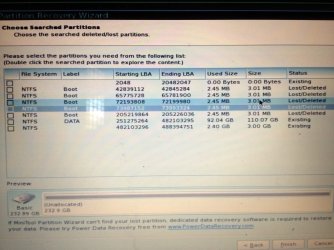
I did not see my Windows 7 drive. I am seeing a lot of drives with "Boot" label. Here is the camshot:
image 2.jpg

What do I do next? I hope the data is still recoverable?
 

My Computer

OS
Windows 7 Ultimate 32bit
I did not see my Windows 7 drive. I am seeing a lot of drives with "Boot" label. Here is the camshot:
View attachment 254981

What do I do next? I hope the data is still recoverable?
I don't know why it's labeled Boot and why it's 3MB. I've seen it many times before. Not real partitions of course. Now do a "full scan" in the "unallocated space".

How did it happen? Did you mess around with partitioning software?

The pointer in partition table is gone (is not pointing to start and end sector). No NTFS structures are found in unallocated space.... so it looks like someone wiped partition or corrupted it.

You can try http://www.powerdatarecovery.com/free-file-recovery-software/recover-lost-partition.html as well. But I think it's actually the same
 

My Computer

Computer type
Laptop
Computer Manufacturer/Model Number
ACER ASPIRE 5742G
OS
Microsoft Windows 7 Home Premium 64-bits 7601 Multiprocessor Free Service Pack 1
CPU
Intel(R) Core(TM) i3 CPU M 370 @ 2.40GHz
Motherboard
Acer Aspire 5742G
Memory
4,00 GB
Graphics Card(s)
ATI Mobility Radeon HD 5400 Series
Sound Card
(1) AMD High Definition Audio Device (2) Realtek High Defi
Screen Resolution
1366 x 768 x 32 bits (4294967296 colors) @ 60 Hz
Hard Drives
WDC WD5000BEVT-22ZAT0
Running the full scan now.

I had written a new partition table according to the instructions here: » How To Fix: External Disk Drive Suddenly Became RAW when this problem occurred before I turned to this forum. Did I messed it all up by doing it?
TESTDISK didn't find the partition that's missing now. So no pointers to that space anymore... making it unallocated. Did you do a "boot sector repair" as well as described on that link? I don't think so, because it didn't find the partition.... so can't do it.

Was partition RAW just before running testdisk? What software told you it was RAW?
 

My Computer

Computer type
Laptop
Computer Manufacturer/Model Number
ACER ASPIRE 5742G
OS
Microsoft Windows 7 Home Premium 64-bits 7601 Multiprocessor Free Service Pack 1
CPU
Intel(R) Core(TM) i3 CPU M 370 @ 2.40GHz
Motherboard
Acer Aspire 5742G
Memory
4,00 GB
Graphics Card(s)
ATI Mobility Radeon HD 5400 Series
Sound Card
(1) AMD High Definition Audio Device (2) Realtek High Defi
Screen Resolution
1366 x 768 x 32 bits (4294967296 colors) @ 60 Hz
Hard Drives
WDC WD5000BEVT-22ZAT0
PQSERVICE partition size is 9.7GB. Very strange. Was it always that size? Normally it's about 16GB As far as I know. Do you remember?

Lucky you... testdisk didn't recover it to sizes like 100GB. So C drive space will be used by PQSERVICE.

But main problem occured all of a sudden . Hibernation went fine.... but harddisk was damaged when doing a reboot.
You did nothing special afterwards? I don't care about bootrec/fixmbr and "rewrite mbr".

PQSERVICE and DATA were still on disk when running testdisk?
 

My Computer

Computer type
Laptop
Computer Manufacturer/Model Number
ACER ASPIRE 5742G
OS
Microsoft Windows 7 Home Premium 64-bits 7601 Multiprocessor Free Service Pack 1
CPU
Intel(R) Core(TM) i3 CPU M 370 @ 2.40GHz
Motherboard
Acer Aspire 5742G
Memory
4,00 GB
Graphics Card(s)
ATI Mobility Radeon HD 5400 Series
Sound Card
(1) AMD High Definition Audio Device (2) Realtek High Defi
Screen Resolution
1366 x 768 x 32 bits (4294967296 colors) @ 60 Hz
Hard Drives
WDC WD5000BEVT-22ZAT0
Running the full scan now.

I had written a new partition table according to the instructions here: » How To Fix: External Disk Drive Suddenly Became RAW when this problem occurred before I turned to this forum. Did I messed it all up by doing it?
TESTDISK didn't find the partition that's missing now. So no pointers to that space anymore... making it unallocated. Did you do a "boot sector repair" as well as described on that link? I don't think so, because it didn't find the partition.... so can't do it.

Was partition RAW just before running testdisk? What software told you it was RAW?

I did not do a boot sector repair. I used Windows Recovery and tried chkdsk drive C. But it returned "the type of the file system is RAW. chkdsk is not available for RAW drives".
 

My Computer

OS
Windows 7 Ultimate 32bit
PQSERVICE partition size is 9.7GB. Very strange. Was it always that size? Normally it's about 16GB As far as I know. Do you remember?

Lucky you... testdisk didn't recover it to sizes like 100GB. So C drive space will be used by PQSERVICE.

But main problem occured all of a sudden . Hibernation went fine.... but harddisk was damaged when doing a reboot.
You did nothing special afterwards? I don't care about bootrec/fixmbr and "rewrite mbr".

PQSERVICE and DATA were still on disk when running testdisk?

I am not aware of the PQSERVICE partition until when I was running testdisk.

As far as I can remember, I didn't do anything special afterwards. Prior to this, I've tried booting Linux Mint from USB drive to try to access the files. I used Windows Recovery but it could not detect any OS. Then tried the command prompt, tried to fix the MBR. Also wrote the partition table according to the link I gave above.

Yes, PQSERVICE and DATA were still on disk when running testdisk.

When I was in Windows Recovery, in the window that appear when I choose to load drivers, I can see PQSERVICE and DATA. Double-clicking partition C, however, will ask for a drive format.
 

My Computer

OS
Windows 7 Ultimate 32bit
Finished the full scan. The result is still the same, with lots of partition labelled as "boot".

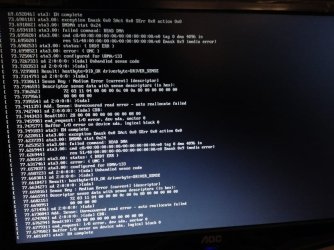
I noticed that while booting Linux Mint from USB drive, there are messages which says "Buffer I/O error on dev sda, logical block 0". Does it signify anything?

Camshot here:
image 3.jpg
 

My Computer

OS
Windows 7 Ultimate 32bit
Running the full scan now.

I had written a new partition table according to the instructions here: » How To Fix: External Disk Drive Suddenly Became RAW when this problem occurred before I turned to this forum. Did I messed it all up by doing it?
TESTDISK didn't find the partition that's missing now. So no pointers to that space anymore... making it unallocated. Did you do a "boot sector repair" as well as described on that link? I don't think so, because it didn't find the partition.... so can't do it.

Was partition RAW just before running testdisk? What software told you it was RAW?

I did not do a boot sector repair. I used Windows Recovery and tried chkdsk drive C. But it returned "the type of the file system is RAW. chkdsk is not available for RAW drives".
Drive letter are just..... drive letters. They are defined in current registry of RUNNING windows. So it can be called C in running win7 (it was). But it's called nothing at all in windows recovery. Most likely PQSERVICE is called C then!! It's called RAW because is some kind of special hidden FAT32 partition
 

My Computer

Computer type
Laptop
Computer Manufacturer/Model Number
ACER ASPIRE 5742G
OS
Microsoft Windows 7 Home Premium 64-bits 7601 Multiprocessor Free Service Pack 1
CPU
Intel(R) Core(TM) i3 CPU M 370 @ 2.40GHz
Motherboard
Acer Aspire 5742G
Memory
4,00 GB
Graphics Card(s)
ATI Mobility Radeon HD 5400 Series
Sound Card
(1) AMD High Definition Audio Device (2) Realtek High Defi
Screen Resolution
1366 x 768 x 32 bits (4294967296 colors) @ 60 Hz
Hard Drives
WDC WD5000BEVT-22ZAT0
Is it a seagate disk? Use seatools bootable CD to diagnose the physical disk.
Western digital has a diagnostics tool as well. Post results
 

My Computer

Computer type
Laptop
Computer Manufacturer/Model Number
ACER ASPIRE 5742G
OS
Microsoft Windows 7 Home Premium 64-bits 7601 Multiprocessor Free Service Pack 1
CPU
Intel(R) Core(TM) i3 CPU M 370 @ 2.40GHz
Motherboard
Acer Aspire 5742G
Memory
4,00 GB
Graphics Card(s)
ATI Mobility Radeon HD 5400 Series
Sound Card
(1) AMD High Definition Audio Device (2) Realtek High Defi
Screen Resolution
1366 x 768 x 32 bits (4294967296 colors) @ 60 Hz
Hard Drives
WDC WD5000BEVT-22ZAT0
TESTDISK didn't find the partition that's missing now. So no pointers to that space anymore... making it unallocated. Did you do a "boot sector repair" as well as described on that link? I don't think so, because it didn't find the partition.... so can't do it.

Was partition RAW just before running testdisk? What software told you it was RAW?

I did not do a boot sector repair. I used Windows Recovery and tried chkdsk drive C. But it returned "the type of the file system is RAW. chkdsk is not available for RAW drives".
Drive letter are just..... drive letters. They are defined in current registry of RUNNING windows. So it can be called C in running win7 (it was). But it's called nothing at all in windows recovery. Most likely PQSERVICE is called C then!! It's called RAW because is some kind of special hidden FAT32 partition

I see. I forgot about that. So, is there any way I can proceed? Should I try to use the Power Data Recovery Tool? Though I have no idea how to use it this way. I don't suppose I can boot it into a USB drive and run from there as well?
 

My Computer

OS
Windows 7 Ultimate 32bit
Back
Top