
Solved Drive Icons in Windows Explorer Boogered - Where to Fix?

GeneralEclectic

New member
Member
Local time
12:31 AM
Messages
39
Win7 x64 Pro, Asus P8Z77-V

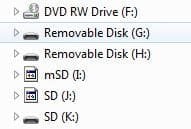
This machine has an AFlashData USB3 internal card reader. They have this "accelerator" program (it accelerates nothing, it turns out) that installs some cute card-activated color icons for the five removable drives it creates. Since the accelerator program caused many more problems than it was worth, I uninstalled it without any errors occurring. However, it has left some detritus in the drive icons that appear in Windows Explorer. Picture attached -- note I: and J: These icons are permanent -- they appear this way after restarts, and have survived several Windows Updates, etc.

Can someone please tell me where to fix this? I'm stumped.

Thanks!
 

Attachments
  • drive-icons.JPG
    drive-icons.JPG
    12.3 KB · Views: 43

My Computer My Computer

At a glance

W7 Pro, W7 Ult, W7 EnterpriseE1730, Q8400, Q9550, i7-Q3610M, i7-3770K, others
Computer Manufacturer/Model Number
Many. Asus, Asrock, Dell, HP, GigaByte, Jetway
OS
W7 Pro, W7 Ult, W7 Enterprise
CPU
E1730, Q8400, Q9550, i7-Q3610M, i7-3770K, others
Other Info
Untangle x64 on Asrock/Intel with Intel NICs

My Computer My Computer

At a glance

Microsoft Windows 10 Pro Insider Preview 64-bitIntel(R) Core(TM) i3-4130 CPU @ 3.40GHzCorsair Vengence 4GB x2 (8.00GB Dual-Channel ...2047MB GeForce GTS 450 (ZOTAC International)
Computer type
PC/Desktop
Computer Manufacturer/Model Number
Self Assembled
OS
Microsoft Windows 10 Pro Insider Preview 64-bit
CPU
Intel(R) Core(TM) i3-4130 CPU @ 3.40GHz
Motherboard
Gigabyte Technology Co., Ltd. B85M-D3H
Memory
Corsair Vengence 4GB x2 (8.00GB Dual-Channel DDR3 @ 798MHz)
Graphics Card(s)
2047MB GeForce GTS 450 (ZOTAC International)
Sound Card
Onboard (Realtek High Definition Audio)
Monitor(s) Displays
LG Flatron E2040T
Screen Resolution
1600x900
Hard Drives
Western Digital 1 TB
Seagate 500 GB
PSU
Corsair VS550
Case
Cooler Master K380
Cooling
Cooler Master Seidon 120V Plus
Keyboard
Logitech MK260r
Mouse
Logitech MK260r
Internet Speed
PMPL Broadband
Antivirus
Windows Defender + MBAM
Browser
Firefox
Other Info
Dell Studio 15" Laptop
Yep. The iconcache.db file no longer exists in ....\appdata\local. No trace of it post-reboot, and all icons appear the same as they did before removing it and rebooting. Kind of suggests that there's another "iconcache.db" in use somewhere else (under a different name?), though I searched the User tree for *icon* and didn't find any likely-looking candidates.

Also, ran sfc /verifyonly that reported no problems.

Edit:
After two more reboots, iconcache.db has reappeared, but Explorer looks just as it did in the picture above. Conclusion: something is assigning the wrong (or no) icons to these devices.

So I compared the details of the five devices and they appear to be identical (I'm talking about things like device class) as they appear in the registry.

Also tried disabling/re-enabling the devices. No joy.
 
Last edited:

My Computer My Computer

At a glance

W7 Pro, W7 Ult, W7 EnterpriseE1730, Q8400, Q9550, i7-Q3610M, i7-3770K, others
Computer Manufacturer/Model Number
Many. Asus, Asrock, Dell, HP, GigaByte, Jetway
OS
W7 Pro, W7 Ult, W7 Enterprise
CPU
E1730, Q8400, Q9550, i7-Q3610M, i7-3770K, others
Other Info
Untangle x64 on Asrock/Intel with Intel NICs
SOLVED!

HKLM\Software\Microsoft\Windows\CurrentVersion\Explorer

There was a key named "DriveIcons" that contained exceptions for the two icons. There were two subkeys for each problematic drive letter, and under those, a subkey for the path to a nonexistent icon file, and one for the non-default name.

I deleted the DriveIcons key and WaLaaa.... everything's back to where it should be.

So the learning here is that iconcache.db isn't authoritative when it comes to these icons. The registry entry here IS, and if there's an entry that doesn't belong here, such as I found, no amount of rebuilding iconcache.db is going to help.
 

My Computer My Computer

At a glance

W7 Pro, W7 Ult, W7 EnterpriseE1730, Q8400, Q9550, i7-Q3610M, i7-3770K, others
Computer Manufacturer/Model Number
Many. Asus, Asrock, Dell, HP, GigaByte, Jetway
OS
W7 Pro, W7 Ult, W7 Enterprise
CPU
E1730, Q8400, Q9550, i7-Q3610M, i7-3770K, others
Other Info
Untangle x64 on Asrock/Intel with Intel NICs
BTW, if anyone's interested in how I ran this down:
1) Went to the system devices page. Created a desktop shortcut for the removable drive that had the improper icon.
2) Created a desktop shortcut for a removable drive that had a correct icon.
3) Observed that the shortcut icons were similarly wrong too.
4) Using the property page for both new shortcuts, I identified the path to the icon file(s), and determined that they were different.
5) Verified that the correct icon was available from a file that existed.
6) Verified that the wrong icon was trying to load from a NONEXISTENT file.
7) Searched for that nonexistent filename in the registry, whereupon the key I mentioned above appeared.
8) Observed that the only two subkeys were for the problematic drive icons, and reasoned that since all other drives were shown correctly that these two keys were the problem, not to mention that they pointed to a nonexistent file.
9) Removed key.
 

My Computer My Computer

At a glance

W7 Pro, W7 Ult, W7 EnterpriseE1730, Q8400, Q9550, i7-Q3610M, i7-3770K, others
Computer Manufacturer/Model Number
Many. Asus, Asrock, Dell, HP, GigaByte, Jetway
OS
W7 Pro, W7 Ult, W7 Enterprise
CPU
E1730, Q8400, Q9550, i7-Q3610M, i7-3770K, others
Other Info
Untangle x64 on Asrock/Intel with Intel NICs
Back
Top