Drive letter disappear after reboot

If you've got no other volume that size and everything else you say is true, it does look as though you've selected correctly. Do you know why it's flagged as hidden? Internal or external (I see a SiI 3132)?
 

My Computer My Computer

At a glance

Windows 7 Ultimate x64
OS
Windows 7 Ultimate x64
If you've got no other volume that size and everything else you say is true, it does look as though you've selected correctly. Do you know why it's flagged as hidden? Internal or external (I see a SiI 3132)?

Not a clue as to why its hidden. This is an internal raid. I'm not sure if this is the one running off the board or an external card. I think its the one coming off of the external card.

I've been asked to update the drivers but I'm scare of doing so because the last time I did that, I lost the RAID which is why its on a new card (I think)
 

My Computer My Computer

At a glance

Washington
OS
Washington
Do you think it is hidden because it's the mirror of your other drive?
 

My Computer My Computer

At a glance

Windows 7 Ultimate x64
OS
Windows 7 Ultimate x64
Do you think it is hidden because it's the mirror of your other drive?

I wouldn't think so but then again, I'm not computer technician. I feel confident though that the raid is that volume because (correct me if I'm wrong) under device manager > disk drives, the only thing listed is 3 drives: (1) stripe raid which is the OS drive, (1) maxtor sata drive which is the temporary download drive and lastly, SiImage SCSI Disk Device (to be exact) which is the card that is installed controlling the RAID I'm having problems with.

For it to be the mirror, wouldn't it have to show up as a disk and not a RAID?
 

My Computer My Computer

At a glance

Washington
OS
Washington
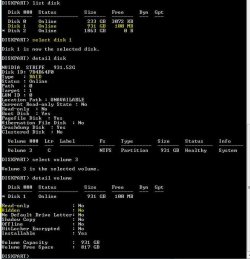
So both Disk Management and Diskpart show only 3 physical drives, and you know for a fact there are 5 physical drives in the machine:

1 entry for a single drive
1 entry for a two disk stripe
1 entry for a two disk mirror

Sound right?

Use Diskpart to check the other RAID set to see if it also has that hidden attribute set...
 

My Computer My Computer

At a glance

Windows 7 Ultimate x64
OS
Windows 7 Ultimate x64
So both Disk Management and Diskpart show only 3 physical drives, and you know for a fact there are 5 physical drives in the machine:

1 entry for a single drive
1 entry for a two disk stripe
1 entry for a two disk mirror

Sound right?

Use Diskpart to check the other RAID set to see if it also has that hidden attribute set...

That is correct!! I'm certain that there are a total of 5 drives in the computer: 2 for the stripe on the NVIDIA controller which is on board, 2 for the SiImage controller which was added and a single drive.

Attached is the screen shot of the detail on the stripe volume. I was comparing this detail with the mirrored volume and I noticed that the stripe is considered a RAID and the mirror is considered a SCSI Disk Device
 

Attachments

  • 05.JPG
    05.JPG
    58.9 KB · Views: 32

My Computer My Computer

At a glance

Washington
OS
Washington
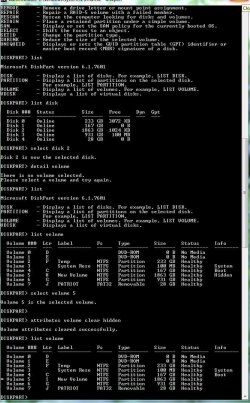
Okay. You can try clearing that hidden attribute using Diskpart. Select the appropriate volume as you did before, then enter:

attributes volume clear hidden

Detail the volume again and observe the attribute truly cleared. Then see what you've got as far as drive letter sticking. If it doesn't work you can change it back to what it was by entering:

attributes volume set hidden

I cannot guarantee it won't mess with your RAID setup, but I don't think it will as you're only messing with how the OS is viewing the RAID volume as a single entity, and not the individual drives.

I was comparing this detail with the mirrored volume and I noticed that the stripe is considered a RAID and the mirror is considered a SCSI Disk Device

I've got a SiI card added to one of my machines and can confirm. Not a RAID setup and no internal drives, as it only adds e-SATA ports for external use. An HD dock is connected with two HD drives and they both have similar descriptions.

Let us know how it goes if you decide to give it a shot!

 

My Computer My Computer

At a glance

Windows 7 Ultimate x64
OS
Windows 7 Ultimate x64
Okay. You can try clearing that hidden attribute using Diskpart. Select the appropriate volume as you did before, then enter:

attributes volume clear hidden

Detail the volume again and observe the attribute truly cleared. Then see what you've got as far as drive letter sticking. If it doesn't work you can change it back to what it was by entering:

attributes volume set hidden

I cannot guarantee it won't mess with your RAID setup, but I don't think it will as you're only messing with how the OS is viewing the RAID volume as a single entity, and not the individual drives.

I was comparing this detail with the mirrored volume and I noticed that the stripe is considered a RAID and the mirror is considered a SCSI Disk Device

I've got a SiI card added to one of my machines and can confirm. Not a RAID setup and no internal drives, as it only adds e-SATA ports for external use. An HD dock is connected with two HD drives and they both have similar descriptions.

Let us know how it goes if you decide to give it a shot!
I'm going to wait until I back the data up. I need to free up $100 so I can buy another drive. Like I said earlier, it's not at the top of my list just yet. It will be though when it fails and I lose everything :mad:
 

My Computer My Computer

At a glance

Washington
OS
Washington
Well, don't forget to post back! Looking forward to finding out how it goes!
 

My Computer My Computer

At a glance

Windows 7 Ultimate x64
OS
Windows 7 Ultimate x64
Hello,

I'm facing a situation very similar to the one discribed in the first post of this thread.
Here is how i got there :

I bought a TV not long ago, and i wanted to try its record option, so i plugged my external HD in the usb port of the tv to store the recorded video. When i plugged it back to my computer, i had a message saying i couldn't use the HD unless i would format it. I found out that the HD went from NTFS to RAW, and i was able to change it back to NTFS without formating the it (i can't afford losing everything i have on this HD). I was rather happy, but the problem is only half solved.

Now i'm facing this situation :

Whenever i plug the HD in my computer, i can hear the "pop" sound, which means the drive is connected correctly. The drive won't show up in "my computer", but it shows up when i check the device manager. As for the creator of this thread, my drive has no letter assigned to it. I can manually assign one to it and by doing so, the drive will magically appear in my computer, and i can use it (all my data are still there). The problem is, whenever i unplug the drive and replug it back after, the letter previously assigned to the drive isn't there anymore, and i have to manually re assign it everytime.

On a side note, my HD (a WD) used to show up with a WD icon in my computer, but when i make it appear by assigning a letter to it, it doesn't have the WD icon, just the regular drive icon.

What i would like to do is to find a way to make things back the way they were before without losing any data (i read about the zero thing on page 3, but i don't want to lose my data so i can't use it).

If this sounds familiar to anyone, please, elighten me, i really need help.
Thanks.
 

My Computer My Computer

At a glance

Windows 7 Starter Edition x64
OS
Windows 7 Starter Edition x64
Have you tried using any of the Diskpart commands to check the drive out?

And why don't you have any backup for its data?
 

My Computer My Computer

At a glance

Windows 7 Ultimate x64
OS
Windows 7 Ultimate x64
The only thing that caught my attention with diskpart is "Location path: Unavailable". The rest seems to be ok (disk online, healthy, ntfs, it even has the letter i manually assigned to it when i uplugged it shown).

And for the backup, well, it would require another 2to HD and i can't afford it at the moment.
 
Last edited:

My Computer My Computer

At a glance

Windows 7 Starter Edition x64
OS
Windows 7 Starter Edition x64
Can you post a screenshot of Disk Management (with drive attached, window maximized, panes/columns adjusted to reveal max info), Diskpart screenshots showing both drive and volume details.
 

My Computer My Computer

At a glance

Windows 7 Ultimate x64
OS
Windows 7 Ultimate x64
Here are the screenshots (all is in French language but i'm pretty sure it's clear enough).

Disk management (just after pluging the drive in, no letter assigned yet) :

diskmanagement.png
ImageShack® - Online Photo and Video Hosting

Diskpart :

ImageShack® - Online Photo and Video Hosting
 

My Computer My Computer

At a glance

Windows 7 Starter Edition x64
OS
Windows 7 Starter Edition x64
On the volume detail, does "cache=oui" translate to "hidden=yes"? I can't relate it to anything else I see when I detail my volumes.
 

My Computer My Computer

At a glance

Windows 7 Ultimate x64
OS
Windows 7 Ultimate x64
Caché means hidden yes. Now that you mention it, it's a bit strange that it's set as hidden. Is this normal ?
 

My Computer My Computer

At a glance

Windows 7 Starter Edition x64
OS
Windows 7 Starter Edition x64

My Computer My Computer

At a glance

Windows 7 Ultimate x64
OS
Windows 7 Ultimate x64
I was kind of affraid to try what you said because the words "data loss" didn't ring nicely in my head, but still i tried it, and it worked. Wonderful ! I'm really grateful, thank you very much.
 

My Computer My Computer

At a glance

Windows 7 Starter Edition x64
OS
Windows 7 Starter Edition x64
You're welcome. I'm glad it worked for you!

I will say though, that you really should have backups of that data! Backup, backup, backup and more backup! ;)

But I've got a question. I was wondering if it solved this issue too:

On a side note, my HD (a WD) used to show up with a WD icon in my computer, but when i make it appear by assigning a letter to it, it doesn't have the WD icon, just the regular drive icon.
 

My Computer My Computer

At a glance

Windows 7 Ultimate x64
OS
Windows 7 Ultimate x64
Okay. You can try clearing that hidden attribute using Diskpart. Select the appropriate volume as you did before, then enter:

attributes volume clear hidden

Detail the volume again and observe the attribute truly cleared. Then see what you've got as far as drive letter sticking. If it doesn't work you can change it back to what it was by entering:

attributes volume set hidden

I cannot guarantee it won't mess with your RAID setup, but I don't think it will as you're only messing with how the OS is viewing the RAID volume as a single entity, and not the individual drives.

I was comparing this detail with the mirrored volume and I noticed that the stripe is considered a RAID and the mirror is considered a SCSI Disk Device

I've got a SiI card added to one of my machines and can confirm. Not a RAID setup and no internal drives, as it only adds e-SATA ports for external use. An HD dock is connected with two HD drives and they both have similar descriptions.

Let us know how it goes if you decide to give it a shot!

SOLVED

F5ing, thanks for your help. What finally broke the camel's back was Windows Back Up. I thought of this today and decided it was time to pull the trigger on your last suggestion (quoted in this post).

I went to run Windows Back Up and I didn't have the option to back up the drive that I had to assign a drive letter too every time I booted. I finally backed up my data and ran the commands listed above and it worked like a charm. A different drive letter stuck but after a restart and reassigning the drive letter and one final reboot, the letter stuck AND the drive shows up in Windows back up because its not *HIDDEN*.

:cool: :geek: :grouphug:
 

Attachments

  • Capture.JPG
    Capture.JPG
    123.6 KB · Views: 9

My Computer My Computer

At a glance

Washington
OS
Washington
Back
Top