Drive - Rename

How to Rename a Drive in Vista, Windows 7, and Windows 8


   Information
This tutorial will show you how to rename a drive in Vista, Windows 7, and Windows 8. For example, a hard disk drive, USB flash drive, CD/DVD drive, etc...

   Tip
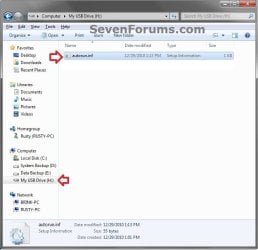
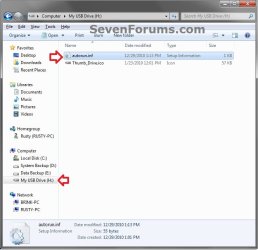
If the drive name is missing or was changed and you did not do it with the methods below, then look for a hidden (not always hidden though) autorun.inf file (OPTION TWO below) when you open the drive letter in Computer, then right click on the autorun.inf file, and click on Delete. Next, approve the deletion.

   Warning
You must be logged in as an administrator to be able to do rename a drive.


CONTENTS:

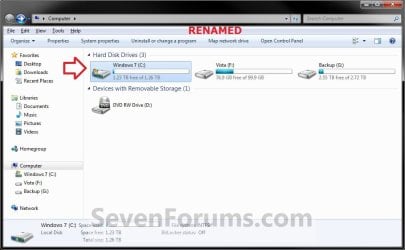
EXAMPLE: Rename a Hard Disk Drive
HDD_Default.jpg

HDD_Renamed.jpg

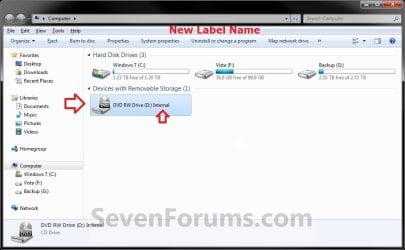
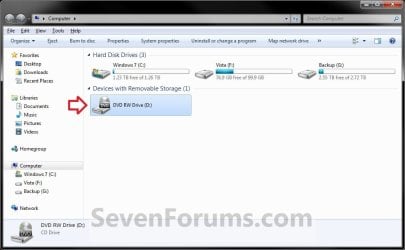
EXAMPLE: Rename a DVD Drive
NOTE: Devices with Removable Storage, such as a DVD drive, can only be renamed by adding a label at the end of the drive description using OPTION THREE below. These devices do not have a Rename option in the context menu when you right click on them in Computer or Disk Management.
Removable_Default.jpg

Removable_Renamed.jpg


OPTION ONE

Rename a Drive in the "Computer" Window


NOTE: For Devices with Removable Storage, such as a DVD drive, that do not have a Rename option, you could use OPTION THREE below instead.
1. If you did OPTION TWO below previously, then you will need to either remove the label=new drive name entry from the autorun.inf file, or delete the autorun.inf file in the root of the drive that you want to change the name of.

2. Open the Computer window.

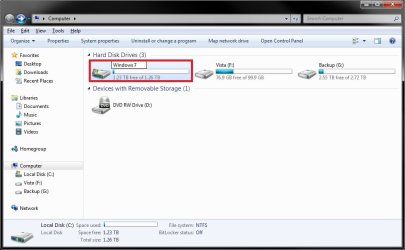
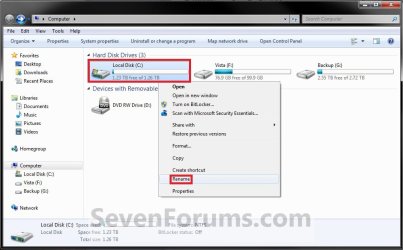
3. Select the drive you want to rename to highlight it, right click on it, and click/tap on Rename. (see screenshot below)
HDD_Step1.jpg
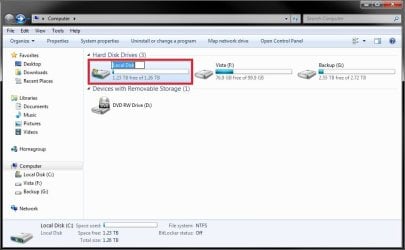
4. Type in a name you want for the drive, then press enter. (see screenshots below)
HDD_Step2A.jpg

HDD_Step2B.jpg

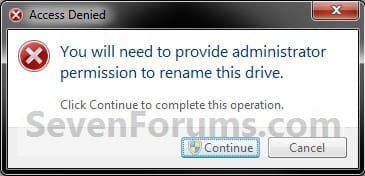
5. Click/tap on Continue. (see screenshot below)
HDD_Step3.jpg
6. If prompted by UAC, then click/tap on Yes (Windows 7/8) or Continue (Vista).

7. The selected drive is now renamed.


OPTION TWO

Change a Drive Name using an "autorun.inf" File


NOTE: While this option can be used for any drive, it is really useful for external drives like a USB flash drive.
1. Set your known file extensions to no longer be hidden.
NOTE: This way you will be able to rename the file extension in step 3 below.

2. Connect and/or open the drive that you want to change the name of.

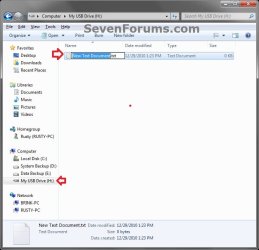
3. In the root of the drive, right click or press and hold on an empty space, click/tap on New and Text Document, then rename this file autorun.inf and press Enter. (see screenshots below)

NOTE: If you already have an autorun.inf file in the root of this drive, then skip this step and proceed to step 4 or 5.
Auto_Step1.jpg

Auto_Step2.jpg

4. If this is a New autorun.inf File
A) Open the autorun.inf file, then type each line below followed by pressing enter. (see screenshot below)
NOTE: Substitute new drive name (ex: My USB Drive) with the actual name you want to use for the drive.
Code:
[autorun]
label="[B][COLOR=red]new drive [/COLOR][COLOR=red]name[/COLOR][/B]"
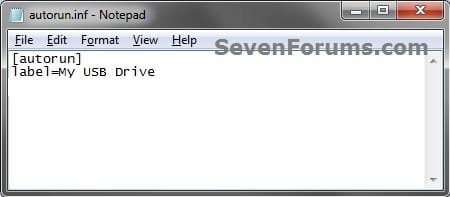
Label.jpg

B) Click on File (menu bar) and Save, then close the autorun.inf file. (see screenshot above)
5. If you already have a autorun.inf File
A) Open the autorun.inf file, then add or change the label= line below. (see screenshots below)
NOTE: Substitute new drive name (ex: My USB Drive) with the actual name you want to use for the drive.
Code:
[autorun]
[B]label="[COLOR=red]new drive name[/COLOR]"[/B]
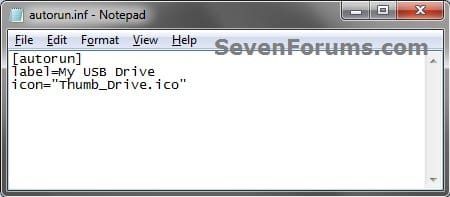
Label.jpg

TXT_file.jpg

B) Click on File (menu bar) and Save, then close the autorun.inf file. (see screenshots above)
7. If this is for an Internal or eSATA Dive
A) Restart the computer to apply.
8. If this is for an External Dive
A) Unplug and plug in the drive to apply.
9. Open the Computer window to see the changes.


   Note
To Restore the Default Name


You would just need to either option below and repeat steps 7 to 9.
  • Delete the autorun.inf and .ico file.
OR

  • Remove the label= line and save the changes if you have other lines (ex: icon=) you wish to continue using.


OPTION THREE

Rename a Drive Through Registry Editor


1. If you did OPTION TWO above previously, then you will need to either remove the label=new drive name entry from the autorun.inf file, or delete the autorun.inf file in the root of the drive that you want to change the name of.


2. Press the Windows + R keys to open the Run dialog, type regedit, and press enter.

3. If prompted by UAC, then click/tap on Yes (Windows 7/8) or Continue (Vista).

4. In regedit, navigate to the location below. (see screenshot below)

Code:
HKEY_LOCAL_MACHINE\SOFTWARE\Microsoft\Windows\CurrentVersion\Explorer
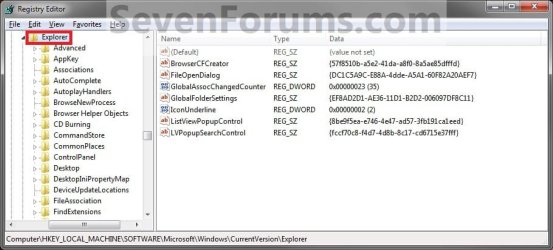
Step1.jpg
5. In the left pane, right click on Explorer, and click/tap on New and Key. Type DriveIcons and press enter.
NOTE: If you already have the DriveIcons key under Explorer, then go to step 6. (see screenshot above and below)
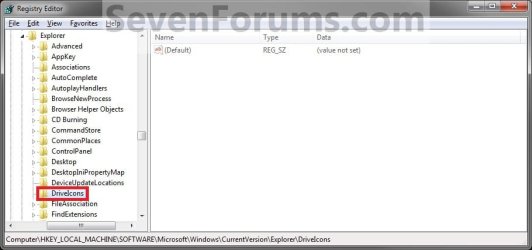
Step2.jpg
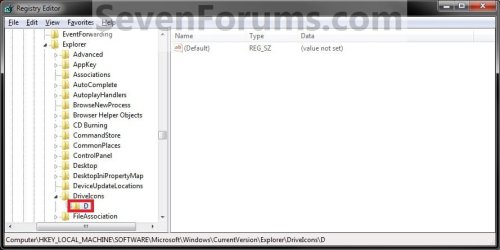
6. In the left pane, right click on DriveIcons and click/tap on New and Key. Type the drive letter (ex: D ) that you want to change the icon for and press enter.
NOTE: If you already have the drive letter (ex: D ) key under DriveIcons, then go to step 7. (see screenshot above and below)
Step3.jpg
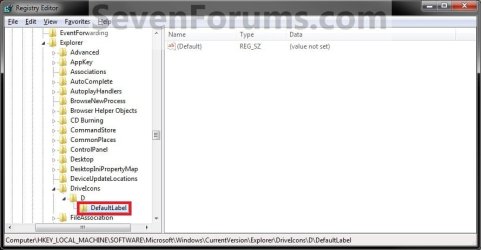
7. In the left pane, right click on the drive letter (ex: D ), and click/tap on New and Key. Type DefaultLabel and press enter.
NOTE: If you already have the DefaultLabel key under the drive letter (ex: D ), then go to step 8 or 9. (see screenshot above and below)
Step4.jpg
8. To Rename the Drive
A) In the right pane of DefaultLabel, double click/tap on (Default) to modify it. (see screenshot below step 7)

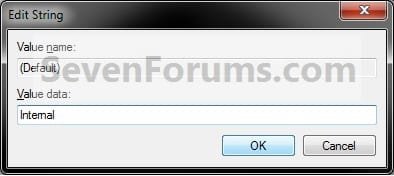
B) Type in the new name (HDD) or label (DVD) you want for the drive, and click/tap on OK. (see screenshot below)
Step5.jpg
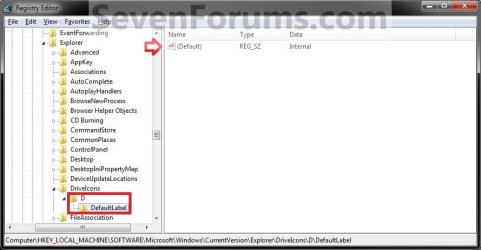
C) The registry should now look similar to this. (see screenshot below)
Step6.jpg
D) Go to step 10.
9. To Restore the Default Drive Name
A) Right click on the drive letter (ex: D ) from step 5 above that you want to restore, and click/tap on Delete and Yes. (see screenshot below step 6)
10. Close regedit.

11. The changes should be immediate, but in some cases you may need to restart the computer to apply the changes.


OPTION FOUR

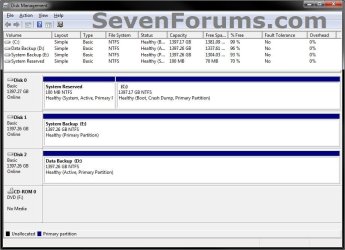
Rename a Drive Through Disk Management


1. If you did OPTION TWO above previously, then you will need to either remove the label=new drive name entry from the autorun.inf file, or delete the autorun.inf file in the root of the drive that you want to change the name of.

2. Do step 3, 4, or 5 below for what you would like to do.

3. In Vista and Windows 7, open the Start Menu, right click on the Computer button (dark right side), click on Manage, and go to step 6 below.

4. In Windows 8, open the Power Users Tasks menu, click/tap on Disk Management, and go to step 6 below.

5. Press the Windows + R keys to open the Run dialog, type either compmgmt.msc OR diskmgmt.msc, press Enter, and go to step 6 below.

6. If prompted by UAC, then click/tap on Yes (Windows 7/8) or Continue (Vista).

7. In the left pane of Computer Management, click/tap on Disk Management under Storage. (see screenshots below)
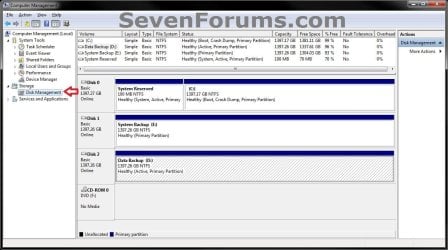
Computer_Management.jpg

Disk_Management.jpg

8. In the middle pane, right click on the drive letter that you want to rename, and click/tap on Properties. (see screenshot below)
Disk_Mangement-1.jpg
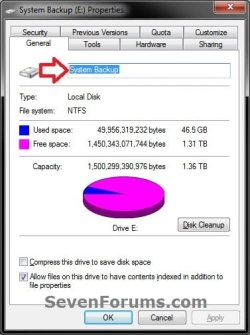
9. Under the General tab, type in the new name that you would like, and click/tap on OK. (see screenshot below)
Disk_Mangement-2.jpg
10. When finished, you can close the Computer Management or Disk Management window.


OPTION FIVE

Rename a Drive using "Label" Command


NOTE: For Devices with Removable Storage, such as a DVD drive, that do not have a Rename option, you will need to use OPTION THREE above instead.
1. If you did OPTION TWO above previously, then you will need to either remove the label=new drive name entry from the autorun.inf file, or delete the autorun.inf file in the root of the drive that you want to change the name of.

2. Open an elevated command prompt.

3. Do step 4 or 5 below for what you would like to do.

4. To Directly Change Drive Name
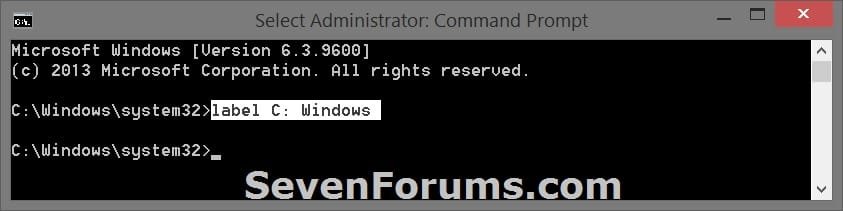
A) In the elevated command prompt, type the command below, press Enter, and go to step 6 below. (see screenshot below)

label DriveLetter: Name

For example: label C: Windows

   Note
Substitute DriveLetter in the command with the actual drive letter you want to rename.

Substitute Name in the command with the name/label you want to rename the drive with. Leave blank if you do not want a name/label.


label_command-2.jpg
5. To See Current Drive Name and Change
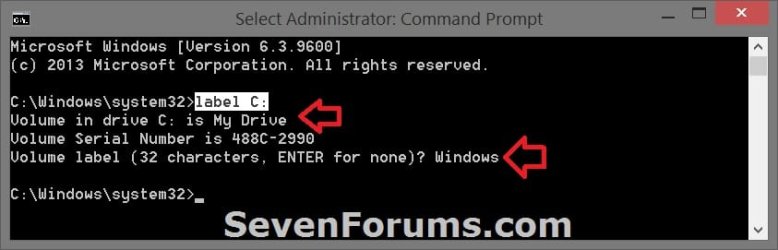
A) In the elevated command prompt, type the command below, and press Enter. (see screenshot below)
label DriveLetter:

For example: label C:
   Note
Substitute DriveLetter in the command with the actual drive letter you want to rename.


B) You will see the current name/label of the drive. Type in the name/label you want to rename the drive with, press Enter, and go to step 6 below.

   Note
If you do not want a name/label for the drive, then leave this blank, and press Enter.


label_command.jpg
6. When finished, you can close the elevated command prompt if you like.


That's it,
Shawn


Attachments

  • Auto_Step3.jpg
    Auto_Step3.jpg
    99.4 KB · Views: 1
Last edited:
Updated to add OPTION ONE to change the drive name with a autorun.inf file. :)
 

My Computer

Computer type
PC/Desktop
Computer Manufacturer/Model Number
Self built custom
OS
64-bit Windows 11 Pro for Workstations
CPU
Intel i7-8700K OC'd to 5 GHz
Motherboard
ASUS ROG Maximus XI Formula Z390
Memory
64 GB (4x16GB) G.SKILL TridentZ RGB DDR4 3600 MHz
Graphics Card(s)
ASUS ROG-STRIX-GTX1080TI-O11G-GAMING
Sound Card
Integrated
Monitor(s) Displays
2 x Samsung Odyssey G7 27"
Screen Resolution
2560x1440
Hard Drives
1TB Samsung 990 PRO M.2,
4TB Samsung 990 PRO PRO M.2,
TerraMaster F8 SSD Plus NAS
PSU
Seasonic Prime Titanium 850W
Case
Thermaltake Core P3
Cooling
Corsair Hydro H115i
Keyboard
Logitech wireless K800
Mouse
Logitech MX Master 4
Internet Speed
2 Gb/s Download and 100 Mb/s Upload
Antivirus
Malwarebyte Anti-Malware Premium
Browser
Google Chrome
Other Info
Logitech Z625 speaker system,
Logitech BRIO 4K Pro webcam,
HP Color LaserJet Pro MFP M477fdn,
APC SMART-UPS RT 1000 XL - SURT1000XLI,
Galaxy S23 Plus phone
NOTE: For Devices with Removable Storage, such as a DVD drive, that do not have a Rename option, you will need to use OPTION TWO below instead.
Hello Shawn, the above is written under Option Two, should be Option three? :confused:
 

My Computer

Computer type
PC/Desktop
Computer Manufacturer/Model Number
Home Built Desktop By DataTech
OS
Windows 7 Ultimate X64 SP1
CPU
Intel i5-2550K, Differing ~4.4-4.8GHz No built in GPU
Motherboard
ASUS P8Z68-V PRO/GEN3
Memory
16GB G.Skill Sniper 1866MHz @ 2133MHz 2x8GB
Graphics Card(s)
ASUS GTX650TIB-DC2OC-2GD5, (650TI Boost)
Sound Card
Onboard Realtek 5-1
Monitor(s) Displays
Samsung P2570HD
Screen Resolution
1920x1080
Hard Drives
Samsung 840 Pro 256GB SSD for OS, 500GB Seagate Constellation (Enterprise drive) for Data
PSU
Corsair HX650W
Case
Inwin Dragon Rider
Cooling
Hyper 212 EVO w/two Noctua fans, push-pull, @1300 RPM
Keyboard
E-Z Eyes, bright yellow keys with large characters
Mouse
steelseries SENSEI Laser Pro Gaming
Internet Speed
48-51Mbs Mbs down, 11 Mbs up Xfinity Cable
Antivirus
Norton Internet Security 2013
Browser
IE 10, Opera, Pale Moon if needed
Other Info
4 case fans, LG BluRay-RE, ASUS DVD-RW, Mr. Fusion power supply, 1.21 gigawatts.
Oops. Thank you Gary. Fixed. :o
 

My Computer

Computer type
PC/Desktop
Computer Manufacturer/Model Number
Self built custom
OS
64-bit Windows 11 Pro for Workstations
CPU
Intel i7-8700K OC'd to 5 GHz
Motherboard
ASUS ROG Maximus XI Formula Z390
Memory
64 GB (4x16GB) G.SKILL TridentZ RGB DDR4 3600 MHz
Graphics Card(s)
ASUS ROG-STRIX-GTX1080TI-O11G-GAMING
Sound Card
Integrated
Monitor(s) Displays
2 x Samsung Odyssey G7 27"
Screen Resolution
2560x1440
Hard Drives
1TB Samsung 990 PRO M.2,
4TB Samsung 990 PRO PRO M.2,
TerraMaster F8 SSD Plus NAS
PSU
Seasonic Prime Titanium 850W
Case
Thermaltake Core P3
Cooling
Corsair Hydro H115i
Keyboard
Logitech wireless K800
Mouse
Logitech MX Master 4
Internet Speed
2 Gb/s Download and 100 Mb/s Upload
Antivirus
Malwarebyte Anti-Malware Premium
Browser
Google Chrome
Other Info
Logitech Z625 speaker system,
Logitech BRIO 4K Pro webcam,
HP Color LaserJet Pro MFP M477fdn,
APC SMART-UPS RT 1000 XL - SURT1000XLI,
Galaxy S23 Plus phone
Thanks for this. Does the name have to be in "" like the text suggests? The screen-cap suggests otherwise...
 

My Computer

OS
Windows 7 Ultimate
Hello TheDookie, and welcome to Seven Forums.

No, the name doesn't have to be in quotes. It's just something that I like to add to make the code look neater. That's all. :)
 

My Computer

Computer type
PC/Desktop
Computer Manufacturer/Model Number
Self built custom
OS
64-bit Windows 11 Pro for Workstations
CPU
Intel i7-8700K OC'd to 5 GHz
Motherboard
ASUS ROG Maximus XI Formula Z390
Memory
64 GB (4x16GB) G.SKILL TridentZ RGB DDR4 3600 MHz
Graphics Card(s)
ASUS ROG-STRIX-GTX1080TI-O11G-GAMING
Sound Card
Integrated
Monitor(s) Displays
2 x Samsung Odyssey G7 27"
Screen Resolution
2560x1440
Hard Drives
1TB Samsung 990 PRO M.2,
4TB Samsung 990 PRO PRO M.2,
TerraMaster F8 SSD Plus NAS
PSU
Seasonic Prime Titanium 850W
Case
Thermaltake Core P3
Cooling
Corsair Hydro H115i
Keyboard
Logitech wireless K800
Mouse
Logitech MX Master 4
Internet Speed
2 Gb/s Download and 100 Mb/s Upload
Antivirus
Malwarebyte Anti-Malware Premium
Browser
Google Chrome
Other Info
Logitech Z625 speaker system,
Logitech BRIO 4K Pro webcam,
HP Color LaserJet Pro MFP M477fdn,
APC SMART-UPS RT 1000 XL - SURT1000XLI,
Galaxy S23 Plus phone
Thanks, registry method worked fine for me on Win 8 Pro x64.
 

My Computer

OS
Windows 8 Pro with MC x64
CPU
i5 3450
Motherboard
Asrock Z77 Pro4
Memory
16 GiB
Graphics Card(s)
GTX 560 Ti
Sound Card
X-fi extreme gamer
Monitor(s) Displays
Acer GD245HQ
Screen Resolution
1920x1080
Hard Drives
OCZ Vertex 3 60 GiB
WD Blue 1TiB
ST 512 GiB
PSU
Fortron Epsilon 550W
Case
Monster
Cooling
Air
Keyboard
Logitech G510
Mouse
Zalman ZM-M300
Internet Speed
10 Mbit
You're welcome Mirecek, and welcome to Seven Forums. :)
 

My Computer

Computer type
PC/Desktop
Computer Manufacturer/Model Number
Self built custom
OS
64-bit Windows 11 Pro for Workstations
CPU
Intel i7-8700K OC'd to 5 GHz
Motherboard
ASUS ROG Maximus XI Formula Z390
Memory
64 GB (4x16GB) G.SKILL TridentZ RGB DDR4 3600 MHz
Graphics Card(s)
ASUS ROG-STRIX-GTX1080TI-O11G-GAMING
Sound Card
Integrated
Monitor(s) Displays
2 x Samsung Odyssey G7 27"
Screen Resolution
2560x1440
Hard Drives
1TB Samsung 990 PRO M.2,
4TB Samsung 990 PRO PRO M.2,
TerraMaster F8 SSD Plus NAS
PSU
Seasonic Prime Titanium 850W
Case
Thermaltake Core P3
Cooling
Corsair Hydro H115i
Keyboard
Logitech wireless K800
Mouse
Logitech MX Master 4
Internet Speed
2 Gb/s Download and 100 Mb/s Upload
Antivirus
Malwarebyte Anti-Malware Premium
Browser
Google Chrome
Other Info
Logitech Z625 speaker system,
Logitech BRIO 4K Pro webcam,
HP Color LaserJet Pro MFP M477fdn,
APC SMART-UPS RT 1000 XL - SURT1000XLI,
Galaxy S23 Plus phone
Neat trick. Helped me out when trying to distinguish my new LiteOn iHAS124 drive. My old Asus drive is starting to fail so I got it. Anyone know if LiteOn is any good? :)
 

My Computer

Computer type
PC/Desktop
Computer Manufacturer/Model Number
Custom Build
OS
Windows 7 Ultimate x64 Service Pack 1
CPU
AMD Athlon II x4 Propus 2.9 GHz
Motherboard
ASRock N68C-GS FX
Memory
2 x 4GB Corsair XMS 3 DDR3 -1600 CL9
Graphics Card(s)
AMD Radeon HD 5850 1GB GDDR5
Sound Card
On-board 6-Channel HD Audio
Monitor(s) Displays
18' LG Flatron E1942TC-BN on DVI, 18' Chimei 95ND on HDMI
Screen Resolution
1366 x 768 x 2
Hard Drives
1 x 500 GB Seagate
1 x 1 TB Western Digital Caviar Green
1 x 1 TB Hitachi Touro Mobile USB 3
PSU
Seasonic S12II 520W
Case
Generic with Cable Management
Cooling
Deep Cool Gammaxx 200
Keyboard
Dragonwar Desert Eagle
Mouse
Logitech B85
Internet Speed
5Mb/s DL, 0.9Mb/s UL
Antivirus
ESET Nod32
Browser
Google Chrome 64 Bit
Other Info
LG G4 H818P - Rooted with Xposed Framework
Hello oreo27,

I've had a few LiteOn drives, and I never had an issue with them. :)
 

My Computer

Computer type
PC/Desktop
Computer Manufacturer/Model Number
Self built custom
OS
64-bit Windows 11 Pro for Workstations
CPU
Intel i7-8700K OC'd to 5 GHz
Motherboard
ASUS ROG Maximus XI Formula Z390
Memory
64 GB (4x16GB) G.SKILL TridentZ RGB DDR4 3600 MHz
Graphics Card(s)
ASUS ROG-STRIX-GTX1080TI-O11G-GAMING
Sound Card
Integrated
Monitor(s) Displays
2 x Samsung Odyssey G7 27"
Screen Resolution
2560x1440
Hard Drives
1TB Samsung 990 PRO M.2,
4TB Samsung 990 PRO PRO M.2,
TerraMaster F8 SSD Plus NAS
PSU
Seasonic Prime Titanium 850W
Case
Thermaltake Core P3
Cooling
Corsair Hydro H115i
Keyboard
Logitech wireless K800
Mouse
Logitech MX Master 4
Internet Speed
2 Gb/s Download and 100 Mb/s Upload
Antivirus
Malwarebyte Anti-Malware Premium
Browser
Google Chrome
Other Info
Logitech Z625 speaker system,
Logitech BRIO 4K Pro webcam,
HP Color LaserJet Pro MFP M477fdn,
APC SMART-UPS RT 1000 XL - SURT1000XLI,
Galaxy S23 Plus phone
Hello oreo27,

I've had a few LiteOn drives, and I never had an issue with them. :)

Hi Shawn,

Sounds good. Hope this one lasts me the same number of years my ASUS did :) Cheers!
 

My Computer

Computer type
PC/Desktop
Computer Manufacturer/Model Number
Custom Build
OS
Windows 7 Ultimate x64 Service Pack 1
CPU
AMD Athlon II x4 Propus 2.9 GHz
Motherboard
ASRock N68C-GS FX
Memory
2 x 4GB Corsair XMS 3 DDR3 -1600 CL9
Graphics Card(s)
AMD Radeon HD 5850 1GB GDDR5
Sound Card
On-board 6-Channel HD Audio
Monitor(s) Displays
18' LG Flatron E1942TC-BN on DVI, 18' Chimei 95ND on HDMI
Screen Resolution
1366 x 768 x 2
Hard Drives
1 x 500 GB Seagate
1 x 1 TB Western Digital Caviar Green
1 x 1 TB Hitachi Touro Mobile USB 3
PSU
Seasonic S12II 520W
Case
Generic with Cable Management
Cooling
Deep Cool Gammaxx 200
Keyboard
Dragonwar Desert Eagle
Mouse
Logitech B85
Internet Speed
5Mb/s DL, 0.9Mb/s UL
Antivirus
ESET Nod32
Browser
Google Chrome 64 Bit
Other Info
LG G4 H818P - Rooted with Xposed Framework
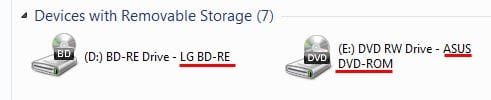
Shawn, I used Option Three to rename my two optical drive but the previous name remains. Is this normal? the bits I added are underlined. My registry already had the key DriveIcons which was empty.

CD Drives.JPG


Neat trick. Helped me out when trying to distinguish my new LiteOn iHAS124 drive. My old Asus drive is starting to fail so I got it. Anyone know if LiteOn is any good? :)
I had two of the same drive, one was a bit noisy but both worked as they should.
 

My Computer

Computer type
PC/Desktop
Computer Manufacturer/Model Number
Home Built Desktop By DataTech
OS
Windows 7 Ultimate X64 SP1
CPU
Intel i5-2550K, Differing ~4.4-4.8GHz No built in GPU
Motherboard
ASUS P8Z68-V PRO/GEN3
Memory
16GB G.Skill Sniper 1866MHz @ 2133MHz 2x8GB
Graphics Card(s)
ASUS GTX650TIB-DC2OC-2GD5, (650TI Boost)
Sound Card
Onboard Realtek 5-1
Monitor(s) Displays
Samsung P2570HD
Screen Resolution
1920x1080
Hard Drives
Samsung 840 Pro 256GB SSD for OS, 500GB Seagate Constellation (Enterprise drive) for Data
PSU
Corsair HX650W
Case
Inwin Dragon Rider
Cooling
Hyper 212 EVO w/two Noctua fans, push-pull, @1300 RPM
Keyboard
E-Z Eyes, bright yellow keys with large characters
Mouse
steelseries SENSEI Laser Pro Gaming
Internet Speed
48-51Mbs Mbs down, 11 Mbs up Xfinity Cable
Antivirus
Norton Internet Security 2013
Browser
IE 10, Opera, Pale Moon if needed
Other Info
4 case fans, LG BluRay-RE, ASUS DVD-RW, Mr. Fusion power supply, 1.21 gigawatts.
Shawn, I used Option Three to rename my two optical drive but the previous name remains. Is this normal? the bits I added are underlined. My registry already had the key DriveIcons which was empty.

View attachment 263850


Neat trick. Helped me out when trying to distinguish my new LiteOn iHAS124 drive. My old Asus drive is starting to fail so I got it. Anyone know if LiteOn is any good? :)
I had two of the same drive, one was a bit noisy but both worked as they should.

Yup, they should show exactly that as these are just labels. Sounds great. Two positive reviews for a drive that I just picked up without even checking. Lol :D
 

My Computer

Computer type
PC/Desktop
Computer Manufacturer/Model Number
Custom Build
OS
Windows 7 Ultimate x64 Service Pack 1
CPU
AMD Athlon II x4 Propus 2.9 GHz
Motherboard
ASRock N68C-GS FX
Memory
2 x 4GB Corsair XMS 3 DDR3 -1600 CL9
Graphics Card(s)
AMD Radeon HD 5850 1GB GDDR5
Sound Card
On-board 6-Channel HD Audio
Monitor(s) Displays
18' LG Flatron E1942TC-BN on DVI, 18' Chimei 95ND on HDMI
Screen Resolution
1366 x 768 x 2
Hard Drives
1 x 500 GB Seagate
1 x 1 TB Western Digital Caviar Green
1 x 1 TB Hitachi Touro Mobile USB 3
PSU
Seasonic S12II 520W
Case
Generic with Cable Management
Cooling
Deep Cool Gammaxx 200
Keyboard
Dragonwar Desert Eagle
Mouse
Logitech B85
Internet Speed
5Mb/s DL, 0.9Mb/s UL
Antivirus
ESET Nod32
Browser
Google Chrome 64 Bit
Other Info
LG G4 H818P - Rooted with Xposed Framework
Shawn, I used Option Three to rename my two optical drive but the previous name remains. Is this normal? the bits I added are underlined. My registry already had the key DriveIcons which was empty.

View attachment 263850

Hello Gary,

Yeah, devices with removable storage, such as a DVD drive, can only be renamed by adding a label at the end of the drive description. The drive description will always be there for these type. :(
 

My Computer

Computer type
PC/Desktop
Computer Manufacturer/Model Number
Self built custom
OS
64-bit Windows 11 Pro for Workstations
CPU
Intel i7-8700K OC'd to 5 GHz
Motherboard
ASUS ROG Maximus XI Formula Z390
Memory
64 GB (4x16GB) G.SKILL TridentZ RGB DDR4 3600 MHz
Graphics Card(s)
ASUS ROG-STRIX-GTX1080TI-O11G-GAMING
Sound Card
Integrated
Monitor(s) Displays
2 x Samsung Odyssey G7 27"
Screen Resolution
2560x1440
Hard Drives
1TB Samsung 990 PRO M.2,
4TB Samsung 990 PRO PRO M.2,
TerraMaster F8 SSD Plus NAS
PSU
Seasonic Prime Titanium 850W
Case
Thermaltake Core P3
Cooling
Corsair Hydro H115i
Keyboard
Logitech wireless K800
Mouse
Logitech MX Master 4
Internet Speed
2 Gb/s Download and 100 Mb/s Upload
Antivirus
Malwarebyte Anti-Malware Premium
Browser
Google Chrome
Other Info
Logitech Z625 speaker system,
Logitech BRIO 4K Pro webcam,
HP Color LaserJet Pro MFP M477fdn,
APC SMART-UPS RT 1000 XL - SURT1000XLI,
Galaxy S23 Plus phone
Thanks for the info oreo27 and Shawn. :)
 

My Computer

Computer type
PC/Desktop
Computer Manufacturer/Model Number
Home Built Desktop By DataTech
OS
Windows 7 Ultimate X64 SP1
CPU
Intel i5-2550K, Differing ~4.4-4.8GHz No built in GPU
Motherboard
ASUS P8Z68-V PRO/GEN3
Memory
16GB G.Skill Sniper 1866MHz @ 2133MHz 2x8GB
Graphics Card(s)
ASUS GTX650TIB-DC2OC-2GD5, (650TI Boost)
Sound Card
Onboard Realtek 5-1
Monitor(s) Displays
Samsung P2570HD
Screen Resolution
1920x1080
Hard Drives
Samsung 840 Pro 256GB SSD for OS, 500GB Seagate Constellation (Enterprise drive) for Data
PSU
Corsair HX650W
Case
Inwin Dragon Rider
Cooling
Hyper 212 EVO w/two Noctua fans, push-pull, @1300 RPM
Keyboard
E-Z Eyes, bright yellow keys with large characters
Mouse
steelseries SENSEI Laser Pro Gaming
Internet Speed
48-51Mbs Mbs down, 11 Mbs up Xfinity Cable
Antivirus
Norton Internet Security 2013
Browser
IE 10, Opera, Pale Moon if needed
Other Info
4 case fans, LG BluRay-RE, ASUS DVD-RW, Mr. Fusion power supply, 1.21 gigawatts.

My Computer

Computer type
PC/Desktop
Computer Manufacturer/Model Number
Custom Build
OS
Windows 7 Ultimate x64 Service Pack 1
CPU
AMD Athlon II x4 Propus 2.9 GHz
Motherboard
ASRock N68C-GS FX
Memory
2 x 4GB Corsair XMS 3 DDR3 -1600 CL9
Graphics Card(s)
AMD Radeon HD 5850 1GB GDDR5
Sound Card
On-board 6-Channel HD Audio
Monitor(s) Displays
18' LG Flatron E1942TC-BN on DVI, 18' Chimei 95ND on HDMI
Screen Resolution
1366 x 768 x 2
Hard Drives
1 x 500 GB Seagate
1 x 1 TB Western Digital Caviar Green
1 x 1 TB Hitachi Touro Mobile USB 3
PSU
Seasonic S12II 520W
Case
Generic with Cable Management
Cooling
Deep Cool Gammaxx 200
Keyboard
Dragonwar Desert Eagle
Mouse
Logitech B85
Internet Speed
5Mb/s DL, 0.9Mb/s UL
Antivirus
ESET Nod32
Browser
Google Chrome 64 Bit
Other Info
LG G4 H818P - Rooted with Xposed Framework
You're most welcome Gary. Glad we could help. :)
 

My Computer

Computer type
PC/Desktop
Computer Manufacturer/Model Number
Self built custom
OS
64-bit Windows 11 Pro for Workstations
CPU
Intel i7-8700K OC'd to 5 GHz
Motherboard
ASUS ROG Maximus XI Formula Z390
Memory
64 GB (4x16GB) G.SKILL TridentZ RGB DDR4 3600 MHz
Graphics Card(s)
ASUS ROG-STRIX-GTX1080TI-O11G-GAMING
Sound Card
Integrated
Monitor(s) Displays
2 x Samsung Odyssey G7 27"
Screen Resolution
2560x1440
Hard Drives
1TB Samsung 990 PRO M.2,
4TB Samsung 990 PRO PRO M.2,
TerraMaster F8 SSD Plus NAS
PSU
Seasonic Prime Titanium 850W
Case
Thermaltake Core P3
Cooling
Corsair Hydro H115i
Keyboard
Logitech wireless K800
Mouse
Logitech MX Master 4
Internet Speed
2 Gb/s Download and 100 Mb/s Upload
Antivirus
Malwarebyte Anti-Malware Premium
Browser
Google Chrome
Other Info
Logitech Z625 speaker system,
Logitech BRIO 4K Pro webcam,
HP Color LaserJet Pro MFP M477fdn,
APC SMART-UPS RT 1000 XL - SURT1000XLI,
Galaxy S23 Plus phone
Me too, since I decided to hang around a few days after your first help you gave me. :p
 

My Computer

Computer type
PC/Desktop
Computer Manufacturer/Model Number
Home Built Desktop By DataTech
OS
Windows 7 Ultimate X64 SP1
CPU
Intel i5-2550K, Differing ~4.4-4.8GHz No built in GPU
Motherboard
ASUS P8Z68-V PRO/GEN3
Memory
16GB G.Skill Sniper 1866MHz @ 2133MHz 2x8GB
Graphics Card(s)
ASUS GTX650TIB-DC2OC-2GD5, (650TI Boost)
Sound Card
Onboard Realtek 5-1
Monitor(s) Displays
Samsung P2570HD
Screen Resolution
1920x1080
Hard Drives
Samsung 840 Pro 256GB SSD for OS, 500GB Seagate Constellation (Enterprise drive) for Data
PSU
Corsair HX650W
Case
Inwin Dragon Rider
Cooling
Hyper 212 EVO w/two Noctua fans, push-pull, @1300 RPM
Keyboard
E-Z Eyes, bright yellow keys with large characters
Mouse
steelseries SENSEI Laser Pro Gaming
Internet Speed
48-51Mbs Mbs down, 11 Mbs up Xfinity Cable
Antivirus
Norton Internet Security 2013
Browser
IE 10, Opera, Pale Moon if needed
Other Info
4 case fans, LG BluRay-RE, ASUS DVD-RW, Mr. Fusion power supply, 1.21 gigawatts.
hI,
I tried your autorun.inf file method, but it does not capture the label . I tried also a icon of 34 pixels. The commands were only three . First line autorun with [], followed by label i choose, in the second line, and icon=choosen icon. I copied the same ico in the same place, that is usb drive and in that, when i plug out and replug, nothing happens. No change in the lable or icon.Where am i missing? Brink
 

My Computer

Computer type
PC/Desktop
Computer Manufacturer/Model Number
custom build
OS
Microsoft Windows 7 Ultimate 64-bit 7601 Multiprocessor Free Service Pack 1
CPU
Intel(R) Core(TM)2 Duo CPU E7200 @ 2.53GHz
Motherboard
To be filled by O.E.M. To be filled by O.E.M.
Memory
4.00 GB
Graphics Card(s)
NVIDIA GeForce 210
Sound Card
(1) NVIDIA High Definition Audio (2) Realtek High Definiti
Screen Resolution
1920 x 1080 x 32 bits (4294967296 colors) @ 60 Hz
Hard Drives
ST3500312CS ATA Device
Hello jraju, :)

Please go ahead an post the text in your autorun.ini file in a code box #.

Was your autorun.ini file and .ico file saved to the root directory of the USB, and not in a folder?
 

My Computer

Computer type
PC/Desktop
Computer Manufacturer/Model Number
Self built custom
OS
64-bit Windows 11 Pro for Workstations
CPU
Intel i7-8700K OC'd to 5 GHz
Motherboard
ASUS ROG Maximus XI Formula Z390
Memory
64 GB (4x16GB) G.SKILL TridentZ RGB DDR4 3600 MHz
Graphics Card(s)
ASUS ROG-STRIX-GTX1080TI-O11G-GAMING
Sound Card
Integrated
Monitor(s) Displays
2 x Samsung Odyssey G7 27"
Screen Resolution
2560x1440
Hard Drives
1TB Samsung 990 PRO M.2,
4TB Samsung 990 PRO PRO M.2,
TerraMaster F8 SSD Plus NAS
PSU
Seasonic Prime Titanium 850W
Case
Thermaltake Core P3
Cooling
Corsair Hydro H115i
Keyboard
Logitech wireless K800
Mouse
Logitech MX Master 4
Internet Speed
2 Gb/s Download and 100 Mb/s Upload
Antivirus
Malwarebyte Anti-Malware Premium
Browser
Google Chrome
Other Info
Logitech Z625 speaker system,
Logitech BRIO 4K Pro webcam,
HP Color LaserJet Pro MFP M477fdn,
APC SMART-UPS RT 1000 XL - SURT1000XLI,
Galaxy S23 Plus phone
Back
Top